27th October 2026 · 15 min
Cross Platform Application Development: Trade-offs for 2026

Android and iOS accounted for 51.77% and 47.80% of UK mobile-and-tablet operating-system usage respectively in July 2025, according to StatCounter. For a UK business, supporting both isn't about reaching an obscure additional audience. It's about making the product available across a closely divided market, without paying to implement every feature separately.
The useful question isn't whether to choose cross platform application development at all. It's which layers to share, where to retain native control, and who will maintain those boundaries after launch.
Table of Contents
- Why Teams Share One Codebase Across Android and iOS
- Four Approaches Compared Side by Side
- How Each Approach Works Under the Hood
- Which Device Features Force Platform-Specific Code
- What Cross Platform Costs After Launch
- Choosing an Approach by Situation
- Confirm the Approach Before You Commit
Why Teams Share One Codebase Across Android and iOS
Cross-platform application development lets a team build shared parts of a product once, then deliver them to different operating systems. Picture one recipe prepared in two kitchens: the ingredients and method may match, while each kitchen's equipment affects the result. In an app, business rules are the recipe; Android and iOS provide different operating environments.
Cross platform application development means building a product around a shared codebase that serves multiple operating systems, rather than independently implementing the whole application for each platform.
Mobile projects commonly target Android and iOS. Some approaches can also serve web and desktop users, but each added target still needs design, testing and release work.
The commercial case is reaching users on both platforms without building every feature twice. In April 2025, StatCounter recorded Android at 51.52% and iOS at 48.05% of UK mobile operating-system usage. These figures show why choosing just one platform can limit reach, though market share does not predict which devices your customers use.
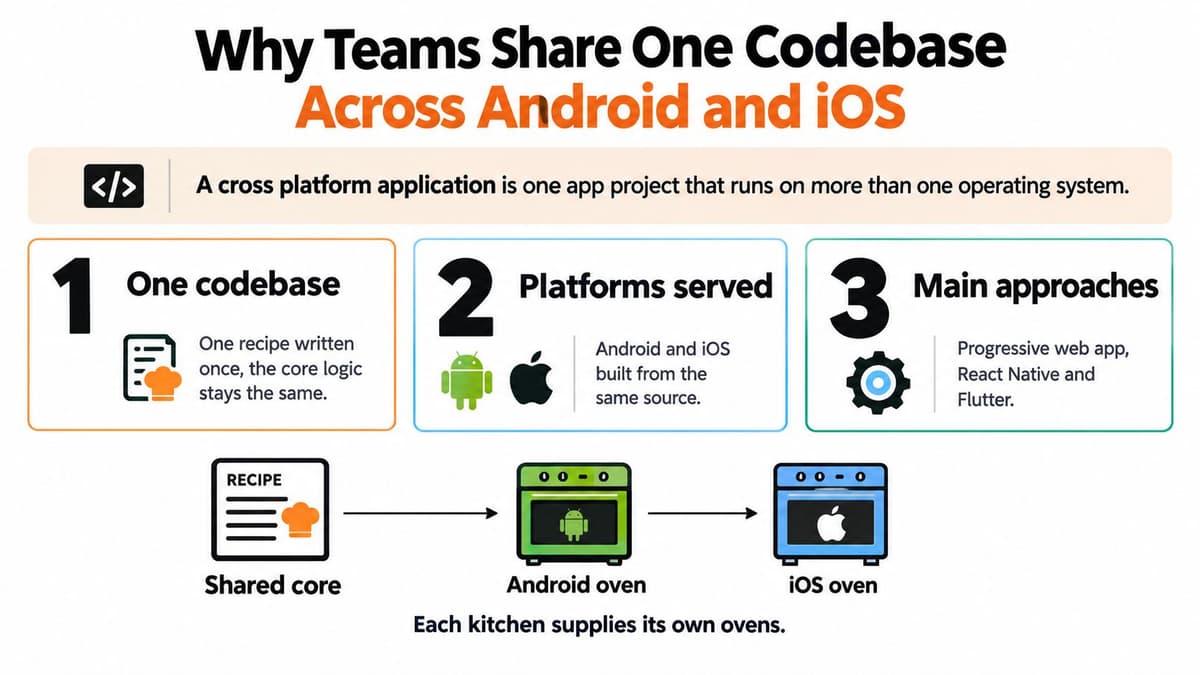
What sharing actually saves
For a training app, course eligibility, quiz scoring, API requests and validation can often use the same implementation on both platforms. That reduces duplicated work and helps keep the product's rules consistent. The shared code is like a common recipe, not a guarantee that both kitchens produce an identical result.
Sharing code cuts repeated work. It doesn't remove platform differences. Notifications, permissions, navigation conventions and store submissions still require platform-aware decisions. Dependencies also need updating, privacy disclosures may change, and accessibility improvements can regress if shared components behave differently on each system. Those costs continue after launch.
A good MVP aims for a coherent experience, not identical screens. Android users should find expected back behaviour; iPhone users should be able to use the keyboard and reach controls around the safe area. Sharing the core can lower duplicated implementation effort, while testing and upkeep protect the experience on both platforms. The choice is which layer to share, and which differences deserve separate treatment.
Four Approaches Compared Side by Side
Cross platform approaches at a glance
| Approach | Built with | Runs as | Best for | Main trade-off |
|---|---|---|---|---|
| Progressive Web App (PWA) | HTML, CSS, JavaScript and service workers | A website that can be installed to the home screen | Content-led products and economical reach | Browser-mediated device access and less direct store presence |
| React Native | JavaScript or TypeScript with React | An app using native interface components | Teams with React skills building conventional mobile experiences | Native modules for integration gaps and ongoing framework upgrades |
| Flutter | Dart | An app with its own rendering engine | Custom, brand-heavy interfaces | Additional runtime footprint and deliberate adaptation to native conventions |
| Native wrapper, such as Capacitor or Cordova | Web code inside a WebView shell | A web application packaged for app stores | Reusing an existing web product | Plugin reliance and potential bottlenecks on demanding screens |
| Fully native, using Swift and Kotlin | Platform-specific application code | Separate iOS and Android applications | Deep platform integration and demanding workloads | Separate interface implementations and platform-specific maintenance |
A web-based approach can remove installation friction and let users open a product directly from a link. That's valuable for booking services, reference tools and content-led products, where discovery matters more than deep hardware integration. It becomes less attractive when the main journey needs capabilities that the browser cannot reliably expose on every target device.
React Native and Flutter both support installed mobile applications with substantial shared code, but neither is merely a website in disguise. React Native is a natural candidate when developers already understand React; Flutter is attractive when the team wants detailed control over a custom visual system. Language familiarity matters, but so does the team's ability to investigate problems outside the shared framework.
Reuse isn't the same as suitability
A wrapper can preserve an existing web investment without requiring a complete interface rewrite. It won't automatically turn a desktop-oriented website into a comfortable mobile app, however. Dense tables, hover interactions and awkward keyboard handling still need redesigning.
Fully native development offers the most direct control over platform APIs and interface behaviour. It requires separate platform implementations, but not necessarily separate departments: a suitably skilled team can maintain both, and backend services or selected libraries may still be shared.
Treat these approaches as candidates, not a ranking. A wrapper that fits a staff reporting tool may be unsuitable for continuous device communication, while a native build can be unnecessary for an installable handbook. The right comparison starts with the user's task, not the framework's reputation.
How Each Approach Works Under the Hood
A PWA is a well-dressed visitor arriving through the front door, the browser. It operates within the permissions and capabilities that the browser exposes, even when its home-screen icon makes it feel like an installed app.
React Native is more like a translator giving instructions to the phone's own interface components. Flutter is an artist working on a canvas, drawing its own controls rather than relying on the operating system's standard widgets.
These different routes explain why similar-looking screens can behave differently.
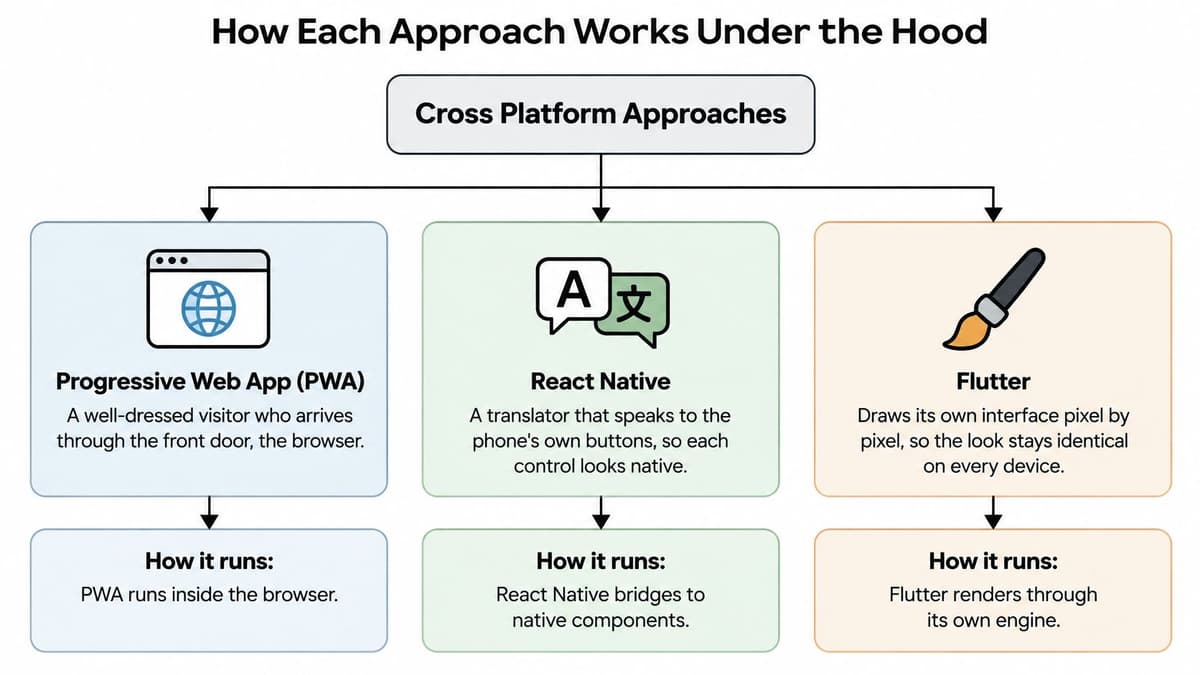
A native wrapper is a website displayed in a window inside an app frame. Plugins connect that window to selected device capabilities, such as the camera or secure credential storage.
Follow the layers
Your application code contains product decisions: what makes a booking valid, which records appear, and what happens after submission. The rendering layer turns interface instructions into visible controls and handles interactions. The operating system manages permissions, scheduling, device services and access to hardware.
The architectural decision is which layer to share, not which framework promises the highest code-reuse figure.
React Native's modern architecture supports direct interaction with native components rather than relying on the older asynchronous bridge model. That doesn't eliminate native integration work or make every JavaScript task instantaneous. Developers still need to avoid blocking application work and profile expensive screens.
Flutter controls rendering, which helps teams deliver consistent custom visuals. It doesn't make every experience identical automatically: fonts, screen dimensions, text scaling, keyboards and platform integrations still affect the result.
Wrappers use WKWebView on iOS and the Android System WebView on Android. Their behaviour follows the relevant web engine and its installed version, so testing only in a developer's desktop browser isn't enough.
Test behaviour rather than screenshots
Say a booking form includes a sticky confirmation button and a long date selector. A Flutter implementation may render predictably while a WebView implementation needs additional work when the keyboard opens and changes the visible viewport.
That's an illustrative integration problem, not proof that one framework always scrolls better. Test typing, scrolling, focus movement and error recovery, not just whether the initial screen matches a design.
For a visual walkthrough of the approaches, this video provides an additional explanation.
Which Device Features Force Platform-Specific Code
Share domain rules, API contracts, validation and design tokens where practical. Treat hardware integration, sensitive authentication, background execution and accessibility semantics as separate engineering decisions. The DesignStack cross-platform development guide highlights why device features can introduce platform-specific implementation and testing requirements.
A plugin isn't necessarily a problem. It's a dependency that someone must configure, verify and maintain, with a native fallback if it doesn't cover the required behaviour.
Device features and how each approach handles them
| Feature | PWA | React Native | Flutter | Native wrapper |
|---|---|---|---|---|
| Push notifications | Web push, with installation and browser restrictions on iOS | Library plus native setup per OS | Plugin plus native setup per OS | Plugin plus native setup per OS |
| Camera and microphone | Browser permission prompts | Library or native module | Plugin | Plugin |
| Bluetooth | Limited; Web Bluetooth unavailable in Safari | Native module usually required | Plugin, sometimes custom code | Plugin, sometimes custom code |
| Offline storage | Service workers, cache storage and IndexedDB | Local database libraries | Local database packages | Web storage or database plugins |
| Background processing | Very limited | Native integration for supported background tasks | Platform integration for supported background tasks | Plugin, subject to OS limits |
| Biometric login and payments | Web authentication and payment APIs with browser restrictions | Library per provider | Plugin per provider | Plugin per provider |
| Accessibility semantics | Browser and assistive-technology interpretation | Native accessibility properties | Framework semantics layer requiring verification | WebView accessibility semantics requiring verification |
Budget for the boundary
If a must-have feature requires a plugin, native module or restricted capability, budget integration work from the outset. First check whether a maintained package covers the exact requirement. Then prove permission handling, failure recovery and behaviour on the target operating systems.
A warehouse scanner needs reliable Bluetooth reconnection, not merely a successful demonstration while the app stays open. A learning app needs interrupted downloads to resume safely. A financial product needs authentication cancellation and payment failures to leave the account in a clear, recoverable state.
No framework can bypass operating-system restrictions on background execution. Native code provides access to the supported mechanisms, not permission to run indefinitely.
Accessibility deserves the same scrutiny. The UK government's accessibility guidance states that public-sector websites and mobile apps should meet WCAG 2.2 Level AA and publish an accessibility statement. That public-sector requirement shouldn't be confused with a blanket statement that every private application falls under the same regulations.
Test the rendered screens with VoiceOver and TalkBack, including focus order, error announcements and enlarged text. A component that looks correct can still expose an unhelpful accessibility tree.
Questions for every integration
- What happens when access is denied? Define the alternative journey when users refuse camera, notification or Bluetooth permissions.
- What happens when execution stops? Specify recovery after a closed app, interrupted connection or expired session.
- Who owns the integration? Name the person responsible for plugin updates, native fixes, privacy disclosures and release verification.
These questions turn a feature checklist into a delivery plan.
What Cross Platform Costs After Launch
A cheaper build isn't automatically a cheaper product to own. Shared dependencies can simplify updates, but a framework upgrade, abandoned plugin or inaccurate SDK disclosure can create work across every supported platform.
Governance needs an explicit owner. The UK government's app-developer survey, covering 600 app developers, found that only 16% were aware of its app-store security and privacy code of practice. Compiling successfully isn't evidence that an application remains ready for responsible distribution.
The ongoing obligations extend beyond application code.
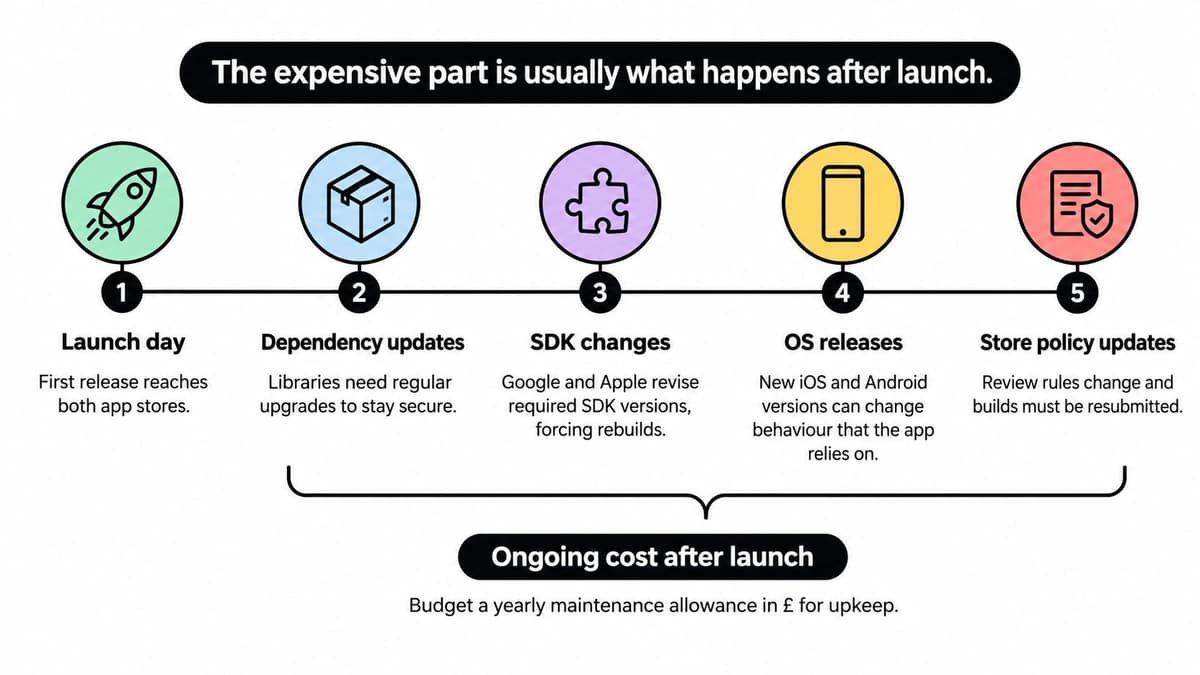
Price a maintenance scenario
Use a hypothetical two-year ownership plan, not a claim that every app follows the same timetable:
- Launch through month three: Allow for crash triage, permission problems, signing issues and support feedback.
- Months three to nine: Reserve capacity for dependency updates and testing against changing operating environments.
- Months nine to eighteen: Review SDK data collection, privacy manifests, store data-safety answers and accessibility.
- Months eighteen to twenty-four: Allow for a substantial framework upgrade and replacement or rebuilding of unsupported native integrations.
The dates are planning assumptions, not mandatory release intervals. Critical vulnerabilities and policy deadlines may require action outside the schedule.
To put a price on that work, request separate estimates for routine maintenance, planned upgrades and incident response. Include engineering, testing, release management and accessibility review rather than applying an unexplained maintenance percentage. The UK app development cost guide provides a useful companion for structuring the wider budget.
Keep an operational scorecard
- Dependency support: Track packages outside their supported versions and assign upgrade owners.
- Crash-free sessions: Separate Android and iOS results, then inspect affected versions and device classes.
- Accessibility defects: Record severity, platform and assistive technology.
- Disclosure accuracy: Reconcile privacy statements and store declarations with actual SDK behaviour.
- Recovery readiness: Test server-side feature switches and previous-compatible backend behaviour, not just build availability.
- Security remediation: Measure how long critical vulnerabilities remain unresolved.
Consider a hypothetical regulated app whose overall stability dashboard looks acceptable while an Android-specific authentication crash remains hidden. Segmenting by operating system and journey would make the affected users visible sooner.
A mobile rollback isn't necessarily an instant binary replacement. Store distribution and installed versions complicate recovery. Feature flags, compatible APIs and a rehearsed incident process deserve their own budget.
Choosing an Approach by Situation
Does the product require a capability marked as restricted or needing native integration? If it doesn't, choose primarily around the user journey, distribution needs and the team's existing skills.
If it does, build a small proof of that integration before selecting the wider architecture. A shared core with a focused native adapter may be sufficient. Separate native applications become more persuasive when platform-specific behaviour dominates the product rather than sitting at its edges.
Best-fit approach by product situation
| Situation | Likely fit | Why |
|---|---|---|
| Content-led site needing an installable presence on a small budget | Progressive Web App | Reuses web skills and supports direct distribution without app-store review |
| Existing React web team building a standard-looking mobile app | React Native | Reuses React knowledge and suitable application logic, though web interface components usually need adaptation |
| Brand-heavy interface requiring consistent visuals | Flutter | Provides detailed control through a shared rendering system |
| Existing web product needing store presence quickly | Native wrapper such as Capacitor | Preserves the web codebase while adding a native shell |
| Hardware, background or performance-critical product | Fully native, or shared core with native modules | Gives direct access to platform capabilities and optimisation tools |
| Regulated or public-facing product with accessibility duties | A suitable shared approach with platform-specific accessibility testing | Supports reusable acceptance criteria without assuming identical rendered semantics |
Let the difficult journey decide
For a small team with a working React web application, React Native may be sensible when customers need a mobile-first experience with familiar controls. But React expertise doesn't make browser components directly reusable as native screens. The estimate must include navigation, mobile layouts and platform testing.
For a logistics firm relying on Bluetooth scanners, framework familiarity is secondary to dependable reconnection and device compatibility. Prototype the actual scanner model, permission flow and interrupted-session recovery. If the available integration fails there, an attractive interface framework won't rescue the operational journey.
Selection rule: Choose the approach whose weakest capability doesn't sit inside your core user journey.
Team capability can matter more than a benchmark measured on an unrelated demo. Ask who can diagnose a native crash, maintain signing credentials and replace a plugin after its maintainer stops updating it. A technically capable framework is a poor fit if nobody can support its difficult parts.
When scoping mobile app development, define acceptance criteria around completed tasks: a successful booking, a recoverable payment, an accessible lesson or a reliably submitted inspection. Those outcomes give decision makers a stronger basis for approval than a code-sharing target.
Confirm the Approach Before You Commit
Confirm the architecture through Specification, Production, Launch and Support. Each stage should produce evidence that the chosen approach still fits, rather than treating framework selection as an irreversible early decision.
Use the delivery stages as approval gates.
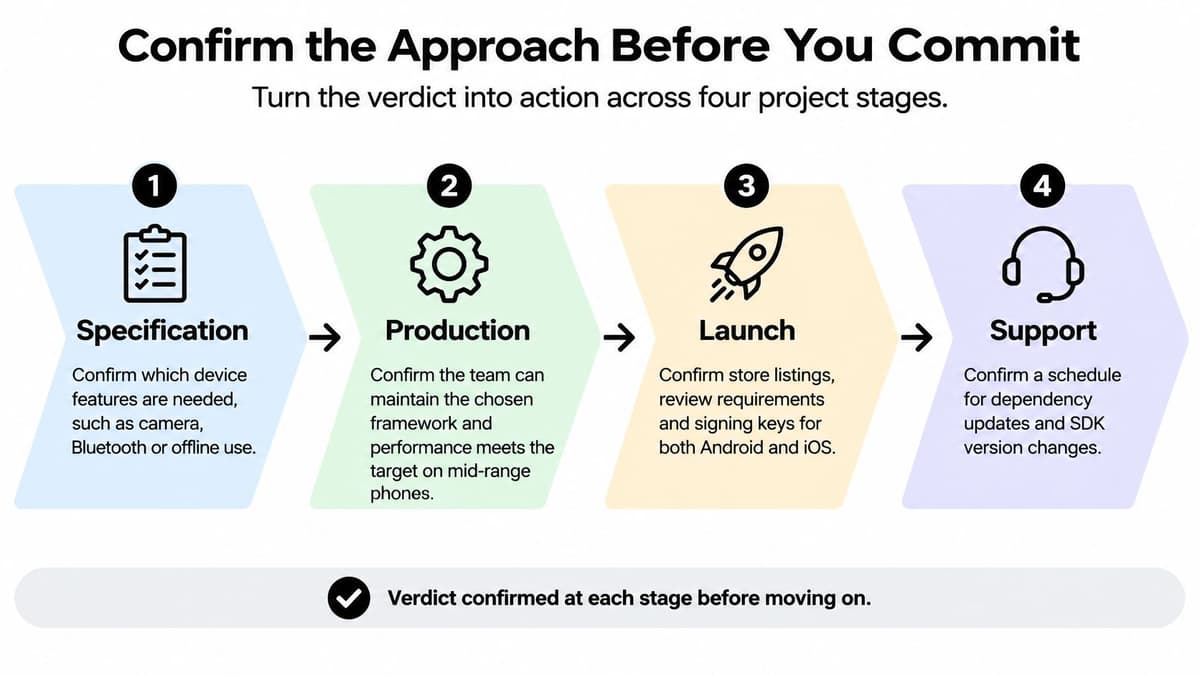
Specification. Identify essential device capabilities and agree the shared-versus-native split. When defining a minimum viable product, remove optional features before removing the testing needed to trust essential ones.
Production. Run a representative Android and iOS device matrix, including a mid-range device and relevant older supported environments. Check rendered accessibility, interrupted networks, keyboard behaviour and realistic data volumes.
Launch. Confirm signing-key ownership, store requirements, privacy disclosures and monitoring. Use a staged rollout where available, with tested feature-disable controls and a recovery plan that accounts for installed app versions.
Support. Assign a fixed review schedule for dependencies, crash reports, security issues and store-policy changes. Record ownership so maintenance doesn't depend on someone remembering an informal conversation.
At Digital Souls Studios LTD, our London studio follows this workflow from specification through launch, with optional support packages covering maintenance after the scoped project is live. That separates delivery approval from the ongoing responsibility to keep the application usable.
Before committing the main build budget, write down the features most likely to break your chosen approach and test them on real devices. Approve the architecture only when those tests demonstrate an acceptable user journey.
Digital Souls Studios LTD offers cross-platform software delivery from specification and design through engineering and launch, with optional post-launch maintenance. Visit Digital Souls Studios LTD to discuss your essential device features, agree the shared-versus-native boundaries and scope the support your product will need after release.