26th October 2026 · 17 min
AI Agent for Business: Use Cases, ROI and Rollout

Only 4% of UK businesses using AI reported that it had reduced their workforce in late September 2025, according to the Office for National Statistics. That's a useful correction to the idea that buying an AI agent means replacing a department. The practical opportunity is narrower: remove repeat handling, improve routing and let people spend more time resolving exceptions.
Choosing an AI agent for business starts with the work you're prepared to delegate, not the model you want to buy. Treat the agent as a non-human operational identity, with a named owner, explicit permissions and a working kill switch.
Table of Contents
- What an AI Agent Does in a Business
- Business Use Cases and Where Each One Fits
- Calculating ROI Before You Commit
- Who Owns the Agent and What Controls It
- Organisational Change and Where Rollouts Stall
- Roll Out Your First Agent and Choose a Provider
What an AI Agent Does in a Business
In late December 2025, 25% of UK businesses reported currently using AI technology, rising to 44% among businesses with 250 or more employees, according to the ONS business insights bulletin. Those figures describe AI generally, not agents specifically, but they show why owners need to distinguish an answering tool from software that can act.
A chatbot is like a receptionist who answers the phone. An agent is closer to an office coordinator who reads the request, checks the records, makes the booking and passes awkward cases to a person.
An AI agent pursues a goal across several steps using approved tools, such as email, a helpdesk or a spreadsheet. It should stop when it reaches a rule it can't pass, rather than improvise around the restriction.

From a request to an auditable action
The operating loop is straightforward: read the input, decide the next step, act through a tool, check the result and log what happened. Every business agent needs:
- A language model to interpret requests and produce structured responses.
- Approved tools that expose specific actions, rather than unrestricted access to an application.
- Written rules defining its scope, escalation conditions and stopping points.
The coordination between these parts is AI agent orchestration. More moving parts aren't automatically better. A fixed workflow with a model handling ambiguous text can be easier to test than an agent that invents its own route.
An earlier UK Government assessment of business AI activity found adoption of at least one AI technology among 68% of large businesses, 34% of medium-sized businesses and 15% of small businesses. A smaller company doesn't need enterprise-scale infrastructure to begin, but it does need a bounded process.
Say a customer requests a refund within your company's approved limit. The agent retrieves the order, checks eligibility, submits the refund through a restricted tool and records the result. Requests outside that limit go to a person.
An agent is a process with a model inside it, not a replacement for managerial judgement.
Business Use Cases and Where Each One Fits
Common business agent use cases
| Use case | Typical trigger | Systems touched | Human checkpoint | First metric |
|---|---|---|---|---|
| Support triage | New email or ticket arrives | Helpdesk, CRM, knowledge base | High-value or refund cases go to a person | Minutes to first routing, misroute rate |
| Document data extraction | Invoice, contract or compliance form received | Document store, accounting or case system | Reviewer checks fields below the confidence threshold | Fields correct per document, rework time |
| Lead qualification | Form fill or inbound enquiry | CRM, email, calendar | Sales owner approves meetings above a set deal size | Response time, qualified meetings booked |
| Internal knowledge answers | Staff question in chat | Policy documents, wiki, HR system | Answers cite a source; sensitive HR queries go to the people team | Questions answered without escalation, citation rate |
| IT service desk | Password reset or access request | Identity provider, ticketing system | Access changes need manager approval | Tickets closed without a human, time to resolution |
| Month-end reconciliation preparation | Bank feed closes | Ledger, bank export, spreadsheets | Finance lead signs off every posting | Hours to close, unmatched items |
| Weekly reporting and summaries | Scheduled reporting date | BI dashboards, CRM | Owner reviews before the report reaches leadership | Hours per report, errors found in review |
Choose work with a clear definition of correct
Start where volume is high, inputs are reasonably structured and the rules for a good outcome can be written down. Support triage, document extraction and internal knowledge retrieval are useful candidates because a reviewer can compare the output with an identifiable source.
For support triage, the agent might classify a message, identify the relevant product and attach a suggested knowledge-base article. Don't initially ask it to resolve every complaint. Routing a request correctly is a smaller, more testable responsibility.
Document extraction works best when you validate individual fields. Check an invoice total against its line items, verify supplier details against approved records and flag missing information. A model's self-reported confidence isn't enough to approve an accounting entry.
Practical rule: Delegate preparation before authority. Retrieving evidence, filling a draft and identifying an exception are different from approving a payment or making a commitment.
Match autonomy to the consequence
Month-end reconciliation preparation suits finance teams that need help gathering evidence and identifying unmatched entries. Keep postings under the finance lead's control. For IT requests, distinguish identity verification from access approval: recognising the requester doesn't establish their entitlement.
Reporting agents need their own boundaries. A summary should distinguish recorded results from interpretation, preserve the reporting period and expose the underlying dashboard or query. Otherwise, leadership receives polished prose without a dependable audit path.
Poor first candidates include hiring decisions, legal advice and irreversible payments without approval. Processes with few repeat cases may not justify an agent at all. A template, spreadsheet formula or deterministic rule can be cheaper and easier to maintain.
Use small-business AI workflow automation to simplify the process before adding autonomy. Shortlist the rows that match existing repetitive work, then write down each trigger and sign-off point before building anything.
Calculating ROI Before You Commit
Calculate value from completed work, not impressive demonstrations. Use a conservative worksheet that includes the time people spend checking, correcting and supervising the agent.
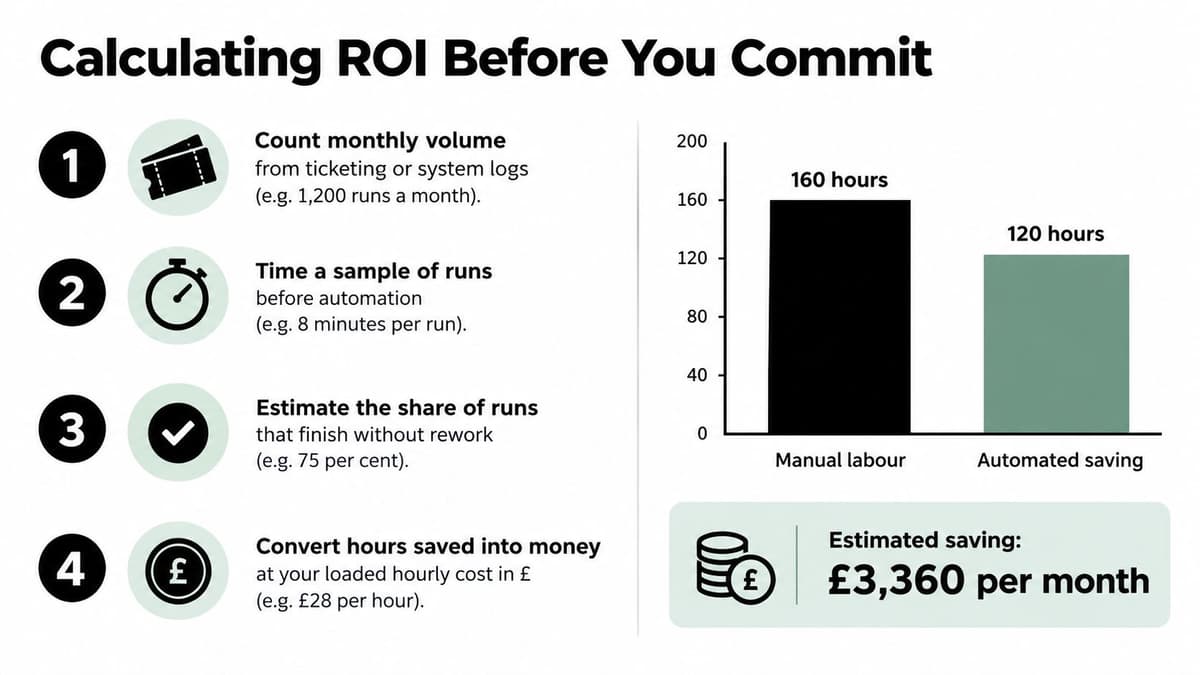
- Count monthly volume from ticketing or system logs. Exclude requests the proposed agent won't handle.
- Time a representative sample before automation, including awkward cases and handoffs.
- Estimate the share completed without rework through a sampled audit. Don't equate a successful tool call with a correct business outcome.
- Calculate hours saved as monthly volume multiplied by minutes saved per clean run, multiplied by the clean-run share, divided by the minutes in an hour.
- Multiply those hours by the loaded hourly labour cost, including employment overheads.
- Subtract running costs: model usage, hosting, subscriptions, maintenance and human supervision.
- Divide build and integration cost by net monthly value to estimate payback. If net value isn't positive, there's no positive payback period.
A conservative worked example
Suppose a support team processes 1,200 eligible tickets a month. In this hypothetical example, handling falls from four minutes to one minute for clean runs, and 70% of runs finish without rework.
The calculation is 1,200 × 3 × 0.70 ÷ 60 = 42 hours saved monthly. At an assumed loaded labour cost of £30 an hour, that represents £1,260 of monthly capacity value, before running costs. These are illustrative assumptions, not a forecast for your business.
ROI worksheet with an illustrative example
| Value | How to estimate | Illustrative figure |
|---|---|---|
| Monthly process volume | Count runs from ticketing or system logs | 1,200 eligible tickets |
| Minutes saved per run | Time study before and after | 3 minutes, from 4 down to 1 |
| Share of runs without rework | Sampled audit of agent outputs | 70% |
| Hours saved per month | Volume × minutes saved × clean-run share ÷ 60 | 42 hours |
| Loaded labour cost per hour | Salary plus overhead divided by productive hours | £30 |
| Monthly value of saved time | Hours saved × hourly cost | £1,260 |
| Build and integration cost | Vendor quote or internal estimate | Unknown until scoped and quoted |
| Monthly running cost | Model usage, hosting and supervision hours | Unknown until usage and review are estimated |
| Payback period | Build cost ÷ net monthly value | Not calculable until costs are known |
The visual below illustrates the calculation method using a separate hypothetical scenario. Use your own measured handling times rather than adopting either example as a target.
Capacity isn't automatically cash
An EY survey of 665 UK professionals found a median saving of six hours per week among workplace generative-AI users. That concerns generative AI generally, not autonomous agents, so use it as a benchmark to test, not a promised return.
Separate model quality from workflow quality. A response can be factually correct while the workflow creates duplicate tickets, sends it to the wrong customer or retries an action that already succeeded.
Also distinguish released capacity from reduced expenditure. Salaried staff costs don't fall just because handling time improves. Name the work that will absorb the released hours, such as clearing overdue cases, improving documentation or reducing an existing backlog.
A time saving becomes a business benefit when someone changes how the team uses that time.
Who Owns the Agent and What Controls It
Only 17% of AI-using businesses had an AI policy or guidance, and just 5% had a formal written policy, according to the governance figures described in the IBM UK governance summary. Buying software without assigning accountability leaves an operational gap that a better prompt won't fix.
Treat the agent as a non-human operational identity. Give it a separate identity and credentials, not an employee's shared login. Record who can approve changes and who answers when its actions cause a problem.
Minimum controls before live actions
Minimum agent controls and who owns them
| Control | Minimum standard | Named owner |
|---|---|---|
| Least-privilege access | Read-only by default; write access granted per action | Systems owner |
| Action log | Every tool call stored with input, output and time, with sensitive values protected | IT or security lead |
| Approval threshold | Spend, refunds or record changes above a set limit need a person | Process owner |
| Data boundary | Only approved sources are indexed; personal data use has a documented basis | Data protection lead |
| Incident procedure | Named contact, agreed response time and written rollback steps | Operations manager |
| Kill switch | A single action disables the agent and returns work to the manual queue; tested monthly | Agent owner |
| Review cadence | Monthly sample of decisions with recorded override rate | Agent owner |
Least privilege means restricting actions as well as applications. Access to a CRM shouldn't automatically include permission to export every contact, delete records or change account ownership.
Logs must help someone reconstruct an event. Record the request, tool used, result and approval where relevant. Protect credentials and sensitive personal information rather than copying everything indiscriminately into another searchable store.
Approval thresholds belong in application controls, not just written instructions. A refund tool should reject an unauthorised amount even if the model asks it to proceed.
Make stopping and recovery operational
Define data boundaries before indexing documents. A staff knowledge agent shouldn't retrieve private personnel records just because they share a storage platform with public policies. Apply source permissions during retrieval, not merely when displaying an answer.
The incident procedure needs a real responder and a recoverable queue. If the agent fails halfway through a task, the next person must know which actions completed and which remain pending.
Exercise the kill switch. Confirm that it stops queued activity, blocks further tool access and returns unfinished work to manual handling without creating duplicates. A pause button that only hides the chat window isn't a shutdown mechanism.
For regulated or financial work, changes to records, outgoing messages and spending authority deserve particular scrutiny. Use an AI agent security checklist to turn these controls into acceptance tests.
Before go-live, require explicit answers: who can change permissions, where are logs kept, what can be rolled back, how will recovery work and who receives the incident alert?
Organisational Change and Where Rollouts Stall
A working deployment needs distinct responsibilities. The process owner answers for the business outcome, the agent owner manages permissions and changes, and reviewers inspect outputs and handle exceptions.
In a small company, someone may hold more than one role. The responsibilities still need separate definitions, especially when the person requesting broader permissions is also responsible for delivery.
Staff need a usable handoff, not just a training presentation. Show reviewers how to check evidence, reject an output and explain their decision. Tell the team which work changes, which decisions remain theirs and how concerns will be investigated.
Diagnose the symptom before changing the model
Rollout symptoms, causes and fixes
| Symptom | Likely cause | Fix |
|---|---|---|
| Staff route around the agent | Workflow handoff never changed | Redesign the handoff and name a process owner |
| Several teams run separate agents with no shared rules | Agent sprawl across business units | Central register of agents, owners and permissions |
| Confident but wrong answers | Stale or unscoped knowledge sources | Restrict sources, require citations and run a weekly audit |
| Savings never show up in capacity | Freed hours not reassigned | Name the task for released hours before go-live |
| Escalations rise after launch | Triggers set too wide | Tighten triggers and compare with the baseline exception rate |
| Costs rise faster than volume | Usage not capped | Set usage budgets and alerts |
| Team refuses to trust outputs | No visible review or explanation | Share sampled outcomes with reasons and involve staff in the test set |
Don't assume every failure requires a stronger model. If the policy library contains contradictory instructions, changing the model won't establish which policy is authoritative. Assign document ownership, remove obsolete versions and preserve effective dates.
Likewise, rising usage bills can come from unnecessary retries, repeated retrieval or agents passing the same task between themselves. Inspect execution traces before increasing the budget.
Management check: If reviewers routinely correct the same mistake, fix the rule, source or integration. Don't make permanent manual repair part of an invisible operating cost.
Prevent agent sprawl early
Keep a central register before separate departments start buying or building independently. Record each agent's purpose, owner, connected systems, permissions and cost centre. Include agents embedded in existing business software, not just bespoke builds.
Check for overlapping authority. A sales agent and a support agent may both update the same customer record, using different assumptions about which system is authoritative. Decide ownership of shared fields and test conflicting updates.
At a scheduled post-launch review, ask the process owner to describe the agent's current permissions, override rate and released hours. They should be able to answer from operating records rather than a launch presentation. If they can't, pause expansion until ownership and measurement are working again.
Roll Out Your First Agent and Choose a Provider
Start with an internal triage or knowledge process before handing an agent a customer-facing responsibility. Internal deployment gives staff a chance to expose incomplete records, ambiguous policies and broken handoffs without turning every defect into a customer interaction.
Capability matters as much as software. EY's UK AI trust analysis reports that around 18% of medium-sized businesses with 100–249 employees cited insufficient expertise as a factor delaying adoption. A sensible rollout therefore includes reviewer training and process redesign, not merely integration.
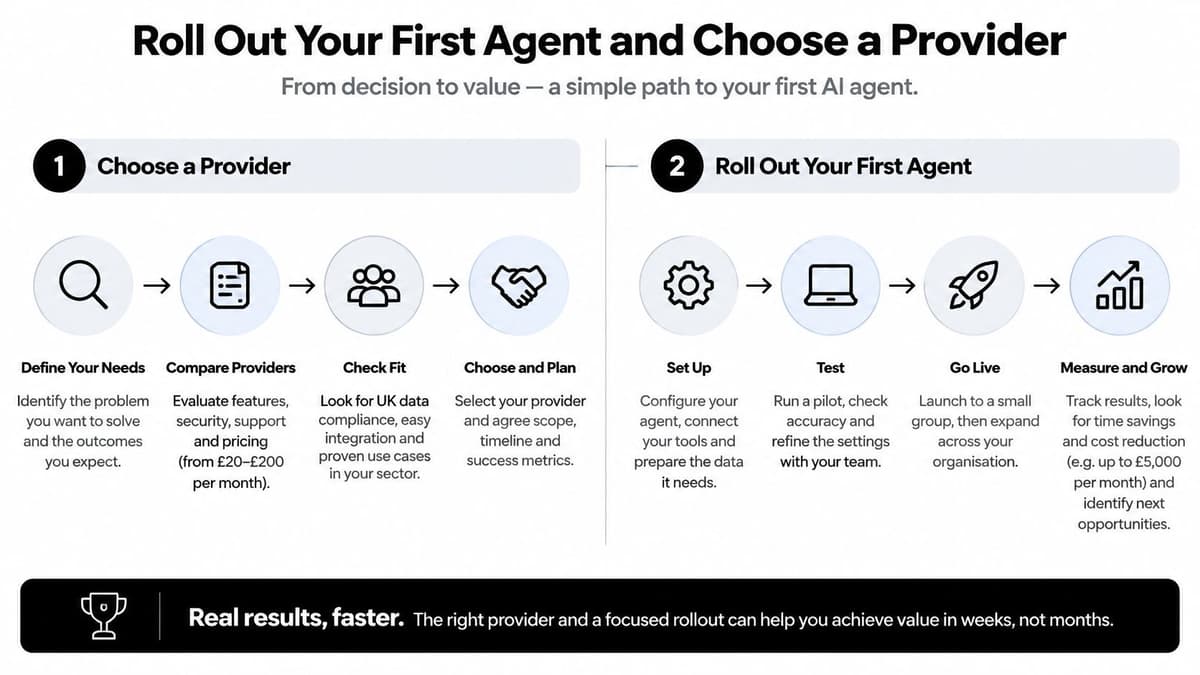
Use the deployment sequence as a set of gates, rather than a deadline-driven launch checklist.
A gated route into production
Choose a bounded internal process. Start with a shared operations inbox, document extraction queue or approved-policy search. Specify what the agent must ignore as carefully as what it should handle.
Establish the manual baseline over a representative operating cycle. Capture volume, handling time, rework and exceptions, including busy periods. Add integration effort and reviewer capacity to the cost estimate before approving development.
Assign the process owner and reviewers before building. Give them authority to reject an unsafe workflow. Include staff who handle difficult cases, not only the person sponsoring the project.
Run in shadow mode. The agent drafts, retrieves or classifies while people continue taking the actual actions. Compare outputs against the human result and investigate disagreements rather than automatically assuming either side is correct.
Agree the stop-or-go gate in writing. Release requires the agreed accuracy and override criteria to be met, exception volume to remain within the team's handling capacity, and no unresolved permission or data-boundary failures. A failed gate means correcting and retesting, not granting access with a promise to monitor.
Grant permission for a low-risk action, such as applying an internal tag or saving a draft. Don't begin with payments, deletion or external commitments. Test retries so a timeout doesn't produce duplicate actions.
Expand autonomy incrementally. Review evidence before adding another action or data source. Treat a new permission as a deployment change requiring testing, not a casual configuration edit.
Shadow mode should include awkward inputs: missing attachments, conflicting records, expired policies and messages containing instructions that contradict the agent's task. The question isn't whether it can produce a plausible answer. It's whether it recognises when it lacks authority or evidence.
This video provides another format for considering the deployment process.
Evaluate delivery beyond the demonstration
A provider demonstration should use representative tasks and show the resulting records, not just the chat response. Include a failed tool call, a human rejection and a shutdown test. Require the delivery scope to distinguish configuration, integration, evaluation and ongoing operation.
Clarify who owns credentials, source documents, workflow configuration and logs. Establish how the business can export its records and continue manually if the service becomes unavailable. These questions matter more than how conversational the agent sounds.
We're Digital Souls Studios LTD, a London software studio serving UK and international clients. Our custom AI support agent answers email, replies to user messages and triages issues, working as an extra team member on tasks that might otherwise require more staff; it costs £3,000, paid once, while clients pay third-party agent subscriptions and usage. That offer doesn't remove the need for business ownership, approval boundaries or operating controls.
Bring the ROI worksheet and controls table into scoping. Require a written distinction between what the agent can demonstrate, what it will be permitted to do at launch and what remains subject to human approval.
Digital Souls Studios LTD builds custom AI support agents around defined business requirements. Visit Digital Souls Studios LTD to book a scoping call, bringing your process volume, handling-time estimates and proposed human checkpoints. Ask for the permissions, acceptance tests and shutdown controls in writing before any build begins.