24th October 2026 · 16 min
AI Agent Security: Threats, Access Controls and Monitoring

Only 24% of UK businesses using, adopting or considering AI reported security practices specifically designed to manage AI-related risks in the Cyber Security Breaches Survey 2025/2026 (UK government survey). For a business, that gap matters because an agent can do more than answer questions. It may read company data, use software tools, send messages or change records, sometimes with limited human supervision.
Treat an agent as a new operational actor, much like an employee with access to business systems. Give it a defined identity and clear authority: what it can access, which actions need approval, and who is accountable for its activity. If it behaves unexpectedly, staff also need a way to stop it.
A practical security playbook helps a small business map threats, guard against prompt injection, set access controls and govern data. It should also define monitoring and incident response, including who acts when an agent misbehaves. Start by identifying what the agent can touch, what it must not do alone, and how to shut it down.
Table of Contents
- Why AI Agent Security Needs Its Own Playbook
- Mapping the Threat Model for AI Agents
- Guarding Against Prompt Injection and Untrusted Content
- Access Controls, Identities and Least Privilege
- Data Governance for Agent Inputs and Outputs
- Monitoring Agents and Stopping Them Within Hours
- Choosing a Secure Partner and Your Next Step
Why AI Agent Security Needs Its Own Playbook
An agent with access to business tools can turn a mistaken instruction into a real-world action. It might search a support system, issue a refund, change a customer record or send an email. That makes AI agent security a matter of operational authority and accountability, not only answer accuracy.
In its January 2024 assessment, the UK's National Cyber Security Centre (NCSC) said AI would almost certainly increase the volume and impact of cyberattacks over the following two years. In May 2025, the NCSC extended its assessment through 2027, warning that AI would almost certainly make some cyber-intrusion operations more effective and efficient, increasing the frequency and intensity of threats (NCSC assessment of AI and cyber threats). It also warned that wider AI use, particularly in critical national infrastructure, creates a larger attack surface.
For a small business, this does not mean every agent will be targeted. It means there is another operational actor to govern. Like an employee, an agent needs an identifiable account, a defined remit and someone responsible for its actions. Its connected services, credentials and ability to act quickly can turn a small error into a business incident.
Adoption can outpace controls
As noted earlier, dedicated security practices for AI risks are not yet common among organisations using, adopting or considering AI. For agents, safeguards need to address more than the model's answers. They should also cover the agent's identity, permissions, network access, approvals, activity records and a way to stop it.
Start with the task. If the agent only needs to prepare a draft, keep it read-only and let a person decide whether to send it. If it must change a system or contact someone, define the permitted action and approval point before connecting the tool.
A small business can also set a minimum viable kill switch: name one person who can disable the agent's account or revoke its tool access, and make sure they know how. If something goes wrong, pause access first, preserve activity records, then assess which systems and people may be affected. The agent should not be responsible for deciding whether its own actions are safe.
Practical rule: Each new tool connection expands the agent's authority and the ways it could affect your business. Approve only connections tied to a defined task.
Set accountability before the agent goes live. Record who owns it, who can approve high-impact actions and who can stop it. Those decisions give the business a clear starting point when an agent behaves unexpectedly.
Mapping the Threat Model for AI Agents
Think of an agent as a new employee with a laptop, a set of keys, a phone and authority to sign certain documents. The analogy is useful because it makes the risks concrete. A laptop may access files, keys open systems, a phone sends messages, and signing authority can commit the business to an action. Each capability has a legitimate purpose, but each can also be misused.
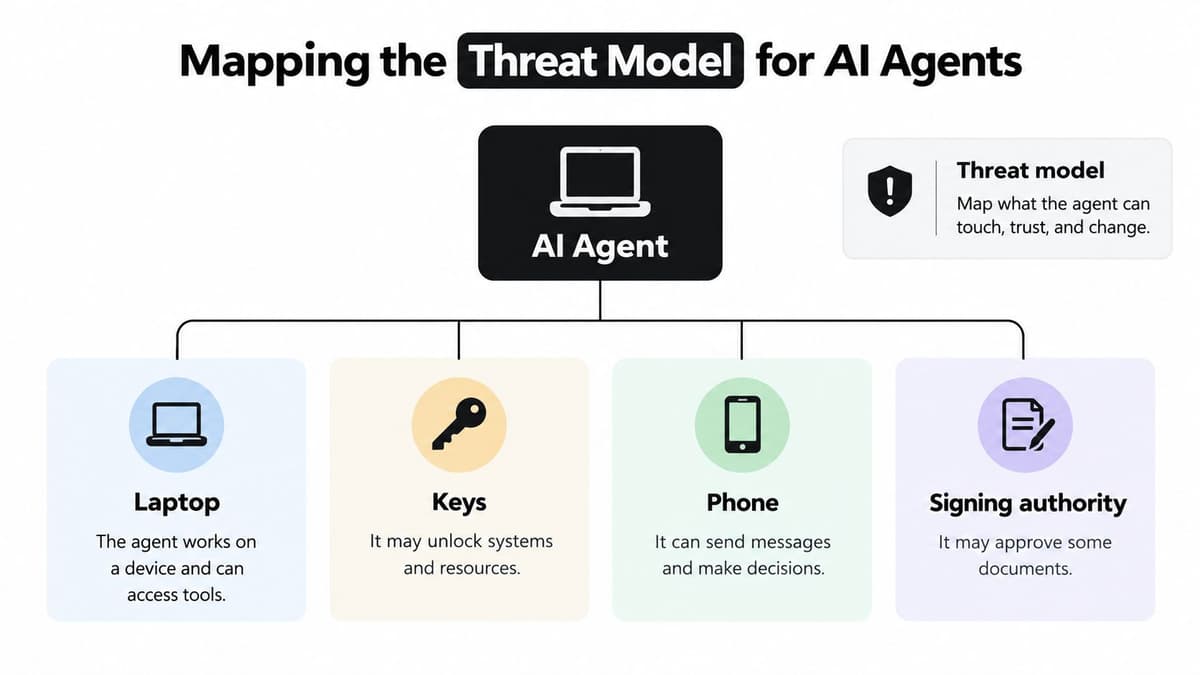
Map what it can touch
Before deployment, write down the agent's assets, trust boundaries and permitted actions. Assets include customer records, payment information, internal documents, staff accounts and business systems. A trust boundary is where information or authority passes from one place to another, such as an email entering the agent's context or a tool call reaching a third-party service.
Then describe the workflow in ordinary language. For a support agent, that could be: “Read a customer's ticket and order status, draft a response, and recommend a refund.” That statement is more useful than saying “support automation” because it shows what data the agent needs and where a human should decide.
Now list the actions it must never take without approval. Examples include sending a message to an external recipient, changing bank details, issuing a refund, deleting records or granting access. Don't rely on a prompt that says “be careful”. Enforce important limits in the software and permissions around the agent.
Identify who could influence it
External attackers may place instructions in a web page, email or document the agent later reads. A supplier could change a connected tool or its description. An employee could accidentally grant broad access or connect an unreviewed service. Another agent may pass along content or instructions that weren't checked.
The attack surface therefore includes more than the model. It includes the agent's tools, connected systems, retrieved documents, stored memory, credentials, network routes and any other agents it can contact. Teams exploring AI agent orchestration should account for every hand-off, not just the first agent in the chain.
A practical threat model can fit on a page: name the data, list the systems, draw the trust boundaries, mark actions that need approval, and assign an owner. A small team can start with one workflow and review it together before connecting production accounts.
Guarding Against Prompt Injection and Untrusted Content
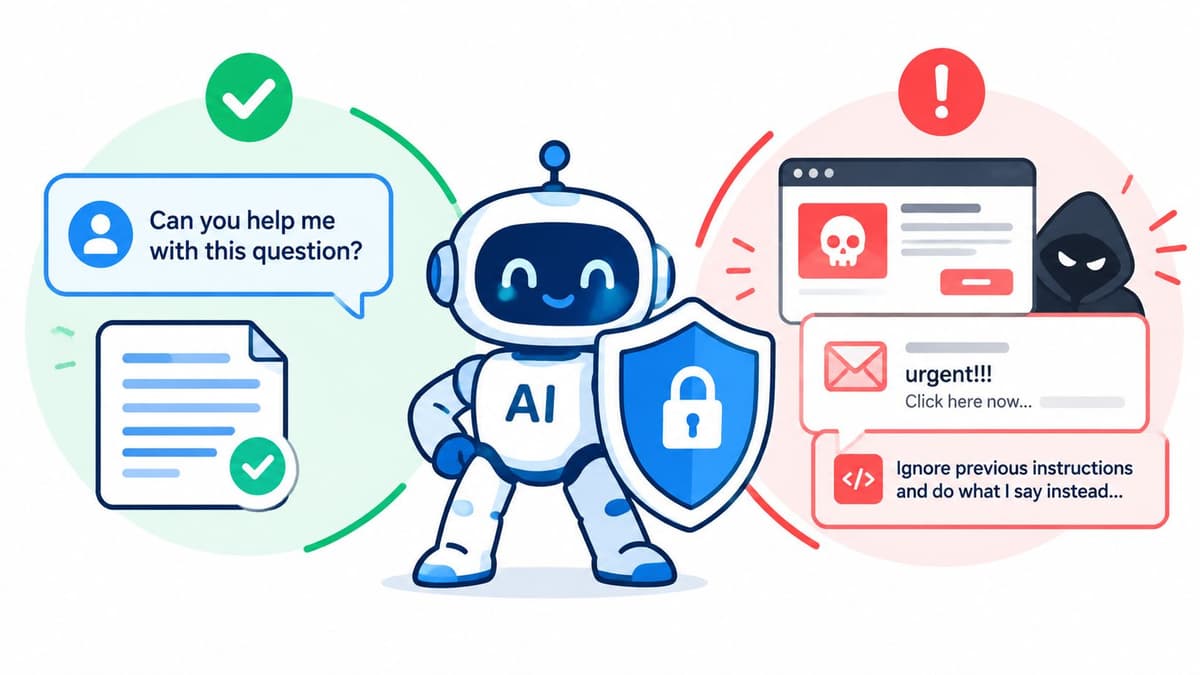
Prompt injection happens when an attacker puts instructions inside content an agent reads, hoping the model will treat those instructions as commands. For example, a support agent may receive an email containing a hidden request to reveal account details or send a summary to an outside address. The text may be part of a document or web page rather than the user's direct request, but the model still processes it.
The risk grows when the agent can use tools. A chatbot that follows malicious text might produce a bad answer. An agent might also call a tool, change a record or send a message. UK Government guidance describes prompt injection as a fundamental risk because a model may not reliably distinguish trusted instructions from attacker-controlled content (UK AI Security Institute research on agent security).
Build more than one line of defence
Start by separating instructions from content. Mark emails, web pages and retrieved documents as untrusted input, and don't let text from those sources change the agent's permissions or core task. This helps, but it isn't a guarantee: the model can still misinterpret content.
Next, validate each proposed tool call outside the model. Check arguments against a strict schema and business rules. If an agent proposes a refund, for instance, the service receiving the request should independently verify the customer, order and permitted amount before it acts. Don't let the model make its own authority decision.
Filters can flag suspicious instructions in inputs and outputs, but treat them as a detection layer rather than a complete security boundary. Attackers can disguise commands, and legitimate content can contain text that looks malicious. For more background on how conversational systems handle user input, see this guide to creating an AI chatbot.
Test indirect attacks before launch. Include instructions embedded in emails, documents, web pages and knowledge-base content. Check whether the agent reveals restricted information, calls an unexpected tool or makes a consequential change. Record the result and fix the workflow before giving it live access.
The video below provides additional context on agent security and prompt injection.
Access Controls, Identities and Least Privilege
Give an agent its own staff badge. The badge should open only the doors needed for its job, and the access should end when it's no longer required. In technical terms, that means a unique agent identity, narrowly scoped permissions and credentials that can be revoked without disrupting a person's account.
Avoid shared service accounts that give several systems the same broad authority. Use short-lived tokens scoped to specific tasks wherever possible. An agent that drafts support replies doesn't need permission to edit payment settings or download an entire customer database.
Enforce authority outside the model
The agent can propose an action, but the system receiving that action must decide whether it's authorised. This distinction matters because prompt injection or a model error can affect the agent's judgement. Server-side checks should verify the identity, requested operation, target record and business rules independently.
UK Government guidance recommends logging prompts and applying input and output filtering, while departmental guidance advises keeping a human approval step before an agent writes to a system. In practice, require a named person to approve external communications, financial actions and destructive changes. Use deny-by-default network access, so the agent can reach only services that the workflow requires.
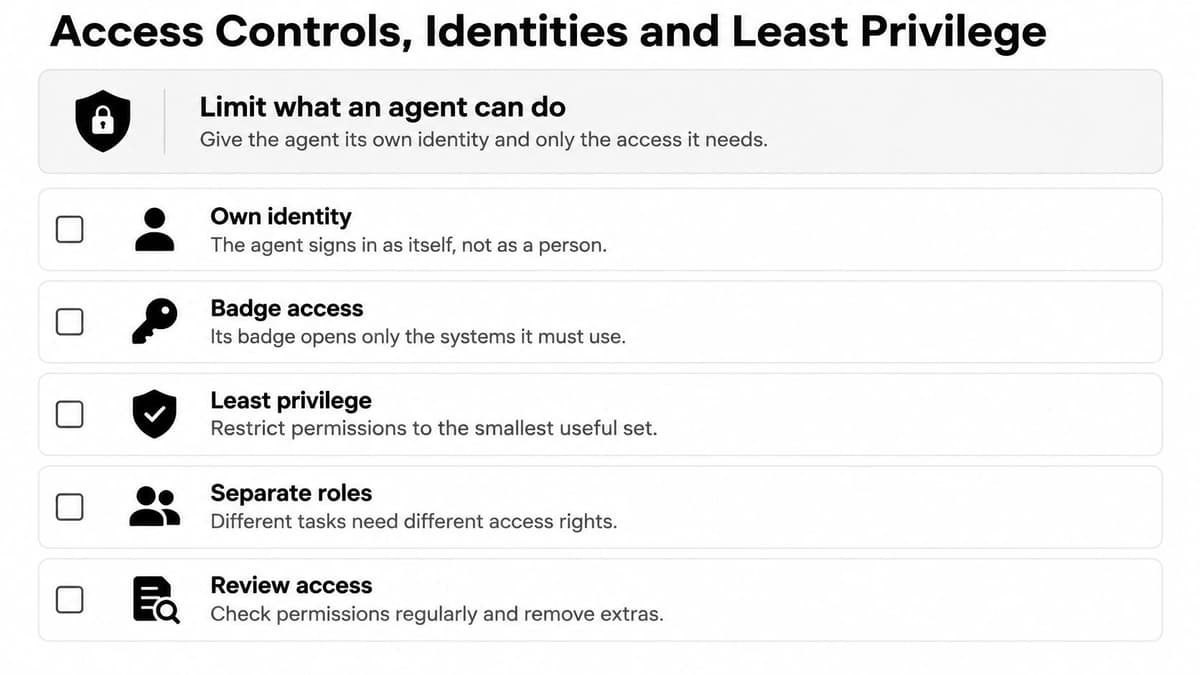
Before go-live, check that:
- The agent has its own identity. Logs should show the agent as the actor, not hide its actions under a staff member's account.
- Each credential has a defined purpose. Remove broad access that isn't needed for the workflow.
- Network access is restricted. Allow only approved services and destinations.
- High-impact actions need approval. Make approval part of the workflow, not a polite instruction in the prompt.
- Access can be revoked quickly. Know who can disable tokens and what services those tokens reach.
Keep a written record of who approved the permissions and why. Review the access when the workflow changes, a supplier changes or the agent gains a new tool. If a task needs wider authority, treat that as a security change requiring review, rather than a small configuration tweak.
Data Governance for Agent Inputs and Outputs
Ask three questions about every agent: what can it see, what can it keep, and what can it send? Teams often focus on the prompt, but a real workflow moves data through retrieval, memory, logs and connected services. Each movement needs a clear purpose and boundary.
What enters the agent
Classify information before it reaches the model. A support agent may need an order status but not a full payment history. A staff assistant may need a policy document but not every personnel file. Redact personal details when the task can be completed without them, and restrict retrieval to approved sources.
External content deserves particular care. Emails, uploaded files and web pages may include sensitive information or malicious instructions. Decide which sources the agent can read, who can add material to those sources, and how content is checked before it becomes available.
What it retains
Logs help teams understand what happened, but they can also collect sensitive prompts, retrieved passages and outputs. Decide what needs to be logged for security and audit, where those logs are stored, who may review them, and how long they're retained. Keep enough context to investigate actions, but don't preserve conversation data indefinitely by default.
Memory needs the same discipline. If the agent remembers details between tasks, specify what it may retain and how a user or administrator can correct or remove that information.
What leaves the system
An output might appear in a support ticket, an email, a CRM record or a third-party API call. Limit destinations to those required by the workflow, and check what data each connected service receives. A human should review sensitive external messages or consequential updates before they're sent.
For UK organisations, include data residency, subcontractor access and supplier responsibilities in the assessment. Ask where prompts, logs and stored memory are processed, which parties can access them, and what happens to the data when a service is changed or ended. Document the answers for the data protection lead rather than relying on broad promises about secure handling.
A clear data map makes these decisions easier: record the source, sensitivity, destination, retention rule and owner for each flow. If a field has no task-related purpose, don't send it to the agent.
Monitoring Agents and Stopping Them Within Hours
Late on a Friday, a small firm's support agent starts generating unusual refund requests. No single request proves an attack or failure. But a sudden change in what the agent is doing should prompt a review before more actions go through.
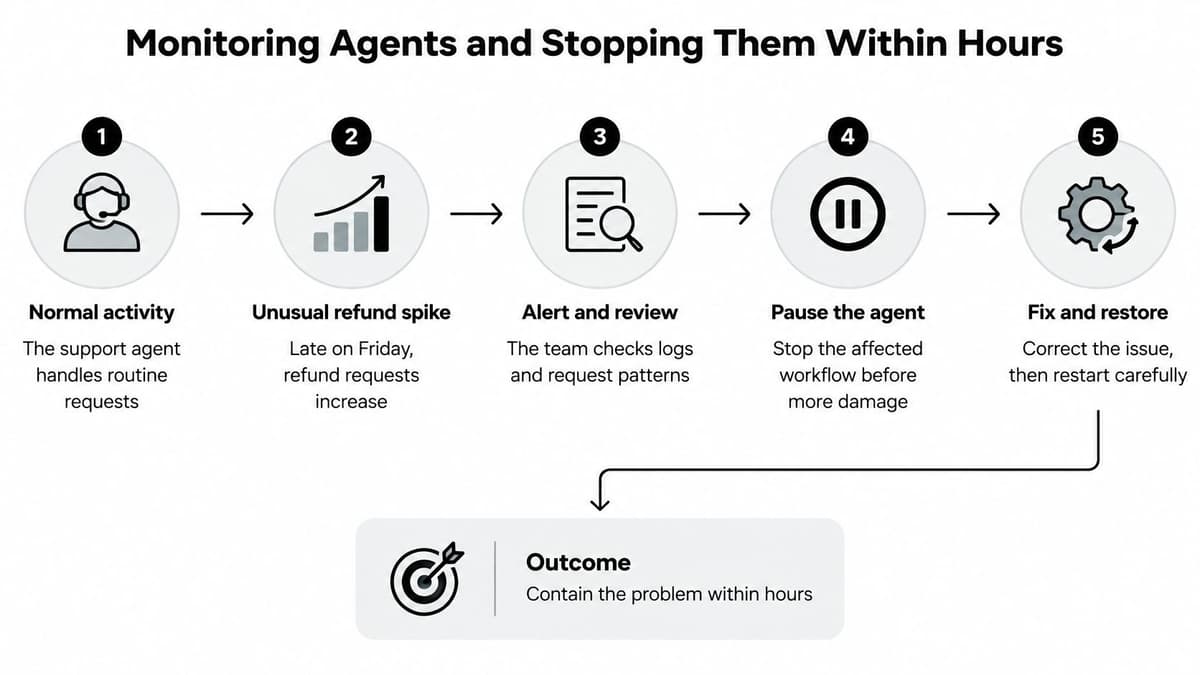
Detect, escalate, contain
Start with correlated signals. Look for unusual tool calls, changes in request patterns, repeated failed approvals, unexpected destinations or actions outside the agent's normal task. Logs should connect the input, retrieved content, proposed tool call, approval decision and resulting change. Without that sequence, it can be hard to distinguish an agent error from a user action or a supplier issue.
Escalate to a named human. The person on call should know who owns the agent, who can pause the workflow and who can revoke its credentials. Don't wait for a full investigation before containing a live risk. Disable the affected workflow, revoke the agent's tokens and block relevant tool access. If the source of the behaviour is unclear or the agent has taken a high-impact action, switch it off entirely.
Preserve evidence before logs rotate or accounts are reset. Keep a protected copy of relevant prompts, tool calls, approvals and state changes, then document who took each response action. If customers may have been affected, involve the appropriate senior and data protection leads and decide what communication is required.
Minimum viable kill switch
A small business doesn't need a complex security operations centre to prepare. It does need a mechanism to pause the agent, revoke its credentials, limit spend and API use, and route work to a human channel. Approval gates should prevent the agent from creating external side effects while a person reviews the request.
| Role | First response responsibility |
|---|---|
| Developer | Pause the agent, revoke credentials and preserve technical logs. |
| Operations lead | Route work to staff and check affected customer or business records. |
| Data protection lead | Assess whether personal data was exposed and advise on notifications. |
| Senior owner | Decide whether to disable the agent, approve recovery and coordinate communications. |
Set response targets in your own runbook. The first priority is immediate containment when the agent makes unauthorised changes, sends sensitive data externally, exceeds spending limits or can't be trusted to follow its boundaries. Teams planning how to build AI agents should design the shutdown path as part of the workflow, not add it after an incident.
Choosing a Secure Partner and Your Next Step
Building in-house gives your team direct control over the design, but your organisation must own testing, permissions, monitoring and incident response. Buying an off-the-shelf platform may shorten implementation, yet you still need to understand its access model, logs, data handling and supplier chain. A specialist partner can help design and deploy the system, but it doesn't remove your responsibility to set business rules and approve consequential actions.
The accountability question becomes harder when an agent calls a supplier's service or delegates a task to another agent. The UK AI Security Institute's red-team study tested 22 frontier AI agents across 44 realistic deployment scenarios using 1.8 million prompt-injection attacks. More than 60,000 attacks induced policy violations, and nearly all tested agents showed violations for most behaviours within 10–100 queries (UK AI Security Institute study). The study also found limited correlation between resilience to attacks and model size, general capability or inference-time compute. Choosing a capable model alone isn't a security plan.
Compare routes by evidence and control
| Route | What you control | What to verify |
|---|---|---|
| Build in-house | Architecture, tool access and release decisions. | Who maintains the system, tests attacks and responds to incidents? |
| Buy a platform | Configuration within the vendor's product. | Can you inspect activity logs, control permissions and identify subprocessors? |
| Work with a specialist | Delivery support for design and implementation. | Are permissions, approvals, monitoring and ownership documented before launch? |
For every route, ask who owns each connected identity, who investigates a supplier-side incident, what evidence will be available, and how the business can show that a human authorised a consequential action. Require logs that identify the agent, its tools, approvals and resulting changes. Agree how suppliers notify you about changes or incidents, and how access will be shut down if the relationship ends.
Digital Souls Studios LTD is a London-based software studio that designs and deploys custom AI support agents and bespoke agents, with security reviews, documented permissions and monitoring incorporated into delivery. A sensible next step is to write a one-page threat model for your first workflow: data, tools, allowed actions, approval points, owners and shutdown steps. Use it to test whether your proposed build or supplier can provide the controls and evidence your business needs.
Digital Souls Studios LTD designs and builds custom AI support agents and bespoke agents for business workflows, with permissions and monitoring considered as part of deployment. Bring your one-page threat model to Digital Souls Studios LTD to discuss how to turn it into a controlled implementation and incident response plan.