19th October 2026 · 14 min
AI Agent Orchestration: A Practical Guide for UK Teams

A customer asks whether a refund is due. One bot checks the support article and says yes, another reads the billing record and says no, and a third tells the customer to call the team. The operations lead now has three answers, no clear explanation of which one to trust, and a human who still has to resolve the case.
That isn't a shortage of capable AI models. It's a coordination problem. AI agent orchestration gives a team a controlled way to route work between specialised agents, business tools and people, while keeping track of what happened and who approved it.
Table of Contents
- What AI Agent Orchestration Actually Means
- Why Orchestration Matters Now in the UK
- The Core Building Blocks of an Orchestrated System
- The Four Controls That Make Orchestration Safe
- Choosing the Right Topology for Your Team
- A Walkthrough of an Orchestrated Support Workflow
- Common Misconceptions About Agent Orchestration
- A 30 Day Starter Plan and Frequently Asked Questions
What AI Agent Orchestration Actually Means
An operations team might have separate bots for order questions, billing and returns. Each can be useful on its own, but if they can't share the relevant context or follow the same policy, they may produce conflicting responses. Adding another bot doesn't resolve that inconsistency. Someone needs to coordinate the work.
AI agent orchestration is the coordination of agents, tools, data and human decisions so a multi-step task follows an intended process. The system decides which agent should handle a task, what information it can use, what happens next, and when a person needs to take over. Think of it as a dispatcher for digital work: it directs each request to the right specialist and keeps the hand-offs visible.
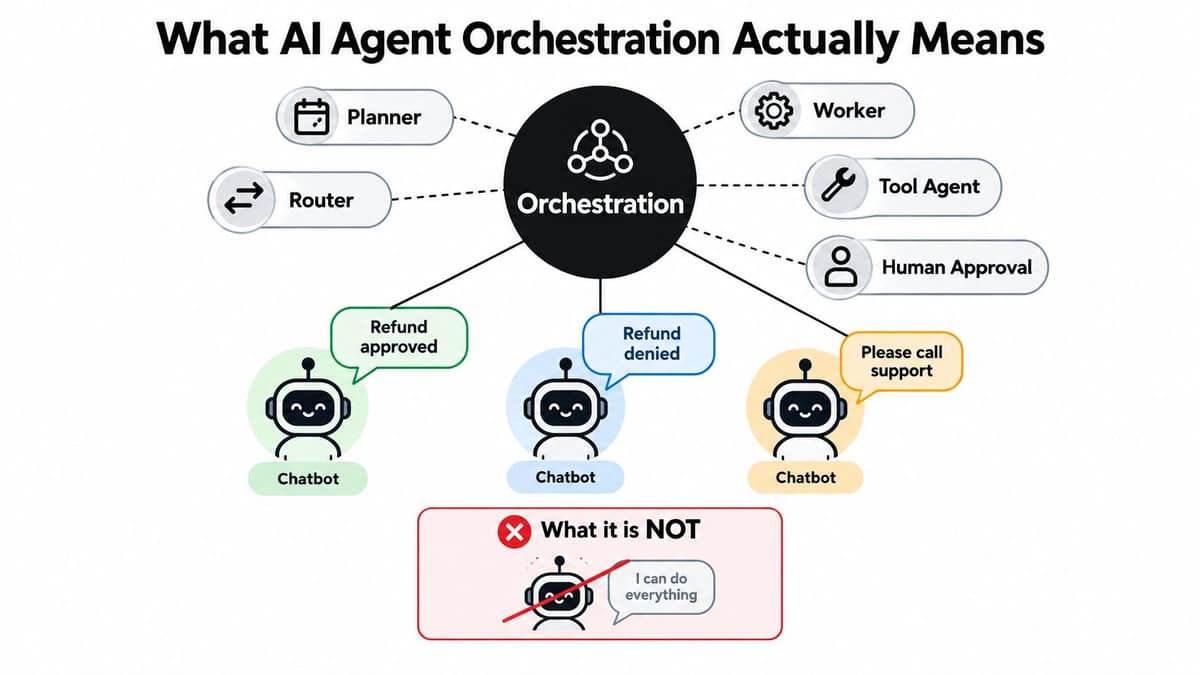
A lone chatbot is like a single staff member expected to handle every query, consult every system and make every decision. An orchestrated system is closer to a team with defined jobs and a supervisor: a routing agent classifies the request, a billing agent checks the account, a knowledge agent finds the relevant policy, and a human reviews a sensitive or uncertain outcome.
The orchestrator is the control layer that coordinates those roles. It might send a refund question to the billing agent first, then ask a policy-checking agent to verify the applicable rule. If the request falls outside the agreed conditions, it can route the case to an approval inbox rather than letting an agent make an unchecked decision.
What orchestration isn't matters just as much. It isn't a clever prompt, a collection of bots, or a promise that AI will make decisions without people. The practical aim is a workflow where each component has a defined job, access is limited to what it needs, and the team can inspect the result.
Why Orchestration Matters Now in the UK
A UK operations team signs off on an AI pilot. The demo goes well. Then the practical questions arrive: which systems can it read, who checks its output, and what happens when it gets something wrong. The distance between a working demo and a working process is where most adoption efforts stall, and orchestration exists to close that distance.
The Office for National Statistics reported that 9% of UK firms used AI in 2023, with adoption projected to reach 22% in 2024; among firms that had planned to adopt AI that year, 38% subsequently reported adoption, compared with 27% of firms that had not, according to the ONS report on technology and AI adoption in UK firms.
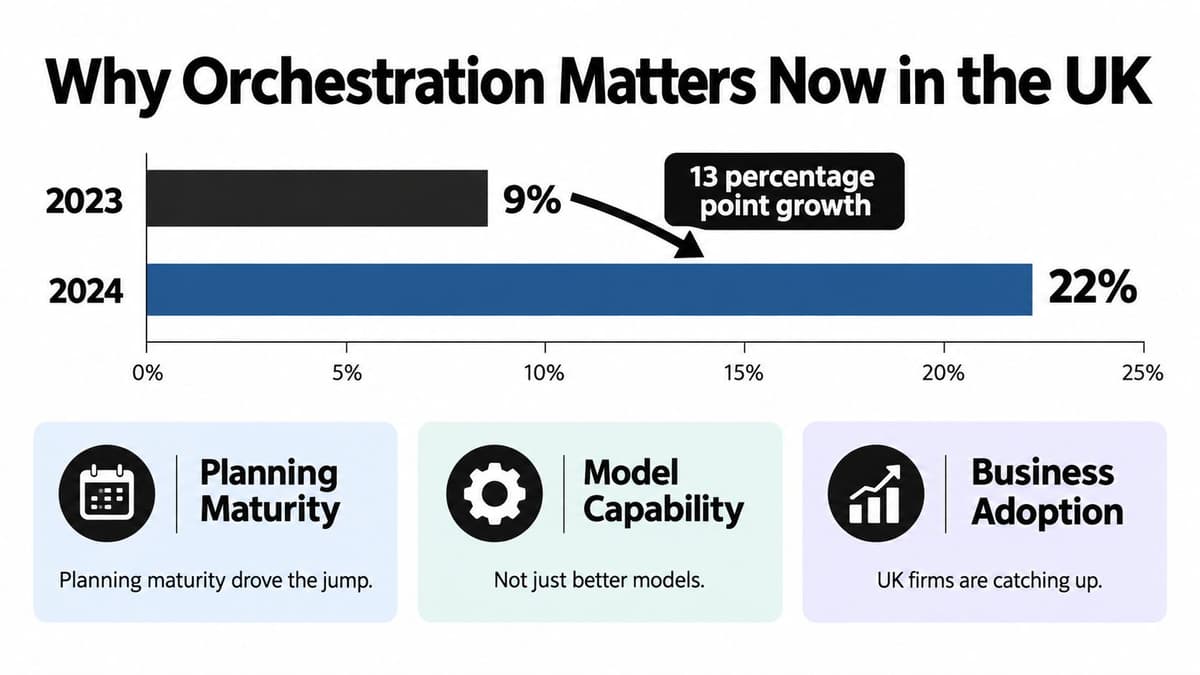
That eleven-point gap is worth pausing on. Planning, in this context, rarely means choosing a better model. It means deciding where AI sits inside an existing workflow before switching it on: which data it can reach, which actions need a person's sign-off, and how the team inspects what it did. Those are governance and integration questions, and orchestration is the discipline of answering them in software. A capable model with no defined place in the process behaves like a new hire with no desk, no login and no manager. The talent is there, but the work cannot start.
Government research adds scale to the picture. It estimated that approximately 15% of UK businesses, or 432,000 companies, had adopted at least one AI technology, while 2% were piloting AI and 10% planned future adoption, as reported in the UK Government's AI adoption research. The same research found adoption rising sharply with size: 68% of large businesses, 34% of medium-sized businesses and 15% of small businesses had adopted AI.
Those size figures can make coordination sound like an enterprise concern.
For a smaller firm, the opposite holds. Large organisations can afford to build a new team around the technology; a small business has to fit it into the team it already has, which makes the hand-offs and permissions matter more, not less. A structured workflow for support triage, document checks or compliance review keeps routine work moving while still routing exceptions to a person. The milestone worth aiming for this quarter is one existing process that runs more predictably, with a record your team can check.
The Core Building Blocks of an Orchestrated System
A restaurant provides a helpful way to picture an orchestrated system. The head chef keeps the service moving, but doesn't prepare every dish, take every order and run the till. They coordinate a team with distinct roles, and step in when the hand-off or result needs attention.

In an AI workflow, those roles often look like this:
- Planner: Breaks the request into manageable steps. For customer onboarding, it might identify the checks and information needed before an account is ready.
- Router: Sends each task to the relevant specialist, much like a waiter directing an order to the right part of the kitchen.
- Worker: Completes a defined job, such as checking submitted documents or drafting an answer from approved information.
- Tool agent: Connects an agent to a business system, such as a CRM or ticketing platform, under specific permissions.
- Human approval: Gives a person the chance to review a sensitive action, such as changing account details or resolving an ambiguous compliance flag.
These roles don't have to mean five separate AI models. Some can be implemented as ordinary software rules, and one agent may perform more than one bounded task. The important part is that the team can tell what each part is allowed to do.
That requires shared state: a structured record of what has happened so far. For onboarding, it might hold the customer's request, the checks already completed, the source documents used and the next action. Shared state is more reliable than asking each agent to reconstruct the history from a long prompt. For a practical introduction to connecting repeatable tasks into a business process, see AI workflow automation for small business.
The Four Controls That Make Orchestration Safe
A system can coordinate agents and still be unsafe or hard to operate. UK public-sector guidance groups the operational requirements into optimisation, administration, governance and security, a useful frame for organisations of any size. Treat each as a design choice that should have a clear operational result.
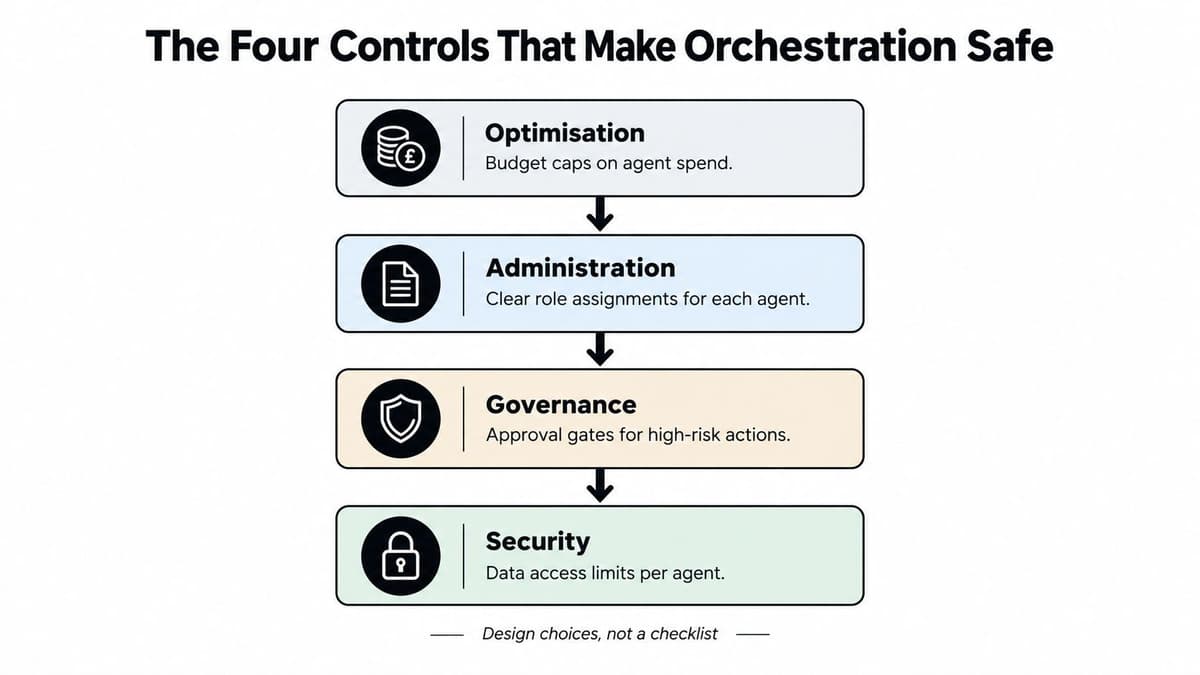
Optimisation is about keeping a workflow within acceptable cost and response time. Set a budget for the work an agent can initiate and a latency limit for each workflow. If a task exceeds those boundaries, the system should stop, retry under a defined rule or route it to a person. This prevents an automated process from spending indefinitely to resolve a task that needs human judgement.
Administration means operating agents as maintained software, not forgotten prompts. Give each agent an owner, monitor whether it's running properly, and decide who receives an alert when a tool or workflow fails. Keep a clear way to pause or retire an agent whose behaviour changes or whose role is no longer needed.
Governance defines what an agent may do and when a human must intervene. Give tools narrow, task-specific permissions and use structured inputs and outputs so agents can't pass ambiguous instructions downstream. Require approval for consequential actions, especially those that are difficult to reverse.
Security protects identities, credentials and data as agents move between systems. Use distinct agent identities, keep secrets out of prompts, and record tool calls so the team can see what data was accessed and what action followed. The UK public-sector guidance on preparing for agentic AI describes these controls as operational capabilities, not a one-off checklist.
Choosing the Right Topology for Your Team
A topology is the way agents are arranged and pass work to one another. The right choice depends on how predictable the workflow is, how much control the team needs and what happens if an agent makes a mistake.
| Topology | Best fit | Main trade-off |
|---|---|---|
| Centralised | A workflow where one orchestrator routes tasks to specialists | Clear oversight, but the orchestrator becomes a key dependency |
| Hierarchical | Work that breaks into sub-tasks, with managers coordinating worker agents | Supports delegation, but adds another layer to monitor |
| Peer-to-peer | Experimental work where agents need to exchange suggestions directly | Flexible, but harder to audit and constrain |
In a centralised design, one orchestrator decides where each task goes. That makes the path through a workflow easier to inspect and gives the team a clear place to enforce policy. For an SME, it's often the simplest starting point: a support request comes in, the orchestrator routes it to billing or technical support, and the outcome is logged.
A hierarchical design adds supervisors. A lead agent might divide a broad onboarding task between document checking and account setup, then review the results. That can suit work with several distinct sub-tasks, provided the team tracks both the supervisor's decisions and each worker's actions.
With peer-to-peer coordination, agents communicate more freely and may decide among themselves who should act next. That can be attractive for exploration, but it makes responsibility and failure analysis less straightforward. If one agent passes a task to another and the result goes wrong, the operations lead needs a reliable record of who made each decision.
For regulated or sensitive work, start with centralised or hierarchical control unless the workflow has a clear reason to be more open. Public administration, financial services and healthcare teams need to know which system accessed data, what action it took and whether a person approved it. A simple, traceable structure is often more useful than a complex network. The same principle applies when choosing the surrounding application design, as outlined in web application architecture.
A Walkthrough of an Orchestrated Support Workflow
A UK software company has three bots answering customer questions. One searches help articles, another checks billing, and a third drafts replies. Their answers vary because they don't share the same case history or policy checks. The team replaces them with one coordinated workflow, while keeping the specialist capabilities.
The process starts when a support request enters the ticketing system. A router classifies the request and records the result in shared state, then the orchestration layer retrieves the customer context from the CRM. For a billing question, a billing agent checks the relevant record, while a retrieval agent searches the company's approved knowledge base for the applicable policy.
The system then checks whether the requested action is within the permitted rules. If it is routine and authorised, the workflow can prepare the response or carry out the allowed action. If the customer's case is ambiguous or the requested change has significant consequences, the system sends the case to a human approvals inbox with the relevant context attached.
Operational rule: Let an agent prepare a decision when useful, but make the approval boundary explicit before connecting it to actions that affect customers or accounts.
After the human resolves the case, the system records the decision, source material, agent steps and any tool calls. A trace ID ties those events together, so the operations team can follow the case without relying on a chain of disconnected chat logs. That record also makes it easier to review what happened if a customer later questions the outcome.
The company evaluates the workflow as a whole, not just whether the drafting agent produces fluent text. It tracks task success, escalation rate, tool errors, latency and token cost per workflow. These measures help the team find the actual bottleneck, whether that's poor classification, an unreliable integration or an approval process that needs clearer rules. For teams considering a customer-facing assistant, AI chatbots for customer service can be a useful starting point for thinking about where automated responses belong.
Common Misconceptions About Agent Orchestration
Adding agents can add work as well as capability. Each one introduces another permission boundary, hand-off, possible error and audit question. Salesforce's 2025 UK connectivity report found that surveyed organisations used an average of 13 AI agents and expected that number to double within two years. It also reported that 51% of agents operated in isolated silos and 75% of surveyed IT leaders feared agents could add more complexity than value. Those findings point to an integration and governance challenge, not a question of which model to choose.
Orchestration is more than prompt chaining. A sequence of prompts can pass information between steps, much like a relay passes a baton. It does not, by itself, establish who or what may act, how failures are handled, what gets recorded, or when a person must approve a decision.
Agents cannot set their own business boundaries. They can flag uncertainty or recommend a review, but the organisation must decide what triggers that review and who is accountable for the outcome. As noted earlier, UK government research found significant concerns about ethical issues, costs and unclear regulation among surveyed businesses. Those concerns call for clear ownership and controls.
Before deploying a workflow, ask:
- What is the most harmful action it could take? Set permissions to limit that risk.
- Which actions are difficult to reverse? Require approval before those actions happen.
- Could the team reconstruct a failure? Keep records of tasks, tool calls, outputs and approvals.
- Does the measure reflect the whole workflow? Assess end-to-end outcomes, not just the quality of an individual agent's response.
Orchestration provides a way to control and observe a process. It does not make a weak process safe on its own. The team still needs to define the boundaries before allowing the system to take on more work.
A 30 Day Starter Plan and Frequently Asked Questions
Start with one workflow that already has clear hand-offs and a business owner. The aim isn't to build a general-purpose agent team. It's to find out whether coordination can improve a bounded piece of work without creating a harder system to manage.
A practical first month
- Week one, map what exists. List current bots, automations, connected systems, owners and known failure points. The output is a simple workflow and access map.
- Week two, choose one workflow. Pick a repeatable task, such as support triage, and define its entry point, expected outcome and exceptions. Produce a workflow specification.
- Week three, add controls. Set permissions, escalation rules, logging requirements and budget boundaries before connecting the workflow to live actions. Produce an approval and access policy.
- Week four, review behaviour. Run the workflow under controlled conditions, record failures and assess task success, escalations, tool errors, latency and cost. Produce a go, revise or stop decision.
Questions operations teams ask
When should a person enter the loop? When the agent is uncertain, encounters a case outside its approved rules or is about to take an action with significant consequences. Make the trigger explicit and route the case with enough context for a person to decide.
How do we keep token costs predictable? Put limits on the work a workflow can initiate, keep tasks narrow and review cost alongside outcomes. Stop repeated retries or unproductive agent hand-offs rather than allowing them to continue unchecked.
How do we retire an agent that misbehaves? Pause its access to tools, route its assigned tasks to a human or a safe fallback, preserve the relevant logs and review the failure before restoring or replacing it.
How do we evidence compliance? Retain a usable record of agent identity, data access, tool calls, outputs, human approvals and the final action. Confirm that the record matches the organisation's requirements for the particular workflow.
Digital Souls Studios LTD designs and builds AI automation, custom support agents and software products, with delivery spanning specification, engineering, launch and ongoing support. If you're planning an orchestrated workflow and want help turning its access rules, integrations and approval steps into a build plan, visit Digital Souls Studios LTD.