16th October 2026 · 13 min
AI Chatbot for Customer Service: A Practical UK Guide
If you're staring at a support inbox full of the same “Where's my order?” and “Can you reset this?” messages, the temptation is obvious. Put an AI chatbot for customer service on the front line, clear the queue, and call it progress. That works for simple journeys, but in the UK it can also backfire fast if the bot lands in the wrong place, blocks access to a person, or sounds confident while missing the point.
The better question is not how much you can automate. It's what must stay human, where the handoff happens, and how you prove the bot is helping instead of containing complaints. That boundary-first approach is the difference between a support tool customers tolerate and one they trust.
Table of Contents
- Why Most UK Chatbots Underperform and What to Do Instead
- Mapping Use Cases by Volume, Risk and Emotional Sensitivity
- Building the Training Data Set That Actually Holds Up
- Designing Escalation Flows That Customers Actually Trust
- Metrics That Reveal Whether the Chatbot Is Working
- A Week-One Scenario From a UK Operations Team
- Your 30-Day Launch Checklist and Honest Self-Audit
Why Most UK Chatbots Underperform and What to Do Instead
UK teams usually feel the pressure from the same place. The support lead is buried in repetitive tickets, the board wants lower service costs, and someone has seen a competitor launch a chatbot in a week. The result is often a speed-first rollout, with the bot placed on the busiest queue before anyone has decided what it must never handle.
That is where trust starts to slip. UK consumer research found that 62% thought chatbots could not solve complex or specific issues, 51% said they never understood requests or needs, and half said they caused frustration by repeating themselves or sending people around in circles. Human support was still preferred, with 42% choosing telephone support as their top option and 89% preferring a human voice over a synthetic one (UK consumer chatbot frustration research).
Practical rule: if the journey already carries complaint risk, vulnerability, regulation, or money movement, the bot needs a narrow role or no role at all.
The production-ready approach starts with boundaries. Map use cases by volume, risk, emotional sensitivity, and authentication need. Build training data from real tickets and policy content, not guesses. Design escalation so customers can reach a person without friction. Measure whether the bot resolved safely, not whether it merely ended the chat.
That is also why handoff design matters so much, as explained in why chatbot benefits depend on a well-designed handoff. A bot that handles routine questions well can still damage trust if it turns into a maze once the issue becomes personal, sensitive, or tied to a regulated outcome. In fintech and SaaS support, I have seen that boundary decide whether the chatbot reduces pressure or just hides it for a few minutes.
Mapping Use Cases by Volume, Risk and Emotional Sensitivity
Start with a shortlist of customer journeys, not a shopping list of features. You want the chatbot to begin where the traffic is steady, the answers are stable, and the user won't feel blocked if the bot is wrong or unhelpful. In practice, that means ranking every candidate journey against four questions.
Score the journey before you automate it
Volume tells you where the repetitive work sits. Risk and sensitivity tell you how costly a bad answer would be. Authentication requirement tells you whether the bot would need to touch a secure account area. Emotional sensitivity tells you whether the customer is likely to be stressed, upset, or vulnerable.
A few examples make the ranking clearer. Order status and delivery updates are usually strong early candidates because they're repetitive and low-stakes. Password resets can also fit, provided the security design is tight. Billing disputes are trickier because the issue can turn into a complaint fast. Bereavement handling and suspicious-transaction reviews should stay human-led in almost every case I've seen.
Here's a simple scoring matrix you can use with operations, compliance, and support leads.
| Customer journey | Ticket volume | Risk and sensitivity | Authentication needed | Chatbot fit |
|---|---|---|---|---|
| Order status | High | Low | Low to moderate | Strong |
| Delivery updates | High | Low | Low | Strong |
| Password reset | High | Moderate | High | Good with controls |
| Billing dispute | Moderate | High | High | Limited |
| Bereavement handling | Low to moderate | Very high | High | Poor |
| Suspicious-transaction review | Low | Very high | Very high | Poor |
The biggest mistake is skipping this stage and automating the surface that feels loudest rather than the one that's safest. That's how teams end up with complaint traffic, not just ticket reduction.
Turn the ranking into a launch list
Your first wave should usually contain three things at most. They should all be high-volume, low-risk, and low-vulnerability journeys. Anything that needs nuanced judgment, financial discretion, or identity challenge should either be excluded or heavily constrained.
Start where the customer can safely self-serve, not where the ticket count merely looks attractive.
The process is dull, but it saves months later. Once the bot is live, the ranking becomes your expansion map. If a journey has good resolution and low complaint density, it may be ready for the next layer of automation. If not, it stays human-led.
Building the Training Data Set That Actually Holds Up
The knowledge base is the part that makes or breaks the AI chatbot for customer service. If the content is stale, vague, or written in a tone nobody uses, the bot won't just answer badly, it'll answer confidently. That's how support teams lose trust internally before customers even notice.
The right corpus starts with actual customer language. Pull transcripts from resolved tickets, live chat logs, email threads, help centre articles, policy docs, and escalation notes. Then sit down with your best agents and ask which phrases they see every day, which answers need legal or compliance sign-off, and where customers usually get stuck.
Build from real work, not from the homepage
Do not upload the entire website and hope for the best. Marketing pages are written to persuade, not to resolve. Your bot needs service language, policy boundaries, and answers that survive a messy real-world question.
A practical build order looks like this.
- Start with top intents: Take the highest-volume queries from support logs and write one clear answer per intent.
- Extract agent language: Use the wording experienced agents use when they de-escalate, clarify, or hand off.
- Lock policy boundaries: Record what the bot can say, what it must never promise, and where it must stop.
- Write in plain British English: Keep sentences short, specific, and consistent with the brand voice.
- Version everything: Track who changed what, when, and why, so stale answers can be rolled back.
The owner of that knowledge base matters just as much as the initial build. Once the studio or vendor hands over the keys, the business needs a named person or team to maintain it. Otherwise the bot drifts, and drift is where trust goes to die.
If you want a more technical framing for the structure of the data and ownership of the build, this guide on how to build AI agents is a useful companion.
Practitioner note: the first version doesn't need to be huge. It needs to be accurate, dated, and owned.
A small monthly review cadence is enough to keep the system honest. Read failed conversations, update the answers, retire obsolete policies, and check whether a new issue is appearing often enough to deserve a dedicated response. That's maintenance, not optimisation theatre.
Designing Escalation Flows That Customers Actually Trust
Escalation is the centre of the deployment, not a fallback button you hide in the footer. If customers feel trapped, they stop seeing the bot as assistance and start seeing it as a gatekeeper. That's where a service project becomes a complaints project.
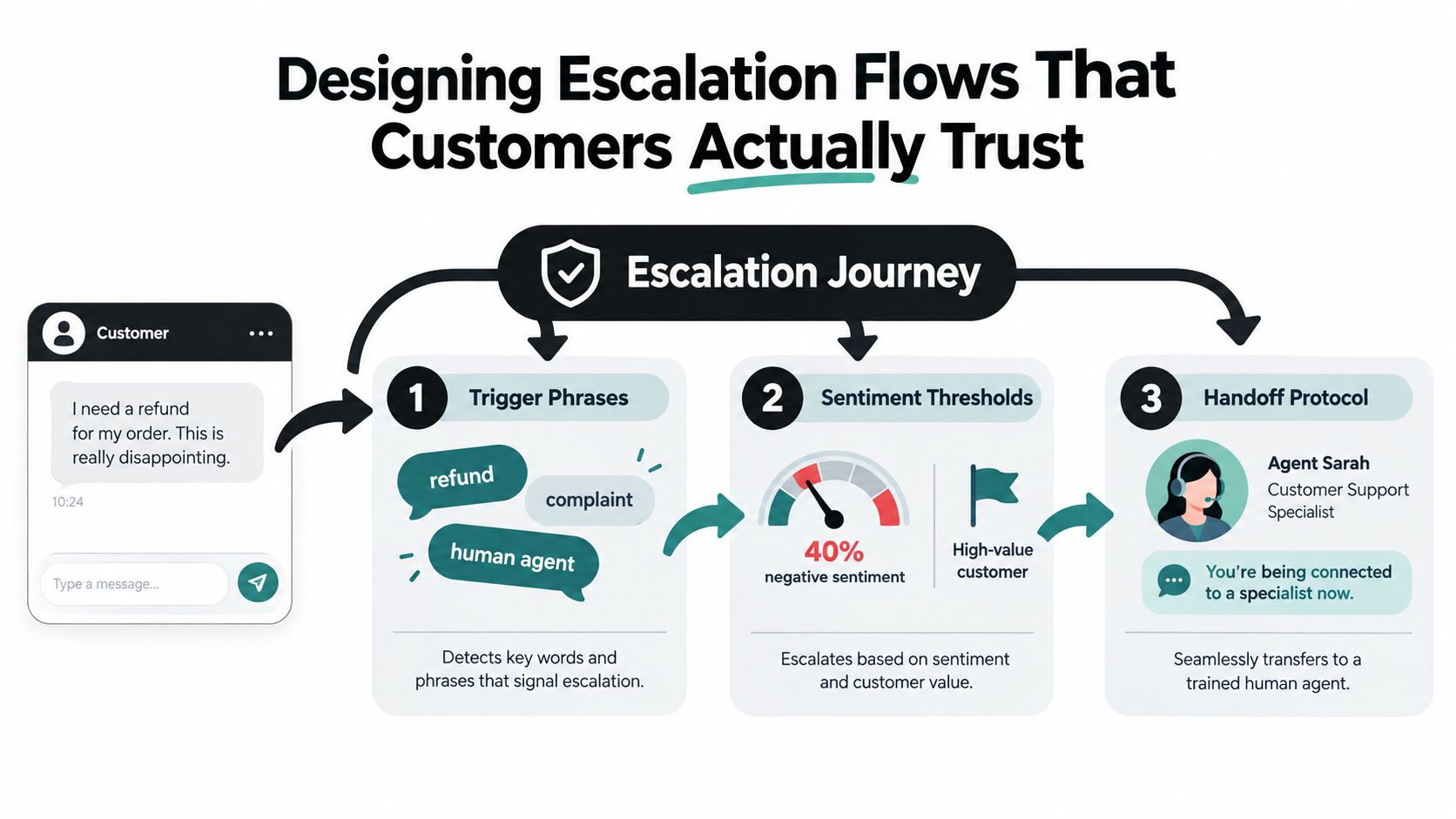
The design has to make the human route obvious at every stage. The bot should recognise trigger phrases such as refund requests, formal complaints, and direct asks for a human agent. It should also watch for frustration, repeated failures, and secure-account actions that need a person to confirm.
Make handoff feel like service, not surrender
The transfer itself should preserve context. If the bot has already collected an order number, account identifier, or problem summary, the human agent needs that context immediately. Asking the customer to repeat everything is one of the fastest ways to make the whole interaction feel cheap.
The handoff also needs a service owner. If the bot starts the conversation and a human finishes it, the customer should not be passed around between teams with no visible accountability. Queue, callback, and live chat all work, but they should be chosen based on the sensitivity of the journey, not on what's easiest for the platform to offer.
Set the threshold before launch
The cleanest escalations are defined in advance. Don't wait for the first angry transcript to decide what counts as a handoff trigger. Use a mix of signal types, including direct requests, negative sentiment, repeated confusion, and any journey that crosses into regulated or vulnerable territory.
A good bot also says what it can't do. That sounds small, but it matters. Customers trust systems more when the limits are explicit and the route to a person is visible.
Clear rule: if a customer can't see how to reach a human within one or two steps, the flow is too tight.
That's where accessibility comes in too. Older users, lower-confidence users, and people using assistive tech need a route that's obvious, not buried inside clever conversation design. Transparency usually beats sophistication here.
Metrics That Reveal Whether the Chatbot Is Working
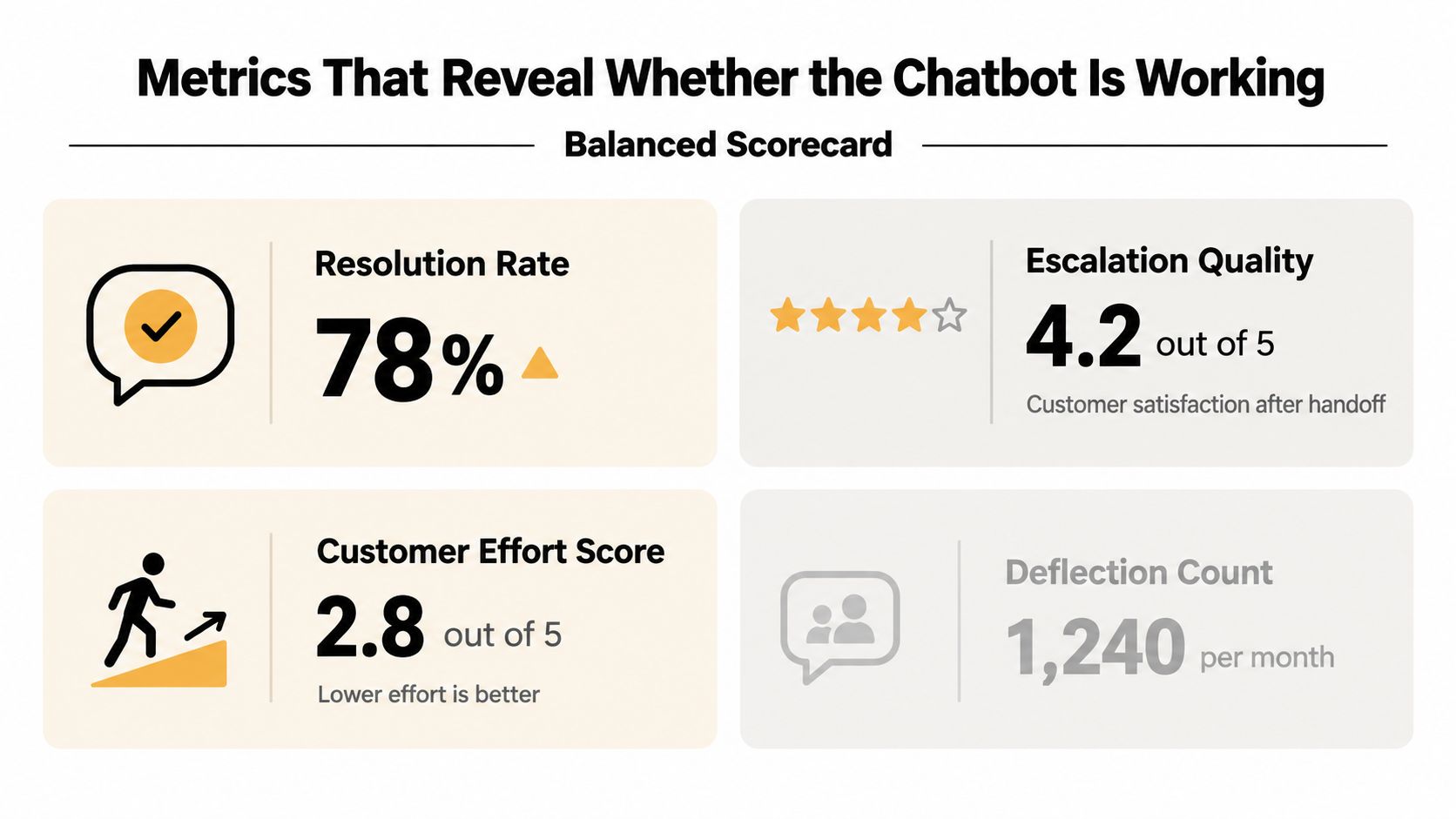
The wrong metric can make a bad bot look successful. Containment rate and deflection count are useful in finance reviews, but they're dangerous if they become the headline. A bot that closes a lot of chats by blocking people is not delivering service, it's producing artificial efficiency.
The better scorecard starts with resolution rate. Then add escalation quality, which tells you whether the handoff improved the outcome. Track customer effort as well, because a bot that makes people work harder is still failing even if the chat technically ends.
A useful review pack should also include complaint themes tied to the bot, repeated fallback phrases, and accessibility patterns by audience segment. You don't need to pretend every metric is equally important. You do need to see whether the bot is helping older users, confusing people with lower digital confidence, or creating extra steps before a human can step in.
What to keep, what to drop
From day one, keep the measures that tell you whether the conversation ended safely and usefully. After launch, retire vanity reporting that only proves the bot stayed busy. If a metric can't help you change the scope, the answers, or the handoff rules, it's probably decoration.
A weekly review should sit across operations, compliance, and product. Operations sees where the queue is clogging. Compliance sees where the bot is overreaching. Product sees which journeys are ready for careful expansion and which ones still need human control.
Here's the most important discipline. Use metrics to narrow or sharpen the bot's scope before you use them to expand it. If the bot struggles on a certain journey, the answer is often to remove that journey, not to train harder and hope trust magically appears.
Measure whether customers got the answer they needed without being trapped, not whether the bot merely occupied them.
That single distinction changes the whole review meeting. It stops the team celebrating noise and forces them to look at outcomes.
A Week-One Scenario From a UK Operations Team
A London-based fintech support team rolls out a chatbot on Monday morning. The first version only handles balance lookups, order-status checks, and basic account queries. Anything involving a billing dispute, a complaint, or vulnerability language goes straight to a human with the transcript attached.
By Wednesday, the team can see which answers are stable and which prompts are causing friction. Some customers use the bot exactly as intended, then hand off cleanly when they need a person. A few try to push it into complaint territory, and the bot stops short instead of guessing. The lead in the daily standup asks one question every morning: did the bot keep the customer moving, or did it make the human harder to reach?
A speed-first version of the same launch would have gone differently. If the highest-volume complaint queue had been automated first, the team would probably have spent the week untangling repeated escalations, frustrated users, and unclear ownership between the bot and the support agents. The issue wouldn't be that the bot couldn't answer anything. It would be that it answered the wrong things first.
That's where the ownership model matters. The support lead, the compliance lead, and the knowledge-base owner need to review transcripts together and decide whether a journey stays automated, gets narrowed, or goes back to human-led support. The cleanest teams treat that as normal operations, not a postmortem.
If you're working on the service architecture behind the scenes, the same logic applies to your wider stack. Web application architecture for support tooling matters because the bot is only as usable as the systems it can reach, the audit trail it leaves, and the handoff it supports.
Your 30-Day Launch Checklist and Honest Self-Audit
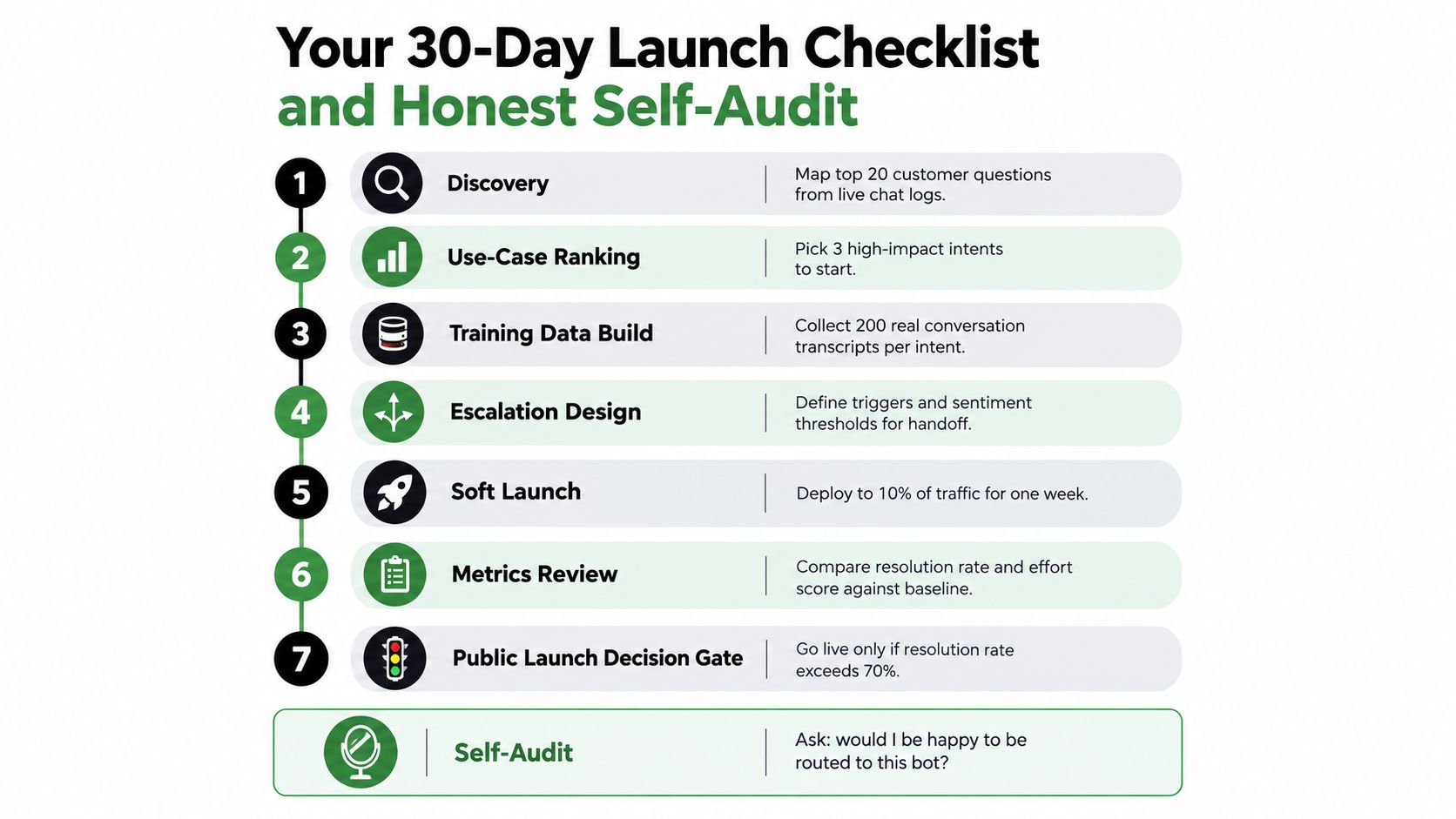
Use the first week for discovery and ranking, the second for training data and policy boundaries, the third for escalation design and soft launch, and the fourth for review and launch approval. Keep the first release narrow, visible, and fully owned. If the bot can't hand off cleanly, the project isn't ready.
A simple self-audit before go-live
Ask four blunt questions on Monday morning.
- Have we named the journeys that must stay human?
- Do we know who owns the knowledge base after launch?
- Can customers reach a person without feeling trapped?
- Are we prepared to disclose when the customer is talking to AI?
If any answer is fuzzy, delay the launch. Slowing down is the safer move when the bot touches complaints, accounts, or vulnerable customers.
Digital Souls Studios LTD designs and builds AI support agents, customer-service chatbots, and the web applications that sit around them, including the routing, interfaces, and handoff logic that make automation usable in production. If you're planning a boundary-first rollout and want a team that can handle the product, engineering, and launch work together, visit Digital Souls Studios LTD and start the conversation.