13th November 2026 · 17 min
AR and VR Explained: Differences, Uses and Business Value

Someone in your organisation has just come back from a conference with a headset in their bag and a slide deck full of promises. Now there's a line in next quarter's plan that reads "explore AR/VR", no budget attached, and you've been asked what it would involve. Or you have the opposite problem: a quote for an immersive training build and a director asking whether it will do anything a decent video and a laminated checklist couldn't.
Both questions come down to the same thing. AR and VR are tools with specific strengths, and the useful conversation is never "is immersive tech exciting" but "which task gets measurably better, and how would we know".
This guide starts with the plain definition, moves through how the hardware really behaves, then looks at what UK organisations have done with it and where the evidence thins out. By the end you'll be able to match a task to a format and test the choice without burning a year.
Table of Contents
- AR and VR Side by Side
- How and VR Work in Practice
- Where UK Organisations Use AR and VR
- How Far UK Adoption Has Really Reached
- Barriers Holding Back UK Adoption
- When AR and VR Beat Simpler Training Formats
- How to Run a First AR or VR Pilot
AR and VR Side by Side
Augmented reality adds digital content on top of what the user already sees. Virtual reality replaces the surroundings with a computer-generated world. That one sentence settles most of the confusion, and the table below is the reference to keep beside you for everything that follows.
| Feature | Augmented reality (AR) | Virtual reality (VR) |
|---|---|---|
| Core idea | Digital content placed over the real world | A fully digital environment that replaces the real world |
| What the user sees | Real surroundings with a layer of graphics | Computer-generated scene, usually through a headset |
| Typical hardware | Smartphones, tablets, smart glasses | Headsets with motion tracking and hand controllers |
| Physical surroundings | Stay visible and in use | Blocked out while in use, with a marked safe play area |
| Typical business uses | Guided maintenance, product preview, wayfinding | Simulated training, design review, remote collaboration |
| Setup needs | Good lighting and surface mapping | Clear play space, comfort and motion settings |
Read the rows in order and the logic holds together. The core idea sets the difference; what the user sees follows from it; the hardware follows from that. The physical surroundings row is the one that decides most projects, because it answers a practical question: does the person need to keep working on the physical object while the digital layer is visible, or can they be taken somewhere else entirely?
Marketing blurs the two labels constantly. A vendor will describe a phone camera overlay, a headset walkthrough and a pair of smart glasses with the same vocabulary, and "XR" gets used as an umbrella for all three. Trust the rows, not the product name.
This isn't a niche experiment. Research presented to Parliament identified approximately 1,000 UK businesses specialising in immersive technologies, employing around 4,500 people and generating approximately £660 million in annual sales, with £33 million committed from the Industrial Strategy Challenge Fund in March 2018.
By the end of this section you should be able to name the technology that fits a task. A technician checking a valve's pressure reading on a live pump needs AR, because the pump stays in view. A new starter rehearsing a fire evacuation needs VR, because the building can be simulated safely and repeated.
How and VR Work in Practice
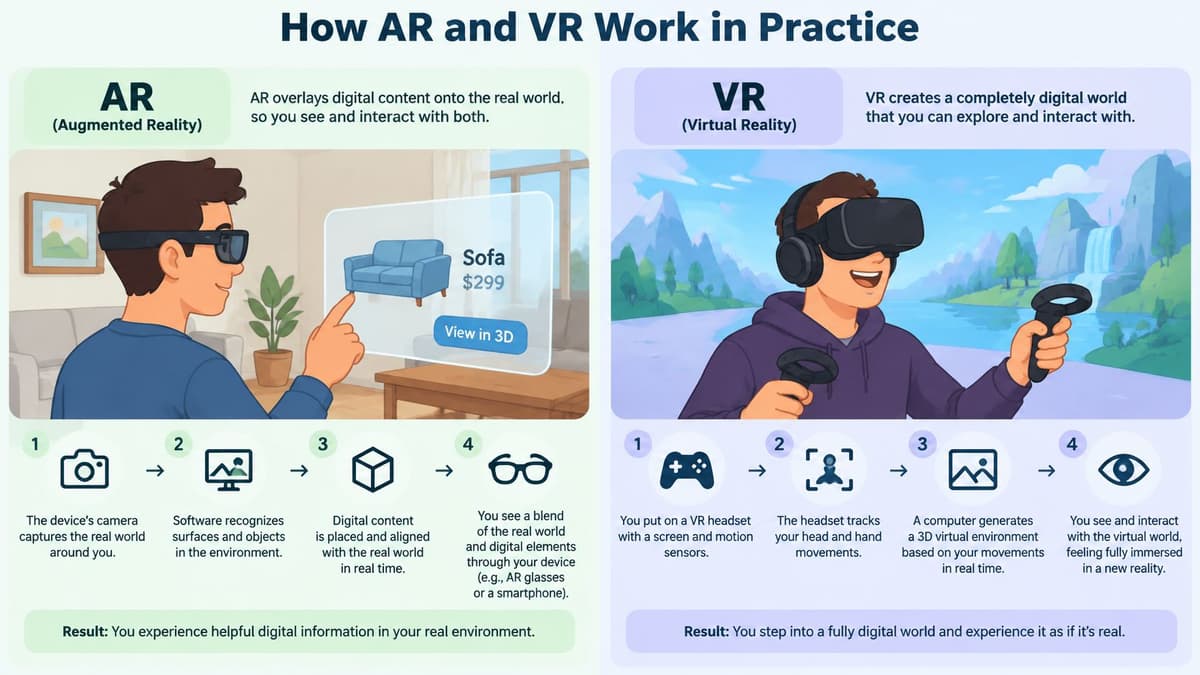
A sat nav that draws the next turn onto the windscreen is augmented reality. The road stays real, the arrow sits on top of it, and you still see the cyclist in your mirror. VR is closer to a cinema that wraps around you: the screen fills your view, the sound follows your head, and the seat underneath you is the only part of the room you can still find.
The diagram below places both systems on the same spectrum, from a real room with graphics layered on it to a scene with no real room in it at all.
Three parts every immersive system shares
Strip away the branding and each device is doing the same three jobs:
- Sensors that know where you are. Cameras, gyroscopes and accelerometers combine to track position and movement, which is why a headset reacts when you turn and a phone can tell when you raise it.
- A processor that keeps up. Graphics have to render fast enough to match your head movement. When rendering lags behind the movement, the world swims and the stomach objects.
- A display that delivers the image. A phone or tablet screen for most AR, a pair of lenses a few centimetres from your eyes for VR, and increasingly a see-through lens in smart glasses.
The short walkthrough below shows both in use, which is quicker than reading about frame rates.
Why AR needs the room and VR needs a steady frame
AR's hard problem is anchoring. The software has to map surfaces and read the lighting so a virtual label stays stuck to the same valve when the technician steps sideways. Dim light, shiny metal and cluttered plant rooms all make that harder, which is why AR pilots often succeed in one bay of a factory and fail in the next.
VR's hard problem is comfort. Tracking accuracy and frame rate have to stay high enough that the inner ear and the eyes agree, otherwise motion sickness arrives within minutes and the headset goes back in its case.
Put both to work on one scenario each. A technician wearing AR glasses looks at a pump and sees the live pressure reading floating beside the inlet, hands free, with the asset still visible. A trainee in VR practises a fire evacuation inside a simulated version of their own building, taking the same route three times without smoke, crowds or risk.
A simple test applies to any product claim you're shown: does it keep the world in view, and does it track the user's movement in real time? If the answer to the first is yes, you're looking at AR. If the second is shaky, the demo won't survive a shift.
Where UK Organisations Use AR and VR
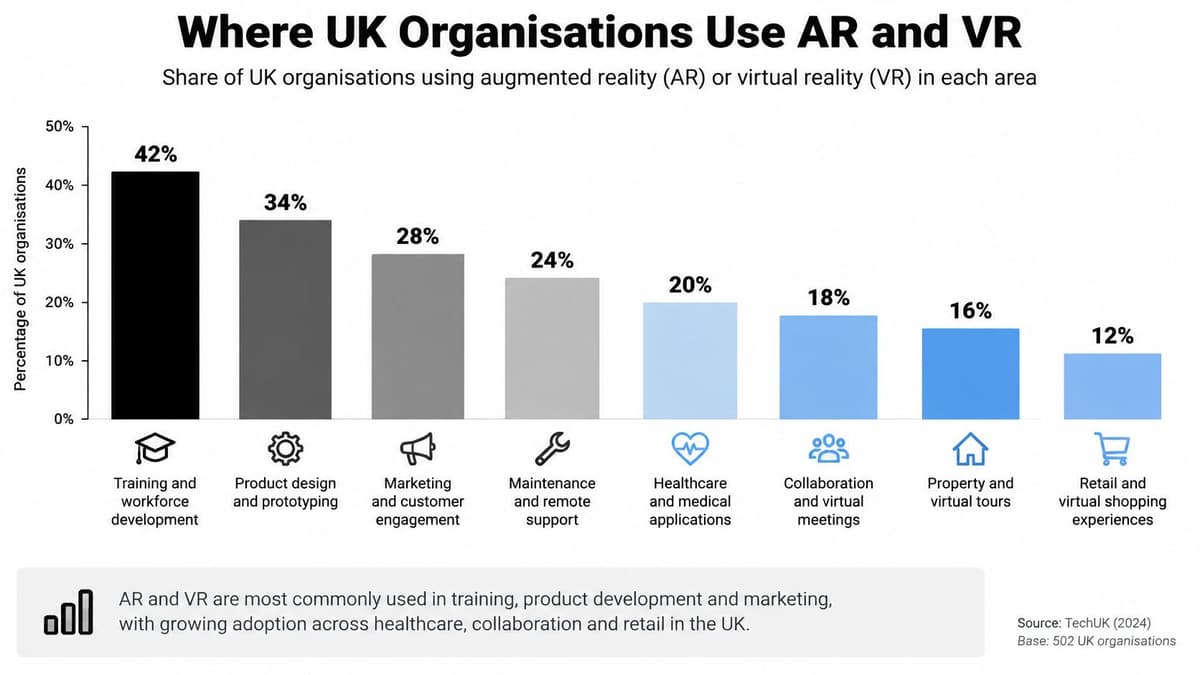
The clearest picture of UK deployment comes from PwC's analysis of how UK organisations use VR and AR, which processed roughly 500 million data points across 2.2 million organisations and surfaced 1,550 publicly documented examples of extended-reality use. VR accounted for 66% of identified deployments, with AR making up the remainder.
That split is worth sitting with. The technology with the headset, the setup cost and the safety briefing is the one appearing most often in documented projects, which says something about where the repeatable, contained use cases live.
| Sector or application | Share of identified UK examples or use cases | Typical AR or VR use | Why it fits |
|---|---|---|---|
| Engineering and manufacturing | 24.13% of identified examples | AR guided maintenance; VR safety training | AR overlays asset data; VR allows risk-free repetition |
| Retail and consumer | 10.90% of identified examples | AR product preview; VR showroom | Shows products in context before purchase |
| Professional services | 10.65% of identified examples | VR client presentations and design review | Lets clients walk through unbuilt projects |
| Learning and development | 21.7% of use cases | VR simulations and practice | Repeatable scenarios with feedback |
| Consumer engagement | 37.9% of use cases | AR filters and VR experiences | Builds interest and brand recall |
What the sector shares tell you
Engineering and manufacturing is the largest industry group at 24.13%, and the fit is easy to see. AR lets a fitter overlay a digital twin or an asset record onto the machine in front of them, and VR lets an operator rehearse a lockout or an evacuation without stopping a line.
Retail and consumer follows at 10.90%, where AR product preview does the work of answering "will this fit in my kitchen" before the customer commits. Professional services at 10.65% leans on VR for design review and client presentations, letting a client walk through a building that exists only as a model.
Where the use cases cluster
The application split cuts across sectors. Consumer engagement leads at 37.9% of use cases, which covers campaign experiences, filters and virtual try-ons. Learning and development is 21.7%, covering simulations, procedure practice and onboarding.
If you're building a training simulation or a product experience, those two numbers tell you where the pattern of demand sits. Our own breakdown of augmented reality product experiences covers the retail side in more depth.
One caution on the arithmetic: the sector percentages and the application percentages come from different bases, so they don't sum to anything meaningful together. These are publicly visible examples, not the full installed base, and the analysis dates from the late 2010s. Use it to prioritise which sectors and use cases to study, not to estimate how many UK firms run this today. Whatever the share, the deployment rule stays the same: tie the build to task accuracy, completion time, customer conversion or retention, and treat immersion as a means rather than the goal.
How Far UK Adoption Has Really Reached
The University of Cambridge Centre for Digital Built Britain study of the UK architecture, engineering and construction sector scored adoption on a 1 to 5 scale, where 1 meant the technology was not used at all and 5 meant full adoption. The headline is a gap between trying and running.
| Technology | Median adoption score (1 to 5) | Tested or piloted | Full implementation |
|---|---|---|---|
| VR | 2.5 | 61.8% | 2.9% |
| AR | 1.5 | 52.9% | 0% |
Reading the adoption scores
VR's median score of 2.5 out of 5 sits squarely in "some use, not embedded". AR's 1.5 sits closer to "considered and shelved". Yet 61.8% of surveyed companies had tested VR or introduced it through a basic implementation such as a pilot, and 52.9% had done the same for AR.
Then the second half lands. Only 2.9% reported full VR implementation, and no surveyed company reported full AR implementation, so the figure is 0%, not unknown. Roughly nine in ten of the firms that touched VR were still somewhere short of company-wide deployment. The pattern works like a gym membership: signing up is common, showing up every week is rare.
Pilots are common. Mature operational use is rare.
Why VR led and AR lagged
The study records the gap rather than the reasons behind it. Across industries, though, VR tends to find clearer entry points. Visualisation, design review, training and project communication each have an obvious owner and a deliverable you can put in front of a client. Someone books a room, loads a model into a headset, and shows progress in a meeting.
AR asks for more before it earns a place. Hardware capability, environment mapping, workflow integration and content production all have to work at once, and any one of them failing breaks the experience for the person wearing the device. When you weigh your own position, judge it against this baseline rather than assuming competitors have already rolled out. The study dates from 2018, so treat the numbers as a historical benchmark, not a current census.
Barriers Holding Back UK Adoption
The bottleneck isn't awareness. A UK-wide survey of 405 adults and healthcare professionals found that 71.4% were familiar with spatial computing, yet only 4.7% used it regularly. That's roughly one regular user for every fifteen people who know what the term means, and it reframes the whole problem.
| Barrier | Share citing it | What it looks like in a pilot |
|---|---|---|
| Lack of training | 67.4% | Staff hours unscheduled, no named owner for content after launch |
| Data-privacy concerns | 63.5% | Gaze, movement or voice data captured with no retention rule agreed |
| Cost | 56.5% | Device price budgeted, hardware refresh and content updates forgotten |
Training at 67.4% is the top barrier, and it's the easiest to underplan. Budget the staff hours before anyone switches on a headset, and name who maintains the content once the supplier leaves. A simulation nobody updates is a museum piece by month six.
Privacy at 63.5% means listing exactly what the system captures, whether that's gaze direction, movement traces, voice recordings or health-adjacent data, and deciding the retention period before purchase rather than after.
Practical rule: if you can't say in one sentence what data the headset records and how long you keep it, you're not ready to run the pilot.
Cost at 56.5% is rarely about the headset. Total ownership runs across hardware replacement, content updates, support and staff time, and the content side usually dominates over three years.
There's an access question underneath all three. Some users get motion sickness, some have disabilities that the interaction design ignores, some have low confidence with digital tools and some don't have a compatible device. Build a non-immersive fallback route from day one.
The nuance that decides budgets: positive attitudes and perceived benefits don't demonstrate operational value. Wait for evidence of sustained use, learning transfer, privacy compliance and inclusion before you scale past a pilot.
When AR and VR Beat Simpler Training Formats
Immersive training is often presented as better. The UK evidence doesn't support that framing yet. A UK rapid review of extended-reality solutions for clinical skills screened 7,167 records and included only 41 studies, finding low-to-moderate evidence that VR improves post-intervention medical knowledge and skills.
The same source describes a second UK review of AI-supported surgical education, where the literature is dominated by single-centre pilots and feasibility studies, with limited evidence of better operative performance or patient outcomes. Gaps remain in multi-centre validation, standardised assessment, curriculum integration and equitable access.
So the honest question for an employer isn't "is VR effective". It's when does AR or VR outperform a well-designed 2D simulation, an instructor-led session or a blended programme, and how would you measure that.
Matching each format to the task
| Format | Best fit | Main risk |
|---|---|---|
| 2D simulation | Repeatable procedures with clear right answers | Less immersive, though often enough to build skills |
| Instructor-led session | Judgement, communication and interpersonal skills | Limited repetition and scale |
| Blended programme | Mixed knowledge and practice | Harder to coordinate and measure |
| VR simulation | High-risk tasks and repeated practice | Novelty inflates short-term engagement; headset cost |
| AR on-the-job guidance | Tasks performed in the real environment | Needs environment mapping and workflow integration |
Compare options on seven things: task type, learner risk, repetition needed, quality of feedback, accessibility, deployment cost and what happens after training ends. A fire drill needs repetition and zero real risk, so VR earns its place. A one-off policy briefing doesn't, and a well-built 2D module will do the job for a fraction of the budget.
The trap is novelty. A headset produces a spike of engagement in week one that tells you nothing about whether anyone remembers the procedure in month three.
Watch for: satisfaction scores and headset logins dressed up as evidence. Neither tells you whether behaviour changed on the job.
Set up the measurement before the build. Track completion, error reduction, decision quality, retention and on-the-job transfer, and tie each one to a business outcome your finance lead would recognise, such as fewer reworks, faster onboarding or fewer compliance incidents. Our notes on human-focused design cover how to build that into the experience rather than bolting it on afterwards.
How to Run a First AR or VR Pilot
A first pilot works like any well-run experiment: change one variable, measure it accurately, and decide in advance what counts as failure. Six steps take a team from interest to evidence. The diagram below shows the sequence, and each step carries the slip that most often derails it.
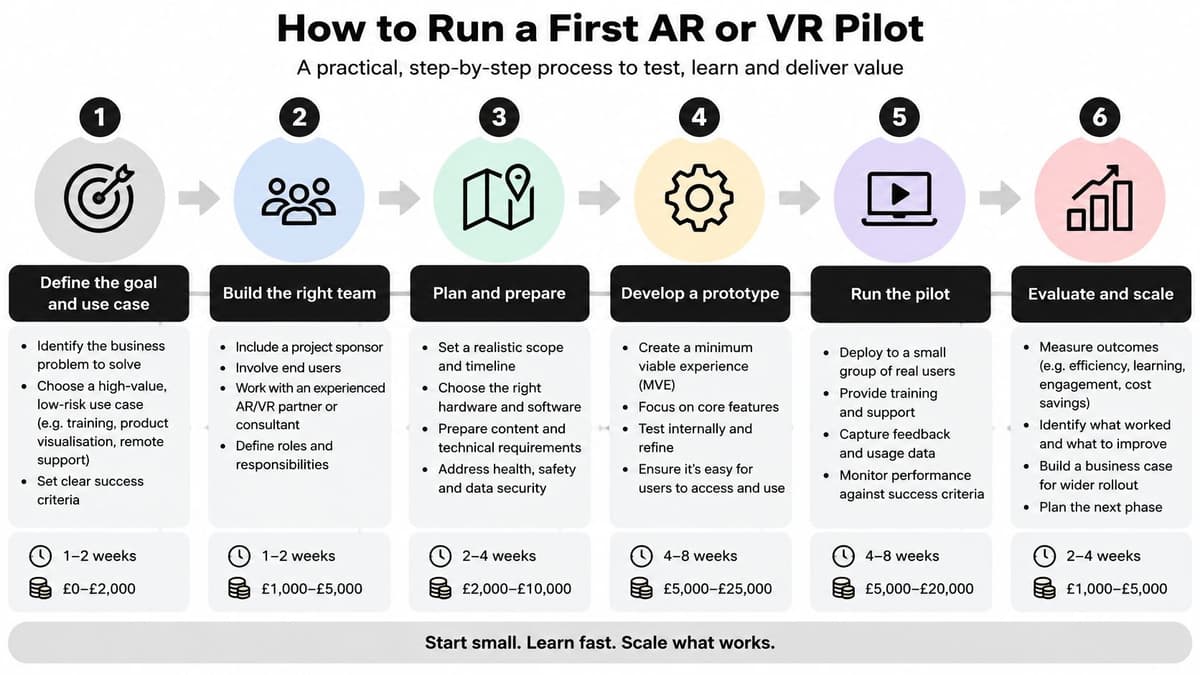
- Write one measurable outcome first. Pick a single number such as error rate, task time or assessment score before you look at any hardware. The common slip is choosing the technology first and inventing a justification afterwards, which makes the result impossible to interpret.
- Choose a task where immersion earns its cost. Repetition, physical risk or distance from a real asset are the three conditions that justify the spend. Getting this wrong means piloting on a task a printed job aid already handles.
- Run the readiness check. Confirm staff training time, the data the system captures and its retention, total cost of ownership and accessibility needs. Skipping this produces a pilot that works technically and stalls commercially.
- Design the fallback route. Anyone with motion sickness, a disability or no compatible device needs a non-immersive version of the same content. Teams that forget this lose a slice of every cohort and damage goodwill.
- Test against a control group using your current method. Run the immersive group and the existing 2D or instructor-led group side by side and record the agreed metrics. The most common failure is counting usage instead of the outcomes agreed in step one.
- Decide on the evidence. Scale if the immersive group transfers better to real work, refine if the result is mixed, stop if novelty explains the gain. A clear stop is a result, and a cheap one.
The scoping discipline behind this sequence is the same kind our engineering lead, Isaac Surfraz, built over roughly a decade across software, AR/VR/XR and platform architecture, including work as a senior AR/VR/XR developer at PAULEY for clients such as Siemens, HS2, InnovateUK, CITB and SeaDream Yacht Club. Condensed, it comes down to three habits: scope small, measure against the old method, and keep the content maintainable after launch. The same discipline applies to any first build, and our guide to building a minimum viable product walks through the scoping side.
Your next action is small and does not need a budget approval. Write the outcome statement in one sentence, then shortlist two candidate tasks this week.
Digital Souls Studios LTD designs and builds training simulations, AR and VR experiences, and WebGL and WebXR applications that run in a browser without a headset install, alongside the web platforms and AI automation that surround them. If you have an outcome statement and two candidate tasks, we can scope a pilot against your current method and tell you plainly whether immersive is the right format. Visit Digital Souls Studios LTD to start that conversation.