15th October 2026 · 16 min
7 Augmented Reality Products and Their Real Use Cases
A training lead has budget for one pilot, three stakeholders want different outcomes, and the shortlist is already messy. One person wants a premium spatial headset for polished demos, another wants rugged glasses for field guidance, and someone else wants a lighter option that can sit on top of a PC workflow without changing everything else. The right augmented reality products depend on the job, the wear time, and the deployment model, not on headline specs alone. I'd group the seven devices below by where they earn their keep, from training and remote assist to retail activations, marketing, and simulation. If you're choosing your first pilot device, start here.
Table of Contents
- 1. Apple Vision Pro
- 2. Meta Quest 3
- 3. Meta Quest 3S
- 4. Microsoft HoloLens 2
- 5. Lenovo ThinkReality A3
- 6. XREAL One Pro and the One Series
- 7. Vuzix M400
- Top 7 AR Headsets, Quick Feature Comparison
- Turning the Shortlist Into a Two-Week Pilot
1. Apple Vision Pro
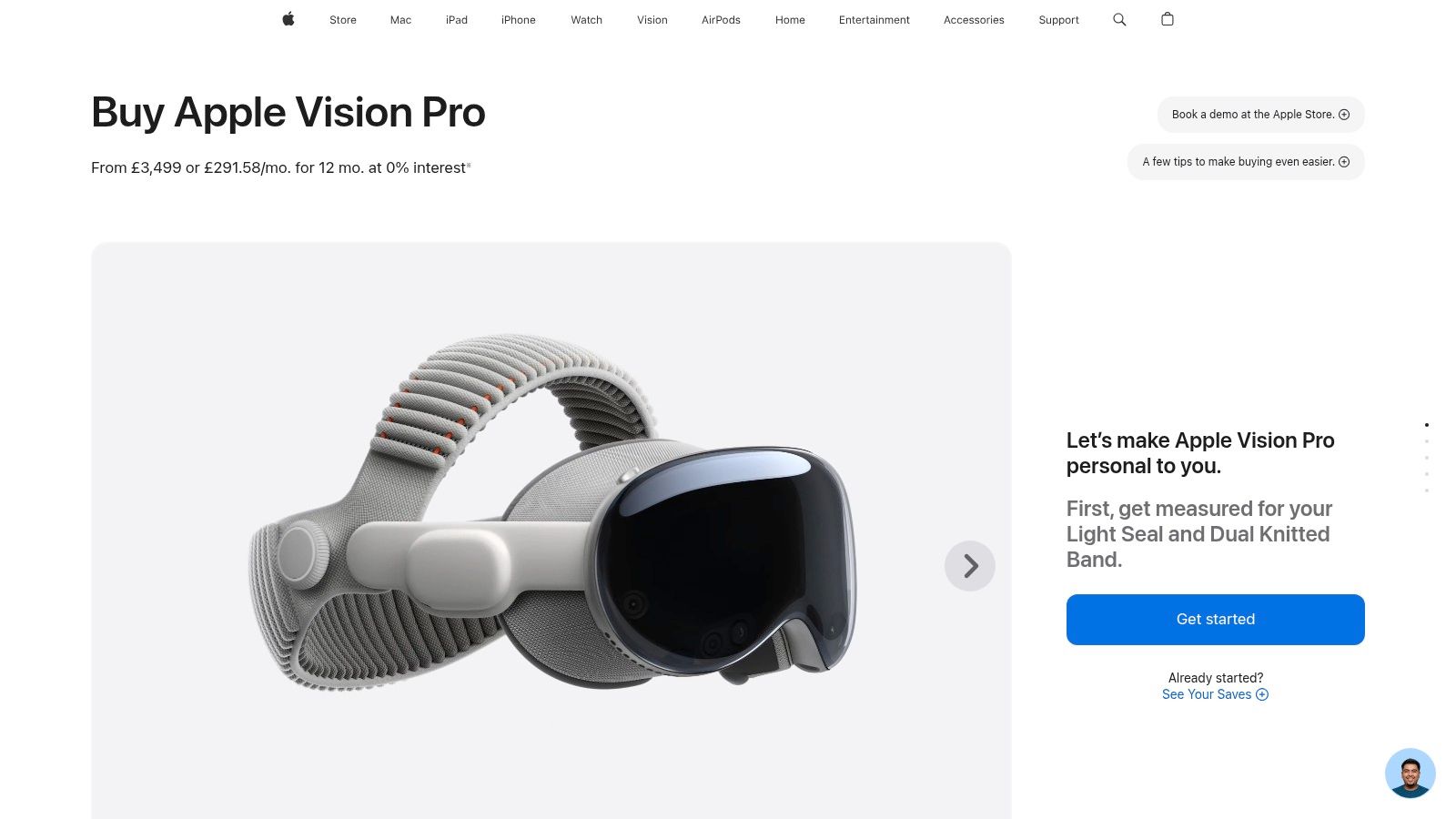
Apple Vision Pro is the easiest device on this list to recommend when the brief is high-end presentation, not rough-and-ready field work. The visual polish is the point, along with spatial video and photo playback, iPad and Mac Virtual Display support, and Apple's enterprise management stack. It's sold officially in the UK, with pricing from £3,499 for the 256 GB model on Apple's UK store, so procurement teams should treat it as a premium pilot, not a casual purchase (Apple UK store).
Strategic Analysis
Best fit, premium collaboration, media review, and custom app experiences where visual quality matters more than portability.
The strongest use case is for teams that want a polished spatial experience and already live inside the Apple ecosystem. It makes sense for product demos, executive reviews, and design sign-off sessions where the interface itself needs to feel impeccable. It's less convincing as a rugged training tool or a frequent-wear field device, because it asks more from both budget and tolerance.
For UI and interaction work, it's also a strong reference device for what “good” feels like. If your team is evaluating gesture flow, visual hierarchy, or immersion quality, it helps to benchmark against something this polished, then decide what level of refinement your own experience really needs. That design lens pairs well with the thinking in this UI and UX design guide.
Tactics to Replicate
- Pilot one polished workflow: Pick a single review task, such as immersive product walkthroughs or design approvals, and keep everything else out of scope.
- Test comfort over a full meeting block: See whether the device stays acceptable through a normal working session, not just a 10-minute demo.
- Validate ecosystem fit: Check whether the team already uses Apple hardware and software, because that's where the device feels most natural.
The procurement constraint is straightforward. This only makes sense if the upside comes from presentation quality, device support, and developer polish. If you need a workhorse for rough environments or high-volume deployment, there are better options below.
Practical Takeaway
Vision Pro is the right choice when the pilot has to feel premium and controlled. It isn't the cheapest route to AR, but it is a strong benchmark for visual quality, interface clarity, and executive-facing experiences. If the task needs frequent mobility, shared use, or lower hardware risk, move further down the list.
2. Meta Quest 3
Meta Quest 3 is the most balanced standalone choice for teams that need mixed reality without a large procurement fight. It has colour passthrough, hand and body tracking, and access to Meta's Horizon OS catalogue, so it can cover prototypes, training pilots, and public activations without extra compute hardware. The official UK product page makes it clear that this is a general-purpose mixed-reality headset first, not just a niche developer device (Meta Quest 3, and for the device-to-host distinction in deployments, Bluetooth and Wi-Fi explained).
Strategic Analysis
Quest 3 works best when you need a flexible pilot that can move between stakeholders. It's good for training demos, event use, and marketing activations because users can pick it up quickly and the content library is broad. The trade-off is obvious, though. It's a consumer-rooted product, so enterprise controls may need extra tooling, and battery life will always be part of the operational conversation.
This is the headset I'd pick when a team wants proof of value before committing to a more specialised platform. It gives enough capability to test whether the use case is real. If the pilot succeeds, you can decide whether to scale into a managed enterprise stack later.
Tactics to Replicate
- Use one repeatable task: Put every participant through the same short spatial interaction, then compare completion and drop-off.
- Measure setup friction: Time how long it takes a non-specialist to get from box to first successful session.
- Separate content from hardware: Test one app, one headset, and one room setup at a time so the result isn't muddled.
Practical rule, if the pilot depends on easy demos and broad content choice, choose the platform that your team can actually deploy fast.
Quest 3 is a practical default, especially when the audience includes non-technical decision-makers. It's not the most refined display on the market, but it's one of the easiest ways to learn what people do with mixed reality when it's available in the room.
3. Meta Quest 3S
A rollout team that needs more headsets than budget usually points to Meta Quest 3S. It keeps the current Meta mixed-reality platform and camera setup, while trimming polish to bring the unit cost down. That trade-off matters in procurement, because many pilots stall on quantity long before they reach the point of proving capability.
Strategic Analysis
Use it for volume testing. It fits user research, classroom-style trials, and internal demos where the goal is to put several people through the same workflow and see what breaks. The lower display specification means you give up some premium feel, but you also reduce buyer resistance and keep the pilot easier to approve.
It is also a practical choice when the content is still under review. If the team has not settled on a final workflow, starting with the cheaper unit lowers the cost of being wrong. That makes Quest 3S a sensible second step when the concept already looks sound, but adoption risk is still unclear.
Tactics to Replicate
- Run a paired trial: Give one group Quest 3S and another a higher-end headset, then compare completion time and comfort.
- Test at scale: Use enough units to see whether charging, cleaning, and support requests become operational issues.
- Check content parity: Confirm that the same app performs well enough across the device line, so you do not end up building separate content paths.
Practical rule, if unit cost is blocking the pilot, accept the lower display tier and put the saved budget into content and testing.
The main limitation shows up in sales demos and executive presentations, where the less premium feel is easier to notice. For adoption testing, that is often an acceptable compromise.
4. Microsoft HoloLens 2
A warehouse supervisor needs a worker to follow a repair sequence without putting tools down. A trainer needs the same headset to guide a new hire through a safety procedure while keeping the environment visible. Microsoft HoloLens 2 fits those jobs because it is built for hands-free guidance, remote assist, and enterprise management, with see-through optics plus hand and eye tracking that suit regulated and industrial settings (Microsoft HoloLens).
Strategic Analysis
Use HoloLens 2 for field service, remote support, and digital work instructions where both hands stay busy. It also fits safety-sensitive training, because the form factor encourages procedural guidance instead of passive viewing. That makes it a practical match for enterprise AR deployments in care, rail, and similar settings, where the value comes from task support rather than visual spectacle.
Procurement needs a harder look than the device demo suggests. The platform's maturity is less of the story than its momentum, so teams should check availability, support routes, and long-term service coverage before they commit. For a pilot, that means validating not only the workflow, but also the buying path and the people who will maintain it.
A good test is narrow and operational. Pick one SOP, one remote expert workflow, and one escalation path, then run it end to end. Log every intervention, including when the worker asked for help, how fast the expert answered, and whether the task finished without a site visit. Test comfort while walking, bending, and using tools, because a headset that works at a desk can still fail in motion.
The benchmark here is task execution, not visual excitement. If the goal is to improve response time, reduce travel, or support field instructions, HoloLens 2 remains one of the more credible enterprise options.
5. Lenovo ThinkReality A3
A quiet device often wins in office pilots, and ThinkReality A3 fits that job. It is aimed at tethered productivity, virtual multi-monitor setups, and guided workflows, so it works best where comfort and screen extension matter more than spectacle. That makes it a practical pick for desk-based trials, especially when the team wants AR to sit beside existing work rather than replace it. Lenovo's ThinkReality A3 keeps the focus on the task, and the software fit depends on the realities of custom developed software considerations.
For the right job, that restraint is the selling point.
Strategic Analysis
ThinkReality A3 makes sense when the work already lives on a PC and AR is there to extend the desktop. Analysts, remote reviewers, and operators can gain more screen space without moving into a full mixed-reality headset. The tethered setup also keeps latency low, which matters when the work is about reading, comparing, and switching between windows quickly.
The trade-off is dependence on the host device. You need a compatible PC or supported phone, so this is not a standalone platform. That limits it for mobile activations and any use case that depends on untethered movement.
Tactics to Replicate
Start with one desktop task that already uses multiple windows and tabs. Run it in a normal work session and check whether the extra display space actually helps, or whether it just adds another layer of attention management.
Comfort should be tested in real use, not at a desk demo. Watch for pressure points, fatigue, and distraction over time. Then confirm whether IT can support the required endpoints without creating a separate hardware burden.
For organisations planning custom workflows, the practical question is simple. If the job is desk-based productivity, tethered glasses usually make more sense than a heavier standalone headset.
This makes ThinkReality A3 one of the more useful augmented reality products for teams that want an incremental change, not a full hardware shift.
6. XREAL One Pro and the One Series
XREAL's One Pro and the wider One series fit jobs where portability matters more than full mixed-reality depth. They are a practical choice for spatial video, large virtual screens, and travel-friendly productivity. The XREAL UK store makes the line easy to source, and the accessory setup matters because these glasses usually pair with a phone, laptop, handheld, or compute puck rather than working as a standalone computer.
For training teams, retail demos, and marketing walkthroughs, that trade-off is often the point. You can hand the glasses to someone quickly, show a virtual display, and keep the interaction focused on the content instead of the hardware. That makes them useful for sales presentations and prototype storytelling, especially when the goal is to show a concept clearly and move on.
The limit appears once the job calls for richer spatial interaction. XREAL is primarily a viewing device, so if your use case depends on standalone tracking, room-scale behaviour, or deeper mixed-reality workflows, it will run out of room fast. For display extension and lightweight prototyping, that is acceptable. For more demanding simulation or interactive field use, it is a constraint you feel immediately.
A practical pilot should stay close to real deployment. Test the glasses on the devices your users already carry, then check whether the viewing experience still works in the environments where they will use them. Use them in public-facing demos and watch how quickly people can understand the setup. Then confirm fit, prescription needs, and comfort before you assume the device will work for a broad group.
XREAL is strongest where convenience and portability carry the job. It sits between an interesting demo and a useful mobile display, which is why it suits teams that need something practical to show, not just something impressive to wear.
7. Vuzix M400
The Vuzix M400 is what you deploy when the job is everything. This is a tool, not a concept piece. It's a monocular smart glass built for the realities of fieldwork: remote expert support, inventory management, and guided standard operating procedures. Its rugged design, hot-swappable batteries, and varied mounting options make it a practical device for workers who need information in their line of sight without holding a tablet. Vuzix built this for continuous use in demanding environments, which is why it often appears in logistics and field service.
Its focus is its main trade-off. The monocular display is ideal for showing checklists, schematics, or a remote expert's video feed. It is not designed for the immersive 3D content a HoloLens or Vision Pro provides. But for a technician getting live guidance on a repair, that is a strength, not a weakness. The goal is to keep their hands free and their attention on the task.
Before you pilot the M400, your camera policy must be finalized. Any device with a forward-facing camera introduces privacy and data governance questions. A successful pilot addresses these issues first. Define when recording is permitted, who can access the footage, and how the data is stored and secured. Without clear rules, the hardware will create organizational friction that no workflow can solve. For a clear example of how this can be managed in a regulated field, look at how remote-assistance is used in the care sector.
A good pilot test for the M400 is tightly scoped and practical.
- Pick one workflow. Choose a single, repeatable inspection or maintenance task that relies on a checklist.
- Test the power cycle. Verify that hot-swapping batteries keeps the device running without interrupting the user's work.
- Audit the environment. Check connectivity and durability in the actual warehouse or field location, not a conference room.
The M400 earns its place on this list by solving a specific, hands-on problem better than any other form factor. It is for people who work on their feet, not at a desk.
Top 7 AR Headsets, Quick Feature Comparison
| Product | Implementation complexity 🔄 | Resource requirements ⚡ | Expected outcomes 📊 | Ideal use cases 💡 | Key advantages ⭐ |
|---|---|---|---|---|---|
| Apple Vision Pro | 🔄 Moderate, polished visionOS, enterprise MDM available; Apple‑centric integration | ⚡ High, expensive hardware, local storage, benefits tied to Apple ecosystem | 📊 Premium visual fidelity, immersive spatial apps, high productivity/UX gains | 💡 Spatial computing, collaboration, media, Apple‑centric enterprise pilots | ⭐ Best‑in‑class visuals & UX; strong developer tools; enterprise support |
| Meta Quest 3 | 🔄 Low–Moderate, standalone setup; easy for demos, some enterprise tooling needed | ⚡ Moderate, wireless battery device with large app library; good value | 📊 Broad content access, effective MR prototyping and public activations | 💡 Prototyping, training pilots, events, demos | ⭐ Excellent price‑to‑capability; huge app ecosystem; portable |
| Meta Quest 3S | 🔄 Low, same platform as Quest 3 with simplified feature set | ⚡ Lower, reduced display modes, cost‑focused hardware for scale | 📊 Cost‑efficient MR testing at scale with slightly reduced performance | 💡 Volume deployments, user testing, budget pilots | ⭐ Lower entry price; platform compatibility; easier procurement |
| Microsoft HoloLens 2 | 🔄 Moderate–High, enterprise procurement and MDM, mature workflows | ⚡ Moderate, untethered see‑through optics, rugged options for field use | 📊 Reliable hands‑free workflows, improved field productivity and compliance | 💡 Field service, remote assist, regulated/industrial environments | ⭐ See‑through holographics; all‑day comfort; industrial certifications |
| Lenovo ThinkReality A3 | 🔄 Low–Moderate, tethered PC/phone setup; ThinkReality fleet tools available | ⚡ Low latency tethered solution; requires compatible PC or supported phone | 📊 Effective virtual multi‑monitor productivity and guided workflows | 💡 Virtual desktop, long‑session productivity, guided work instructions | ⭐ Comfortable for extended use; discreet form; low latency for productivity |
| XREAL One Pro (One/1S/Air 2) | 🔄 Low, simple casting/connection to host devices; minimal setup | ⚡ Low, very portable; relies on phone/PC; optional Beam accessories | 📊 Portable spatial screens and media playback; easy prototyping/demos | 💡 Travel, media, WebXR/app prototyping, events | ⭐ Very portable and comfortable; broad host compatibility; UK availability |
| Vuzix M400 | 🔄 Moderate, rugged deployment planning, mounts and governance required | ⚡ Moderate, hot‑swappable batteries, rugged kits, Android ecosystem | 📊 Reliable video‑first remote assist and inspection workflows for continuous use | 💡 Inspections, remote expert support, pick/pack, harsh environments | ⭐ Rugged accessories; hot‑swap batteries; field‑proven for enterprise use |
Turning the Shortlist Into a Two-Week Pilot
The cleanest way to choose between these augmented reality products is to stop comparing them as gadgets and start testing them as job tools. Pick one device per use case, define one repeatable task for each, and measure completion time, error rate, and user comfort over two weeks before you commit budget. A tethered pair of glasses makes sense for desk-based productivity, a rugged monocular unit fits field guidance, and a standalone headset is usually the best route for demos and activations.
If you're choosing a training device, keep the task narrow. Use one procedure, one location, and one assessor so the results are comparable. If you're choosing for retail or marketing, test whether the device helps customers visualise the product in context and whether the team can deploy it without support overhead swallowing the benefit.
UK evidence still shows a gap between curiosity and routine use, so novelty alone isn't a buying argument. The better question is whether the device helps people finish work more accurately, more safely, or more consistently. That is the standard procurement teams should use when they evaluate mixed-reality pilots.
If your pilot reveals a need for a custom training simulation or a bespoke AR experience, Digital Souls Studios Ltd can scope the build, design the interaction, and handle delivery from specification through launch. If you want a London-based team that works across AR, VR, simulation, and product builds, visit Digital Souls Studios LTD and start the conversation there.
Digital Souls Studios LTD builds AR and simulation work alongside web apps, SaaS, and AI-enabled products, so it can help turn a pilot idea into a working experience. If your team needs a custom training simulation, a retail visualisation flow, or a mixed-reality prototype tied to a real business task, visit Digital Souls Studios LTD and outline the brief.