13th October 2026 · 16 min
Custom Developed Software: A 2026 Guide for UK Firms
You've probably felt it already. The team is moving fast, but the tools are starting to argue with each other. Sales logs one thing in the CRM, ops rekeys it into a spreadsheet, finance can't trust the numbers, and someone ends up exporting three reports just to answer one client question.
That's usually the point where off-the-shelf software stops feeling cheap. Not because the licence fee changed, but because the true cost shows up in duplicated work, brittle integrations and decisions made off half-trusted data. At that stage, custom developed software stops being a vanity project and becomes a question of how your business runs.
Table of Contents
- Why Growing Teams Reach the Limits of Off-the-Shelf Tools
- What Custom Developed Software Actually Is
- Custom Software Versus Off-The-Shelf and Configured SaaS
- How Much Custom Software Costs and How Long It Takes
- Where Custom Software Genuinely Pays Off
- When Custom Software Is the Wrong Answer
- How a Bespoke Project Goes from Specification to Launch
- Choosing a Partner and Measuring What Matters
Why Growing Teams Reach the Limits of Off-the-Shelf Tools
The break point is rarely dramatic. One day you've got a tidy stack of subscriptions, the next you've got five tools doing the job of two people badly. The founder thinks the process is “fine for now”, while the operations lead is rebuilding the same record in three places before lunch.
This is how the mess usually starts. A support team can't pull a clean audit trail. A compliance manager relies on manual exports. A customer success lead keeps asking why the dashboard says one thing and the billing system says another.
The pattern behind the pain
Off-the-shelf tools are built to serve many businesses at once, so they force your workflow into their shape. That works until your process is unusual, regulated, or central to how you compete. Then every workaround becomes part of the system, and every workaround adds another place for errors to hide.
The warning sign is not that the software is “old”. It's that your people are spending more time translating between systems than doing the work the systems were meant to support.
Practical rule: if your team keeps saying “we just do it manually for this part”, you're already paying for software and process drift at the same time.
The UK's digital economy is not a side story here. UK government estimates put Digital Sector GVA at £177.2 billion in 2024, equal to 6.8% of total UK GVA, and the sector grew by 3.3% in real terms between 2023 and 2024, compared with 1.1% for the wider economy (UK Digital Sector GVA). That matters because the teams feeling this friction are usually the ones trying to operate inside a more productive, more software-driven economy.
What this moment really means
The moment you stop hunting for another app is the moment you should ask a harder question, which workflow should the software be built around? If the answer is “ours”, not “the vendor's”, you're in bespoke territory.
You're not buying novelty. You're deciding whether software should adapt to your operating model, or whether your staff should keep adapting to software that was never designed for them.
What Custom Developed Software Actually Is
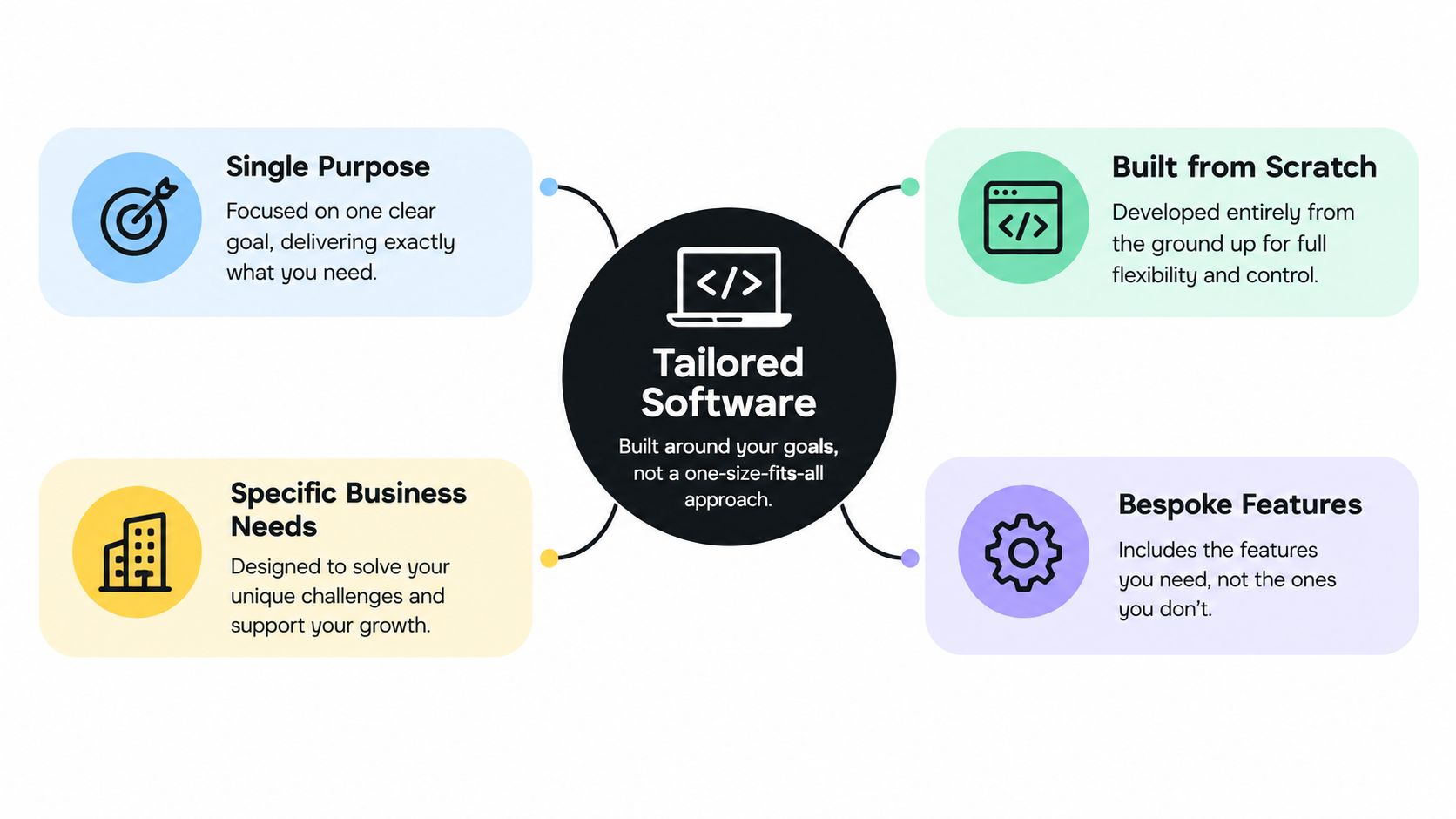
Think of it as made-to-measure software. Off-the-peg software arrives in a standard size, and you make your team fit it. Custom developed software starts with your measurements, your process and your constraints, then gets built around that shape.
That doesn't automatically mean “big platform from scratch”. It might be a focused internal tool, a workflow layer, an integration service, a customer portal, or a SaaS product with one very particular way of handling data. What makes it bespoke is who owns the specification and how closely the system mirrors the business process.
Where the word custom gets messy
A lot of software sits in the grey zone. A configured CRM with custom fields is not the same thing as a purpose-built operations platform. A low-code app with a few scripts is still not the same thing as a system that owns its own data model, permissions and workflow logic.
The clean distinction is simple:
- Configured SaaS adapts a vendor product with settings, fields and workflow rules.
- Custom developed software is specified for one organisation's requirements, including its data flows and integrations.
- Hybrid builds sit between the two, often combining vendor services with bespoke layers around them.
What counts as bespoke in practice
If the product only becomes useful after you've changed your process to fit it, it's not custom. If the software exists to remove duplicated work, encode specific rules, or connect systems that don't naturally speak to each other, it probably is.
That's why the label matters less than the ownership model. When you commission bespoke work, you're not just paying for screens and buttons. You're paying for decisions about data structures, access, integration, and the way the work moves through the business.
Custom Software Versus Off-The-Shelf and Configured SaaS
The right comparison is not “which option is better”. It's “which one fits the shape of the problem without creating a bigger one somewhere else”. Bespoke wins when the workflow is unique or strategically valuable. Off-the-shelf wins when the process is ordinary and the team wants speed.
| Criterion | Custom Developed Software | Off-The-Shelf or Configured SaaS |
|---|---|---|
| Fit to workflow | Designed around your process, not a vendor's default assumptions | Broad enough for many users, but often forces process changes |
| Cost shape | Higher upfront effort, stronger control over scope and value capture | Lower entry cost, then recurring licences and add-on spend |
| Ownership of data | You define the data model and integration rules | Vendor model first, your process second |
| Speed to value | Slower start, faster fit where the workflow is complex | Fast to deploy for common use cases |
| Long-term flexibility | Easier to extend around your operating model | Flexible only inside the vendor's limits |
The middle ground is where people get trapped
Configured SaaS looks sensible because it promises the best of both worlds. In practice, heavy configuration can become expensive, fragile and awkward to maintain. You end up paying vendor fees, specialist admin overhead and a process tax every time the business changes.
That's why the question is not “Can this be configured?” It's “Should this be configured at all, or does the workflow deserve its own system?”
The UK digital and technology sector gives useful context here. In 2024, the sector contained 107,082 companies, generated around £408 billion in turnover, employed 1.33 million people, and produced an estimated £158 billion in GVA, equal to 6.0% of overall UK GVA (UK Digital and Technologies Sector Statistics). In other words, software-led work sits inside a high-value economy, so you should judge your tooling with the same seriousness you'd give any core operational asset.
Use this rule of thumb
If the software supports a commodity process, buy it.
If the software defines how your business differentiates, build it.
That's the cleanest way to avoid both extremes. You don't need bespoke for everything, and you definitely don't need a product team pretending every internal workflow is a startup.
How Much Custom Software Costs and How Long It Takes
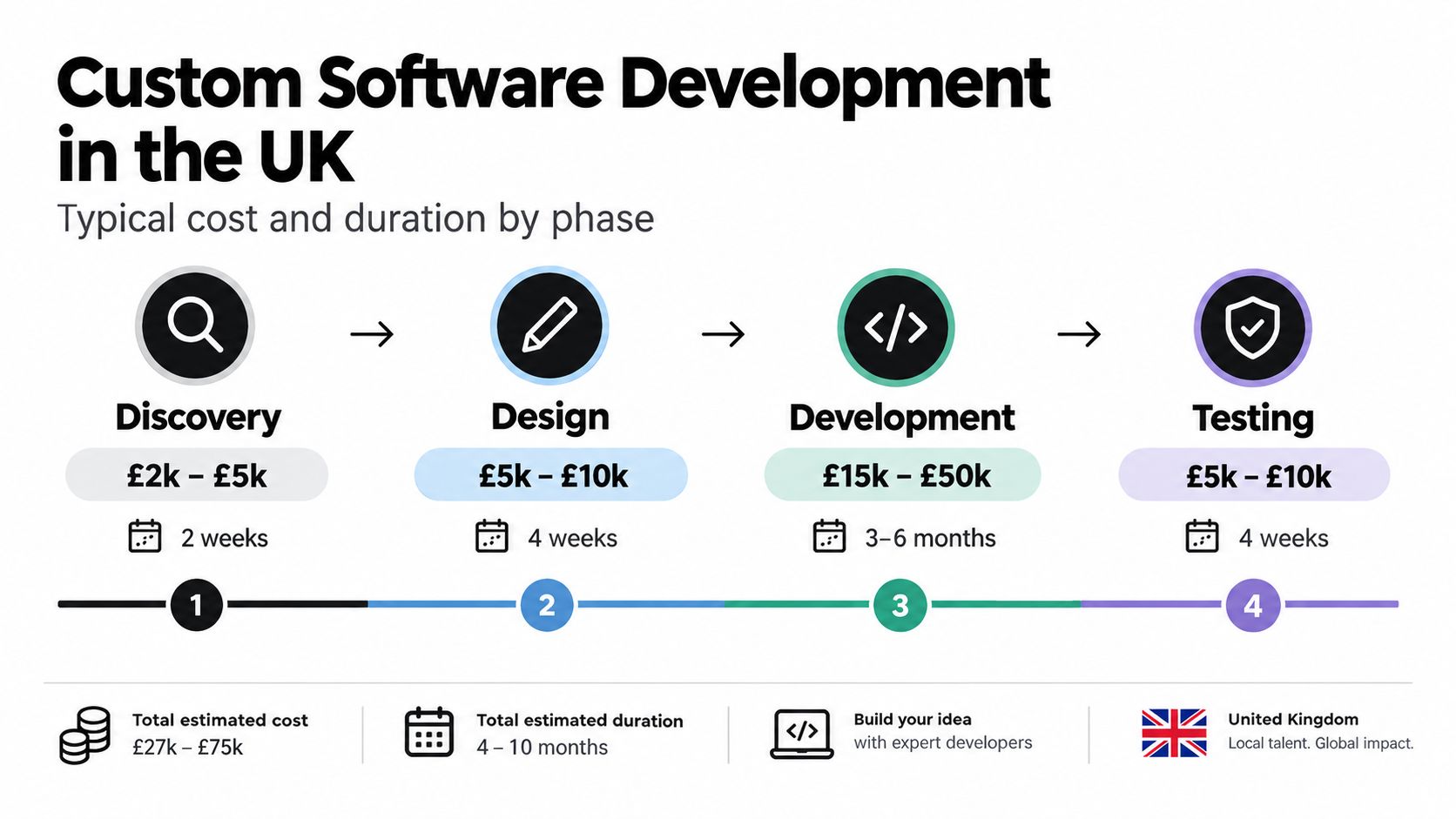
Bad quotes fail in the same predictable way. They bundle discovery, design, engineering and launch support into one tidy figure, then leave out the messy parts. A “cheap” build turns into change requests, rework and launch friction.
Discovery should pin down the workflow and the outcome you need to measure. Design should turn that into screens, roles and system behaviour. Engineering builds the product, but infrastructure, testing, migration and support keep it alive under real use.
What actually drives the price
Price rises fast when a project needs more integrations, more user roles, more data migration or more regulatory risk. It also rises when the business is vague about what success looks like. Teams often blame development for overruns when the actual problem was an unclear brief.
Fixed scope only works when the scope is genuinely fixed. If discovery is supposed to expose hidden dependencies, a rigid quote just delays the pain until later.
A proper proposal also covers life after first release. Training, support, iteration and rollback planning should be in the delivery plan. If they are missing, you are looking at a demo with a budget attached.
How to read a proposal properly
- Check what's included: discovery, design, build, testing, deployment and support should be separated clearly.
- Look for assumptions: integrations, data migration and third-party tools are where quotes usually move without warning.
- Ask how success is measured: if the answer is only “we'll build the features”, the scope is too shallow.
- Test the maintenance model: software that cannot be updated safely gets expensive quickly.
For teams setting a technical foundation, how to develop an API is a useful starting point, because integration is where bespoke work either earns its keep or turns into debt.
The UK Government's SME Digital Adoption Taskforce says Enterprise Research Centre evidence links adoption of technologies such as CRM, resource-planning and e-commerce systems with productivity improvements of roughly 7–18% depending on the technology (SME Digital Adoption Taskforce final report). That does not mean every build delivers that outcome. It means you should budget around workflow impact, not feature count.
Where Custom Software Genuinely Pays Off
Bespoke software pays for itself when the job is bigger than storing records or showing a few forms. It earns its keep when the workflow is strategic, the data is sensitive, or the business needs control a vendor platform will never quite give you.
SaaS products with a real workflow advantage
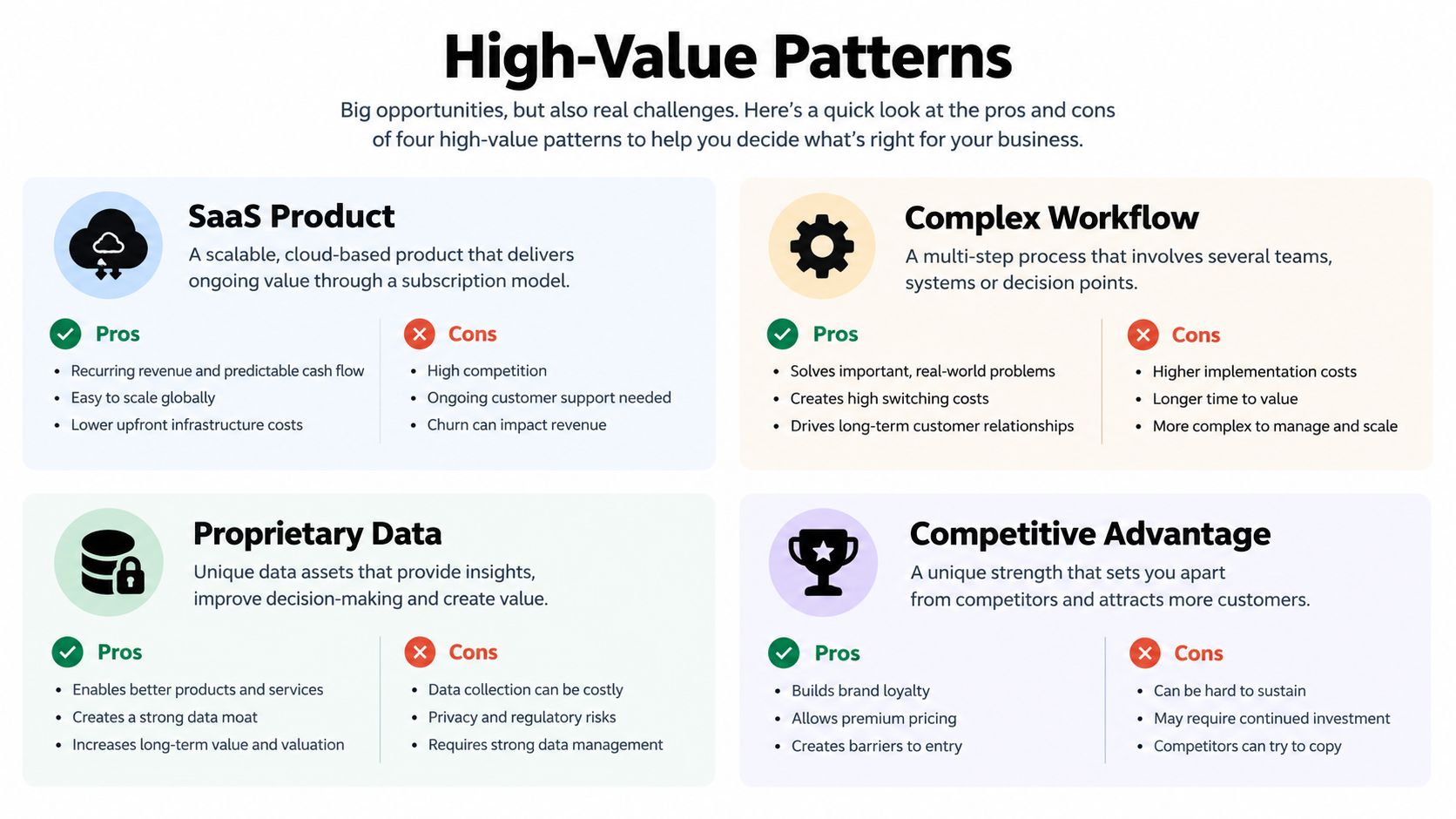
If you are building a SaaS product, the software is the product. Workflow, permissions, billing logic and reporting are not extras. They define the offer.
Custom development matters here because the edge usually sits in the process design, not in a nicer interface. A generic platform gets you to market faster, but it rarely gives you a defensible operating model.
Internal tools that connect messy systems
Operations teams feel the pain first. They are the ones reconciling spreadsheets, CRM records, support tickets and finance data by hand. A bespoke internal tool can sit above those systems and give the business one controlled view of the workflow instead of another isolated dashboard.
That matters where staff need to move through steps in a strict order, or where one error creates rework downstream. The value comes from cutting translation work, not from adding another screen.
Compliance, reporting and AI-enabled workflows
Regulated reporting platforms need to mirror the rule set in front of them, not a generic one. Public-sector services and high-volume workflows also need auditability, observability and resilience built in from day one. The UK Government's State of Digital Government review reports £26 billion in annual public-sector digital and data spending in 2023, about 28% legacy estate on average across central-government technology, and more than 95 million digital transactions plus 4 billion API hits annually across online public services (State of Digital Government review).
That kind of environment does not tolerate soft engineering discipline. It depends on it.
A bespoke build also makes sense when AI is used inside a controlled workflow, not bolted on for decoration. If the task is simple and deterministic, rules are usually safer. Save AI for cases where it improves decisions, routing or extraction. Keep the rest boring.
For one option in this space, Digital Souls Studios LTD builds custom web applications, SaaS products and AI automation systems for UK clients, which suits teams that want one delivery partner across product, design and engineering. It is one route among several, not a universal answer.
The best bespoke systems usually remove a handoff, not just add functionality.
When Custom Software Is the Wrong Answer
A lot of companies commission software because they want relief from chaos, but they still keep the same broken workflow underneath. That's backwards. If the process is unclear, software just freezes the confusion in code.
Commodity work is the easiest place to overspend. If a mainstream product already handles invoicing, scheduling, ticketing or basic CRM tasks well enough, custom development is usually a vanity tax. The same applies when a team wants to “fix” a process that should be simplified or standardised first.
The wrong reasons to build
- You want novelty, not fit: a custom platform is not a status symbol.
- The process is broken: software won't rescue a workflow nobody agrees on.
- You're using AI as decoration: if the underlying task is simple, deterministic rules are safer.
- You're avoiding adoption work: if staff won't change behaviour, the build won't save you.
The contrarian truth is that a technically elegant platform can still fail commercially if users don't adopt it. UK employer data backs up why that risk is real. 79% of UK employers reported identifying skills gaps in the previous 12 months, with technology and IT gaps reported by 38% of smaller employers and 43% of larger SMEs; AI skills gaps affected 37% overall (Mind the Skills Gap 2025). If your team doesn't have the capacity to learn the new way of working, the software becomes another source of drag.
Be especially cautious with AI
Not every workflow should have AI embedded into it. In compliance, support, finance and training, the question is not “Can we add AI?” It's “What breaks if the system is wrong, and who checks it?”
A 2025 survey of 500 UK SME owners found that inaccuracy was the leading AI concern at 24.8%, followed by workforce knowledge gaps at 22.8% and regulatory uncertainty at 19.8% (AI adoption plan for professional and business services). That lines up with the practical reality. In many cases, deterministic rules, human review, or a narrower automation step are better than a glossy AI feature.
Don't embed AI to impress the buyer. Embed it only where accuracy, control and escalation paths are already designed.
How a Bespoke Project Goes from Specification to Launch
The best bespoke projects start with a specification that names a business outcome, not a shopping list of features. “Reduce duplicate entry” is better than “build a dashboard”. “Shorten case handling” is better than “add workflows”. If the outcome cannot be measured, the work will drift.
A good delivery team separates presentation, business logic and data access. That makes the build easier to test, easier to change, and less likely to become tomorrow's legacy headache. It also keeps integration sane, because the system can expose versioned APIs instead of hard-coding every connection.
The stages of software development are useful as discipline, not theory. Discovery defines the problem. Design makes it usable. Engineering turns it into something stable. Launch covers migration, training and enough monitoring to catch issues before users lose trust.
What good proposals include
- Measurable outcomes: cycle time, error rates, support load or adoption should be defined up front.
- Testing and scanning: automated testing and dependency checks are required for serious builds.
- Rollback and recovery: if deployment fails, the team needs a safe exit.
- Migration support: staged data movement and reconciliation should be planned before launch day.
- Training and ownership: the client team needs a named path for handover, not a final zip file and a polite goodbye.
Reliability should be treated as a delivery requirement, not a nice extra. Public services have shown the scale and pressure that software can face, with heavy transaction volumes and constant API traffic. Private-sector teams running regulated or high-volume operations should hold the same standard.
The State of Digital Government review backs that point without needing any theatre. If the system cannot be operated cleanly on day one, it was not ready for launch.
The project is done when users can do the work cleanly. A tidy repository does not count.
Choosing a Partner and Measuring What Matters
Price matters, but it should not be the first filter. Start with proof. Has the team shipped adjacent work, do they understand the operational trade-offs, and will they define success in measurable terms before any code is written? If they avoid metrics, they are selling confidence, not delivery.
What to ask in discovery
Ask how they handle workflow change, not just screen design. Ask what happens when client data is messy, integrations break, or adoption stalls. Ask how often they expect to ship, and who owns the iteration after launch.
A credible team should talk about product, engineering and support without pretending those functions live in separate worlds. Good delivery partners know software only matters when people can run it safely the next day.
Measure outcomes, not vanity features
Track the numbers that reflect real use:
- Workflow cycle time: how long a task takes from start to finish.
- Transactions per process: how much work the system handles.
- Error rates: whether the build is reducing or creating mistakes.
- Support tickets: whether users are struggling after launch.
- Adoption: whether people use the system as intended.
The SME Digital Adoption Taskforce notes that a 1% productivity improvement across UK SMEs over five years could add £94 billion annually to GDP. That is the scale of the opportunity, but only if the software changes how work gets done.
If you are shortlisting suppliers, ask for evidence of shipped work, a clear measurement plan, and a realistic view of adoption risk. If a partner also understands UI and UX design, the conversation gets more useful fast, because the interface stops being decoration and becomes part of the operating model.