20th November 2026 · 13 min
Augmented Reality Training: How It Works and Pays Off

The most popular advice about augmented reality training starts in the wrong place: choose an impressive headset, then find something to teach with it. A business should start with a costly training failure instead. If employees don't perform the job better afterwards, the immersive experience hasn't earned its place.
AR should compete against a good video, a capable trainer and supervised practice, not against outdated slides. The buying decision also needs to account for employees who can't comfortably use the equipment.
Table of Contents
- What Augmented Reality Training Is
- How AR Training Compares With Video, Classroom and VR
- What the Evidence Says About AR Training
- How an AR Training Session Works in Practice
- Where AR Training Pays Off Most
- Risks, Accessibility and Who Might Be Left Out
- Buy, Build or Hire a Studio for AR Training
- Plan, Measure and Choose Your First AR Training Pilot
What Augmented Reality Training Is
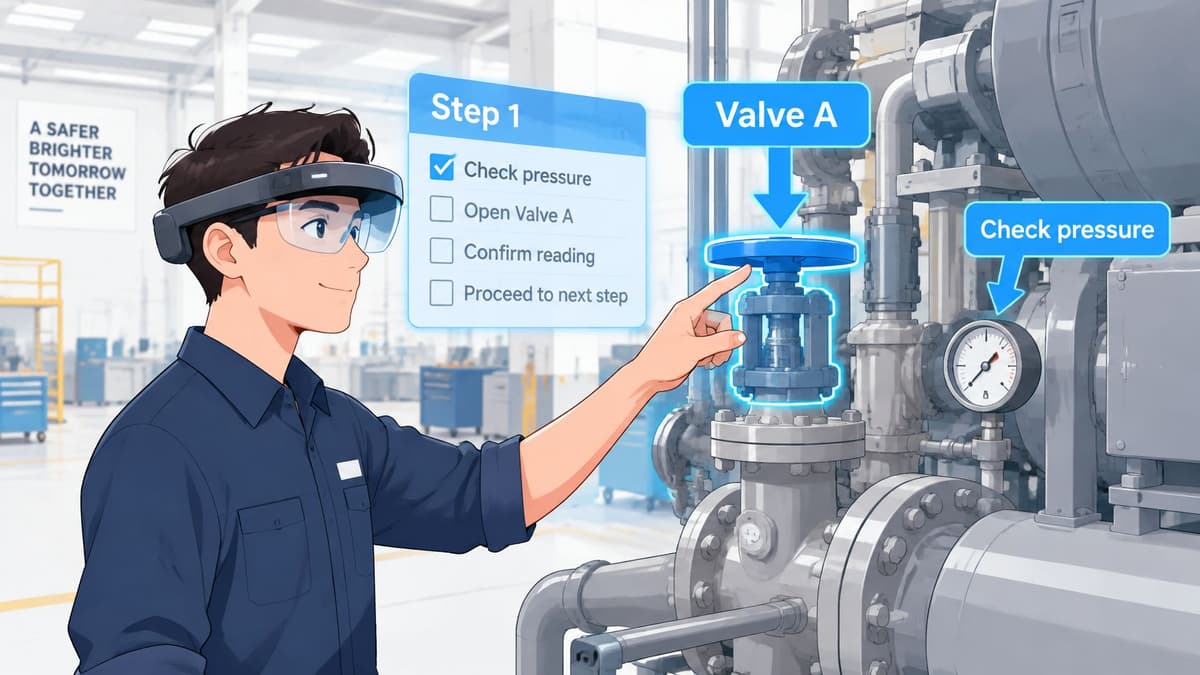
A new engineer stands beside a machine wearing smart glasses. Arrows identify the correct valve, labels name the components, and prompts explain the maintenance sequence.
Augmented reality training places digital instructions, images or prompts over the real world so people can practise a task in its physical setting. AR is like a sat-nav line drawn over the road already in view; virtual reality, or VR, is like a driving simulator in a separate room.
Many AR tools run on phones or tablets, so a headset isn't automatically part of the starting cost. Every programme still needs a learning goal, accurate overlay content and a way to check performance. Showing a prompt doesn't prove that someone followed it correctly.
The commercial interest is substantial. A PwC forecast reported by the Society of Operations Engineers projected that AR and VR could add £62.5 billion to the UK economy by 2030, including £44.4 billion from AR. Separately, Market Research Future estimated the UK immersive-technology market at approximately $1.35 billion in 2024.
Those market figures aren't a business case for an individual employer. The first useful question is narrower: which task must employees perform correctly, and what does getting it wrong cost today?
How AR Training Compares With Video, Classroom and VR
| Criterion | AR training | Video or e-learning | Classroom or supervised practice | VR training |
|---|---|---|---|---|
| Best for | Tasks on real kit or in real places | Knowledge and policy without physical practice | Interpersonal skills, discussion and coached practice | Tasks unavailable on site |
| Practice on the real task | Yes, with the work in view | No physical practice | Yes, subject to trainer and kit availability | Simulated only |
| Risk of practising | Low on safe training kit; live equipment retains its hazards | No equipment exposure, but no physical rehearsal | Can be high on live equipment | Low physical task exposure |
| Feedback to the learner | Flagged errors if detection is built in | Usually quizzes or interactive questions | Given by the trainer | Can be built in |
| Set-up effort | Scenario and overlay build | Low once content exists | Trainer time and scheduling | Full scene build |
| Cost to update | Revise and validate affected overlays | Edit or re-record content | Update materials and brief trainers | Revise and validate the scene |
| Works away from site | Yes, with suitable objects or training materials | Yes | Only with a trainer present | Needs a headset and clear space |
Video is often the sensible purchase. A support team learning an online shop's returns process needs to recognise exceptions, use the system and explain decisions. A screen recording, practice cases and a trainer can address that without building spatial overlays.
Supervised practice is also a serious competitor. A trainer can spot hesitation, ask why someone chose a particular action and adapt the explanation immediately. The constraint is access to that trainer and the equipment, especially across shifts.
AR becomes more useful when the physical location of a component matters. A maintenance crew learning pump isolation may benefit from prompts attached to the relevant controls, provided the exercise uses equipment made safe for training. An overlay doesn't make live machinery safe.
VR is better suited to replacing an unavailable environment entirely. The practical differences between AR and VR matter more than which looks more impressive.
Buying rule: Choose AR when spatial guidance solves a real practice problem and errors can be observed and corrected. Otherwise, video or classroom delivery usually wins on cost and speed.
What the Evidence Says About AR Training
The evidence supports carefully designed applications, not a blanket claim that AR teaches better. A small clinical trial can justify testing a similar approach. It can't establish the return for a warehouse or support team.
A UK randomised controlled trial published in BJS, involving 20 medical students from seven UK universities, compared Microsoft HoloLens-based AR with consultant-led teaching for knee replacement surgery and reported 38.6% higher technical skill scores, 33% higher checklist performance and 54.5% higher written-examination performance in the AR group, with no significant difference in procedural completion time. These are promising results from a small sample, not proof of universal workplace effectiveness.
A University of Manchester care-home training evaluation reported that an AR/immersive-VR intervention increased hand-hygiene knowledge scores from 65% to 71% and practical skills scores from 4.77 to 7.23 out of 11, highlighting the importance of realism, feedback, reminders and interactivity.
Engagement isn't competence
The Lloyd's Register Foundation's 2025 briefing describes improved engagement and motivation from AR and VR, but mixed evidence on knowledge acquisition. The Chartered Institute of Ergonomics and Human Factors likewise stresses that outcomes depend on experience quality and whether learners can apply their skills at work.
The purchasing test therefore needs to be transfer to the job. Assessment should establish whether employees perform the relevant procedure accurately without prompts, not merely whether they enjoyed the session. A credible evaluation also compares AR against a competently delivered alternative rather than a deliberately weak course.
How an AR Training Session Works in Practice
A useful session has a clear task, observable actions and a supervisor who can explain the result. The workflow should be agreed before anyone starts producing digital content.
The process below keeps the equipment and the learning outcome connected.
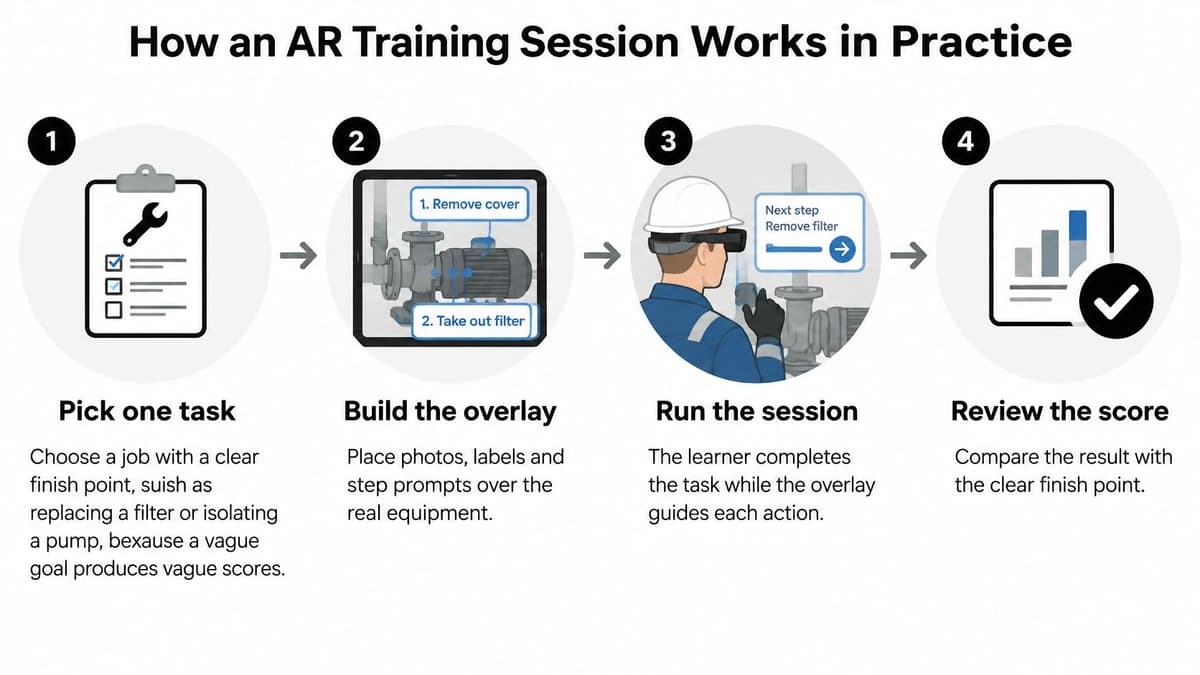
Pick a task with a finish point. Replacing a filter is assessable; understanding maintenance is too broad. Specify what correct completion looks like, including the checks required before work starts.
Build and validate the overlay. Place photographs, labels and prompts against the relevant components. An experienced operator should approve them on the actual equipment, rather than accepting instructions written solely from a manual.
Brief the learner. Explain the goal, safety boundaries, stop procedure and information being recorded. Don't assume familiarity with the device means understanding the assessment.
Run the practice. Prompts guide the sequence, while configured checks or a supervisor record missed actions. Automatic error detection must be commissioned explicitly; displaying an instruction doesn't mean the system can recognise compliance.
Debrief against the task. The supervisor reviews flagged steps and explains the consequences of each mistake. A score without corrective feedback gives the learner little direction.
Schedule reinforcement. Reserve a later session and an unaided assessment in the team's working schedule. Otherwise, operational pressure can turn repeated practice into a demonstration that never gets revisited.
A good result isn't a cleaner second attempt with prompts still visible. The learner should complete the task unaided, the record should identify which errors have reduced, and the supervisor should explain why that improvement matters on site.
Where AR Training Pays Off Most
Consider an engineering firm training a new technician to identify a pump's isolation points. AR can support rehearsal on a safe training assembly without interrupting the operating site. The technician shouldn't manipulate a live pump because digital prompts are available.
A care provider has a different problem: staff need to reproduce a hygiene sequence consistently. Here, the value lies in observing the order and quality of actions, then correcting omissions. A warehouse preparing for peak season might use AR to rehearse an unfamiliar packing procedure on sample orders before mistakes reach customers.
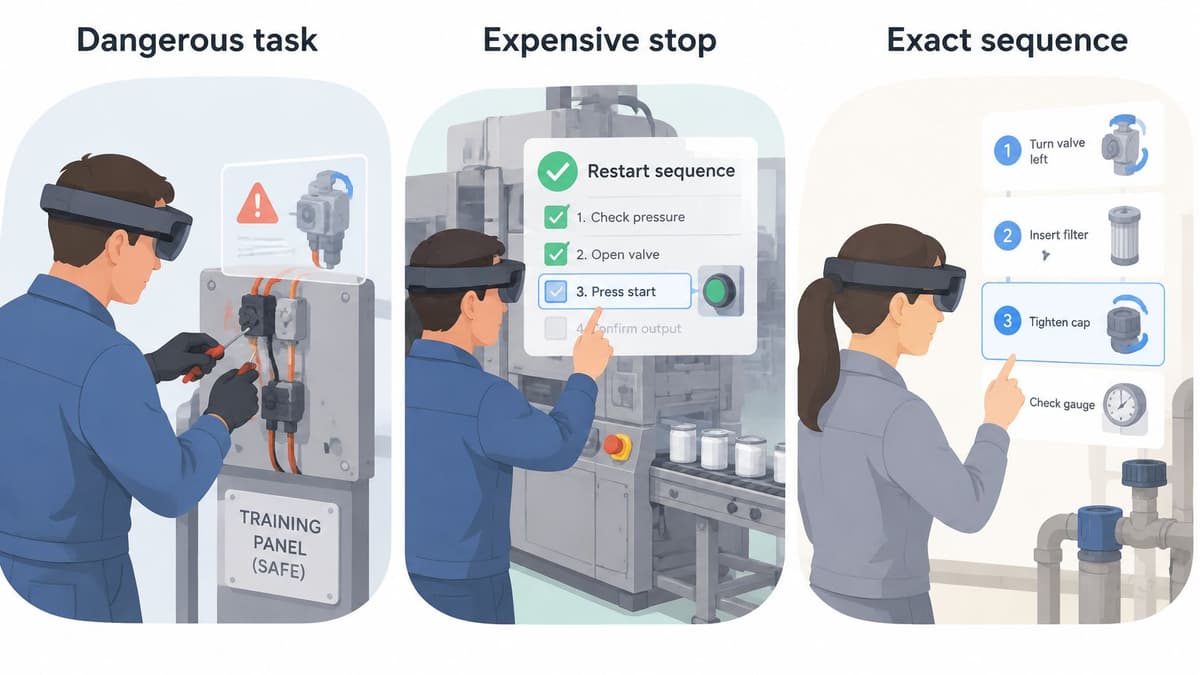
Where the extra production effort is justified
These examples share a physical task and a visible sequence. AR deserves consideration when training equipment is scarce, production interruptions are expensive, or staff rarely encounter a procedure between refreshers.
Policy induction, customer-service scripts and software administration are weaker candidates. A finance team learning an approval policy usually needs clear examples and practice decisions, not labels floating over a desk. Different augmented reality products should be judged by the workflow they support, not their visual sophistication.
A practical screening checklist is:
- Frequency of failure: How often do employees miss steps or require repeat instruction?
- Consequence: Does an error cause rework, downtime, waste or a safety concern?
- Observability: Can an assessor see whether the task was completed correctly?
Repeated failures and costly consequences justify investigation. If correct performance can't be observed, the assessment design needs work before an AR pilot proceeds.
Cornerstone OnDemand research reported by Learning News found that UK VR/AR job postings had increased by 154% over the five years to 2024. That indicates demand for immersive-technology skills, not proof that a particular employer needs immersive training.
Risks, Accessibility and Who Might Be Left Out
The most overlooked risk is excluding employees while recording the programme as successfully deployed. A device that works comfortably for the buying team may be unsuitable for someone wearing glasses, working with restricted movement or experiencing visual discomfort.
Capytech's employee-training guidance identifies nausea, eye strain and disorientation as potential problems and recommends an equivalent delivery route for learners who can't use a headset. Accessibility therefore belongs in procurement, not in a complaints procedure after launch.
| Risk | How it shows up | What to put in place |
|---|---|---|
| Motion discomfort | Nausea, eye strain or dizziness | An equivalent facilitated session with the same goals |
| Inaccurate overlay | Instructions no longer match the equipment | A named owner who updates content after process or equipment changes |
| Hygiene | Shared contact surfaces create cleaning and skin-comfort concerns | A device-compatible cleaning routine, suitable personal liners and a log |
| Poor fit for glasses or physical needs | Some learners can't use the device | Accessibility testing before purchase and an alternative route |
| Data protection | Records, scores and video contain personal data | Agreed storage, retention and access rules with the data protection lead |
| Passing without performing | Good assessment scores but weak workplace execution | Supervisor observation and sign-off after training |
Test participation, not just device fit
Procurement trials should include employees from different shifts, language groups and physical circumstances. Instructions need readable text, understandable wording and controls that suit the intended work. A tablet isn't an adequate alternative if the task requires both hands.
The alternative route must lead to the same learning objectives and credible assessment. Completion records should distinguish delivery methods without treating non-headset participation as a lesser qualification.
A blended programme is often the more responsible purchase: suitable immersive practice alongside conventional routes, rather than compulsory headset use.
Buy, Build or Hire a Studio for AR Training
| Option | Best when | Main risk | Who runs it after launch |
|---|---|---|---|
| Buy an off-the-shelf tool | Tasks match the vendor's library | Content doesn't match the kit or process | Vendor and internal trainers |
| Build in-house | Learning, safety and technical staff are already available | Skills gaps and a slow first version | The internal team |
| Commission a studio | Tasks are specific and a focused pilot matters | Weak handover from a vague brief | The business after an agreed handover |
An existing tool offers the shortest route only when its content fits. In-house development offers control but commits the employer to maintaining both software and instructional content. A studio can handle a bespoke project, although commissioning doesn't guarantee a quick delivery.
Digital Souls Studios LTD is an option for scoped training simulation and AR projects. Isaac Surfraz, its co-founder and director, leads engineering with roughly a decade of experience across software, AR/VR and platform architecture; the studio builds across sectors with attention to end-user experience and modern development techniques.
Costs and delivery commitments
There isn't a substantiated AR price range to quote here. A phone-based overlay using existing assets is a different purchase from a multi-site headset programme with action detection and linked training records.
Quotes should separate content production, devices, licences, assessment, accessibility, deployment and ongoing updates. Suppliers should also identify dependencies affecting delivery, such as equipment access, operator approval and existing learning-record systems.
The written supplier checklist should establish:
- Learning ownership: Who defines the objectives and validates each scenario?
- Assessment: How are scores recorded, and what happens after failure?
- Maintenance: Who approves updates after process or regulatory changes?
- Data handling: Where are records stored, and who can access them?
- Handover: What content, documentation, licences and editing rights transfer?
Request separate pilot and rollout quotes, with acceptance criteria and an exit point. Don't fund a full deployment before the training method has passed its own assessment.
Plan, Measure and Choose Your First AR Training Pilot
Buy evidence before buying a fleet of headsets. The pilot should answer a business question, such as whether technicians can complete a specific procedure with fewer omissions than after conventional instruction.
The planning sequence keeps the purchase tied to that question.
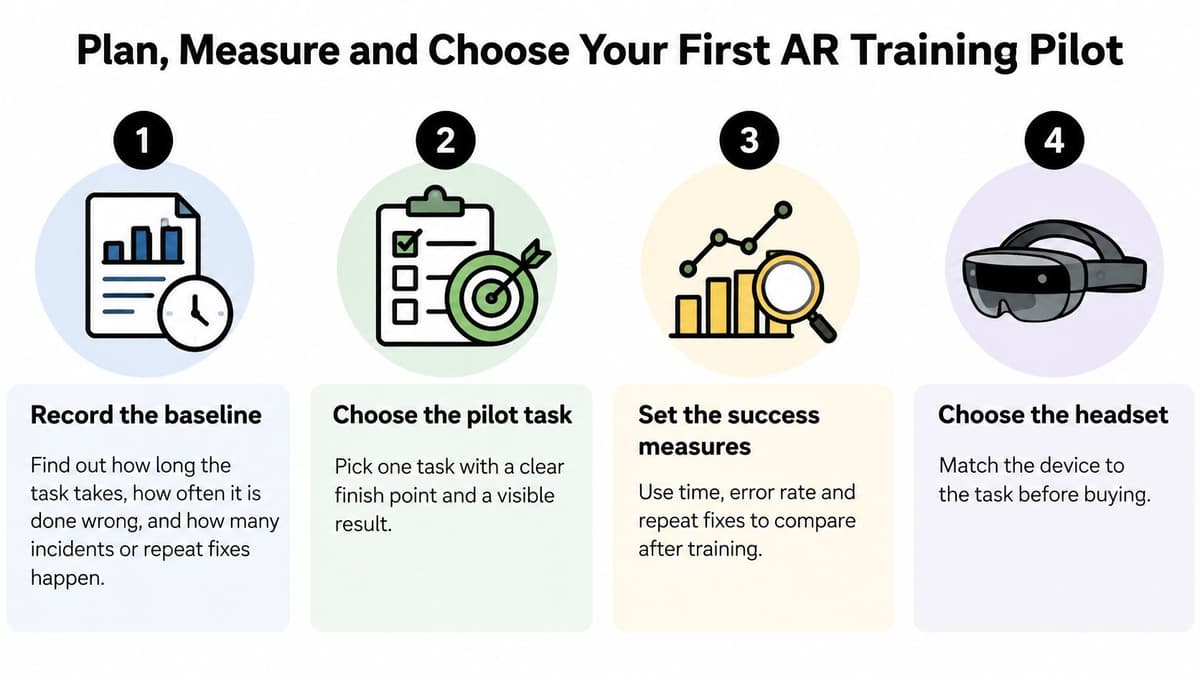
Record the baseline. Capture task duration, observed errors, repeat fixes and relevant incidents under the current training approach. Define each measure consistently so different supervisors don't score the same action differently.
Select meaningful measures. Prioritise time to competence, error rate, first-time fix rate and retained performance. Give safety-critical omissions their own assessment rather than hiding them inside an average score.
Set a fair comparison. Compare similar learners receiving AR with those receiving video or trainer-led instruction. Both routes should cover the same objectives and receive adequate practice time.
Keep the scope contained. Use a defined task and operating location, with a named owner responsible for content approval. Apply proof-of-concept testing to resolve the uncertain part before committing to broader production.
Retest after a planned interval. Include an unaided assessment and workplace observation, not just the immediate end-of-session score. Reserve staff time and set the review date before starting.
The accompanying video can support discussion of the training approach, but the buying decision still needs observed results.
Make the decision before extending the contract
Scale when AR improves the important outcomes enough to justify its full operating cost. That cost includes employee time, supervision, cleaning, maintenance and alternative delivery, not just software.
Adjust when results reveal a specific, fixable problem, such as unclear prompts or unreliable assessment. Stop when video or classroom training performs equally well at lower cost, or when participation barriers outweigh the benefit.
Headset hours and enjoyment can inform delivery improvements. They shouldn't decide whether the programme continues.
Digital Souls Studios LTD builds and maintains business software, including training simulations and AR/VR experiences. Visit Digital Souls Studios LTD and describe the proposed training project, including the task, site and outcome to be measured, so an initial scope can focus on a useful pilot rather than an unnecessary rollout.