24th November 2026 · 15 min
Automating Financial Reporting Without a Tech Team

Automating financial reporting means software collects your figures on a schedule, checks them against rules you've agreed, and drafts the report for a named person to approve. The repetitive work moves to software, but the judgement stays with people.
Table of Contents
- What Automating Financial Reporting Really Means
- Three Terms You Will Hear
- Why Smaller Teams Gain Most
- A Practical Shortlist to Start From
- Decisions That Must Stay with People
- Comparing Candidate Reports Side by Side
- Listing Where Your Figures Live
- Mapping Categories So Sales Count Once
- Agreeing Names Before Anything Is Connected
- What to Ask Your Supplier to Build
- Preparing for Digital Filing
- Four Things Every Workflow Needs
- Checks a Finance Lead Can Specify
- The Approval Sequence in Plain English
- A Refund Batch Caught Before the Board Sees It
- Supplier Checklist
- Three Routes Compared
- What Drives the Cost
- A Realistic Sequence
- Questions to Ask Any Supplier
- Common Problems and Quick Fixes
- Practical Habits That Prevent Repeat Errors
- Measuring Success Against Your Baseline
- Can Software Prepare Statutory Accounts on Its Own?
- Do We Need New Accounting Software First?
- What If Our Spreadsheet Expert Leaves?
- How Do We Protect Confidential Financial Data?
What Automating Financial Reporting Really Means

Think about a typical month-end. Someone exports three spreadsheets, pastes the numbers into a board pack, and then loses two days chasing a figure that simply won't reconcile.
Three Terms You Will Hear
- Accounting software connection: a secure link that lets your reporting tool read figures straight from your bookkeeping system.
- Structured data: information held in consistent fields, such as dates, amounts and categories, so software can sort and check it.
- Audit trail: a dated record of where each figure came from, who checked it and who approved the final version.
Not every reporting job deserves the same treatment. Here's how the work tends to split in practice.
| Reporting job | Automate now | Human review | Business gain |
|---|---|---|---|
| Cash position | Yes | Large movements | Earlier warning |
| Sales by channel | Yes | New product lines | Faster comparisons |
| Management pack | Draft only | Full review before issue | Less assembly time |
| Going concern and provisions | No | Qualified accountant | Clear accountability |
This is controlled automation of collection, checking and drafting. It isn't software signing off your statutory accounts, which still need a qualified person's name on them.
Why Smaller Teams Gain Most
Larger finance teams usually have people and systems dedicated to this kind of work. Smaller businesses often don't, so the hours saved make up a much bigger share of what's available. That's where the case for automation tends to be strongest.
Automating financial reporting is really one example of wider automated report generation. The same pattern shows up in other areas too, and how teams automate recurring PDF reports is a good place to see it in action.
Read also: AI workflow automation for small businesses.
A simple test: count the hours spent on month-end before and after, the number of corrections, and how quickly directors receive reliable figures.
Start small. Automating the whole finance function in one go is how these projects quietly stall. Pick a single report and prove it works first.
The rule to stick to is simple. Automate where the rules are clear and a mistake is cheap to fix. Where judgement decides the answer, keep a qualified person in charge.
A Practical Shortlist to Start From
Two examples make this easier to picture. An online shop with a small team usually wants its cash and sales figures sorted first. A founder with no finance function often just needs a clear monthly picture before anything else.
Good early candidates tend to include:
- Cash position and runway: how much money is in the bank and how many months it will last.
- Sales and margin by channel: which store, marketplace or ad campaign is actually making money.
- Debtor ageing: which customers owe you money, and how long they've owed it.
- Monthly management pack: the summary the leadership team reads every month.
Decisions That Must Stay with People
Some calls need experience, not just data. Spotting unusual revenue, assessing provisions, reading a complicated contract and deciding whether there's a going concern issue all belong with a qualified accountant. Software can flag the numbers, but it can't tell you whether they make sense.
So where do organisations feel comfortable letting software help? According to the Financial Reporting Council's research, the areas with the most confidence are drafting, copyediting, trend analysis and cross-checking.
In everyday terms, that means the software writes the first draft of the pack and tidies the wording. It can also point out that sales have dipped against last quarter, or confirm that two reports show the same total. The person still decides what the numbers mean.
Comparing Candidate Reports Side by Side
Line up your candidates before you commit to one. The table makes it obvious which reports are cheap to get wrong and which ones aren't.
| Report | Data source | How often | Who reviews | Risk if wrong |
|---|---|---|---|---|
| Cash position | Bank feed | Weekly | Finance lead | Missed shortfall |
| Sales by channel | Shop dashboard | Monthly | Owner | Wrong marketing spend |
| Debtor ageing | Accounting software | Monthly | Credit controller | Late chasing of debts |
| Management pack | Combined sources | Monthly | Named director | Poor board decisions |
Start with the report a director already reads every month. It's the easiest one to prove value against, because everyone already trusts the baseline.
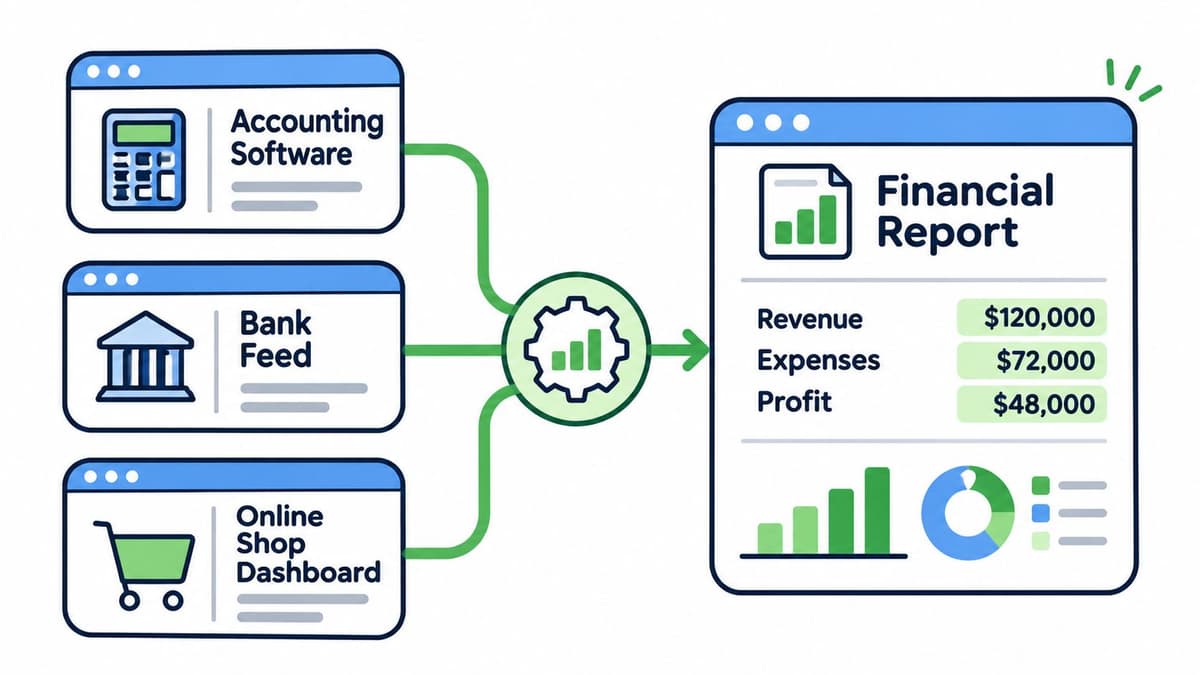
Automated reporting is only as good as the data feeding it. Messy inputs produce the same muddle, just faster. So the first job is the least glamorous one: write down how month end actually runs today, and mark every figure someone types in by hand.
Listing Where Your Figures Live
Most small businesses keep numbers in more places than they'd guess. The usual suspects tend to be:
- Accounting software: the ledger that should hold your official record.
- Bank feeds: transactions pulled in automatically from your bank.
- Payment provider payouts: the net amounts that actually reach your bank after fees and refunds.
- Online shop dashboard: orders, returns and sales broken down by channel.
- Payroll: staff costs and pension contributions.
- Unowned spreadsheets: files nobody looks after but everybody relies on.
Mapping Categories So Sales Count Once
A single sale can turn up in three reports under three different names. One sheet calls it Online Sales, another calls it Web, and a third calls it Shopify.
The fix is to map your chart of accounts, the list of ledger codes your books use, to agreed reporting categories. Each ledger code points to one category, and every report reads from the same map. It's dull work, but it's the difference between a report you trust and one you argue about.
Agreeing Names Before Anything Is Connected
Settle naming conventions for sales channels, departments and cost centres before you connect anything. It's tempting to skip this and tidy up later, but later never comes. Write the names in one short list and get everyone to sign it off.
What to Ask Your Supplier to Build
When you talk to a supplier, push for three things:
- Scheduled collection: figures pulled on a fixed day, not whenever someone remembers.
- Automatic checks: alerts when data goes missing or contradicts itself.
- Version history: a clear trail from the bookkeeping entry through to the management accounts.
That last one matters most. A finance professional should be able to trace any number back to its source, and if a supplier can't show you how, that's worth knowing before you sign anything. For the data collection side of preparing reports, it's also worth looking at how to browse client onboarding templates.
Preparing for Digital Filing
Government guidance points towards inline XBRL, or iXBRL, from 1 April 2028. In plain terms, it means accounts that people can read and software can interpret without someone re-keying them.
Picking systems that already handle structured data now saves you from a frantic migration later.
Read also: how software connections move data.
Automating financial reporting is only worth doing if you can trust what it produces. That trust comes from the control layer, a set of business rules that stops a draft from quietly becoming an official statement.
Four Things Every Workflow Needs
Most automated reporting setups that hold up in practice have four things in place. The ones that fail usually lack at least one.
- Source record: a note of where each figure came from, such as a ledger code or bank feed.
- Evidence preserved: invoices, statements or screenshots kept for every number that reaches a report.
- Named owners: exceptions go to a specific person, never to "the team".
- Hard stop: an unverified draft cannot be distributed until sign-off is recorded.
Checks a Finance Lead Can Specify
You don't need any technical skills to define these. Describe them in plain terms and let whoever builds the workflow translate them.
- Totals agree across the board pack and the bank statement.
- Each figure is compared with the same period last year.
- Alerts fire when movements exceed an agreed threshold, such as £10,000.
The Approval Sequence in Plain English
There are five stages, and each one has a named owner.
- Generate: the draft is produced, and nobody outside finance sees it.
- Review: a reviewer checks every flagged item.
- Correct: each change is logged with the reason for it.
- Sign off: the approval is recorded with a name and date.
- Distribute: the pack goes out.
The infographic below maps the workflow from ledger entry to distributed pack.
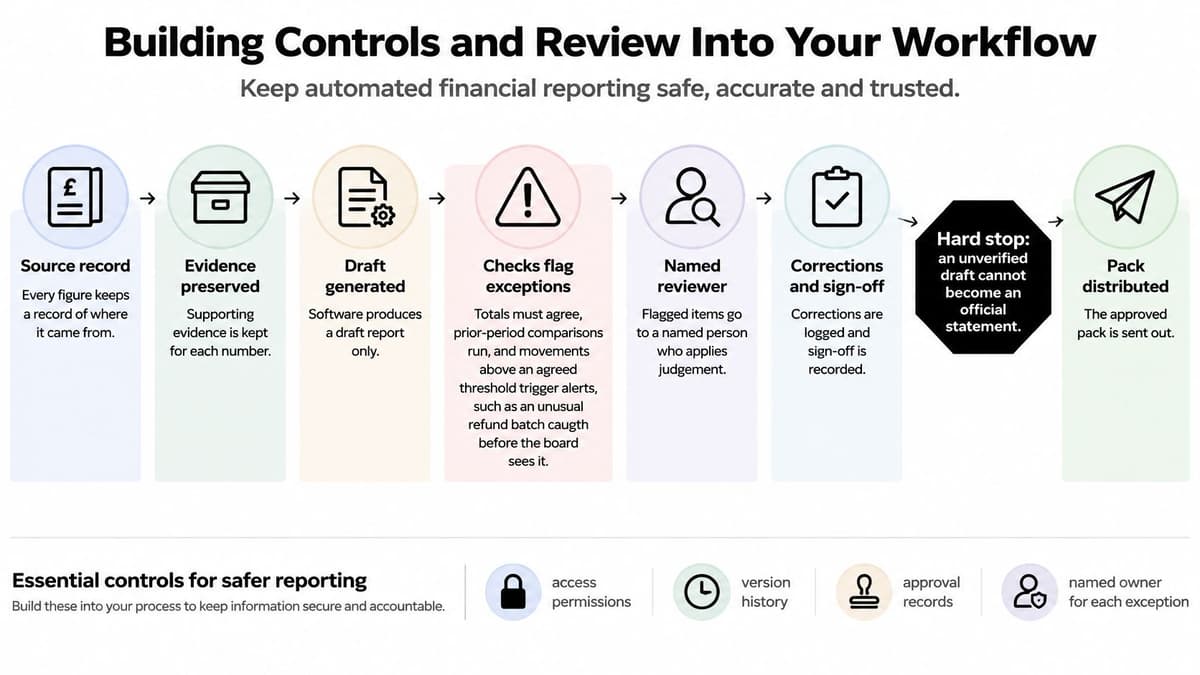
Software never gets the final word. The hard stop sits before the board, and that is where it should stay.
A Refund Batch Caught Before the Board Sees It
Picture an online shop whose refunds usually follow a fairly steady monthly pattern. One month, a refund batch jumps well above that. The variance check flags it, and a reviewer finds a duplicate import before the figures reach the board.
Supplier Checklist
Use this list when you're asking a provider, or your internal IT team, what they'll hand over:
- Access permissions: who can view, edit and approve each report.
- Version history: every draft and final pack kept with dates.
- Approval records: who signed off, and when.
- Exception owners: one named person per flagged item.
Automation works best where the rules are clear and mistakes are cheap to fix. Judgement calls stay with a qualified reviewer, every time.
Read also: human oversight in AI tools.
When founders start looking at automating financial reporting, the question usually comes down to three options: make do with what they already have, buy a dedicated tool, or commission something bespoke. The software matters less than you might expect. Tidy inputs make almost any route work, while messy ones can turn the cheapest option into the most expensive.
Three Routes Compared
| Route | Best suited to | What drives the price | Ongoing effort | Main risk |
|---|---|---|---|---|
| Configure existing accounting software | Simple reports from one or two sources | Licence tier and set-up time | Low, though manual exports tend to hang around | Reports stay partly manual |
| Buy a dedicated reporting tool | Repeatable packs from a few clean sources | Number of users, sources and templates | Medium, since someone has to watch the connections | Outgrowing the tool, or a weak audit trail |
| Commission a custom automation | Several sources, messy data, strict approval rules | Number of sources, data mess, checks and filing needs | Higher, unless a retainer covers it | Depending on one supplier |
What Drives the Cost
- Number of data sources: every connection needs building and testing, and the time adds up faster than most people expect.
- Messy inputs: inconsistent naming usually takes longer to untangle than the connection itself.
- Checks and approvals: each rule and sign-off step needs designing, so approval chains are never free.
- Structured filing: if the output has to support iXBRL, that part needs more care.
As a guide, a custom AI agent is typically priced between £3,000 and £10,000. An all-in-one retainer, which covers ongoing support and changes, runs from £1,000 to £15,000 a month. Prices depend on the scope, so treat these as starting points rather than fixed quotes. You can see the services on the services page.
A Realistic Sequence
Resist the urge to automate the whole month end in one go. The businesses that succeed tend to start small and stay patient for longer than they'd like.
- Write down the current process: note how long the close takes and mark every point where someone copies data by hand.
- Connect one source: the bank feed or the main ledger is usually the sensible place to begin.
- Run both methods side by side: keep the old pack and the new draft going for a full cycle.
- Add sources gradually: bring in the next one only once the first matches every time.
Don't fix a delivery date until one full cycle has passed side by side.
Questions to Ask Any Supplier
Vague answers are common at this stage, so press for specifics before you sign anything.
- Who owns our data, and can we export all of it?
- What are the exit terms, and what do we receive back?
- Who maintains the workflow after launch, and at what cost?
- When a connection breaks, who fixes it, and how quickly?
- Who holds the access permissions and admin logins?
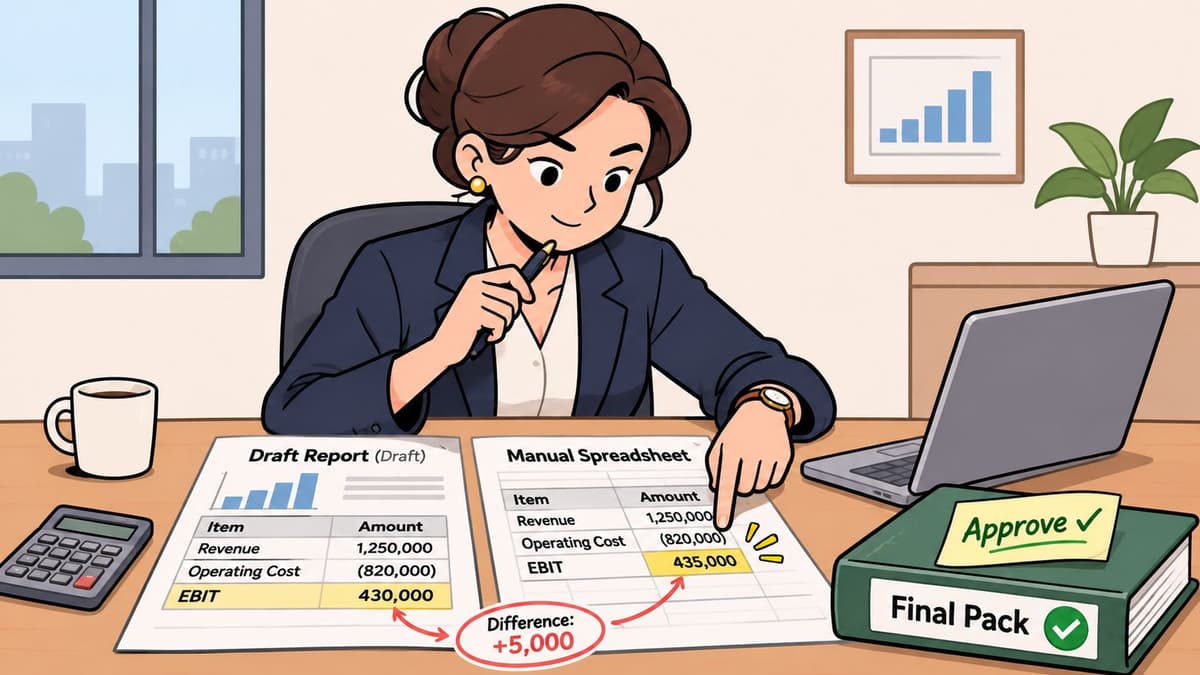
Keep your old manual pack running alongside the automated draft for one full month-end. Go through it line by line and note every difference, even the tiny ones. You don't need to fix them all straight away, but you do need to understand where each one comes from.
The first cycle is rarely smooth, and a decent close workflow makes it much easier to handle. If you want something to work from, eight steps to a clean close is worth a read.
Common Problems and Quick Fixes
| Symptom | Cause | Fix |
|---|---|---|
| Totals don't match | Sources use different cut-off dates | Agree one cut-off date for every source |
| Report comes out empty | A connection quietly expired | Reconnect it and set an expiry alert |
| Categories start drifting | A new account was never mapped | Map new accounts before the next run |
| Commentary sounds certain | Nothing backs it up | Treat it as a draft until someone has checked it |
Practical Habits That Prevent Repeat Errors
Three habits do most of the heavy lifting:
- Freeze the reporting calendar so nobody shifts a cut-off date halfway through the cycle.
- Give each report one owner who answers for its accuracy.
- Keep a short written definition beside every metric. Spell out what counts as margin or runway, so everyone is talking about the same thing.
Don't retire the manual pack until corrections stop for a full cycle.
Measuring Success Against Your Baseline
Before you switch anything on, write down three figures: preparation hours, the number of corrections and the time it takes to reach reliable numbers. If you skip this step, you'll have no real way of proving the automation helped. People tend to remember the good months and forget the baseline.
Each month, compare those numbers with your starting point. If all three have dropped, the automation is paying its way.
If you'd rather have a team build and maintain this for you, the studio's case studies show examples of past projects you can review before deciding.
Can Software Prepare Statutory Accounts on Its Own?
Software can pull the figures together and draft the accounts, which saves a lot of chasing around. A qualified accountant still needs to review the numbers and sign them off.
Do We Need New Accounting Software First?
Usually not. Automation tends to sit on top of the system you already use, pulling in data and handing back a draft. Changing ledgers and reporting methods at the same time is a quick way to double the disruption.
What If Our Spreadsheet Expert Leaves?
This is the question that tends to come up after one person has carried a reporting process in their head for years. Written steps and version history let a colleague follow the same route and trace each figure back to its source. The knowledge stops living in one person's files.
How Do We Protect Confidential Financial Data?
Start by limiting access to the people who genuinely need it. Check who can open draft reports too, because drafts often reveal more than the final version. Then ask your supplier where the data is stored and who can see it, and get those answers in writing.
Automation doesn't remove accountability. It changes where people spend their time, so the review step has to be planned, not assumed.
Ready to start? Describe your reporting process and first report to Digital Souls Studios LTD at the contact page.