11th November 2026 · 15 min
Human in the Loop AI: Meaning, Roles and When to Use It

You're about to let AI draft replies, screen applications or approve refunds, and someone asks a simple question. Who checks it before it reaches a real person? If you can't name that person, the time they'll spend, and what they're allowed to change, you don't yet have a control. You've got a hope. Human in the loop AI is how you turn that hope into a designed step, with a named reviewer, clear thresholds and a record of every decision.
Table of Contents
- What Human in the Loop AI Means in Practice
- Deciding When Human Review Is Worth the Cost
- How a Human-in-the-Loop Workflow Runs, Step by Step
- Who Reviews, Labels and Owns the Output
- Real Examples From Support, Moderation and Training Data
- Pitfalls That Make Human Review Ineffective
- Confirm Your Review Design Before You Launch
What Human in the Loop AI Means in Practice
An AI system works through the night and drafts a loan referral. It gathers the applicant's details, scores the risk and writes a recommendation. Nothing goes to the applicant yet. In the morning, a lending officer opens a queue, reads the evidence, changes one detail and approves it. Only then does the decision take effect.
That's human in the loop AI. The AI produces an output, and a person checks, edits or approves it before it acts. Think of an aircraft autopilot. The system flies most of the route, but the pilot stays responsible, watches the instruments and can take the controls at any point. The pilot isn't decoration. They're the person who can stop a bad outcome.
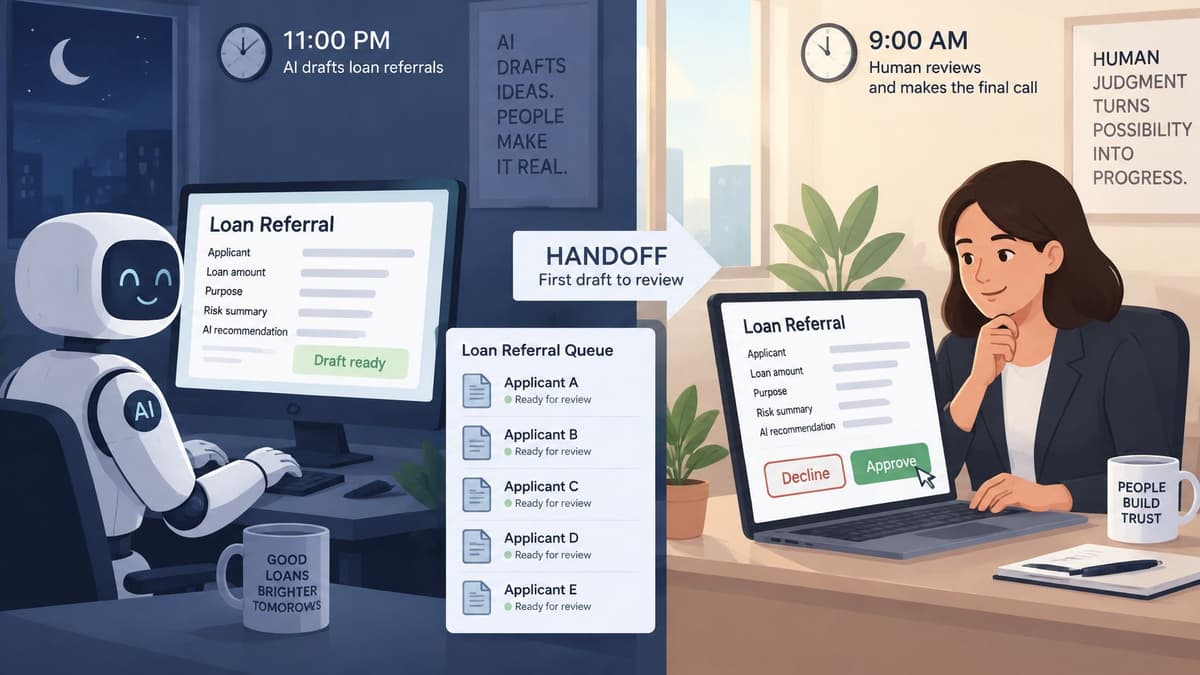
Confusion usually starts because three different models get called human oversight. The difference is timing. Does the person act before, during or never?
Three levels of AI automation compared
| Model | Who acts | Typical example | Best for |
|---|---|---|---|
| Human in the loop | AI proposes, a person approves or edits before action | Loan referral or refund approval | Consequential or ambiguous decisions |
| Human on the loop | AI acts, a person monitors and can intervene | Automated chat replies with a supervisor dashboard | High volume, low individual stakes |
| Fully autonomous | AI acts with no routine human check | Spam filtering or autocorrect | Low-risk, easily reversed actions |
This is already the mainstream approach in the UK. In UK Government research published in 2025, the UK Government AI adoption research found 84% of AI-using businesses reported that people provided at least some input or checked AI-generated outputs or decisions, while approximately 67% reported significant human input or checking. Only 2% said that no human input or checking was applied.
Can a person stop this output before it reaches a customer, an employee or a record? If yes, you've got a human in the loop. If not, you've got monitoring at best.
Deciding When Human Review Is Worth the Cost
Review isn't free. Every check costs staff time and slows the answer, so you need a reason for each one. Five criteria tell you how much review a process needs.
- Error severity: What happens if the AI is wrong? A typo in an internal summary differs from a wrongly declined application.
- Vulnerability of the people affected: Children, patients, people in debt or applicants for essential services need stronger protection.
- Data sensitivity: Outputs using health, financial or other personal data carry higher risk if they're wrong or exposed.
- Response-time target: A live chat answer can't wait two hours for approval. A monthly compliance report can.
- Reversibility: Can you undo the action quickly and completely? If not, check before it happens.
Matching the model to the risk
Review models matched to risk and volume
| Review model | How it works | Suits | Watch for |
|---|---|---|---|
| Every output checked | A human reviews all outputs before release | Low volume, high severity, legal effect | Queue bottlenecks and reviewer fatigue |
| Risk-based sampling | Review is triggered by a risk score plus a random audit | Medium volume, mixed severity | Errors missed in unsampled cases |
| Exception-only escalation | AI acts unless confidence is low or a rule is triggered | High volume, reversible actions | Overconfident outputs that pass unflagged |
| Specialist approval | A named expert signs off defined categories | Regulated decisions and novel cases | Slow queues if the scope is too broad |
Sometimes review isn't a choice. Under UK GDPR, people subject to solely automated decisions with legal or similarly significant effects have safeguards that include the right to obtain human intervention, express a point of view and contest the decision. If your system makes that kind of decision, you need a person who can reconsider it, not a form that repeats the original answer.
Trust adds another wrinkle. In a 2026 UK survey covered by EY's UK AI adoption, trust and governance newsroom report, 70% agreed that human oversight is necessary, yet only 43% trusted companies to manage AI-related data effectively. Separate UK pension research in the same report found 53% of respondents lacked confidence in AI-generated information, while 69% were comfortable, or could become comfortable, with AI supporting pension decisions if a human remained responsible for the final outcome.
Read those figures carefully. A named human clearly reassures people. Reassurance is not the same as accuracy. If reviewers wave outputs through, you've paid for comfort without reducing risk. Reserve scarce reviewer time for cases where a person can spot an error, apply judgement or protect someone vulnerable.
Working out the real workload
Do the arithmetic before launch. Say a support team handles 10,000 tickets a month. You class 5% as high risk and review all of them. That's 500 reviews. You also sample 10% of the remaining 9,500, which adds 950. Your total is 1,450 reviews.
At three minutes each, that's about 72 hours a month, or roughly 3.5 hours per working day. Now run your own numbers. Multiply monthly volume by the share you'll review, multiply by minutes per review, then divide by 60. If the result is more hours than your reviewers have, your design will fail, however sensible it looks on paper.
How a Human-in-the-Loop Workflow Runs, Step by Step
A good workflow makes the right action easy and the lazy action visible. These six steps cover most human in the loop AI systems, whether the AI drafts emails, classifies documents or recommends a decision. The diagram below shows the basic flow.
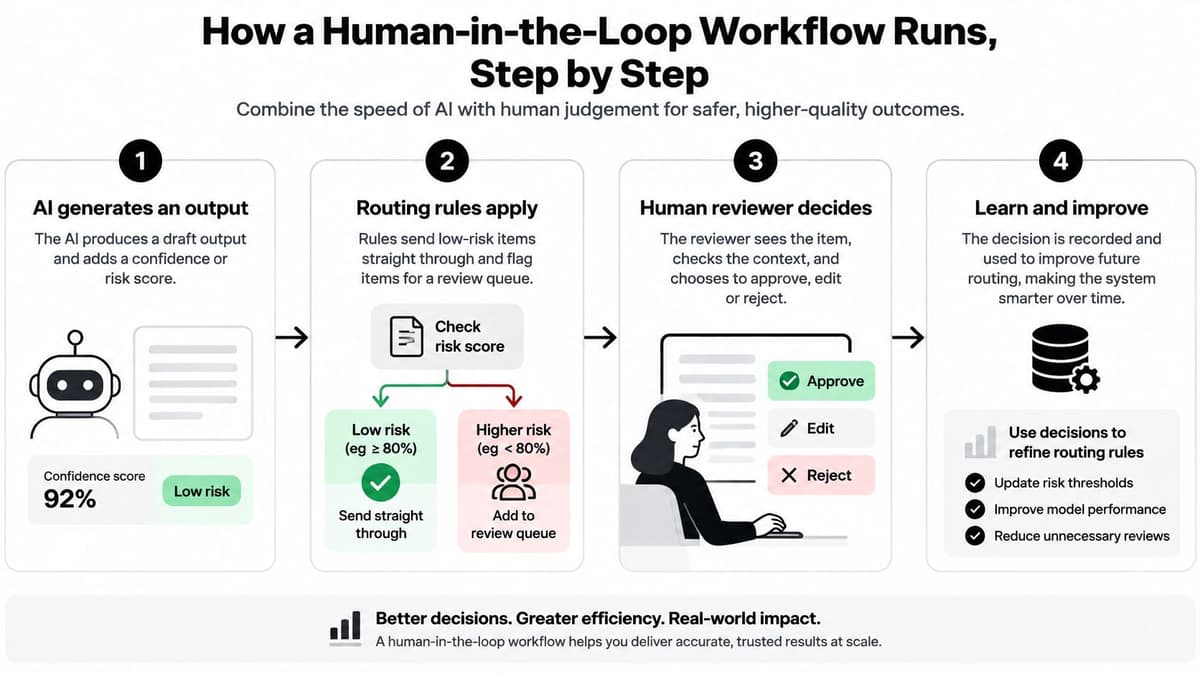
- The AI generates an output and attaches a confidence or risk score. The score gives you a first signal about uncertainty. It isn't proof the output's right, so treat it as a routing aid, not a verdict.
- Routing rules decide the path. Low-risk, high-confidence items may go straight through. Flagged items enter a review queue. Rules can also send certain categories, such as complaints or large payments, to a person every time.
- The reviewer sees the output, the source evidence and the available decisions. Here, most systems slip. If reviewers see only a polished answer, they can't check it. Show the customer message, the policy extract, the transaction history or whichever evidence the AI used.
- The reviewer approves, edits or rejects and records a reason code. Reason codes turn individual judgement into usable data. Use short options such as wrong fact, wrong tone, missing evidence or policy exception.
- The system logs the reviewer's name, the time and any change made. That log proves who decided what. It also helps you answer a customer, auditor or manager who asks why an action happened.
- Corrections feed back into prompts, rules or training data. A weekly audit samples approved items, including ones nobody flagged. Without that check, you won't know whether your routing rules are missing a whole class of error.
Practical rule: If the reviewer can't see the evidence behind an answer, approval is a formality.
The video below walks through how approval points fit into an agent workflow in practice.
When you're designing the mechanics, a guide to building AI agents with approval steps can help you place checkpoints at the actions that matter, rather than only at the end of a chain. A working system clears its queue within the target time, tracks its override rate, and lets you trace every sensitive decision to a named person and a recorded reason.
Who Reviews, Labels and Owns the Output
Suppose three people can approve a refund, and none of them owns the rule that sends a case into the queue. The morning's work still gets done. The control does not. Reviewers handle today's items. Someone else has to decide which cases enter that queue, how much error is acceptable, and when the rules change. A person in the loop is a cost. That cost cuts risk only when the person can change what happens next, not merely nod at what the model already did.
Roles in a human-in-the-loop system
| Role | Core job | What they need | Typical output |
|---|---|---|---|
| Reviewer | Approves, edits or rejects AI outputs | Domain knowledge and authority to override | Daily decisions logged with reason codes |
| Annotator | Labels examples to train or test a model | Clear labelling guidelines | Labelled batches with agreement checks |
| Escalation specialist | Decides uncertain or high-impact cases | Senior judgement and policy knowledge | Resolved exception queue |
| Quality auditor | Samples approved outputs and measures error rates | Statistical sampling and independence from reviewers | Scheduled audit report |
| Process owner | Accountable for thresholds and error correction | Authority to change routing rules | Monthly review of override and error metrics |
Read the rows as a split of authority, the way a kitchen splits the line cook from the person who writes the recipe. A reviewer can override one draft and still cannot fix a bad threshold. That sits with the process owner. An escalation specialist takes the rare, high-impact case. A quality auditor samples work reviewers already approved, and stays independent of them, so the sample is not marking its own homework. If those jobs collapse into one tired person, you are paying for a feeling of safety.
Annotators shape the system before it goes live. They label examples the model learns from or is tested against. When two annotators read the same guideline and mark the same example differently, the model receives mixed signals and later answers inconsistently. Written guidelines, worked examples and agreement checks stop private opinions from becoming training data. They work like a shared recipe: two cooks season the same dish the same way because the standard is written down, not left in someone's head.
What large-scale review actually feels like
AI.GOV.UK insights on the DWP consultation-analysis tool describe a UK government evaluation that assessed more than 85,000 consultation responses with 125 reviewers, left the AI's suggested themes unchanged for 73% of responses, and took about 19 seconds per review.
That pattern is assistive compression. The model does repetitive sorting, so people spend their time on correction and sign-off. Sign-off was still hard mental work. A faster first pass moved the difficult part. It did not remove it.
Measure more than speed. Track reviewer fatigue, disagreement between reviewers, correction rates, and sampling coverage. Sample across categories, require a person for novel or sensitive themes, and compare results from time to time with independently coded human baselines. A fast queue staffed by tired reviewers is a cost you are paying without knowing whether risk has fallen.
Real Examples From Support, Moderation and Training Data
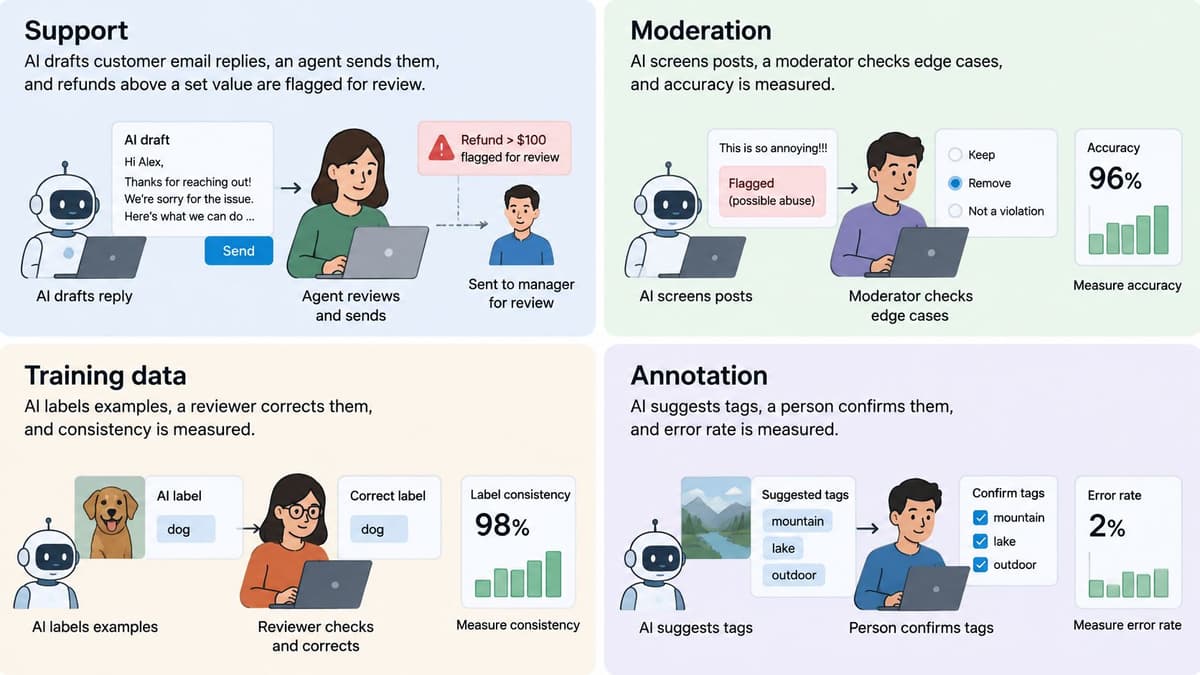
The pattern changes with the work, but each example needs the same three things. Name what the AI does, what triggers a human check, and which metric proves the check works.
Customer support
The AI drafts replies to customer emails and an agent edits and sends them. Set clear thresholds. Refunds above a value your finance team chooses need approval, and any message mentioning legal action, harm or a regulator goes to a specialist. Measure edit rate, escalation rate and reopened tickets. If agents almost never edit drafts but reopened tickets rise, review isn't catching poor answers. For a fuller support design, see how AI works in customer support workflows.
Content moderation
The AI flags posts that may break your policy. Humans decide borderline cases, because context, satire and quoted speech are easy to misread. Give users an appeal route and measure appeal reversal rate. A rising reversal rate tells you the first decision, human or AI, is getting a category wrong.
Training data
Annotators label examples under written guidelines. A second annotator checks disagreements, and a senior reviewer settles recurring disputes by updating the guidelines. Mix in gold-standard items with known answers to test annotator quality without warning. Measure agreement between annotators and accuracy on those gold items. Low agreement usually means the guidelines are unclear, not that annotators are careless.
Financial services
Finance shows why semi-autonomous designs are common. The Bank of England report on artificial intelligence in UK financial services in 2024 found 55% of AI use cases reported by UK financial-services firms involved some degree of automated decision-making, and 24% of those were semi-autonomous and designed to involve human oversight for critical or ambiguous decisions. The trigger is the critical or ambiguous case. The metric is whether reviewers overturn or amend those cases at a rate that shows they're exercising judgement.
Pitfalls That Make Human Review Ineffective
Adding a person doesn't automatically make a system safe. These six failures turn real oversight into nominal oversight, where someone is present but control is missing.
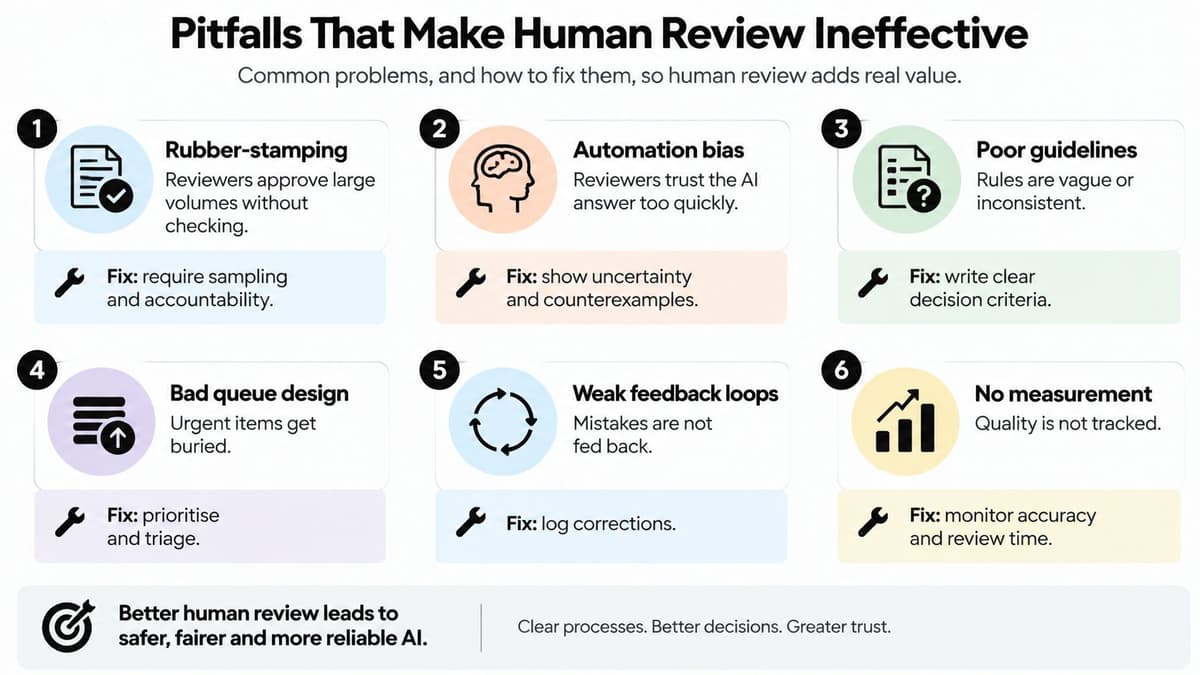
- Rubber-stamping: Reviewers approve large volumes without checking. The warning sign is an approval rate near 100% with very short decision times. Fix it by cutting queue volume, requiring reason codes and auditing approved items.
- Automation bias: Reviewers accept the AI's answer because it looks confident and well written. Watch for a falling override rate even though audited error rates haven't fallen. Fix it by showing uncertainty, evidence and plausible alternatives, not just the answer.
- Reviewer fatigue: Accuracy drops across long shifts of repetitive decisions. Identical decision times for easy and hard cases are another warning sign. Fix it with shorter review blocks, breaks, varied work and realistic daily limits.
- No authority to override: The reviewer can comment but can't change the outcome. You'll see concerns recorded while the original action still goes ahead. Fix it by giving reviewers a real reject and escalate option, and protect them when they use it.
- Missing audit trails: Nobody can show who approved what, when, or on what evidence. Fix it by logging reviewer identity, time, changes and reason codes from day one. This also supports the controls described in our guidance on AI agent security.
- Review added informally after launch: Someone starts checking outputs because they're worried, but thresholds are never written down or revisited. Fix it by naming a process owner and reviewing the rules on a fixed schedule.
A reviewer who can't say no isn't a control. They're a witness.
Review override rates, escalation rates and error detection monthly. When the numbers move, change the thresholds. A model change, a new customer group or a seasonal surge can all make last quarter's safe setting wrong today.
Confirm Your Review Design Before You Launch
A refund and a reply that mentions legal action are both ready to send. A reviewer is on the rota. They reduce risk only if you know which message must wait, how many minutes that wait may cost, and whether they can stop the send. Otherwise the review mostly makes the launch feel safer.
Use this checklist before any human in the loop AI system goes live. If you can't answer an item in writing, treat it as unfinished.
- Consequential outputs: List which outputs need approval before they take effect, such as refunds above a set value or any message mentioning legal action.
- Risk threshold: State the score or rule that sends a case to a human, in plain language a process owner can explain.
- Reviewer time: Set how many minutes each reviewer gets per decision and check that figure against expected volume.
- Evidence: Confirm the reviewer sees the source material behind each output, not just the AI's answer.
- Logging: Confirm the system records the reviewer's name, the time, any change made and a reason code.
- Threshold ownership: Name the process owner who can change thresholds after launch, and set how often they'll review override and error metrics.
A custom agent earns its place by working as an extra team member. The custom AI support agent answers email, replies to user messages, and triages issues. That extra capacity helps only when ambiguous or high-consequence cases still reach your reviewers with the relevant context attached, inside the minutes you just set.
Before you go live, write down the review model chosen for each workflow, run it on a sample of real cases from the last month, and record every point where reviewers disagreed with the AI. Fix the guidelines and thresholds those disagreements reveal.
If you're planning an AI agent or support workflow, Digital Souls Studios LTD builds custom AI agents and support automation that answer routine queries and triage issues. Visit the studio to discuss your workflow and the review capacity you have.