5th November 2026 · 17 min
AI in Customer Support: Where It Works and Where It Fails

A 2026 survey of 1,000 UK consumers found that six in ten described AI customer service as frustrating, while 42% said they often or always had to repeat themselves when transferred from an AI agent to a human, compared with 36% in the US and 29% in Germany, according to CMO Tech UK.
That gap reframes AI in customer support. A tidy answer to a common question is the easy part. The journey breaks when context dies at the handover, or when the customer never trusted the software to decide.
Picture a reception desk. The system can greet someone, sort the reason for contact, and answer questions you've already written down. It shouldn't approve an exception unless a written rule says it can.
What follows is the working sequence: where that desk belongs, what it changes for agents, how a case should reach a person, how trust shifts with the stakes, which numbers to watch, and how to connect it to the helpdesk you already run.
Table of Contents
- Where AI Fits in Customer Support
- What AI Does to Agent Productivity
- Designing the Handover to a Human
- Disclosure and Trust by Customer Type
- Measuring ROI and Support Metrics
- How to Integrate AI With Your Helpdesk
- Case Studies From UK Deployments
- Choosing Your First AI Support Step
Where AI Fits in Customer Support
The UK Government's 2025 AI Adoption Survey found that 16% of UK businesses were using at least one AI technology, a further 5% planned to adopt one, and the rest reported neither current use nor plans to start. That figure counts AI of every kind, from forecasting to fraud checks, so read it as a baseline for how early the market still is rather than a census of support chatbots. Most startups, SMEs and mid-market teams sit in that early group. They have the volume to justify triage and FAQ handling, and they often lack the mature helpdesk stack a bot needs to do anything useful.
A support bot works like a hospital triage desk. Sorting is cheap and fast. Diagnosis is not. AI in customer support is software that reads a customer message and does one of five jobs: answering, routing, assisting an agent, summarising a case, or taking an action. It greets, sorts and clears the simple queue. A person still owns the exception.
Five jobs and their limits
| Use case | What the AI does | Human role | Main limit |
|---|---|---|---|
| Answering routine questions | Replies from the knowledge base on order status, returns and opening hours | Writes and maintains source articles | Fails on unusual or account-specific cases |
| Triage and routing | Reads the message, tags intent and priority, sends it to the right queue | Reviews misroutes and tunes categories | Misroutes ambiguous or multi-issue messages |
| Agent assist | Retrieves policy, suggests replies and surfaces account history | Approves or edits each suggestion | Quality depends on how current the knowledge base is |
| Case summarisation | Writes a summary and suggested disposition when a case closes | Checks accuracy before the record is saved | Misses facts that were never said in the conversation |
| Automated actions | Changes an address, rebooks or issues a refund within set limits | Approves exceptions above the limit | Needs permissions, rules and an audit trail |
Take a clothing shop handling a few hundred "where is my order" emails a week. The answering job looks up tracking and replies. The same shop should not let the action job refund a damaged item above a set amount without a person looking at it. The dividing line is not how confident the model sounds. It is whether the customer's next step is reversible.
Integration, not the greeting, determines whether any of this succeeds when interacting with real customers. The bot requires a current returns article, a stable field for order status, and queue names that align with how the team works. If the help centre says "contact us" and orders live in a spreadsheet, the first two rows of that table collapse in production even when the demo sounded fluent.
Governance comes down to three things: a named owner for the articles, a log of every change the bot made, and a weekly review of misroutes. Remove the owner and the desk keeps quoting last season's policy for months. Judge the tool on customer records, escalation behaviour and an outcome you can count. Fluency in conversation tells you almost nothing about whether the handover to a person will hold.
What AI Does to Agent Productivity
A UK Government Digital and Data Benefits Framework cites evidence that AI assistance increased customer-support agents' throughput by 14%, measured as inquiries handled per hour, while chat-resolution rates improved by 1.3%. Don't take the average at face value. Lower-skilled workers achieved a 34% productivity increase, whereas higher-skilled workers saw minimal improvement.
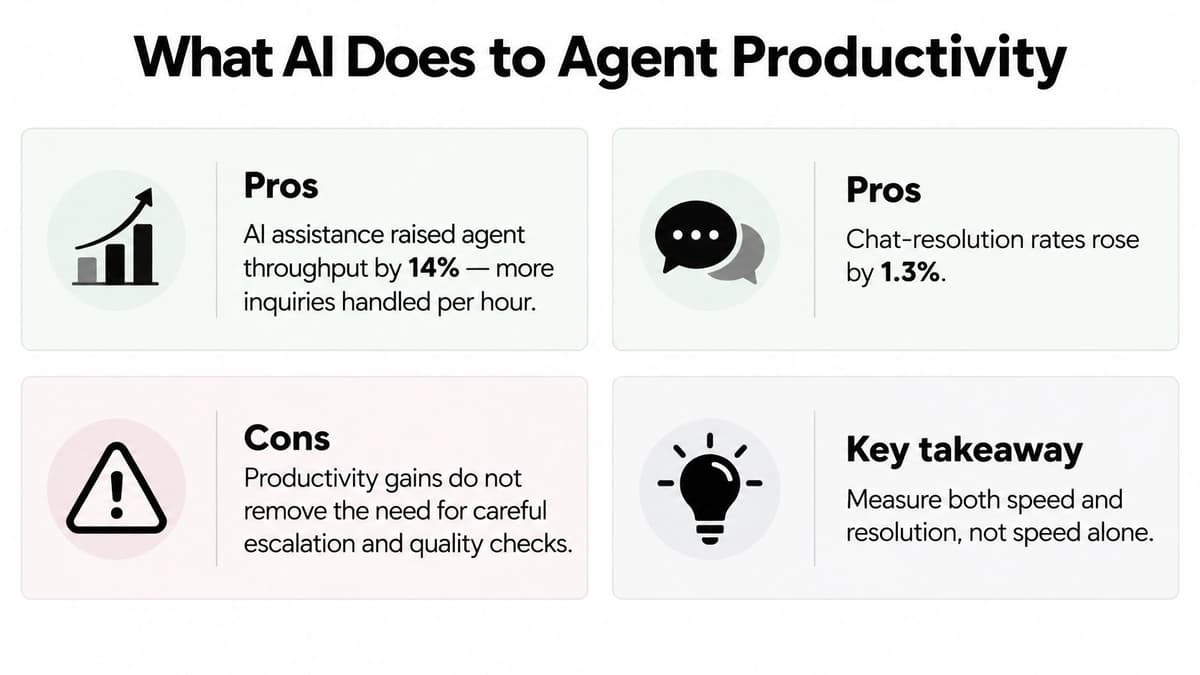
The useful model is agent augmentation. Retrieval pulls the policy or product answer. Suggested replies sit in the composer for the agent to edit. A summary lands on the case when it closes. Classification tags the intent so the right queue sees it. The agent still decides on anything complex or sensitive.
Who actually speeds up
Say you run a team of 20, and eight people joined this year. Give the newer agents step-by-step workflow prompts: which article to open, which fields to confirm, and when to stop. The experienced agents don't need that script. They need fast search and less admin, because they already know the policy. One interface for everyone will make the average look modest, and you'll miss that the new starters carried the gain.
The same framework reports a potential annual UK public-sector benefit of up to £1 billion from automating customer-service-related tasks. That's a potential benefit, not a saving you can paste into a business case.
Split results by agent experience before you decide whether the tool earned its place.
Track inquiries per paid support hour, chat-resolution rate, escalation accuracy, rework, and satisfaction, each cut by experience. A single team-wide lift will flatter a rollout that only helped novices, or hide one that slowed your best people with extra clicks.
Speed without a quality check is how bad replies scale. A suggested answer that quotes an expired returns window gets sent more often, not less, if newer agents trust the prompt. Review a sample of accepted suggestions each week, and turn off any prompt that agents accept without editing on sensitive topics. For a wider look at where scripted assistants help and stall, see the benefits of chatbots.
Designing the Handover to a Human
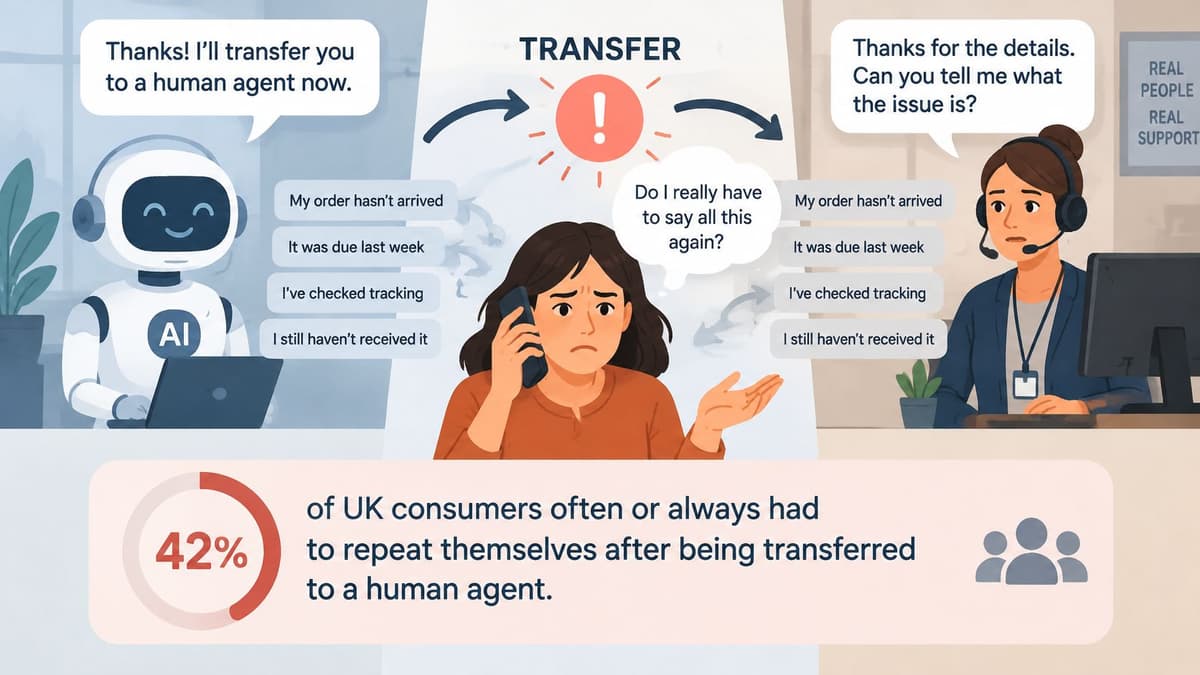
A bot can answer every question correctly and still lose the customer at the door of the human queue. Ecommerce News reports UK consumer research in which trust in AI issue resolution was 55% across the surveyed markets when a human option was available, against 26% when no human option was offered. Closing the human door can trim staffing for a short spell and then raise repeat contacts.
The handover works like a relay baton pass. Whatever the first runner knows has to arrive in the second runner's hand, or the race starts again.
What must travel with the case
Pass verified case attributes, not a raw transcript the agent has to skim under pressure.
- Account identifier: The customer shouldn't retype it.
- Issue category: The queue the case belongs in.
- Attempted remedies: What the bot already tried.
- Consent status: What the customer agreed the bot could see.
When to hand over
| Trigger | Example | Action |
|---|---|---|
| Customer asks for a person | Can I speak to someone? | Transfer immediately without further bot questions |
| Low confidence | Answer score below the set threshold | Ask one clarifying question, then offer a human |
| Repeated failure | Two unresolved attempts on the same issue | Transfer with the attempted fixes attached |
| Negative sentiment | Repeated anger or a threat to cancel | Route to a senior or retention agent |
| High-risk topic | Financial hardship, health, identity or safeguarding | Route to a human at once, with no bot decisions |
| Payment or policy dispute | Refund above the limit set for automation | Route for approval with a case summary |
Say a customer wants a refund above the limit you set for automation. The bot collects the order number and the fix already tried, writes those into the case, and transfers. The agent reads the summary and approves or refuses. They don't open with "what's your order number?"
Why a transcript is not memory
An unstructured transcript buries the one fact that matters. The agent scrolls, misses the order number in message four, and asks again. Structured fields force the bot to confirm those facts before it leaves, which is why the field list matters more than the wording of the summary. If a field is empty, the transfer note should say it's unknown, not invent it. A note that guesses is worse than a note that admits a gap, because the agent will act on it without checking.
After launch, track time-to-human, repeat-explanation rate, policy-violation rate, and satisfaction split between bot-only and assisted journeys. Containment on its own is a vanity number. A contained chat that the customer reopens tomorrow wasn't resolved. Keep the human route visible the whole way through the conversation, so the customer never has to guess whether an exit exists.
Disclosure and Trust by Customer Type
A 2026 UK study reported by Digitalisation World found that 76% of consumers considered it very or extremely important for businesses to disclose AI use. Separate UK research in that reporting found that only 21% trusted AI in retail, just 30% trusted it with customer-service tasks such as delivery updates or order problems, and only 11% trusted it to place orders on their behalf. People are more comfortable with AI as a research or support tool than as a decision-maker.
Disclosure isn't a footer checkbox. It changes whether the customer stays in the chat, and the right amount of automation depends on what's at stake.
Match the AI to the stakes
| Journey | AI role | Human option | Disclosure timing |
|---|---|---|---|
| Order status and tracking | Answers and looks up the order | Available on request | At the first message |
| Returns within policy | Completes the return and confirms it | Available at any step | At the first message |
| Billing disputes | Gathers facts and states its limits, cannot decide | Required before any resolution | Stated plainly before the first question |
| Complaints and cancellations | Logs the case and routes it | Offered immediately | Stated plainly at the first message |
| Health, financial hardship or identity | Routes only, makes no decisions | Immediate, with no queue | Stated before any question is asked |
A line that works at first contact: "You're chatting with an AI assistant, and you can ask for a person at any time."
Tracking can run on its own, with a person one tap away. A billing dispute should let the bot collect the invoice reference and then stop, and it should say it can't decide the outcome. Health, financial hardship, and identity concerns shouldn't wait behind a clarification loop. The bot's job there is to route, not to advise.
Who to test beyond the average user
- Older or less digitally confident customers: Check that the human route is obvious without hunting through menus.
- Complaints and cancellations: These customers are already leaving. A bot that argues policy will make that faster.
Keep data collection small, offer the transcript, and test with accessibility tools, not only with your own staff. Limits on what the system can decide should be visible, not buried in a policy page. AI should assist customers without becoming the only channel. For the security side of letting a bot see account data, read our guide to AI agent security.
Measuring ROI and Support Metrics
Pair every speed figure with a quality figure. One headline will lie to you.
| Metric | Formula | Why it matters | Watch for |
|---|---|---|---|
| Inquiries per paid agent hour | Inquiries handled divided by paid agent hours | Throughput against your baseline | Split by agent experience |
| Chat resolution rate | Resolved chats divided by total chats | Outcome rather than deflection | Confirm resolution with a follow-up check |
| Containment rate by issue | Bot-only resolutions divided by bot-started contacts | Automation coverage for each intent | Pair with repeat-contact rate |
| Repeat-explanation rate | Transfers where the customer repeats details divided by all transfers | Handover quality directly | Sample transcripts each week |
| Time to human | Seconds from the request for a person to agent pickup | Trust and customer effort | Set a ceiling for each queue |
| Satisfaction by journey | Satisfaction scores split into bot-only and assisted journeys | Separates each path | Track useful and satisfied scores separately |
| Cost per resolved contact | Total support cost, including platform and usage fees, divided by resolved contacts | ROI against the baseline | Include third-party agent subscriptions and usage |
The Inside GOV.UK blog records two public pilots of GOV.UK Chat over 18 months: more than 10,000 users submitted 26,000 questions on tax, benefits, and visas. Among app users surveyed, 73% found it useful and 64% were satisfied, a 9 percentage point gap. Useful isn't the same as satisfied.
Cost per resolved contact includes platform fees and third-party usage, set against the same weeks before launch. A deflected ticket that comes back isn't a saving. Take a baseline of at least four weeks, split by experience and issue type, before you expand.
How to Integrate AI With Your Helpdesk
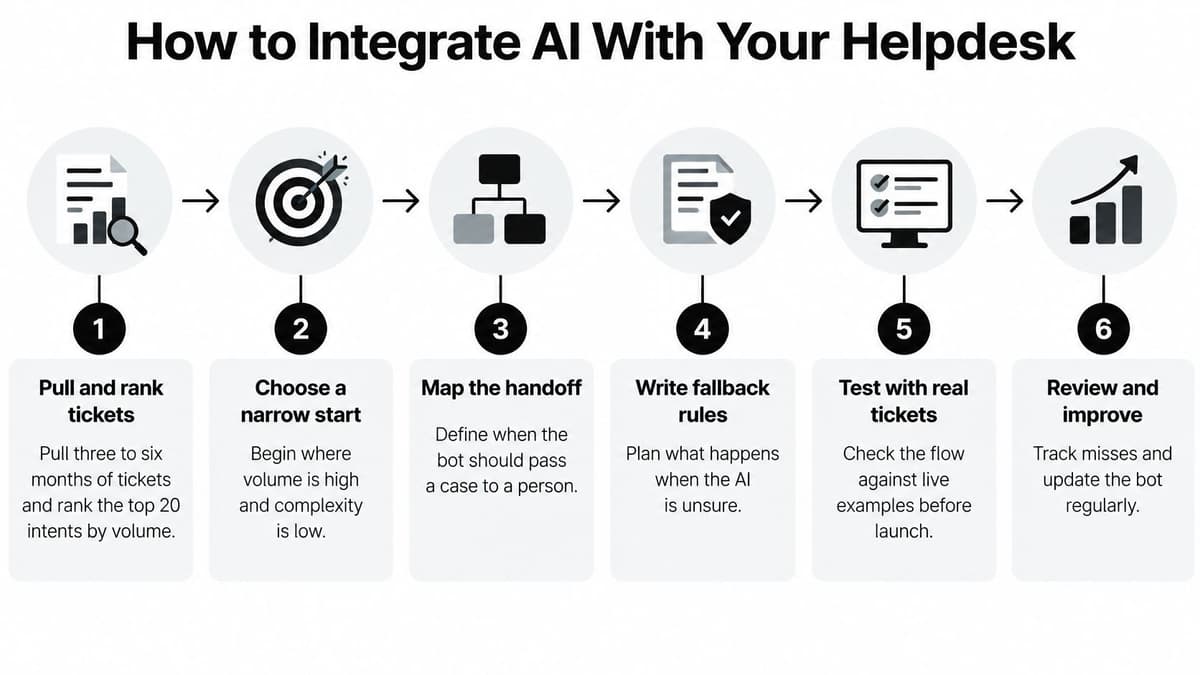
Wire the bot to the desk you have, whether that's Zendesk, Freshdesk, Gorgias, or a shared inbox. Map intents to tags the team already uses, so agents don't learn a second taxonomy.
- Pull and rank real tickets. Export three to six months of tickets and rank the top 20 intents by volume. A bot built on guessed intents misroutes from day one, because your real language rarely matches the workshop list.
- Connect read-only data first. Link the knowledge base, orders, and account data through documented APIs, with read access only. Confirm with your privacy lead that this use sits inside your privacy notice, and limit fields to what each intent needs. The slip is letting the bot write to billing before reads are tested.
- Define the handover fields. Account identifier, issue category, attempted fixes, and consent status should be required on every transfer. The slip is passing a free-text transcript and calling that context.
- Set rules by intent. Give tracking a looser confidence bar than billing. One global threshold over-escalates simple status checks and under-escalates payment disputes.
- Pilot one channel. Run web chat or email for two to four weeks, with a person reviewing a sample of conversations each day. The slip is judging the pilot on containment alone.
- Retrain what fails. Each week, read misroutes and cases where the customer repeated themselves, and fix those intents before you add new ones.
Readiness check
Take a sample of transfers before you call it live. Each one should reach an agent with the summary and the attributes attached, and the agent shouldn't need to ask for them again. If the sample fails that test, don't add a second channel. Fix the fields, then retest the same intents.
For how several agents and tools can share one case without stepping on each other, see our notes on AI agent orchestration.
Case Studies From UK Deployments
The GOV.UK Chat pilot blog gives one useful check. People used the assistant to work through multi-step questions about tax, benefits and visas, rather than only fetching a branded FAQ. The pilot team put usefulness ahead of satisfaction. Read that gap as a prompt to review clarity and the handoff. It is not proof that one score wins. Design for questions that take two or three steps, and show the exit to a person before the customer is stuck.
That point matters because the handover is where the journey either holds or breaks. A delivery-date question needs a clear route to an agent. A benefits or visa question needs the customer to understand when the bot is unsure and how a person takes over. Trust changes by journey type. A fast answer on a low-risk status check feels helpful. The same speed on a sensitive case feels evasive if the bot hides its limits.
What operations teams should copy
The UK Government Digital and Data Benefits Framework describes a second pattern. When a tool supports agents rather than replacing them, the gain sits with less experienced agents while experienced agents barely move. An average across the team would hide who benefited. Before you roll a tool out to a team of 20, split the baseline by tenure. Train newer agents on the workflow prompts. Give senior agents faster retrieval and less after-call writing. Do not buy one training course for both groups and expect the same result.
Neither pattern is universal. Each depends on how current the knowledge base is, whether the handover carries structured fields, and how long you measure before you call it. Thin articles will not reproduce a public-information pilot. Seniors who already work quickly will not produce a team-wide speed jump. Use the patterns to stress-test your own baseline.
Choosing Your First AI Support Step
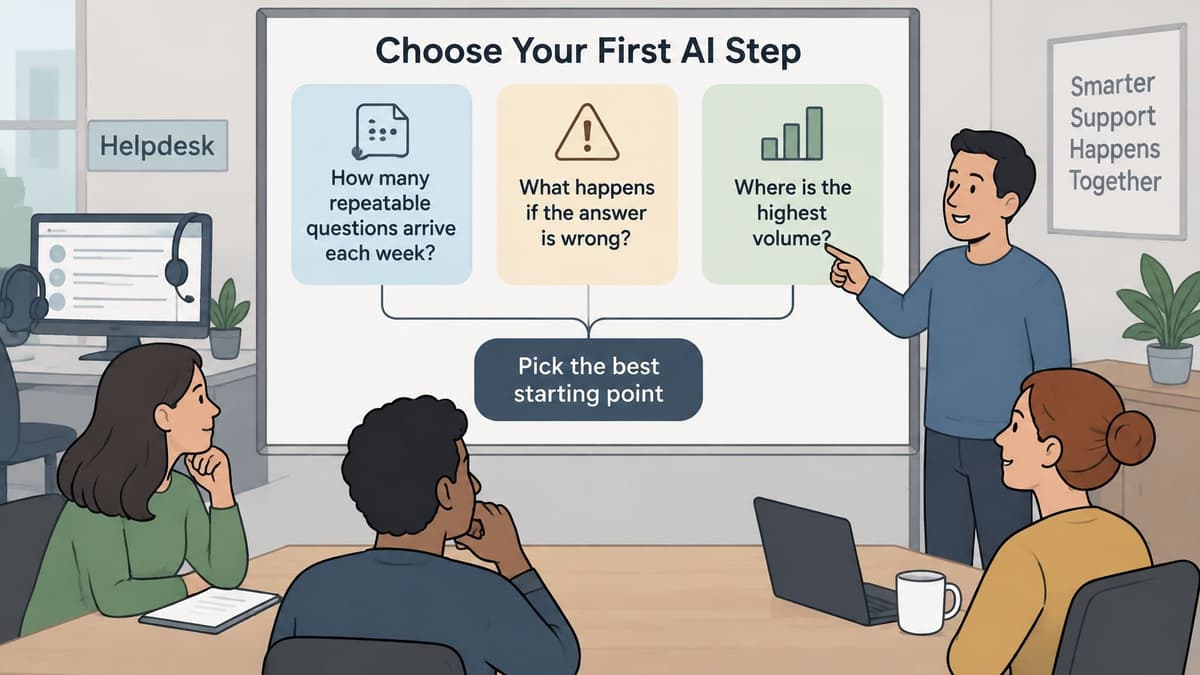
Three questions decide the first step in AI in customer support.
How many repeatable questions arrive each week? If tracking and returns dominate the inbox, you've got a candidate. If every contact is a one-off complaint, you don't.
What does a wrong answer cost? A wrong delivery date is annoying. A wrong refund, a wrong identity check, or advice on a health or hardship case is a complaint or a regulatory problem. Start where the cost of a miss is low.
Is the answer in clean data? If order status lives in one system with a stable field, the bot can read it. If the answer is in someone's head, write the article before you automate the reply.
Pick one high-volume, low-risk intent. Write its handover rule: when confidence drops, when the customer asks for a person, and when the amount exceeds the limit. Record the baseline for at least four weeks before you switch it on.
We're Digital Souls Studios LTD, a London software studio, and we build AI support agents and automation for UK and international teams. Our custom AI support agent is a one-off £3,000 build that answers email, replies to user messages, and triages issues. A project moves through four stages: Specification, Production, Launch and Support. You can run the three-question test with us or on your own.
The short video below shows how a support assistant sits beside a human queue, rather than replacing it.
Digital Souls Studios LTD designs and builds custom AI support agents that answer email, reply to user messages, and triage issues, with a clear handover to your team. If you want that first high-volume intent scoped, built, and launched as a one-off project, visit Digital Souls Studios LTD and tell us which queue you want to start with.