28th October 2026 · 15 min
How Does Search Engine Optimisation Work? a Plain Guide

A Bristol bakery owner has a solid website, but when neighbours search for sourdough, her shop doesn't appear. She's not looking for an advert. She wants the right people to find a useful page about her bread, understand what she offers and choose whether to visit.
Search engine optimisation, or SEO, improves the odds that a page appears for relevant searches. It can't guarantee a particular position. Think of a search engine as a library: a book can help someone only if it's on the shelf, catalogued under the right subject and recognised as useful for their question.
SEO doesn't buy a ranking. It removes the reasons a page can't be found, understood or trusted.
The audience is substantial beyond any one search engine. Ofcom's Online Nation 2024 report found that Google Search was visited by 83% of UK online adults in May 2024, while Microsoft Bing reached 39%. Good SEO therefore considers accessibility across devices and search engines, not just how a page looks on a desktop or performs on Google.
The process is a chain of hand-offs: discovery, crawling, rendering, indexing, ranking and display. A fault at any stage can prevent a page from appearing as intended. Once you understand that pipeline, it becomes easier to see what ranking signals matter, which on-page elements you can improve, how technical performance fits in, how to match content to searches, what SEO can't promise and which fix to start with.
Table of Contents
- The Six Stages Behind Every Ranking
- Ranking Signals and What Search Engines Weigh
- On-Page SEO Elements Every Page Needs
- Technical SEO and Core Web Vitals Thresholds
- Content Strategy Matched to Search Intent
- Common SEO Misconceptions and What Is True
- Choose Your First SEO Fix This Week
The Six Stages Behind Every Ranking
A page doesn't jump directly from publication to a prominent search result. Search engines process it through distinct stages, and success at one stage doesn't guarantee success at the next.
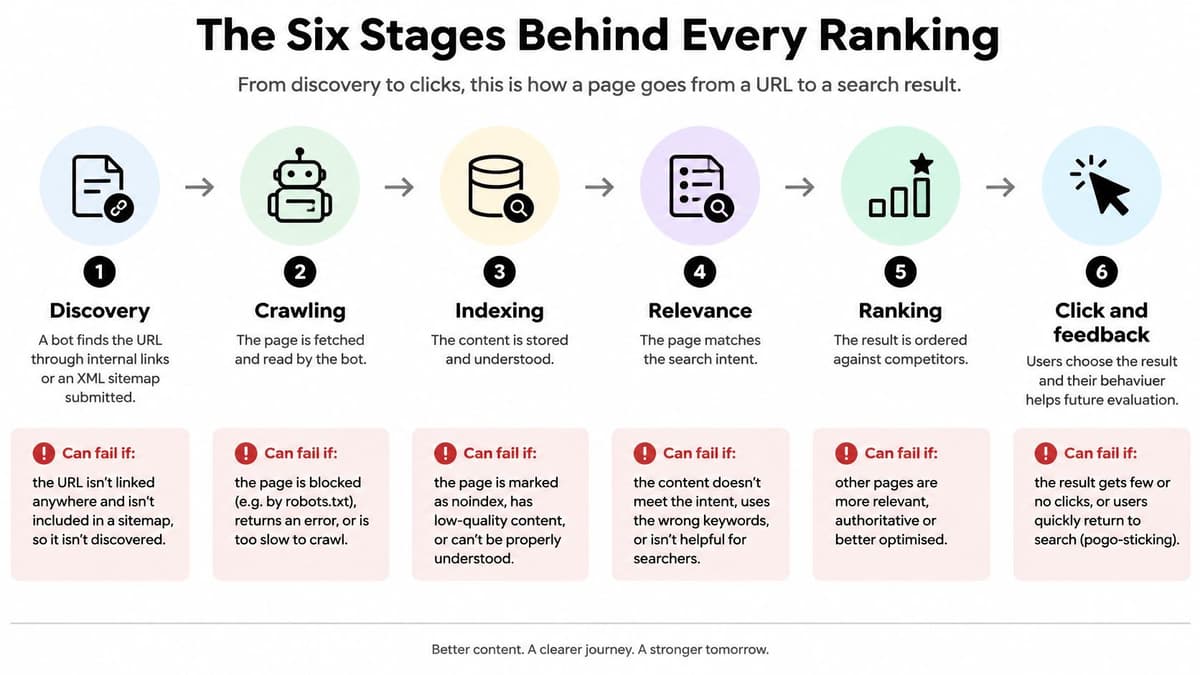
- Discovery. A search engine finds a URL through links from other pages or an XML sitemap submitted in Google Search Console. If no page links to a new service page, it may be orphaned and difficult to find.
- Crawling. A search-engine bot requests the page and reads its response, while respecting rules in
robots.txt. A mistaken rule that blocks an important folder can stop the bot from accessing pages there. - Rendering. The engine processes the page as a browser would, including running JavaScript where needed. If the main service details appear only after a script runs and that script fails, the engine may not see the content as intended.
- Indexing. The engine analyses the page and may store it in its index, considering factors such as its subject, language and relationship to similar pages. A
noindextag accidentally left on a live page can tell search engines not to include it. - Ranking. For a particular query, the engine orders eligible pages against other candidates. A brief page with little detail may struggle against a thorough guide that better answers the same question.
- Display. The engine presents a result, often using a title and snippet drawn from the page. A vague, generic title can make a useful page less appealing to searchers.
Find the failed hand-off
These stages are separate. A page may be crawled but not indexed, or indexed but not ranked prominently. For example, a new service page might appear in the index yet sit deep in results because its title repeats the homepage title without making clear what the service is or who it's for.
Check Search Console's indexing report first. It can help you identify pages that haven't been indexed and investigate possible causes, such as access rules, duplicate-page handling or content that the search engine hasn't chosen to include. Once you know which hand-off is failing, you can focus your fix instead of rewriting a page that search engines can't reach.
Ranking Signals and What Search Engines Weigh
Search engines don't use one magic signal to decide which result comes first. They interpret a query, compare candidate pages and combine signals to estimate which pages will best serve that particular search.
For a UK business, the scale of general search helps explain why visibility matters. UK government market-outcome data reports that Google Search accounted for more than 90% of annual general-search queries in the UK between January 2018 and December 2024. That makes Google important to many SEO plans, but it doesn't mean every query is judged in the same way or that Bing can be ignored.
| Signal | What it measures | Practical check |
|---|---|---|
| Relevance | How closely the page matches the query's topic and intent | Does the H1 and first paragraph answer the query directly? |
| Content quality | Depth, accuracy and usefulness compared with other results | Would a reader need to open another result to finish the task? |
| Authority | Links from other sites pointing to the page | Count referring domains in a backlink tool and check their relevance |
| Freshness | Whether information is current for time-sensitive searches | Is the date visible and the content updated for the year? |
| Location and language | Local relevance for place-based and market-specific searches | Is there a local address, UK English spelling and sterling pricing where relevant? |
The practical meaning becomes clearer with examples. A page about “sourdough classes Bristol” should explain the classes, not just the history of sourdough. A guide to choosing a boiler may need a careful comparison of options, while a bakery's opening hours should be easy to find and kept current. A link from a relevant local organisation may help establish that a business belongs in a local conversation, but collecting unrelated links won't make a page more useful.
The query changes the weighting. A search for a recent news event calls for current information; a recipe search calls for clear instructions and a useful recipe page. Search engines assess relevance, usefulness, technical access, internal links, authority and user experience together. Page experience has its own technical checks, which are covered below.
On-Page SEO Elements Every Page Needs
On-page SEO is the work you can do directly on a page to make its topic and purpose clearer to search engines and visitors. Review the elements in order, starting with the words likely to shape someone's first impression in search results.
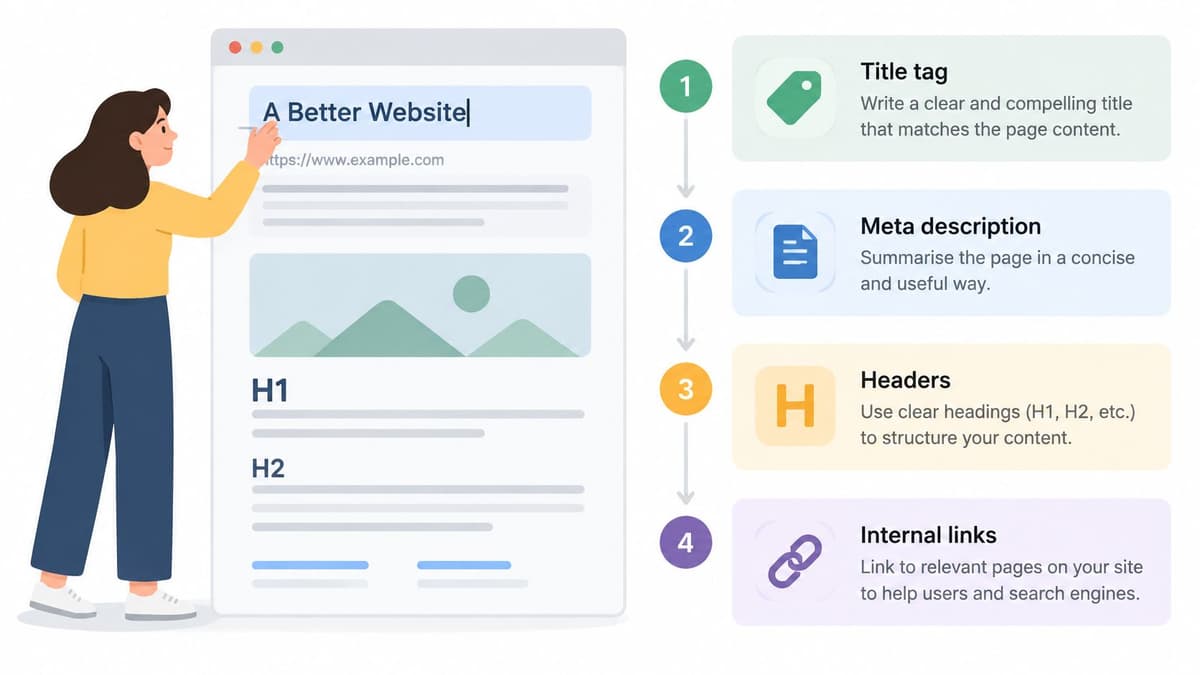
- Title tag. Give each page a distinct title that describes its main subject. Keep it concise, put the main phrase near the start and make sure the title still reads naturally.
- Meta description. Summarise what the page offers and why it's worth visiting. Treat it as a promise the page keeps, rather than a place to cram in search terms.
- One clear H1. Use a main heading that reflects what the reader came to find. A page about sourdough classes shouldn't lead with a broad heading such as “Welcome”.
- Logical H2s. Break the page into sections that cover useful subtopics in an order a person can follow.
- A direct opening. Answer the page's main question early. If the first paragraph is all background, visitors may have to work too hard to confirm they're in the right place.
- A short URL slug. Make the web address readable and relevant to the page.
- Descriptive image details. Use sensible file names and alt text that explains what an image shows. Don't add keywords to alt text if they don't describe the image.
- Helpful internal links. Link to related pages using anchor text that tells readers what they'll find. For example, link “view our delivery information” rather than “click here”.
Make the page clearer, not louder
Say a Bristol ceramics shop has a product page titled “Mugs”. That title doesn't say what makes the mugs distinctive or where the shop is based. Rewriting it as “Handmade Ceramic Mugs in Bristol” names the product and place; a meta description that explains the delivery offer adds a concrete reason to visit. The page still needs accurate product details, useful images and a clear route to purchase.
For a broader look at when a page's layout or content may need more than small edits, read this guide to planning a web page redesign.
Keyword stuffing is a common trap. Repeating the same phrase in headings and paragraphs doesn't make a weak answer strong. Instead, check that the page has a unique title, one useful H1, a direct opening, descriptive sections, an understandable URL, accurate image text and links that help visitors reach related information.
See the on-page SEO walkthrough below for another practical view of how to improve a page.
Technical SEO and Core Web Vitals Thresholds
Technical SEO makes a site reachable, fast and stable. Start with access and configuration before focusing on speed: a beautifully written page won't help if search engines can't access it or the site tells them to ignore it.
Check these foundations on important page templates:
- Robots rules: Make sure
robots.txtdoesn't block important pages or folders. - XML sitemap: Submit a current sitemap in Search Console so search engines can discover the URLs you want them to consider.
- Canonical tags: Point duplicate or very similar pages towards the preferred version.
- Noindex instructions: Keep them on pages you deliberately want excluded, not on live commercial pages by mistake.
- HTTPS and mobile layouts: Use a secure connection and make sure the site is usable on a phone, including navigation, forms and calls to action.
Check real visits, not just lab results
Google's Core Web Vitals documentation defines these as real-user measures of loading performance, interactivity and visual stability. The thresholds below are assessed at the 75th percentile of real visits. Lab tests can help reproduce and diagnose a fault; field data shows how pages perform for people using real devices and connections.
| Metric | What it measures | Good threshold | Main fix |
|---|---|---|---|
| Largest Contentful Paint (LCP) | How quickly the main content loads | 2.5 seconds or less | Serve smaller modern images and prioritise the hero image |
| Interaction to Next Paint (INP) | How quickly the page responds to taps and key presses | 200 milliseconds or less | Split JavaScript bundles and reduce main-thread work |
| Cumulative Layout Shift (CLS) | How much content moves while loading | 0.1 or less | Reserve space for images, embeds and ads |
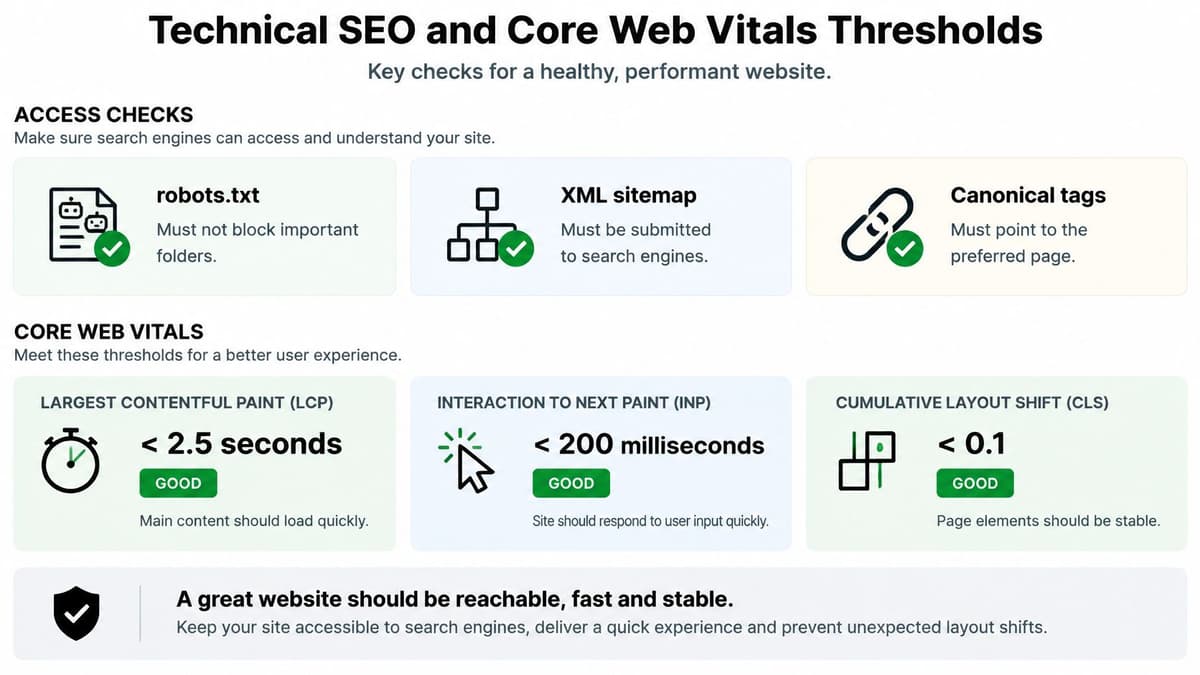
For LCP, resize images for their display area, use modern formats where appropriate, prioritise the main visual and reduce resources that delay it. For INP, split large JavaScript bundles, defer non-essential scripts and reduce work that keeps the main thread busy. For CLS, reserve dimensions for images and embedded content so they don't push text around as they load.
Start with the Core Web Vitals report in Search Console, then test the mobile templates your customers use against field data. A speed score on its own isn't the business outcome: connect changes to organic landing-page visits, enquiries and sales. If performance issues stem from implementation rather than content, this guide to website performance optimisation covers the broader work involved.
Content Strategy Matched to Search Intent
A page should match the kind of answer a searcher wants. A useful guide won't satisfy someone ready to buy, and a product page may frustrate someone who needs an explanation before choosing.
| Intent | Sample query | Page that fits | Common mistake |
|---|---|---|---|
| Informational | how does search engine optimisation work | Guide or explainer | A sales page with no explanation |
| Navigational | brand name plus product name | Homepage or product page | Burying brand pages under blog posts |
| Commercial investigation | best SEO agency for UK startups | Comparison or case-study page | Vague claims with no evidence |
| Transactional | buy handmade ceramic mug Bristol | Category or product page | Slow checkout and missing prices |
Plan content by listing the questions and needs your business can answer, then group related topics into clusters. Give each cluster a main page that addresses the subject broadly and supporting pages that answer narrower questions, linking relevant articles back to the main page. Assign a suitable page type to each query before you write, so a buying search doesn't accidentally land on a general blog post.
The click isn't always the outcome. A 2026 analysis of Google searches found that 69.5% ended without a click to an external website, the highest rate among the six countries analysed. That's a reason to make both the result and the destination more useful, not to give up on SEO. Put important facts plainly on your pages, and, when relevant, offer clear pricing, eligibility information, calculators or interactive tools. A useful experience can earn a direct enquiry, a return visit or a later search for your brand.
Content planning also needs upkeep. Audit your pages regularly: combine thin pages that cover the same ground, refresh dated guides and resolve pages that compete for the same query. If you're considering AI as part of your content process, this guide to AI-powered content creation and marketing can help frame the discussion around how the work serves readers.
Measure each query group by more than impressions. Check whether the relevant pages are indexed, whether they prompt qualified actions, whether users complete the task they came for and whether those visits contribute to revenue. That gives you a clearer view of whether the right page is meeting the right need.
Common SEO Misconceptions and What Is True
The most expensive misconception is that hiring an SEO consultant, publishing a page or changing a title can guarantee a first-page ranking. No one can promise a particular position, because search engines choose among competing pages and the result can change with the query, competitors and search systems.
Here are six other beliefs worth correcting:
- “More pages always mean more traffic.” Pages that cover the same subject thinly can compete with each other. Publish when a page serves a distinct need, not just to increase the page count.
- “Repeating keywords improves rankings.” Clear, complete answers are more useful than awkward repetition. Write for the person trying to solve the problem.
- “SEO is a one-off launch task.” A page can become dated, competitors can improve their answers and technical problems can appear. Keep important content and site checks in regular review.
- “Rankings are the only measure that matters.” A position doesn't tell you whether the visitor became a customer. Track enquiries, sales and other meaningful actions as well.
- “Search means Google only.” Bing and AI assistants can also shape how people discover information, so don't build your whole visibility plan around one interface.
- “SEO results appear within weeks of publishing.” Crawling, ranking and measurement take time. Judge progress over a multi-month trend rather than treating one week's report as a verdict.
Visibility doesn't always produce a visit
A 2026 UK search-demand report says 54% of UK adults reportedly used AI tools in 2026, up from 31% a year earlier, while 42% said they often or always read AI-generated summaries at the top of search results. GOV.UK also reported increased referrals from ChatGPT, Claude, Perplexity and Gemini, while conventional search engines still generated around two-thirds of its visits.
A person may see your information in an AI answer without clicking through to your website. Track branded searches, assisted conversions, qualified enquiries and mentions or citations in answer engines alongside organic sessions. Make important information accurate and clearly attributed. Strong technical foundations and clear pages still matter for conventional search, even when the search interface answers a question before the user visits a site.
Choose Your First SEO Fix This Week
- Check indexing for your top pages. Use Search Console to see whether your most important service, product and contact pages are indexed.
- Review mobile field data. Look for pages that load slowly, respond poorly or shift as they appear.
- Improve titles and descriptions. Start with pages that receive impressions but attract few clicks, and make the subject and benefit more specific.
- Match queries to page types. Decide whether each important search needs a guide, comparison, homepage, category or product page.
- Track organic actions. Record enquiries, purchases or sign-ups from organic visits, not just rankings.
You can handle title rewrites, content audits and intent mapping in-house if you know your customers and can make changes confidently. Outside help makes sense when many page templates have indexing problems, performance issues require engineering work or the underlying codebase is holding the site back.
Digital Souls Studios is a London software studio that works on SEO and performance alongside web builds. In its Specification step, the client explains the idea in writing and the studio prepares a specification suited to the work. During Production, the studio designs and builds the project with regular updates.
Pick one fix to complete within the next 30 days. Record the relevant enquiries or sales before and after, so you can judge whether the change helped rather than relying on a ranking snapshot.
Digital Souls Studios LTD supports businesses with SEO and performance work, including technical improvements and website builds. If your search visibility depends on a site that needs better engineering as well as clearer content, visit Digital Souls Studios LTD to discuss your project.