6th November 2026 · 15 min
Node.js as Backend: Is It Right for Your Product?

The popular advice is to choose Node.js because your team already knows JavaScript, then ship faster with one language everywhere. That's only half the decision. Sharing a language can reduce context switching, but it won't remove database design, deployment pipelines, security reviews or the responsibility for fixing production failures.
Using Node.js as a backend reduces language fragmentation, not delivery complexity or operating cost by default. The right question isn't whether you can build an API with it. It's whether your workload suits its execution model and your team can own the service after launch.
Table of Contents
- Where Node.js Fits as a Backend Choice
- How Node.js Handles Requests Without Waiting
- Frameworks, Tooling and Who You Can Hire
- Monolith, Microservices, Serverless or Containers
- Production Setup and Security Controls That Matter
- Keeping Node.js Secure After Launch
- Confirm Node.js Is Your Backend Before You Commit
Where Node.js Fits as a Backend Choice
A payments API that validates input, calls a processor, then waits for a response is the kind of workload Node.js handles well. A request handler that encodes video on the main thread while checkout requests queue behind it shows where the same runtime struggles.
Node.js is a runtime for executing JavaScript outside the browser. Express or Hapi add routing and application conventions on top of it. Neither choice settles your database design, deployment pipeline, or who fixes production at 2 a.m.
It is an established technology rather than a niche hiring bet. In the 2026 edition, 33.91% of all 83,052 respondents and 36.19% of professional developers reported using Node.js, according to the Stack Overflow Developer Survey figures on technology use. That Adoption signals a large ecosystem. It does not predict hiring speed for your stack, your city, and your budget.
Node.js fit by backend use case
| Use case | Node.js fit | Why | Consider instead |
|---|---|---|---|
| Real-time chat, notifications or live dashboards | Strong | Non-blocking I/O suits many open connections | A dedicated message broker for very high fan-out |
| JSON API for a SaaS MVP | Strong | Shared frontend and API language supports quick iteration | A managed backend service when custom logic isn't needed |
| API gateway or backend-for-frontend layer | Strong | Suits I/O-bound routing and response aggregation | Go or Rust when exceptionally tight latency requirements justify them |
| CPU-heavy work such as video encoding or model training | Weak | Main-thread computation blocks other JavaScript execution | Python or Go workers running separately |
| Complex reporting with heavy relational logic | Moderate | Works with SQL databases, but query design and ORM overhead matter | A SQL-first data layer with a backend suited to the processing |
| Regulated or compliance-heavy platform | Moderate | Workable with strict controls and dependency governance | Proceed only with a named security owner and documented patch policy |
Apply those ratings to workloads, not whole companies. A UK fintech MVP can run its payments API in Node.js because that API mainly validates requests and waits for external services. Its nightly risk-scoring job can run in a separate Python worker, with no need to rewrite the API.
The same distinction applies to reporting. A heavy query that runs inside PostgreSQL is not automatically CPU-heavy Node.js work. The question is where the computation happens, and whether that work blocks the event loop or consumes connections and memory while it waits.
Before choosing, ask three ownership questions:
- Waiting: Does the backend spend most of its time waiting for databases, storage or other services?
- Shared skills: Would JavaScript or TypeScript across interface and API save meaningful effort across design, review and on-call?
- Blocking: Could one task hold the main thread long enough to delay other users, and who will move it to a worker or queue when that happens?
How Node.js Handles Requests Without Waiting
Think of a waiter taking orders and passing them to the kitchen. The waiter doesn't stand at the pass until each dish is ready. They return to the dining room, serve other tables and collect completed dishes when notified.
Node.js follows a similar pattern. Your JavaScript generally runs on one main thread, while the event loop coordinates when that JavaScript runs. Network operations use operating-system facilities, and some operations, including many filesystem tasks, use an underlying worker pool.
The diagram shows how those responsibilities connect.
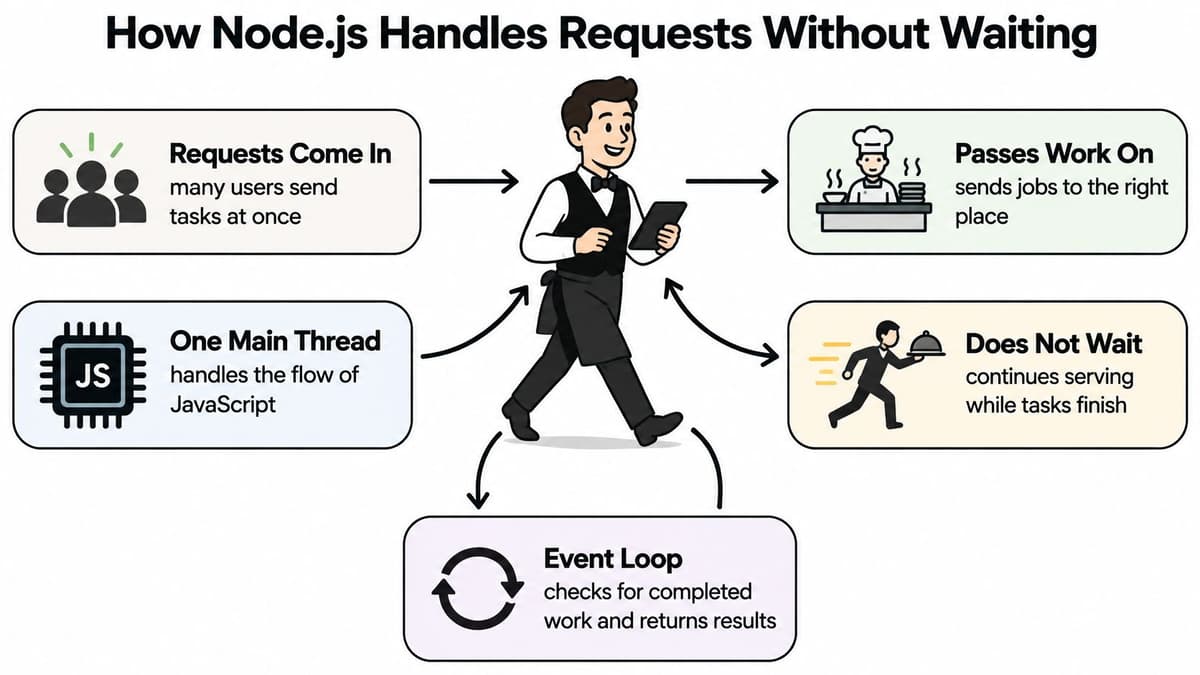
Say a dashboard request needs account details from a database. The handler starts the query and uses await to suspend that handler until the result arrives. Meanwhile, Node.js can run other ready handlers.
await pauses the function, not the whole server. Waiting requests still consume resources, including memory and database connections, so concurrency isn't free or unlimited. Connection pools, backpressure and request limits still matter.
What makes the waiter stop
Now ask the waiter to prepare an elaborate dish personally before taking another order. That's what happens when a request handler performs substantial synchronous computation.
Parsing a large JSON document or calling synchronous bcrypt hashing with an expensive configuration can occupy the main thread. Writing async before that function doesn't move its computation elsewhere.
Practical rule: Asynchronous syntax isn't proof that an operation is non-blocking.
Move substantial computation into worker_threads, a separate worker process or an independently deployed service. For suitable algorithms, processing bounded chunks and yielding between them can preserve responsiveness, though it doesn't eliminate the total CPU cost.
Measure event loop delay, request latency and resource usage together. A rising delay under load suggests that JavaScript execution or runtime pauses are preventing prompt handling, but your acceptable threshold should follow your service's latency requirements.
This video offers another view of the execution model.
When developing an API, identify what each handler waits for and what it computes. Mostly awaiting I/O is a promising fit. Substantial computation needs an explicit execution boundary outside the main request-handling thread.
Frameworks, Tooling and Who You Can Hire
| Framework | Best for | Trade-off |
|---|---|---|
| Express | Minimal APIs and familiar middleware patterns | Few defaults, so teams must add structure themselves |
| Fastify | Schema-validated JSON APIs with performance-conscious design | Check plugin coverage for your required integrations |
| NestJS | Large TypeScript codebases needing modular structure | Heavier setup and a steeper learning curve |
| Hapi | Teams wanting configuration-driven behaviour and security-related defaults | Check team familiarity and plugin availability |
Choose the conventions you want to maintain, not just the shortest starter example. Express leaves architecture decisions largely to your team. NestJS introduces more formal module and dependency-injection patterns, which can help a growing codebase but require developers to understand the framework.
Fastify makes schemas central to request validation and response serialisation. Hapi offers a configuration-led approach that suits teams wanting explicit application policies.
For a concrete UK production endorsement, Defra's software development guidance recommends Node.js with Hapi for frontend and backend services, considering .NET or Python where Node.js is unsuitable. That's a departmental recommendation, not a requirement for every UK business.
The framework is only part of the stack
A practical toolchain should make mistakes visible before deployment:
- TypeScript checks internal contracts during development, but incoming HTTP data still needs runtime validation.
- Vitest or Jest can run unit and integration tests, including database failures and rejected permissions.
- Prisma or Drizzle can organise database access, while engineers remain responsible for migrations, indexes and query plans.
- Pino supports structured logging that can be searched across requests and deployments.
- ESLint helps enforce agreed code rules and catch suspicious patterns.
Shared frontend and backend types are useful, but don't import server-only modules or secrets into browser bundles. Keep public API contracts separate from database models and privileged implementation details.
Hiring also reaches beyond JavaScript syntax. UK Node.js vacancy data associates the roles with AWS in 52.7% of vacancies, full-stack development in 50.8%, TypeScript in 48.1% and CI/CD in 47.0%, according to IT Jobs Watch. Those overlapping requirements describe production work, not just route writing.
A useful backend interview asks how the candidate diagnoses a failed deployment, not only how they implement an endpoint.
Prefer a framework your team can already operate confidently unless a concrete requirement rules it out. Default to TypeScript for a shared, long-lived backend, rather than waiting for an arbitrary team-size threshold. The important investment is consistent boundaries, tests and ownership.
Monolith, Microservices, Serverless or Containers
Start with a monolith unless a specific requirement justifies more deployment boundaries. A single deployable application gives a small team fewer releases, network interactions and operational surfaces to coordinate.
| Architecture | Best when | Operational cost | Watch for |
|---|---|---|---|
| Single monolith | An early MVP built by a unified team | Low relative to distributed services | Growing coupling and unclear module boundaries |
| Modular monolith | A small team working across several product areas | Low to moderate | Modules reaching into each other's internals |
| Microservices | Several teams need independent deployment | High | Network failures, distributed tracing and service ownership |
| Serverless functions | Spiky, event-driven or scheduled workloads | Low initially, potentially less predictable later | Cold starts, vendor lock-in and multi-step debugging |
| Containers on a managed platform | Steady APIs needing a predictable runtime | Moderate | Image updates, base-image patches and scaling rules |
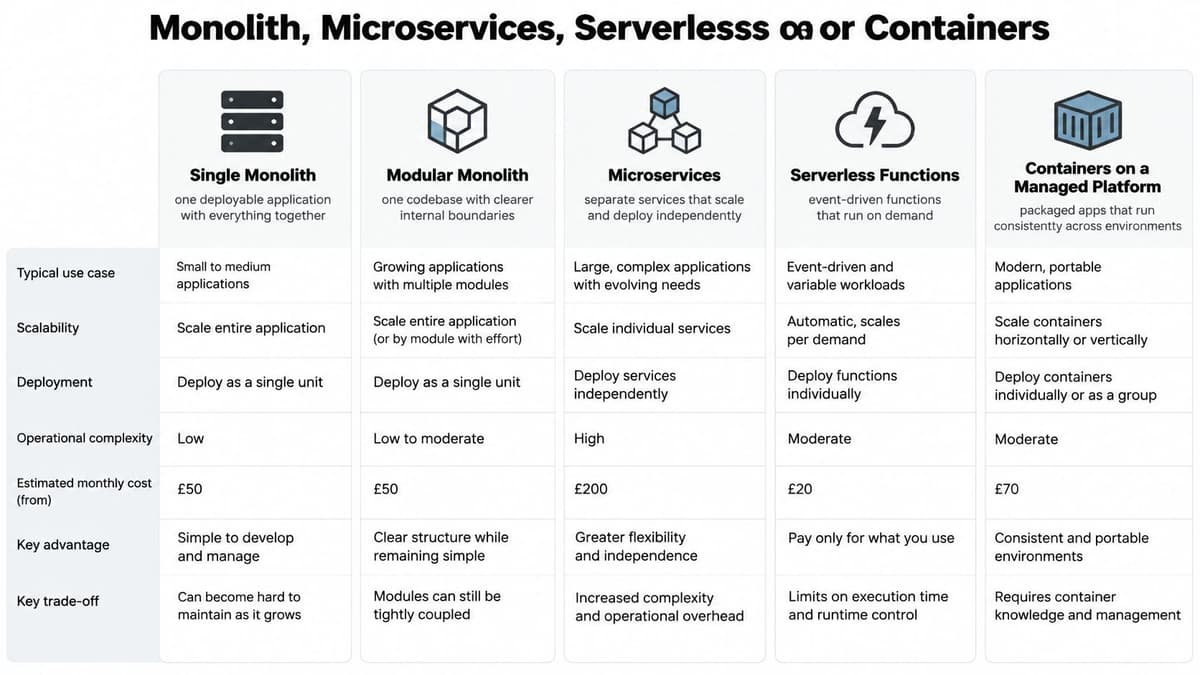
These aren't mutually exclusive categories. Monolith and microservices describe application boundaries; containers and serverless describe execution or deployment choices. You can deploy a modular monolith in a container or build a distributed system from serverless functions.
The comparison helps separate those decisions before they become infrastructure commitments.
Give modules boundaries before giving them networks
A modular monolith separates accounts, billing and notifications through internal interfaces. Each module owns its business rules, and other modules call those interfaces rather than changing its tables directly.
That structure preserves straightforward local calls and, where appropriate, database transactions. You can still run multiple application replicas when traffic grows. A monolith doesn't mean a single permanent server.
Consider a small startup with a web application, billing and email jobs. It can package its modular backend in a container, run the HTTP application as one process type and run queued background jobs as another using the same image.
The queue allows email retries without holding a browser request open. The worker needs idempotency, meaning a repeated job won't produce an unintended duplicate action. Billing should become a separate service only if a genuine ownership, scaling or compliance boundary requires it.
Make distribution earn its cost
Microservices introduce service discovery, cross-service authentication, distributed tracing and partial failures. A remote service can accept an operation even when its response never reaches the caller, so retries require deliberate design.
Serverless functions suit webhooks and scheduled tasks, but execution limits and startup behaviour affect implementation. Long-lived connections such as WebSockets usually need a provider-supported gateway or another hosting model rather than an ordinary short-lived function.
Containers provide a repeatable application package. Run them as a non-root user, keep configuration outside the image and rebuild when application or base-image dependencies change. Managed hosting removes some infrastructure tasks, not application ownership.
Split a module when a different team, scaling profile or compliance boundary needs independence, not because the service diagram looks more sophisticated.
A useful web application architecture makes failures understandable and releases reversible. For an early product, that usually matters more than maximising the number of independently deployable components.
Production Setup and Security Controls That Matter
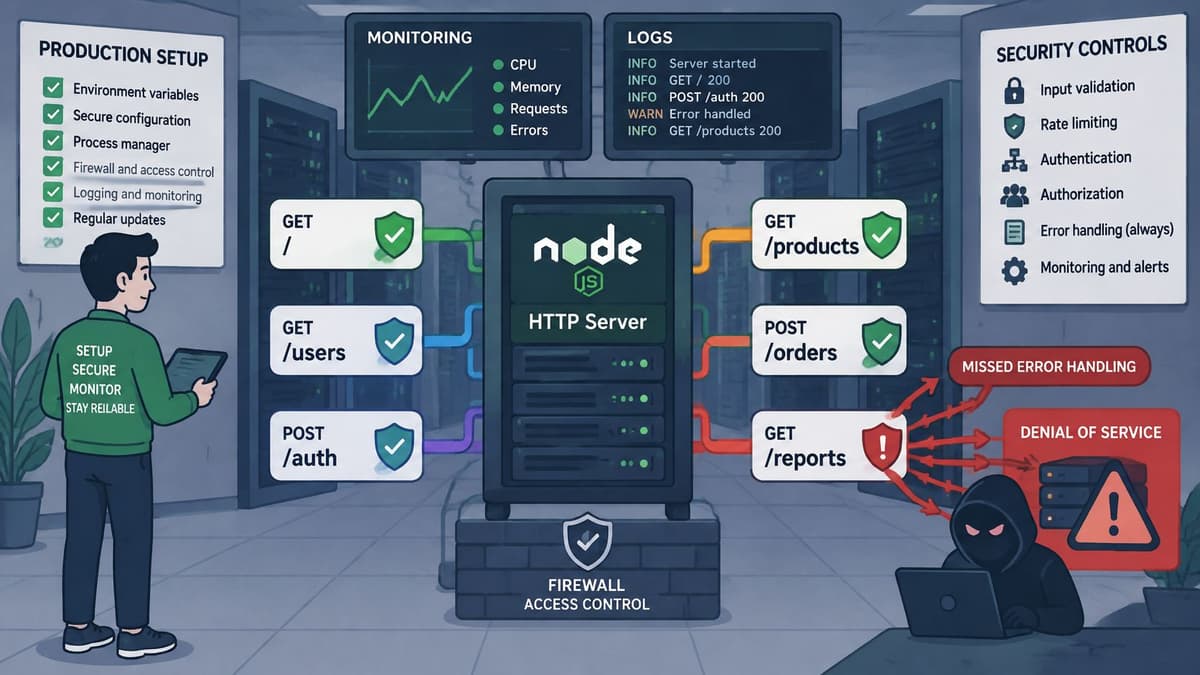
The Government Digital Service Node.js guidance identifies missing error handling around the core HTTP server as an availability risk that can enable denial-of-service conditions. Frameworks can supply safer defaults, but they don't know your acceptable payload sizes, upstream deadlines or access rules.
Production readiness means turning those requirements into enforceable settings. Treat the following controls as release criteria, not tasks to revisit after customers arrive.
The illustration highlights the application, deployment and monitoring boundaries that need protection.
Set an explicit production baseline
- Pin a supported LTS runtime in deployment configuration and declare the supported version in
package.json, with CI checking consistency because a declaration alone doesn't prevent runtime drift. - Install with
npm ciso a lockfile mismatch fails the build instead of producing a different dependency tree. - Enforce HTTPS through a reverse proxy or managed ingress, with appropriate static-content caching, to avoid exposing the application server directly.
- Use process supervision or managed restart policies so a crashed process doesn't leave the service unavailable until someone notices.
- Handle errors across every route, including asynchronous failures, so malformed requests receive controlled responses rather than causing unhandled failures.
- Set payload, connection-lifetime and concurrency limits plus upstream timeouts so slow clients, large bodies or stalled dependencies can't consume resources indefinitely.
- Centralise authentication and authorisation, check access to each protected resource and set session cookies with
Secure,HttpOnlyand an appropriateSameSitepolicy to reduce session exposure. - Inject secrets through a managed secret mechanism, exposed through
process.envwhere appropriate, so credentials don't enter source control or container build layers. - Use structured logs with correlation IDs and redaction, excluding credentials, tokens and sensitive bodies so troubleshooting doesn't create another personal-data store.
Test failures as well as successful requests
Authentication establishes who someone is; authorisation decides what they may do. Test that a signed-in user can't retrieve another organisation's records by changing an identifier. For cookie-authenticated state changes, assess CSRF protection rather than assuming cookie attributes solve every attack.
Run service accounts with least privilege, validate uploads and give dependency alerts an owner. A clean audit result doesn't prove the application's access rules are correct.
Before launch, run a load test containing slow clients, oversized payloads and unavailable upstream services. Check that the application rejects unsuitable traffic predictably, releases resources and remains responsive to legitimate requests.
Keeping Node.js Secure After Launch
The Node.js December 2025 security release advisory addressed seven vulnerabilities across the 20.x to 25.x release lines, including HTTP/2 denial-of-service, memory exposure, TLS-related memory leakage and a permission-model bypass affecting Unix-domain sockets. The operational lesson is straightforward: selecting a runtime doesn't transfer responsibility for updating your deployment to its maintainers.
Your organisation needs someone who can assess an advisory, build a patched image and authorise a release. An automated alert without that person is an unattended inbox.
Turn ownership into a release routine
Assign a runtime owner to track supported release lines and security announcements. Give a delivery engineer responsibility for rebuilding and testing images, and identify who can approve an urgent production change.
Use a documented routine:
- Security patches: Triage promptly, test the patched runtime in staging and release according to exposure and severity, with an accelerated path for urgent issues.
- Routine upgrades: Put dependency maintenance in the delivery calendar rather than waiting for a feature project to require it.
- Release-line changes: Test against the target supported LTS line before the existing line reaches end of support.
- Rollback: Retain the previous image and compatible configuration, while recognising that restoring a vulnerable build may require compensating controls.
As a hypothetical release sequence, an owner could assess an advisory on Monday, test a patched image on Tuesday and deploy on Thursday. That's an example of accountable planning, not a universal safe deadline; an exposed critical issue may require faster action.
Automate changes without automating trust
Dependabot or Renovate can propose dependency and supported container-image updates. Run dependency auditing in CI, but review whether an advisory affects the code paths and configuration you deploy.
Restrict decompressed input sizes to prevent small compressed requests expanding into excessive memory use. Limit outbound network access where practical, particularly when the application fetches user-supplied URLs.
Monitor crash rates, memory growth and event loop behaviour. Name an incident owner and keep a short runbook covering containment, deployment, rollback and credential rotation when exposure warrants it.
Maintenance belongs within the stages of software development, not outside the project budget. At scheduled operational reviews, confirm the runtime remains supported, outstanding advisories have decisions attached and the named owners still have capacity to act.
Confirm Node.js Is Your Backend Before You Commit
Choose Node.js when your workload mainly waits on I/O, your team already works effectively in JavaScript or TypeScript, and your product centres on APIs, SaaS workflows or real-time services. If substantial computation dominates, test a separate worker or a different backend runtime rather than forcing everything through the same execution model.
Before committing, turn the decision into a practical checklist:
- Map the workload: Identify database waits, external calls and CPU-bound processing in real user journeys.
- Choose maintainable conventions: Select a framework your team can operate and recruit for.
- Keep deployment simple: Start with a modular monolith in a container unless a requirement rules it out.
- Verify readiness: Exercise the production controls under realistic failures and load.
- Assign ownership: Name the people responsible for patching, incidents and ongoing infrastructure work.
Run a short, time-boxed spike around a real endpoint, including authentication, database access and deployment. Measure response times and event loop delay under representative load, and include the effort required to diagnose failures.
Write down the conditions that would make Node.js a good choice, then check them against your workload and team capacity. A working demonstration proves feasibility; an owned, observable deployment provides a stronger basis for commitment.
We build web applications, SaaS products and APIs at Digital Souls Studios LTD, covering specification, engineering, infrastructure and launch, with optional post-launch support. If you need help assessing Node.js or turning a prototype into an operable backend, visit Digital Souls Studios LTD and bring your core user journey, expected integrations and maintenance constraints.