15th November 2026 · 16 min
Webflow vs WordPress: Which Fits Your Project and Budget?

Most agencies frame webflow vs wordpress as a design contest: the elegant visual builder against the ageing workhorse. That framing wastes your budget. Teams routinely spend months debating which editor looks nicer while the decision that determines their three-year cost sits untouched, which is how often the site will change and who carries the risk when it breaks.
The comparison that matters isn't licence price. WordPress software costs nothing and Webflow runs a monthly subscription, yet I'd put money on plenty of WordPress sites costing more to own over three years than the Webflow plan they rejected, once you count plugin renewals, security response, accessibility remediation and the freelancer callouts. Platform fees are the smallest line in the model.
So this isn't a feature shootout. It's a decision about operational exposure. Webflow absorbs more of the infrastructure burden and charges you for it; WordPress hands you control and the responsibility that goes with it. Which one suits your project depends on your change rate, your integration list, and whether anyone in-house can own maintenance. Here's how to work that out properly.
Table of Contents
- Webflow vs WordPress at a Glance
- Design Control and the Editing Experience
- SEO Controls and Technical Setup
- Performance Benchmarks and What Drives Them
- Accessibility as an Ongoing Governance Task
- Three-Year Cost of Ownership
- Which Platform Fits Your Project and How to Confirm It
Webflow vs WordPress at a Glance
Start with the shape of each platform before you compare anything else.
| Criterion | Webflow | WordPress |
|---|---|---|
| Best fit | Design-led marketing and brochure sites | Content-heavy sites, blogs and plugin-dependent builds |
| Hosting | Managed hosting included | Self-managed or third-party hosting chosen separately |
| Learning curve | Moderate; visual layout needs CSS understanding | Low for basic editing; deeper for theme and plugin work |
| Pricing pattern | Recurring site and CMS plan subscriptions | Free software; hosting, themes and plugins are extra |
| Extra functionality | Native components, custom code and integrations | Plugins and theme extensions |
| Ecosystem size | Smaller, specialised community | Very large global community and supplier base |
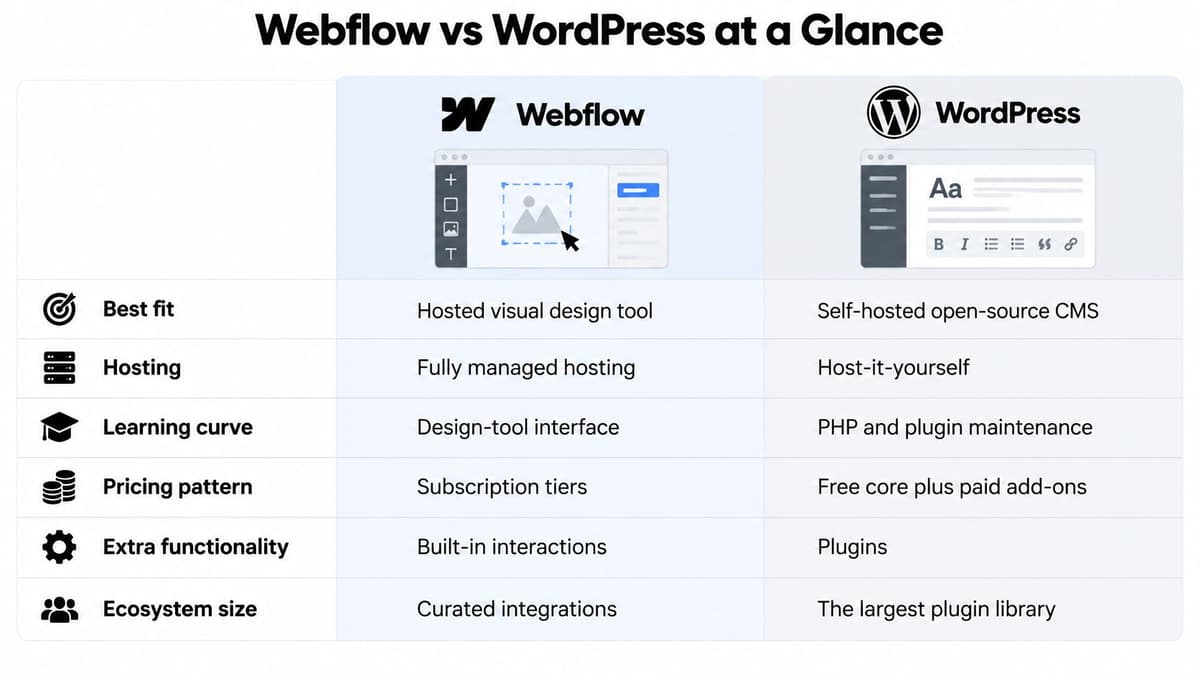
Webflow is a hosted visual design and publishing tool. The designer, the CMS, hosting, deployment, forms and basic SEO settings all sit on one platform, and you can't detach them. WordPress is open-source software you install on hosting you choose. Its capability comes from themes, plugins and the stack underneath, which is why two WordPress sites can behave nothing alike.
The ecosystem gap is the one hard number in the comparison. W3Techs reports WordPress powering about 39.3% of all websites and 58.1% of sites with a known CMS, against Webflow at 0.8% of all websites and 1.2% of known-CMS sites. That's a global figure, not a UK market share, so treat it as a proxy for ecosystem maturity: the size of the developer pool, the supply of agencies, the number of plugins and the availability of hosting built for the platform.
Why does that matter to a UK buyer? A larger pool lowers supplier-switching risk. If your agency disappears or your developer moves on, you'll find someone who knows WordPress within days. Finding the same depth of Webflow experience takes longer.
The default verdict, which holds for most projects unless something specific pushes you off it: Webflow for design-led marketing sites with a handful of editors and infrequent structural change, WordPress for content-heavy or extension-dependent sites with an in-house owner.
Three questions to answer before you read further. How often will the site change, and in what way: new copy, new pages, new functionality? How much custom functionality does it need in year one and year three? And who maintains it after launch, with how many hours a month to spend?
Design Control and the Editing Experience
Webflow's designer maps closely to CSS, with flexbox, grid, spacing and typography values exposed rather than hidden. A designer who already understands CSS gets productive in weeks, and the brand system they set up locks the layout so a content editor can add pages without breaking spacing.
WordPress splits that control across layers. The theme sets the baseline, the block editor or a page builder handles individual pages, and plugins fill gaps. The depth of control depends on theme quality and on how many plugins compete to control the same layout. Install Elementor, Bricks or Oxygen on a theme that already ships its own layout system, and you get two systems arguing over the same page.
The day-to-day difference lands on whoever edits the site.
Practical rule: in Webflow, the editor works inside a system the designer defined. In WordPress, the editor can break the layout if a theme or plugin is misconfigured, which is a governance problem you solve with roles, not features.
Webflow's structure rewards a team with design capability. The studio's UI/UX work runs through Figma interface design, wireframes, handoff and clickable prototypes before anything is built, and that handoff lands in Webflow far more directly because the visual language transfers. WordPress rewards a team with a developer or a strong agency relationship, because the equivalent control comes from code.
Where Webflow's limits show up is anything needing real application logic: membership areas, complex ecommerce rules, tiered pricing, customer dashboards. The workarounds are code embeds and third-party services, and each one pushes you back toward running an integration you didn't plan for.
A short checklist for design needs. Choose Webflow when you need a locked brand system, distinctive layout and motion, a small editorial team, and marketing pages that change a few times a quarter. Choose WordPress when you need a booking plugin, a membership tier, a multilingual setup, a directory with filters, or a theme a future agency can take over without reverse-engineering a bespoke design system.
SEO Controls and Technical Setup
On-page SEO is a draw. Both platforms let an editor set page titles, meta descriptions and URL slugs per page, and both produce an XML sitemap without extra work.
| SEO feature | Webflow | WordPress |
|---|---|---|
| Meta titles and descriptions | Set per page in page settings | Set per page; extended by SEO plugins |
| XML sitemap | Generated automatically | Generated by core or by an SEO plugin |
| Redirects | Built-in redirect manager | Plugin or hosting-level redirects |
| Structured data | Custom code embed for most schema types | Schema templates via SEO plugins or themes |
| URL and slug control | Editable per page | Editable per page; permalink structure set site-wide |
| Programmatic pages | Generated from CMS collections | Generated from custom post types or plugins |
The divergence is in technical depth, and it comes down to named dependencies. On WordPress, Yoast SEO or Rank Math supplies sitemaps, schema templates, canonical handling and a redirect manager. Each of those plugins is another update to run and one more thing that can conflict after a core release. On Webflow, sitemaps, page-level settings and a redirect manager are built in, but schema beyond the basics usually means pasting JSON-LD into the page head, which a marketer won't do unaided.
Gaps surface in three situations. Programmatic pages built from CMS collections work on both, but WordPress needs custom post types and a template loop, while Webflow's collection limits cap how far you scale. Multilingual sites cost extra on Webflow through a localisation add-on and require a plugin such as WPML or TranslatePress on WordPress. Large ecommerce catalogues with many variants stretch Webflow's item limits and push WordPress toward WooCommerce, where plugin conflicts around product schema are common.
Run the same three checks on whichever platform you shortlist. Confirm the sitemap updates when you publish a new CMS item, not just when you publish a page. Confirm redirects survive a URL change, because both platforms have a habit of losing them when a slug changes at the template level. And validate your structured data in a testing tool on a live template, not on a staging copy behind authentication.
These are the same checks in any technical SEO audit, and none of them are platform-specific in principle, only in where you go to fix the problem. A fuller technical SEO checklist is worth working through before launch, since the cost of fixing a redirect chain or a broken canonical rises sharply once Google has indexed the mistake.
Performance Benchmarks and What Drives Them
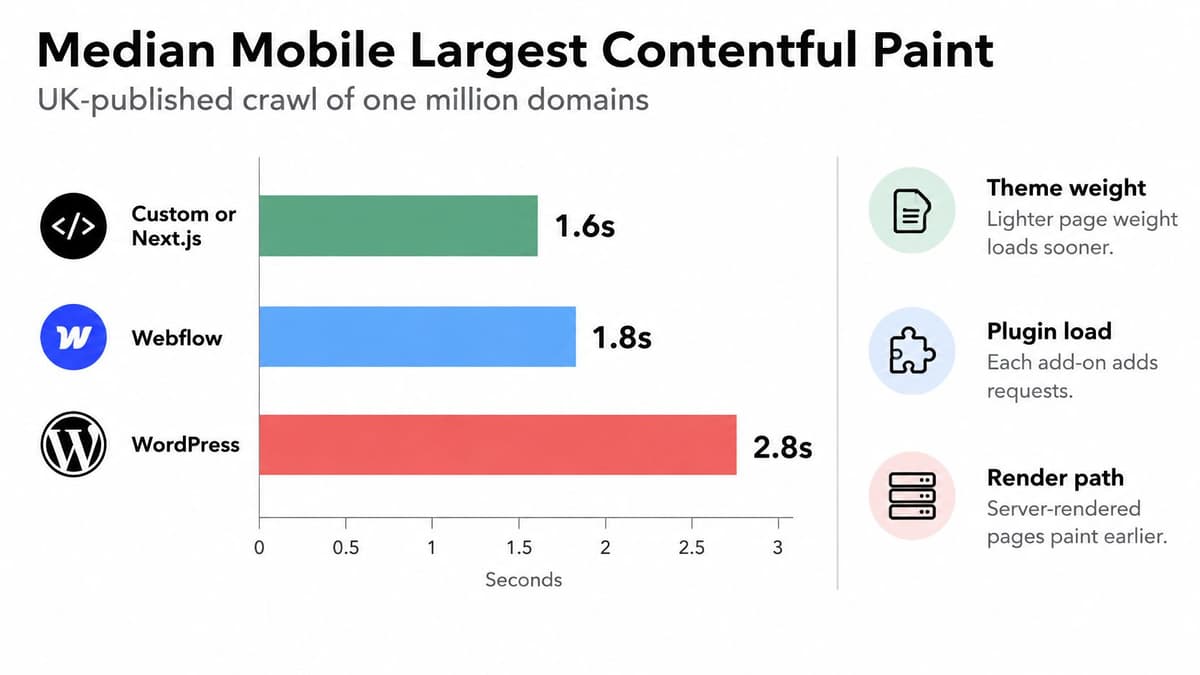
The most quoted UK benchmark comes from a one-million-domain crawl, which reported median Largest Contentful Paint of 2.8 seconds for WordPress, 1.8 seconds for Webflow and 1.6 seconds for custom or Next.js sites. That's a 1.0-second median gap between the two CMS platforms.
Hold the caveat next to the number. This is an agency-published benchmark, not the public Chrome UX Report, so it reflects a particular crawl methodology. Validate it with real-user monitoring on your own audience before you quote it to a client.
The video walkthrough covers Core Web Vitals measurement:
Why WordPress varies more. Its performance is a stack of decisions: theme weight, plugin count, PHP execution time, database query volume, page caching, image delivery, CDN configuration and hosting region. Get all of them right and WordPress is fast. Get three wrong, which is typical of a site built in 2019 and maintained by whoever answered the phone, and you get the median above.
Webflow standardises more of the delivery layer. Hosting, caching and asset serving are managed centrally, so there's less configuration variance between one Webflow site and the next. That isn't immunity. Custom JavaScript, consent management tools, analytics tags, web fonts, scroll animations and oversized CMS images degrade Core Web Vitals on either platform.
How to test properly. Benchmark representative templates from UK-facing locations, not an empty homepage. Measure mobile LCP, Interaction to Next Paint and Cumulative Layout Shift on the pages that carry your revenue: a product page, a pricing page, a category listing. A homepage scoring well tells you almost nothing about the checkout.
A disciplined WordPress build on managed UK or EU hosting with page caching, a CDN and WebP or AVIF assets can close that second, and often does. Webflow remains the faster route when the team wants predictable publishing without operating the stack, and that speed is as much organisational as technical. If you want the deeper mechanics behind these fixes, this guide to website performance optimisation covers the levers in order of impact.
Accessibility as an Ongoing Governance Task
Neither platform passes WCAG 2.2 AA out of the box, and any supplier who implies otherwise is selling you a template, not compliance. UK government accessibility standards guidance requires public-sector websites and apps to meet WCAG 2.2 AA, support common assistive technologies, involve disabled people in user research, and publish an accessibility statement. Note the shape of that obligation: it's continuous, not a launch checkbox.
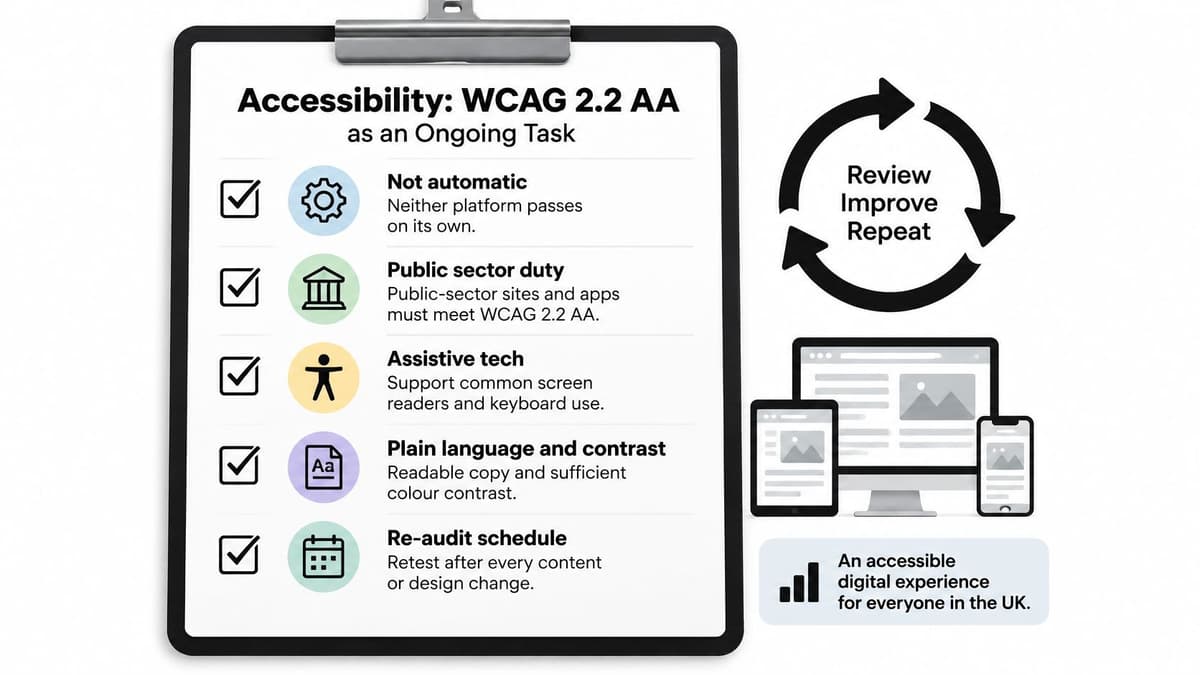
Where each platform creates risk differs. WordPress's plugin ecosystem is its strength and its exposure: an unreviewed slider, form builder or cookie banner can break keyboard focus order, ship insufficient contrast or produce form errors that screen readers can't announce. Webflow's controlled authoring narrows that surface, but custom interactions, third-party embeds and exported code can still be inaccessible, and the visual designer makes it easy to build a hover-only reveal that keyboard users never reach.
Compare the operating model, not the feature list. Six things:
- Component restrictions: limit editors to approved blocks or components, so no one improvises a custom carousel at 4pm on a Friday.
- Automated testing: run axe or Lighthouse on every template in CI, not once at launch.
- Manual screen-reader testing: NVDA and VoiceOver on the journeys that matter, done by someone who uses them.
- Editor training: teach the people publishing content how headings, alt text, link text and tables work.
- Release gates: a checklist that blocks publishing when contrast, focus or error handling fails.
- A named remediation owner: one person accountable when an issue is found, with time budgeted to fix it.
That last item is where most organisations fail. An accessibility statement claims you'll review and remediate, and someone has to own the follow-through.
If your buyer is a public body, a charity or an education provider, accessibility evidence can affect procurement even when the platform isn't specified. Choose the platform that makes repeatable audits easy, not the one marketed as accessible.
Three-Year Cost of Ownership
Almost every comparison on this topic prices the subscription and stops. Your bill is dominated by what happens after launch, so model three years.
| Cost line | Webflow | WordPress |
|---|---|---|
| Platform or software fee | Recurring site and CMS plan fees | Software free; premium themes cost separately |
| Hosting | Included in plan | Separate hosting, often managed UK or EU |
| Plugins and themes | Limited add-ons and integrations | Plugin and theme licences, scaled to the build |
| Security and updates | Managed by platform | Self-managed or retainer; grows with plugin count |
| Accessibility and SEO remediation | Driven by custom code and embeds | Driven by plugin conflicts and theme quality |
| Exit or rebuild | Export and rebuild if requirements outgrow platform | Migration if theme or plugins are abandoned |
The UK-specific risk is that accessibility obligations are framed as ongoing, including regular review and a current accessibility statement. That converts accessibility from a launch cost into a recurring line, and it applies whichever platform you pick.
WordPress looks cheaper on paper and can be, because the software is free and there are no per-seat charges for editors. It also allows a larger maintenance surface: every plugin, theme and integration is something to update, patch or replace, and security response is yours to arrange. Webflow removes server and update management from your list but adds subscription dependence and constrains what you can do when requirements outgrow the visual CMS. The workaround, or the migration, is where Webflow projects blow the model.
Build the three-year tally from nine lines: initial build; hosting and licences; content-editor time; monitoring; accessibility and SEO remediation; security response; agency retainers; integration changes; and exit or rebuild cost. Work each line with realistic figures rather than list prices, and this breakdown of how much a website costs in the UK covers the build side.
Where the cheaper option flips. A brochure site edited a few times a year usually favours managed simplicity, because most of WordPress's flexibility never gets used. A complex content operation or SaaS marketing ecosystem justifies WordPress only if you budget for disciplined maintenance alongside it. The cheaper platform depends on your change rate and your tolerance for operational risk, not on the monthly bill.
Two questions to put to any supplier in writing. What is the exit cost if we move, in export format, rebuild hours and lost functionality? And how is retainer scope defined, in named deliverables rather than a vague promise of support? A retainer should have a defined list of what's included, which is why our own all-in-one retainer spells out maintenance, research, A/B experiments, marketing material, documentation, servers, deployments, meetings, customer support, design and consultation, with the fee set by the requirements.
Which Platform Fits Your Project and How to Confirm It
| Project type | Likely fit | Main reason |
|---|---|---|
| Brochure or landing site with infrequent edits | Webflow | Managed hosting and visual control with little upkeep |
| Content-heavy blog or publisher | WordPress | Editorial plugins and mature publishing workflows |
| Ecommerce store | WordPress or a dedicated ecommerce platform | Broad plugin and integration support, scaled to catalogue size |
| SaaS marketing site with product behind login | Webflow for marketing pages, product built separately | Clean marketing site without mixing app logic into the CMS |
| Public-sector or regulated site | Either, with a governed accessibility process | Platform matters less than the audit and publishing controls |
| Multi-site operation with several editors | WordPress | Wider admin tooling and supplier pool, subject to governance |

The UK installed base supports the same reading. BuiltWith's UK CMS dataset records 3,147,625 detected websites and identifies WordPress on 1,176,929 of them, or 37.39%, against Webflow on 24,747, or 0.79%. That makes the detected WordPress base roughly 47.6 times larger.
What that means in practice: your next redesign, migration or plugin integration is far more likely to involve WordPress, and the supplier pool reflects it. Webflow's smaller footprint signals selective adoption, not unsuitability. These are technology detections, not a census, so treat them as a consistent basis for comparison rather than a precise headcount.
Run these six checks in order before you commit.
- Estimate monthly change volume. Count content and layout changes per month over the last year, then ask whether that's rising. Above roughly ten structural changes a month, favour the platform with lower publishing friction for your team.
- List integrations for year one and year three. Payments, CRM, booking, memberships, multilingual, product feeds. Anything requiring real application logic pushes part of the build off the CMS entirely.
- Name the post-launch maintainer and their hours. A person and a number. No name means you're buying managed hosting or a retainer, and that belongs in the cost model.
- Build a representative template on each shortlisted platform. One real page with your fonts, images and a form, not a sales demo.
- Test speed and accessibility on it from UK locations. Mobile LCP, INP, CLS, keyboard navigation and a screen-reader pass on the form.
- Compare the three-year cost lines and the exit terms side by side. Including what happens to your content if you leave.
The verdict logic is narrow. Low change rate, few integrations and no in-house developer point to Webflow. Frequent changes, many integrations and an existing WordPress team point to WordPress. If you're building a SaaS marketing site with the product behind a login, split it: Webflow for the marketing pages, a separate application for the product. The studio builds this way, from Next.js applications to Webflow marketing sites, because mixing app logic into a CMS creates a maintenance load nobody budgeted for.
If you're weighing webflow vs wordpress for a launch or a rebuild, Digital Souls Studios LTD builds both: high-performance Next.js applications and Webflow marketing sites, with Figma design, technical SEO and ongoing maintenance handled end to end from our London studio. We'll give you a straight recommendation for your change rate and integration list, even when it's the platform with the smaller monthly fee. Visit Digital Souls Studios LTD to talk through your project.