25th November 2026 · 15 min
Automation in Customer Service: A Buyer's Guide for 2026

It's Monday morning, the shared inbox is full again, and most of the messages ask the same three things: where's my order, can I move my booking, do you deliver on Sundays. One person on the team spends the first hour of the day typing answers they've typed a hundred times before. Someone mentions an AI agent, a supplier sends a demo, and suddenly you're being asked to approve a purchase you can't quite picture.
The useful question isn't whether automation in customer service works. It's which requests you hand over, what the software is allowed to do with them, and how you'll know whether customers are better off afterwards. Those are operations decisions, not technical ones, and they belong to the person who owns the queue.
Table of Contents
- What Customer Service Automation Really Means
- Which Service Tasks to Automate First
- How an AI Support Agent Handles One Request
- Benefits and the Numbers to Track
- What Automation Costs and Which Option Fits
- When a Person Must Take Over
- Start With One Queue Before You Commit
What Customer Service Automation Really Means
Customer service automation means software handles some customer requests without a person handling each one, while your staff keep the cases that need judgement. It isn't a robot replacement for a support team. It's a filter that sits in front of the team, deals with the predictable work, and passes everything else through with the details already collected.
Say a clothing shop runs a shared inbox and a web chat widget. Most Monday messages are delivery questions. The shop puts automation on that one type of request, and the team starts the day with complaints, sizing questions and refund decisions instead of tracking links.
The three layers you'll be sold
Suppliers use overlapping language, so it helps to separate what's on offer.
- Scripted replies: the software answers from a fixed list of questions and buttons. It's cheap and predictable, and it fails the moment a customer phrases something differently.
- AI support agents: the software reads a free-text message, checks approved records such as your order system, and takes a defined action. This is the layer most buyers mean when they say "AI".
- Workflows: rules that route a request to the right person or queue, tag it, and set a reply deadline. No conversation involved, and often the cheapest win available.
A scripted chatbot is the receptionist who answers the phone and reads out the opening hours. An AI support agent is closer to an office coordinator: it reads the request, checks the records, makes the booking, and walks the awkward cases over to a person who can decide.
Customers already behave this way. In an Office for National Statistics survey published on 16 June 2023, 34% of UK adults said they'd used an AI chatbot during the previous month, and among those chatbot users 50% reported customer service as a use case, the most common purpose identified. People weren't mainly experimenting. They were trying to get something sorted.
Automation suits repetitive, rule-based requests. Judgement, discretion and empathy stay with your staff, and the design job is drawing that line clearly enough that software can follow it.
Which Service Tasks to Automate First
Three labels cover every decision you'll make. Automate means the software answers and acts inside approved rules. Assist means it drafts a reply or looks something up, and a person approves it before it goes out. Human means a trained person takes the case from the first message.
| Request type | Example | Suggested handling |
|---|---|---|
| Order status and delivery tracking | Where is my parcel? | Automate |
| Opening hours and policy questions | Do you deliver on Sundays? | Automate |
| Password and login resets | Locked out of my account | Automate with an identity check |
| Booking or appointment changes | Move Thursday to Friday | Automate within set rules |
| Product fit and sizing questions | Which size should I order? | Assist: software suggests, a person confirms |
| Refund requests | Refund for a damaged item | Assist: a person decides |
| Complaints and disputes | Order arrived broken twice | Human |
| Financial hardship or vulnerability | Customer struggling to pay | Human |
| Account closures and access changes | Close my account and delete my data | Human |
Reading the table for your business
For an online shop where most messages ask where an order is, that first row is the strongest candidate you'll find. The answer comes from one system, the wording barely changes, and a mistake means an apology and a corrected tracking link. Booking changes work the same way for a clinic or a salon, provided you write the rules first: how much notice, how many moves, what happens to a deposit.
A small services firm usually has a different shape of inbox. Fewer, longer messages, more of them asking for advice or a judgement call. There, the assist column earns its keep: the software pulls the client's history and drafts a reply, and a person spends two minutes editing instead of fifteen composing.
The test to apply to every row
Before a request type goes into the automate column, it should pass three checks.
- Same answer nearly every time. If staff regularly need to exercise discretion, it isn't a rules problem.
- The data sits somewhere readable. Your order system, booking calendar or help centre, not a spreadsheet on someone's laptop.
- A wrong answer is cheap to fix. Sending the wrong delivery date is recoverable. Refusing a refund isn't.
Take the twenty most common requests from the last three months, straight from your inbox or helpdesk tags, and put one of the three labels against each. That list is your specification, and it's worth more in a supplier meeting than any feature comparison.
Practical rule: if you can't write the answer down as a rule your newest team member could follow, don't automate it yet.
How an AI Support Agent Handles One Request
Take one delivery question from an online shop customer and follow it through. The steps below are what a well-scoped agent does, and what a poorly scoped one skips.
The flow matters more than the model behind it, because every failure you'll read about in a complaint happens at one of these six points.
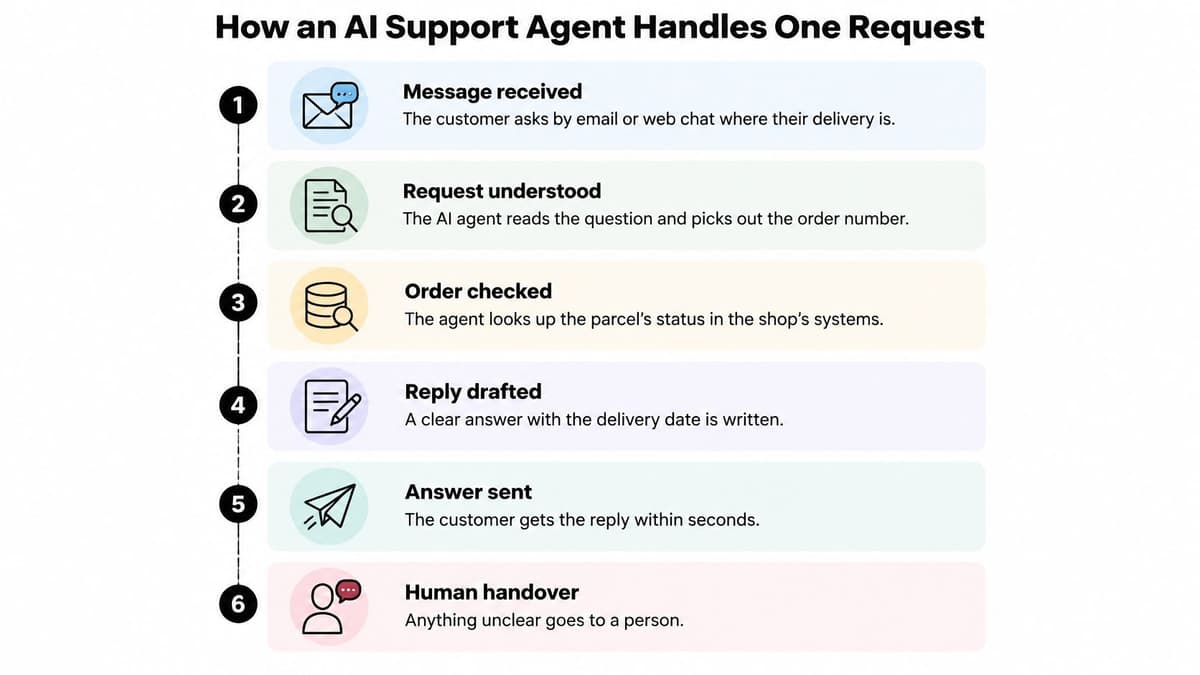
- The message arrives. The customer asks by email or web chat where their parcel is. The agent picks it up from the same inbox your team already uses.
- The request is identified. It classifies the message as a delivery question and pulls out the order number. Where the action touches an account, it confirms who the customer is first.
- Approved sources are searched. It looks in the order system and your help-centre articles, and nowhere else. It doesn't guess from general knowledge.
- The answer or action happens. If the request sits inside its approved set, it replies with the status and sends the tracking link. Anything outside that set stops here.
- The case is handed over. When it can't act within its rules, it passes the conversation to a person with a short summary attached. The customer doesn't start again from the beginning.
- Everything is recorded. What it said, what it looked up and what it did are logged. A manager can read the whole exchange later without reconstructing it.
Step three is the one buyers skip past, and it's the one that protects you. An agent restricted to approved material has far less room to invent an answer, because it can only restate what your business has already written down or recorded. Ask what happens when the approved sources are silent, and insist the answer is "it hands over", not "it does its best".
Coordinating several of these agents across queues and tools is a separate design job, covered in this guide to AI agent orchestration.
Here's a walkthrough of the same pattern in a support setting.
Ask any supplier to draw those six steps for your own queue, with your systems named in step three and your handover rules named in step five.
Benefits and the Numbers to Track
The clearest UK benchmark comes from the government's own service work. The Digital and Data Benefits Framework estimates that automating customer-service tasks could deliver benefits of up to £1 billion annually across government, and cites research showing customer-service agents using an AI tool handled 14% more enquiries per hour than agents without AI assistance.
That's a productivity figure, not a staffing instruction. Fourteen per cent more throughput doesn't become a 14% smaller team, because poor knowledge retrieval, wrong answers and excessive escalations eat the gain. What it does support is a two-layer design: resolve the high-volume, low-risk requests automatically, and give staff retrieved account details and suggested replies for everything else.
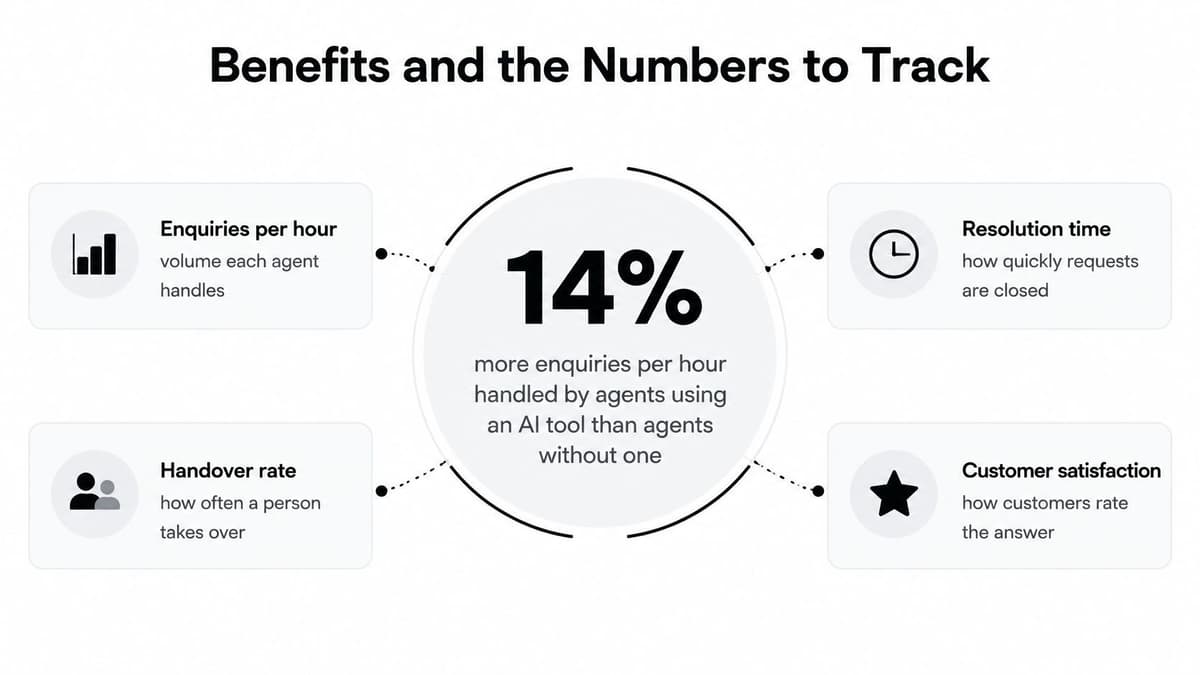
Five numbers to put in a tracking sheet
- Completed cases per paid support hour: cases closed for each hour a person is paid for. This is the headline number, not chat volume.
- Escalation rate: the share of conversations passed to a person. Rising escalation with flat resolution means the agent isn't finishing work.
- First-contact resolution: the share resolved in the first reply, with no follow-up needed.
- Recontact rate: the share of customers returning with the same issue within seven days. This catches confident wrong answers.
- Customer satisfaction: the score customers give the interaction, read alongside the four numbers above rather than on its own.
Record the baseline before you switch anything on
Say a finance team of three spends its mornings answering invoice queries. Before automating, they log hours spent on those queries and how many customers come back with the same question. Afterwards, the claim they can defend is hours freed and repeat contacts held steady, not "the bot handled hundreds of chats".
Record current figures for four to eight weeks first. Without that, you've got no comparison, and every argument about value becomes a matter of opinion.
A fast wrong answer is a cost, not a benefit. Judge the gain by resolved customer outcomes.
What Automation Costs and Which Option Fits
| Option | Published price | Best for | Main cost drivers |
|---|---|---|---|
| Helpdesk add-on or off-the-shelf bot | No public price, quoted per agent seat and message volume | Simple FAQs and routing on a tool you already use | Licence fees, integrations, message volume |
| Workflow automation platform | No public price, quoted per licence tier | Routing requests and handoffs across queues | Licence tiers, number of workflows, integrations |
| Custom AI support agent | £3,000, paid once | One support inbox with clear, approved rules | Systems connected, content clean-up, testing |
| Custom AI agent | £3,000 to £10,000, paid once | Taking on a larger block of work that would otherwise need staff | Number of tools, approval rules, volume |
| All-in-one retainer | £1,000 to £15,000 a month, 3-month minimum | Ongoing maintenance, support and changes after launch | Scope and requirements, meetings, customer support hours |
| In-house build | No licence fee, cost is salaries and hiring time | Firms with engineers and a long-term roadmap | Salaries, testing, monitoring, hiring time |
The pattern is straightforward. An add-on inside a helpdesk you already pay for is cheap to start and limited in reach, because it can only see what that helpdesk holds. A custom agent costs more because someone connects it to your order system, your policies and your approval rules, then tests it against the awkward cases.
Three budget lines to demand in every quote
- The build or product fee. The published number, and the one everyone compares.
- Integration and content clean-up. Tidying help articles so the agent reads current policy, not a returns rule you changed two years ago. This is routinely the largest hidden line.
- Continuing oversight. Testing, monitoring, updating answers and reviewing escalations, with a named owner.
Costs climb when the agent reads private customer records, changes live orders, works across several channels, or follows complicated approval rules. Each of those adds testing surface, not just licence cost.
Digital Souls Studios LTD publishes a custom AI support agent at £3,000 paid once, answering email, replying to user messages and triaging issues, and a broader custom AI agent at £3,000 to £10,000 for a larger block of work. Its all-in-one retainer runs from £1,000 to £15,000 a month with a 3-month minimum, covering maintenance, research, A/B experiments, marketing material, documentation, servers, deployments, meetings, customer support, design and consultation, with the fee set by requirements, so a scoped quote from its service packages is the only meaningful comparison. For businesses that want the infrastructure to run their own agent development team, there's a separate £5,000 package, paid once.
Budget scepticism is warranted. In a 2026 survey of 202 UK contact-centre and customer-experience professionals, up to 46% said it was still too early to judge whether their original business-case objectives had been met. Treat every figure here as a benchmark for a buying conversation, not a quote, and read this breakdown of AI agent development before agreeing scope.
When a Person Must Take Over
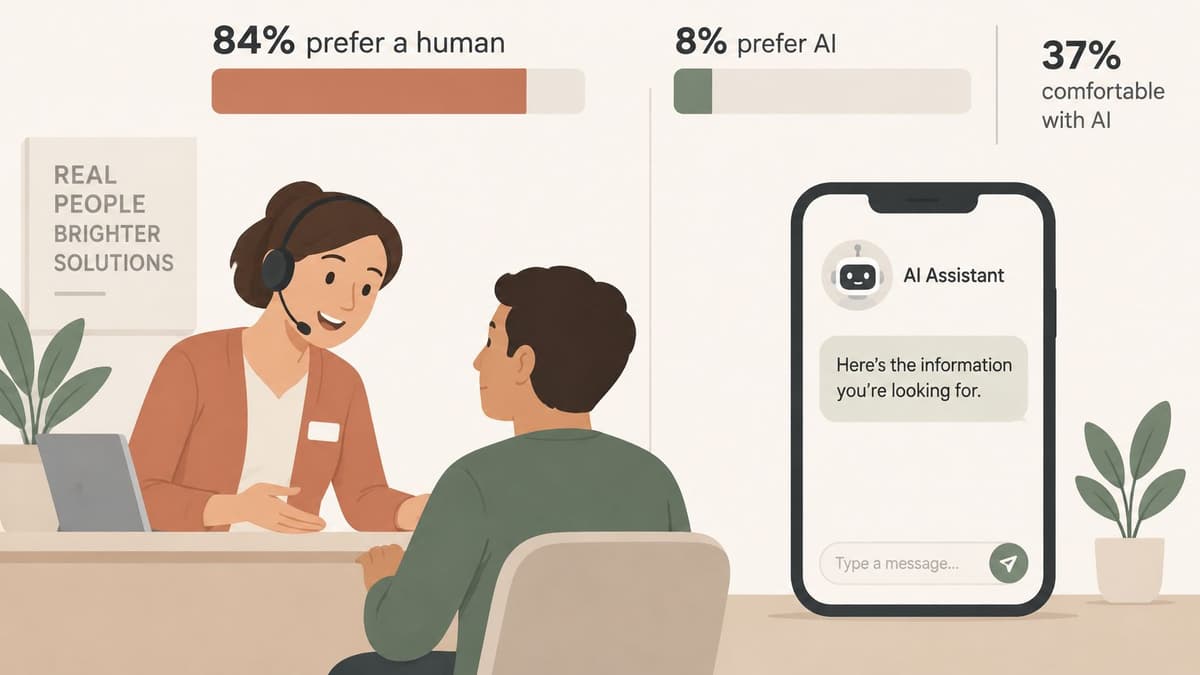
A 2026 survey of 1,000 UK adults found 84% preferred speaking with a human agent when contacting a business, against 8% who preferred AI, while 37% were comfortable engaging with AI and 37% considered it helpful. Those numbers aren't contradictory. People accept automation for a tracking link and resent it when they can't get out.
Write the triggers into the design
Handover rules belong in the specification, not in a support agent's instincts.
- Complaints and disputes, including anything mentioning a regulator, a chargeback or a solicitor.
- Financial difficulty, such as a customer saying they can't pay this month.
- Identity disputes, where the account details and the person messaging don't match.
- Distress or safeguarding concerns, judged on wording rather than sentiment scores alone.
- Two failed answers in a row on the same question, which is the loop customers punish hardest.
- High-value or emotionally sensitive contacts, where the cost of a wrong answer outweighs the time saved.
What a good handoff carries
A customer says the parcel arrived broken and asks for a refund. The agent collects the order number and photos, then hands the case to a person with a summary. It doesn't send the tracking link again, and it doesn't ask the customer to explain the damage twice.
The receiving colleague should see the conversation so far, what the customer has already tried, the order details, and the reply time you've promised. Anything less and the customer does the filing work for you. Keeping that review step deliberate is the whole point of human-in-the-loop AI.
The advantage may come from faster human resolution, not from keeping more customers inside the automated flow.
Measure handoff quality by one thing: how often customers have to repeat themselves. Containment targets reward the opposite behaviour, which is why a rising deflection rate alongside rising complaints is a warning, not a win.
Start With One Queue Before You Commit
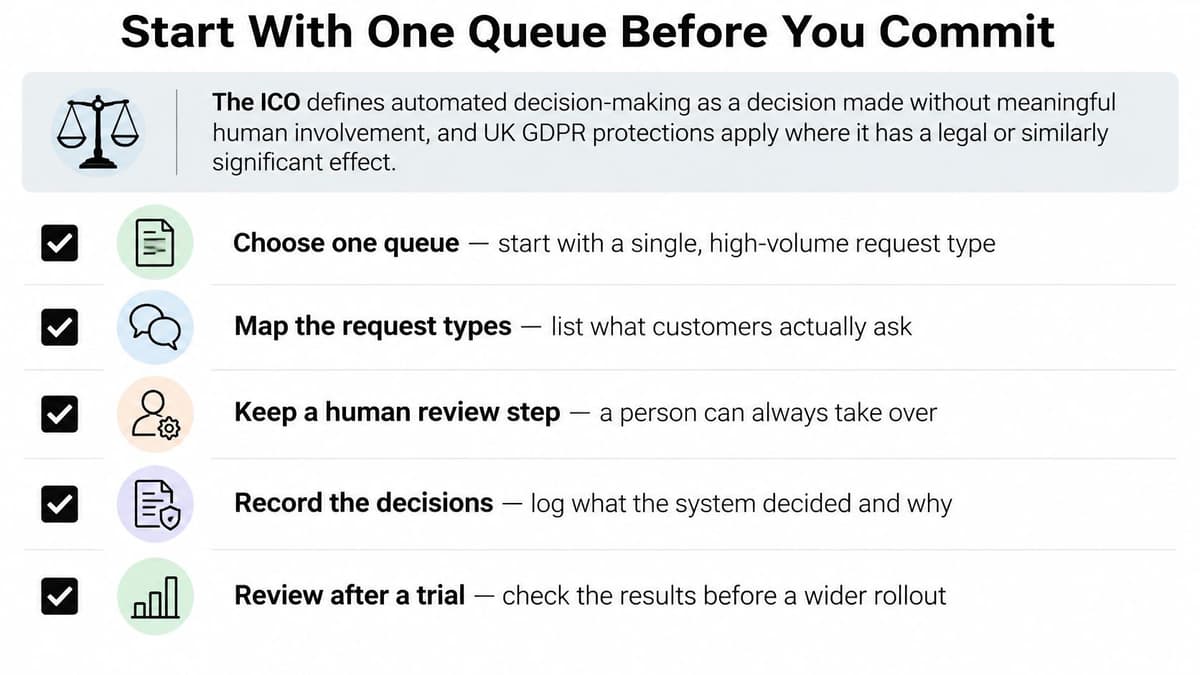
The legal line is worth knowing before you sign anything. The Information Commissioner's Office guidance on automated decision-making defines it as a decision made without meaningful human involvement, and UK GDPR protections apply where that decision has a legal or similarly significant effect on a person. Answering a delivery question sits well below that line. Automatically refusing a refund, cancelling an account or changing someone's access to a service does not.
Keep routine answers automated. Route refunds, eligibility decisions, account suspensions and suspected fraud to trained staff who can review and override.
Five questions for any agency
- What customer data does the system use?
- Where is that data stored?
- How are decisions logged, and who reads the logs?
- How does a customer reach a person?
- How quickly can unsafe behaviour be stopped, and by whom?
A pilot you can run without a technical team
- Pick one queue, such as delivery-status questions, and leave everything else alone.
- Record a baseline for four to eight weeks before launch.
- Run the agent alongside a comparison group handling the same request type.
- Agree acceptance measures and a rollback process in writing, including who signs each off.
- Review escalations weekly for the first month, reading the actual conversations.
Ask the supplier for a written timetable that separates content clean-up, integration, testing and the pilot, with handover and rollback owners named. A founder without technical staff is normally better served buying a managed tool or commissioning a specialist than assembling controls alone.
Write down your queue, your baseline and your handoff triggers, then describe the project through the Digital Souls Studios contact page.
Digital Souls Studios LTD builds custom AI support agents that answer email, reply to user messages and triage issues, priced at £3,000 paid once, with ongoing maintenance and support available through its retainer. If you've identified the one queue worth automating and want the handoff rules, logging and testing scoped properly rather than bolted on, visit Digital Souls Studios LTD and send over your request list, your current reply times and the systems the agent would need to read.