9th November 2026 · 19 min
SEO for Single Page Application: A 2026 Guide

You've launched the app, the demo runs beautifully, and then someone searches for what it really does. Your homepage appears, maybe, with a vague title. The pricing page, the feature page you spent a week writing, the help article that answers real questions, none of them show up. In the browser they all exist. In search, they barely do.
That's the usual starting point for SEO for a single page application. It isn't that search engines dislike your framework. It's that your app and a crawler don't meet the same page.
Table of Contents
- Why a Single Page Application Fails Search
- Rendering Methods and Their Search Trade Offs
- URLs Metadata Sitemaps and Structured Data
- UK Mobile Speed and Core Web Vitals
- How to Test Raw HTML and Field Data
- Worked Routes and the Per-Route Decision
Why a Single Page Application Fails Search
Think of a shopfront. When you visit in person, staff have filled the shelves, lit the signs and written prices on the counter, so the shop looks complete. A crawler often arrives earlier, at the moment the first HTML response lands, and finds an empty counter with a frame around it. If JavaScript has to build every shelf, the first visitor from search reaches the same bare room you worked so hard to avoid showing anyone.
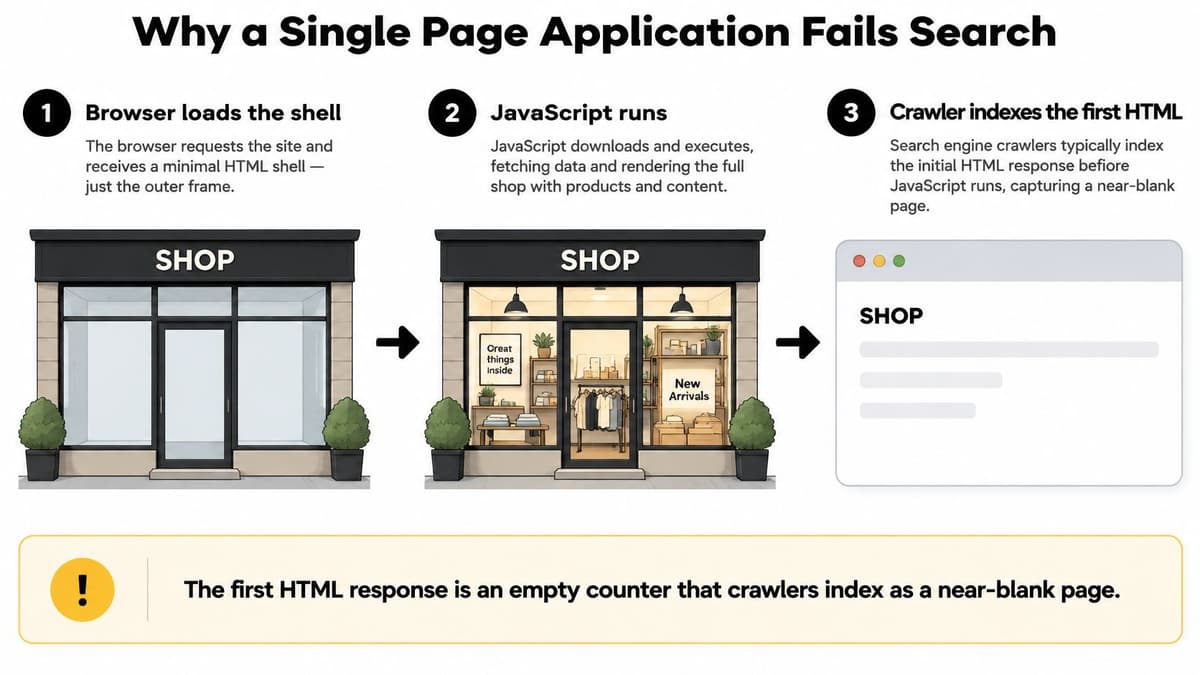
Google's JavaScript SEO basics describes processing in three stages. During crawling, Googlebot fetches the initial HTML, follows eligible links and queues the page. During rendering, a headless Chromium browser executes JavaScript. During indexing, Google uses the rendered HTML, so content counts only if it sits at a stable URL and is still present after rendering.
That sounds reassuring until you meet the limits. JavaScript-generated content can encounter rendering limitations, and other search engines may ignore JavaScript entirely. Relying on the browser to assemble everything is therefore a fragile base, which is why it helps to understand how search engine optimisation works before you blame keywords or copy.
The old web app assumption was that one document plus browser state was enough. Search doesn't work that way. A logged-in shell that ranks nothing, hash-based screens search never sees, and public pages sharing one title are all versions of the same mistake. Treat the app as a collection of indexable routes, not one application shell, and give public routes real HTML in the first response.
Rendering Methods and Their Search Trade Offs
| Method | First response | Best fit | Main trade-off |
|---|---|---|---|
| Client-side rendering | Near-empty app shell | Logged-in tools that should not rank | Weak crawl; other engines may skip JavaScript |
| Server-side rendering | HTML built per request | Public pages that change often | Server cost and slower time to first byte |
| Static site generation | HTML written at build time | Marketing, docs and stable categories | Stale until the next build |
| Prerendering | Snapshot of each route | Legacy SPA with known public URLs | Stale snapshots and hydration mismatches |
| Dynamic rendering | Static HTML for bots, client app for users | Short bridge before a rewrite | Bot detection fails; fragile to maintain |
| Islands or hydration | HTML plus script only where needed | Mixed content and interactive pages | More architecture to design up front |
What each row actually means
Client-side rendering ships a near-empty shell and builds the view in the browser. That's fine, and often simplest, for private tools behind a login where ranking would be a problem rather than a goal. It becomes a problem when a team uses the same pattern for the marketing pages that are supposed to bring people in. The browser does all the work, late, on the visitor's phone.
Server-side rendering, or SSR, returns HTML on each request. A crawler and a first-time visitor both get words, headings and links straight away, then JavaScript makes the page interactive. You pay for that with server work on every request and a time to first byte you now have to watch. If your server is slow, you've swapped a blank page problem for a waiting problem.
Static site generation, or SSG, writes HTML at build time. Marketing pages, documentation and stable category pages suit it well because they rarely change between visits, and serving a finished file is cheap and fast. The downside is plain. Content stays stale until the next build, so a price or stock level baked into the page can be wrong until someone rebuilds.
The rescue options, and their limits
Prerendering snapshots each route in advance and serves that snapshot. It can rescue a legacy app without a full rewrite, especially when the public URLs are known and limited. Snapshots rot, though. If the snapshot says one thing and the hydrated app renders another, you get flicker, mismatched content, or a crawler indexing copy your users never see. Prerendering only works if you refresh snapshots whenever the underlying content changes.
Dynamic rendering goes further. It detects a bot and serves it static HTML while human visitors get the client app. Treat it as a short bridge when a rewrite isn't possible yet, nothing more. Bot detection fails, user agents change, and now you're maintaining two versions of every page and hoping they agree. Teams who adopt it as a permanent answer usually inherit a debugging job that never ends.
Islands or partial hydration keeps the copy in the first HTML and attaches script only where interaction is needed, such as a calculator or a booking widget. Most of the page never needs JavaScript at all. The cost is architectural. You have to decide up front which parts are content and which parts are applications, which is exactly the thinking described in a sensible web application architecture.
Practical rule: Search-demand URLs get SSR, SSG or a fresh prerender, and return HTTP 200. Authenticated screens may stay client-rendered. Hash fragments are not URLs.
There's no single correct row in that table, and anyone selling one is skipping the trade-off column. A small site with stable pages gains little from per-request rendering. A marketplace with changing listings gains little from static files that age overnight. Choose per route, based on how often the content changes and whether a stranger from search needs to land on it cold.
URLs Metadata Sitemaps and Structured Data
Start at the address bar and work inwards. Every screen that should rank needs its own path URL, such as /pricing or /blog/spa-checklist, and that canonical address must return HTTP 200. Reject hash-only navigation for anything public. A route like /#/pricing tells a crawler there's one page, /, with a fragment it can largely disregard. Your router may treat them as different screens. Search does not.
What the initial HTML must contain
Before any script runs, the first HTML for an indexable route should already hold the signals a reader and a crawler both need.
- Title and meta description: Unique to that route, written for the actual content, not inherited from the shell.
- Canonical link: Self-referencing, pointing at the one host and protocol you want indexed for every route.
- One clear heading: A single obvious main heading that matches the page's job.
- Primary copy: The words that make the page worth ranking, present as text rather than fetched after load.
- Real href links: Ordinary anchor elements that mirror your information architecture, so crawlers can follow from section to article to related page.
Buttons that swap content without an anchor are invisible as navigation. If a human can reach a public page only by clicking inside the app, and there's no link with an href pointing at its path, a crawler has no reliable route there either.
Route changes and state
Client-side navigation creates a subtle failure. A visitor clicks from your homepage to pricing, the view updates, but the document title, canonical and history state don't. Now the tab still shows the old title, a shared link points at the wrong screen, and analytics records one long visit instead of two pages. Update all three on every route transition, using the History API so the visible URL, the shareable URL and the content stay in step.
Your XML sitemap then lists only canonical, indexable routes. Leave out faceted duplicates, filter combinations that produce endless near-identical pages, and private app screens. A sitemap is a claim that these URLs matter and are ready. Padding it with thin variations weakens that claim and wastes crawl attention on pages you'd rather search ignored.
Structured data that matches the screen
Place JSON-LD for the page type in the first HTML, and make it describe the visible content on that route. A product page carries product data. An article carries article data. Refresh it on route change, because an SPA that updates the view but not the structured data ends up describing the previous screen, which is worse than offering none. Keep the markup honest. If the price or rating in the JSON-LD isn't visible on the page, don't publish it.
Treat the app as a set of documents that happen to share a shell, and most of these requirements stop feeling like extra work. They're simply what a document needs.
Self-referencing canonicals deserve one last word because they're where SPAs split themselves in two. Pick one host and one protocol, use it consistently in canonicals, sitemap entries and internal links, and redirect the alternatives. Otherwise the same route exists under several addresses and search has to guess which one you meant.
UK Mobile Speed and Core Web Vitals
Getting indexed and being fast enough to keep the visitor are different jobs. Plenty of SPAs pass the first and fail the second, because the person arriving from search is on a phone, on a mobile connection, meeting your JavaScript bundle for the first time.
Ofcom's Online Nation 2024 report found that 47.4 million UK adults accessed the internet across smartphones, tablets, and computers in May 2024, spending an average of 4 hours 20 minutes online each day. Smartphones accounted for 75% of that daily time, approximately 3 hours 15 minutes, while computers and tablets each accounted for only 32 minutes. Among 25-to-34-year-olds, who spent 83% of their online time on smartphones, the pattern was stronger still, and among people aged 65 and over, the smartphone share was still 56%.
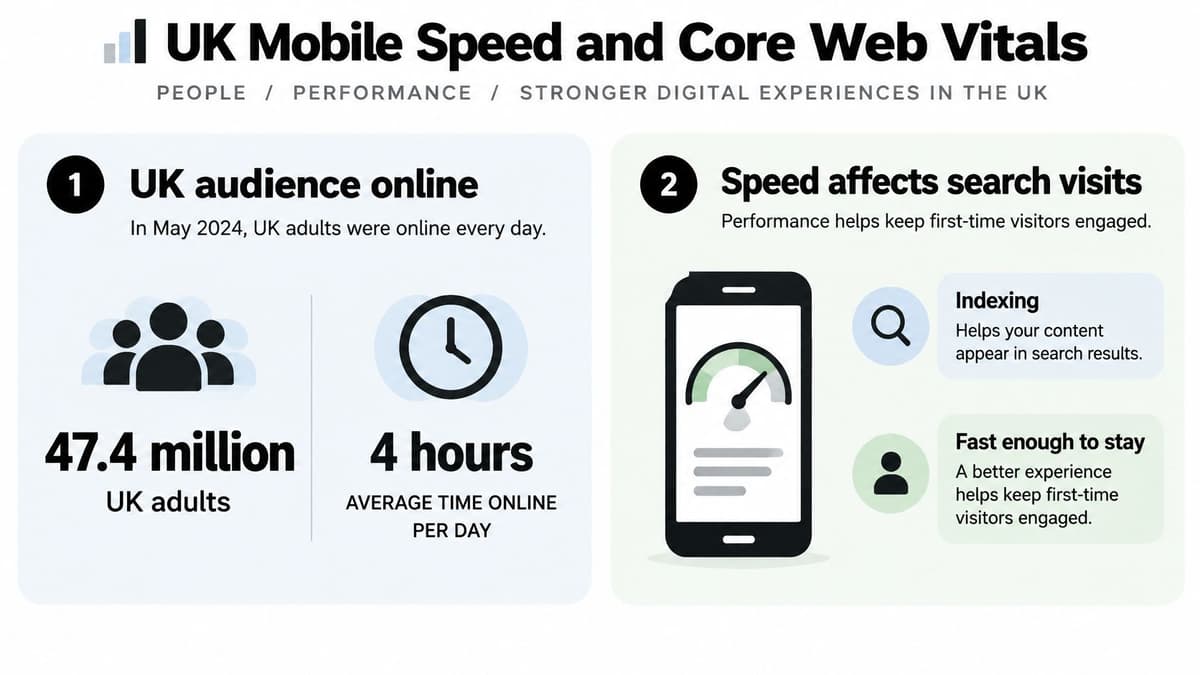
Connectivity makes the point sharper. Across UK mobile connections analysed from October 2023 to March 2024, 78.0% used 4G, 19.6% used 5G, 2.3% used 3G, and 0.1% used 2G. So the common case for a UK search visitor isn't a flagship phone on fast 5G. It's a mid-range handset on 4G, downloading, decompressing, parsing and executing your bundle before it can show anything.
Indexable is not the same as competitive
A UK mobile internet statistics compilation reports that mobile devices account for 58% of UK web traffic, while 56% of UK sites pass all three mobile Core Web Vitals thresholds compared with 68% on desktop. That gap is the story. A route can be perfectly crawlable and still lose, because heavier JavaScript execution blocks the main thread on the device most visitors are holding. Taps feel laggy, content arrives late, and the visitor leaves before your carefully rendered headline registers.
The cost of script weight isn't theoretical. In a GOV.UK experiment on removing jQuery, reducing JavaScript produced a 17% improvement in visual completion, reducing it from 11.3 seconds to 9.4 seconds, and time to interactivity also fell 17%, from 11.34 to 9.43 seconds. Your app won't match those figures, but the direction holds for any SPA. Less JavaScript to process means content sooner, on exactly the lower-powered devices that struggle most.
What to do about the first visit
App-shell caching is the trap here. It makes repeat visits feel instant, which flatters your own testing, because you visit your site constantly. It does almost nothing for a first-time organic visitor who lands directly on a deep route with an empty cache. That landing is where search succeeds or fails commercially, so optimise for the cold visit, not the warm one.
Practical moves that help that visitor include the following.
- Server or static HTML for landing routes: Content arrives with the document instead of after script execution and API calls.
- A small initial bundle: Split code by route so a pricing visitor doesn't download the dashboard.
- Deferred non-critical scripts: Analytics, chat widgets and embeds can wait until after the page is usable.
- Compression: Serve assets with Brotli or Gzip, and remove unused code rather than shipping it hopefully.
Measure LCP, INP and CLS by template on a mid-range phone over a throttled connection, not as one lab score for the homepage. This is ordinary website performance optimisation applied where it matters most, the deep route a stranger lands on. If a client-rendered route and a server-rendered equivalent give you very different field results, believe the field results and change the route, not the report.
How to Test Raw HTML and Field Data
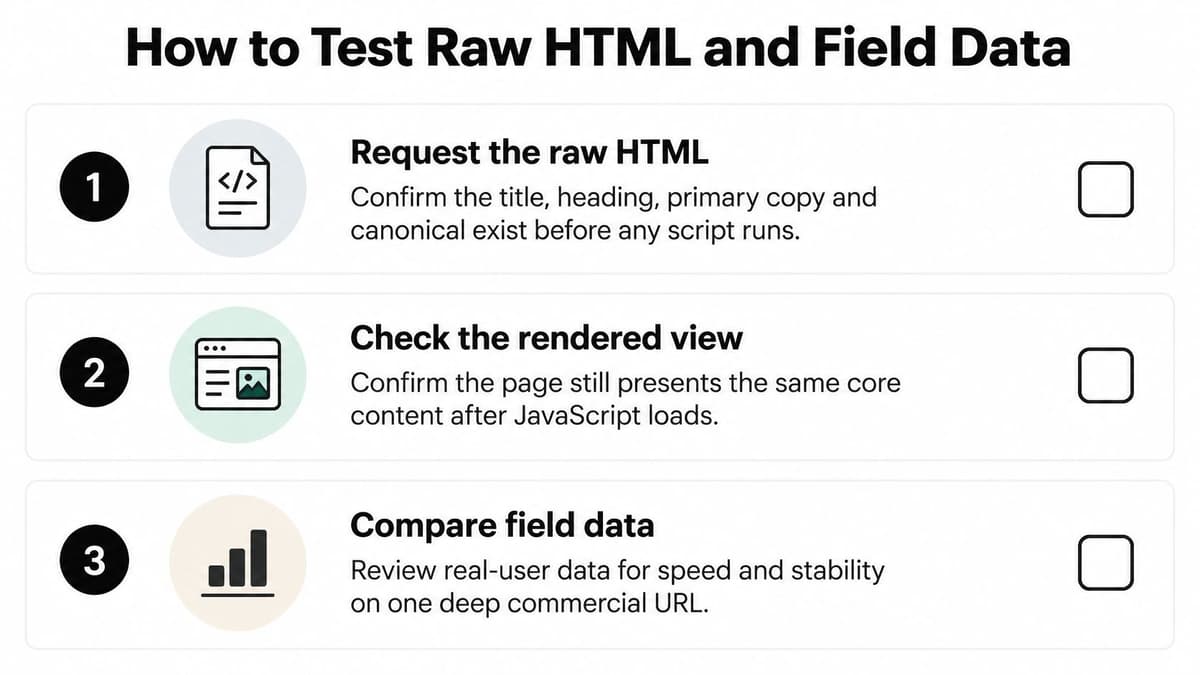
Pick one deep commercial URL, the page you'd most like a stranger to find, and run these checks in order. Don't start with the homepage. Homepages get attention, caching and care that inner routes rarely receive, so they hide exactly the faults you're looking for.
The raw HTML checks
- Request the raw HTML: Fetch the URL with curl or view source, and confirm the title, heading, primary copy and canonical exist before any script runs.
- Check the address: Confirm it's a path, not a hash fragment, and that loading it cold in a new tab shows the right screen.
- Check the status: Confirm the canonical returns HTTP 200 and isn't a soft 404, where the server says success but renders an empty or error-like page.
- Check the links: Confirm internal links are real anchors between indexable routes, not click handlers on divs.
- Check the sitemap: Confirm the XML sitemap lists that URL and that Search Console has seen it, then inspect the URL there to compare what Google rendered.
- Compare raw and rendered: Put the raw response beside the hydrated DOM, so a polished screen isn't hiding an empty first byte.
That last comparison catches the most common self-deception in SPA work. The finished page in your browser looks complete, so the team assumes search sees the same thing. Often it eventually does. But if the raw response is a shell, you're depending on rendering going perfectly, every time, for every route, with no script error, timeout or blocked resource in the way.
From lab scores to field data
Lab audits are a starting point, not a verdict. Instrument real-user monitoring at route level, and record the first document request separately from later client-side navigations, because they behave differently and fail differently. Capture LCP, INP, CLS and TTFB alongside JavaScript execution time, long tasks and route transition latency, then slice by device, network and UK region. Averages hide the visitor in a rural area on an older phone who gets the worst version of your app.
GOV.UK's real-user monitoring findings recorded a median page-load time of 0.455 seconds across pages and devices in April–May 2022, while 83% of visitors achieved a load time considered “good” under the cited CrUX definition of one second, and 75% of visitors were located in the UK. Use that as a ceiling to admire, not a target to promise. It's a public-service site built with unusual discipline, not a typical commercial SPA carrying marketing tags and third-party widgets.
A single homepage Lighthouse run tells you how your best-cared-for page performs on your machine. Field data by template tells you what search visitors actually got.
Test each landing template on a mid-range phone, with the cache empty, on a throttled connection. Note which template produces long tasks during hydration, which one shifts layout as content arrives, and which one delays response to a tap. Those three observations usually point straight at the bundle, the image handling or the third-party script responsible. Fix the template, then watch the field data move. If it doesn't move, your fix helped the lab and nobody else.
Worked Routes and the Per-Route Decision
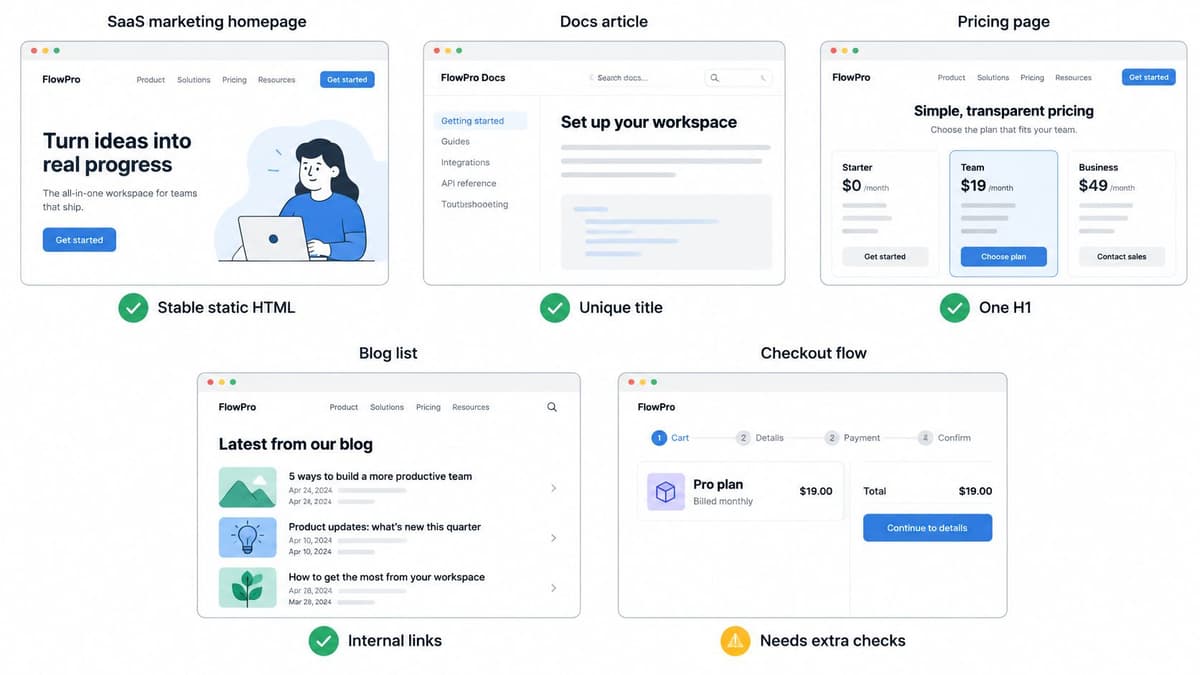
Abstract rules are easier to argue with than specific screens, so here are five you'll recognise. The rendering choice follows from two questions. Should a stranger from search land here directly, and how often does the content change?
Five familiar screens
A SaaS marketing homepage is stable and public. Static HTML with a unique title, one main heading and internal links to features and pricing is enough, and it'll be fast because there's nothing per-visitor to compute. The same logic covers a docs article. It's a document people search for by error message and task name, so give it a descriptive path, prerender the full text, and link it from neighbouring articles rather than leaving it reachable only through in-app search.
A pricing page splits depending on what varies. If the only change is currency by region, it can stay static, with a small script adjusting displayed symbols. If the price depends on the visitor's account, usage or negotiated plan, server-render it, because the HTML has to be built for that request. Don't ship a static page that shows one price and then swaps it after load. Crawlers index the first number, users see the second, and nobody trusts either.
An ecommerce category or product page needs its own path and matching structured data in the first HTML, Product for an item and ItemList for a category. The failure to avoid is a single /shop shell that swaps content after a click, leaving every product sharing one URL and one title. Someone searching for a specific product should land on that product, with its name in the heading and its details in the copy, not on a grid they have to filter.
A blog entry is a document above all. Prerender the full body rather than hiding it behind a read-more request or an API call that fires after hydration. If the words aren't in the first response, you've written an article and then locked it in a drawer.
The logged-in dashboard, settings and inbox go the other way. Keep them client-rendered, mark them noindex, and leave them out of the sitemap. They contain private, per-user content with no search value, and server-rendering them buys you cost and complexity for no return. Being deliberate about excluding them is as much a part of the work as including the public routes.
Infinite scroll and endless filters
Infinite scroll and filter combinations generate states faster than any team can make pages worth indexing. Offer a linked canonical page only for each important state, such as a searched category, and leave the rest unlisted in the sitemap. Give crawlers ordinary paginated or category links to follow, because a crawler won't scroll your feed the way a person does. If a state isn't worth a unique title and unique copy, it isn't worth a URL in the index.
Sort every route into three piles
Take every URL you hope will rank and sort it before you write more code.
- Static: Stable public content, generated at build time, such as marketing pages, docs and blog posts.
- Server-rendered: Public content that changes often or depends on the request, such as listings and personalised pricing.
- Private: Authenticated screens that stay client-rendered, noindex and out of the sitemap.
Each public pile then needs the same four things. A canonical path, first-response HTML carrying its own title and copy, a sitemap entry, and a field-data check on a mid-range phone. Watch for the three recurring traps while you sort. Hash routes dressed up as pages. Empty marketing shells that only fill in once script runs. And dynamic rendering left running permanently because nobody scheduled the rewrite it was meant to bridge.
We build web development projects, from high-performance sites to web apps, using Next.js to Webflow, and the pile-sorting conversation works best early. A project moves through four steps, Specification, Production, Launch and Support, and deciding which routes must rank belongs in Specification, where it's a line in a document. Deciding it after launch turns it into a rendering migration nobody budgeted for.
Run a ten-URL sprint
Don't rebuild everything at once. Choose ten URLs that carry real commercial intent, then work them until they're fully done. Verify the raw HTML holds title, heading, copy and canonical. Confirm each returns HTTP 200 at a clean path, submit the sitemap, and record LCP, INP and CLS on the first visit from a mid-range phone with an empty cache. Ten routes finished properly will teach you where your build pipeline, your data fetching and your bundle resist the approach. Fix those friction points on ten pages, and the next hundred become routine instead of a second project.
If your public routes still ship as an empty shell, or your deep pages are indexable but too heavy for a first visit on a UK mobile connection, we can sort your routes, implement the right rendering per page, and verify the result in raw HTML and field data. Visit Digital Souls Studios LTD to tell us about your application and the pages you need search to find.