23rd November 2026 · 17 min
Software Project Planning: A Business Leader's Guide

At least 29 years of delay and more than £3 billion in extra cost is what five major government digital programmes accumulated, with the overrun equal to at least 26% of what those programmes were originally forecast to cost, according to the National Audit Office. Nobody signs off that kind of money on purpose. It arrives through ordinary habits: a desired date treated as a plan, a scope nobody wrote down, a supplier chosen before the problem was properly understood.
Software project planning is not a document produced to keep a supplier happy. It's the work of reducing uncertainty while changes are still cheap, one gate at a time, so money is committed after the risk has been tested rather than before. For a business owner with no technical team, that discipline is the difference between a product that earns its keep and one that drains a year.
Table of Contents
- The Six Stages of Software Project Planning
- Set the Scope Before Anyone Quotes a Price
- Timelines, Budgets and Contingency
- Risks That Derail Plans and How to Plan for Them
- Planning an AI or Automation Project
- Choosing Between a Tool, Your Own Team and a Studio
- Confirm the Plan Before You Sign
The Six Stages of Software Project Planning
Planning software is like planning a house extension. You settle what you want, someone competent checks the ground and the drains, and you agree costs and the order of work before a builder lifts a spade. Changes are cheap on paper and expensive on site. Software behaves the same way, which is why a useful plan is built from six stages, each settling one question and each producing one document a non-technical leader can read.
| Stage | Question it settles | Output to ask for |
|---|---|---|
| Define the problem | What process or outcome must change? | One-page problem statement with a measurable goal |
| Discovery and scope | What must the software do, and what is out? | Written feature list split into must-have and later |
| Plan and estimate | What will it cost and how long will it take? | Budget and timeline as ranges, with stated assumptions |
| Resource and approve | Who builds it, runs it and signs off changes? | Named owners, chosen delivery route and a change process |
| Build in stages | Is the product working as expected? | Regular demonstrations of working functionality |
| Launch and handover | Can the team run it without the builders? | Launch plan, documentation and a support arrangement |
Define the problem and discovery and scope do the cheap thinking. The first produces a problem statement with one measurable goal. The second produces a feature list split into must-have for launch and later, plus an explicit list of what is excluded.
Plan and estimate turns that list into ranges rather than single figures. Resource and approve names who builds it, who runs it afterwards and who signs off changes, then fixes the delivery route and the change process. Both documents should take five minutes to read.
Build in stages replaces reassurance with evidence: demonstrations of working software, not percentage-complete slides. Launch and handover answers whether your own team can run the thing, and produces a launch plan, documentation and a support arrangement. set owners and stage gates is a practical template for recording those decisions in one place.
Each stage is a gate. If discovery shows the process isn't worth changing, or that the data is a mess, you stop for a small cost instead of discovering both halfway through a build. Say an online shop owner commissions a new ordering system without deciding how stock levels will sync with the existing warehouse sheet. Nobody writes it down at stage two, the gap surfaces in week six, and the answer affects the data model. Ask every supplier for these six outputs before you compare a single price.
Set the Scope Before Anyone Quotes a Price
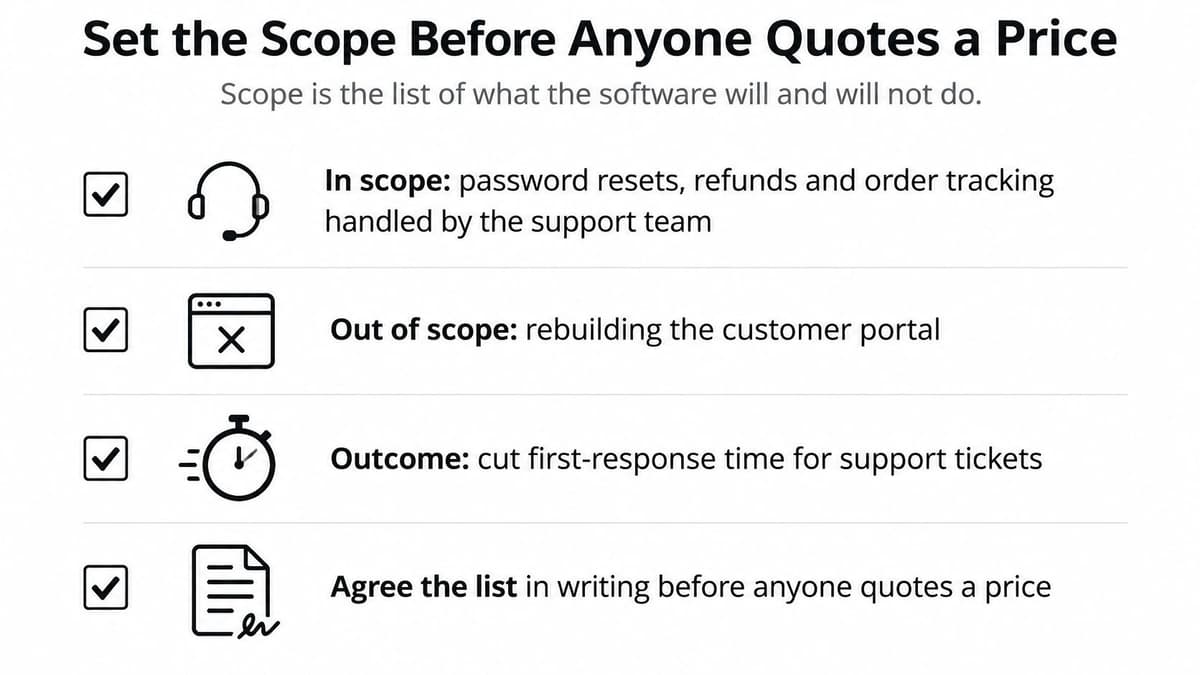
A quote is only useful when suppliers are pricing the same work. Scope sets out what the software will and will not do, so unclear requirements can make two prices impossible to compare. A support team, for example, might want to reduce the time spent answering routine emails. That outcome is clearer than asking for an AI system.
The UK Parliament POST briefing cites a British Computer Society survey that found only about 13% of IT projects delivered on time, to specification and within cost, while fewer than 1% of development projects met all three conditions. The briefing also reports average cost overruns of 43%, schedule overruns of 82%, and delivery of only half of the originally required features and functions.
These figures point to a practical risk: vague requirements leave room for changes, which can create rework, extend delivery and use up budget before the product reaches its first customer. Better scope gives decision-makers a chance to resolve uncertainty while changes are still easier to discuss.
The five-step scope test
- Write the outcome first. State the result you want and a date you would like to reach it. “Cut first-response time on routine support emails” describes a business outcome. “Use AI” describes a possible solution, not the result.
- List the users and their tasks. Name the people who will use the system and what they need it to do for them. This helps separate a real business need from a feature that sounds useful but has no clear purpose.
- Split features into launch and later. Keep the first release focused on what customers or staff need at launch. Put useful additions that can wait into a later phase.
- Write acceptance criteria in plain language. “A customer can check an order status without contacting staff” can be tested. “Improved user experience” does not say what success looks like.
- List integrations and exclusions. Name the systems the project must connect to, such as a helpdesk, spreadsheet or accounting package. Record what the first release will leave out, too.
Requirements left unwritten can return as change requests during production. For each new request, record its expected effect on cost, delivery, risk and business benefit. That gives the person requesting the change a clear trade-off to consider before agreeing to it.
Practical rule: If the business cannot measure a feature's value at launch, consider putting it in phase two.
At Digital Souls Studios LTD, the client explains the idea in writing during Specification, and the studio prepares a specification suited to the work before Production starts. A software requirements specification example can help clarify the kind of document involved. Use the scope to decide whether the work is clear enough to price or whether more discussion is needed first.
Timelines, Budgets and Contingency
A desired launch date is what the business wants. A forecast is what the work, the people and the integrations can deliver. The two get treated as synonyms constantly, and the gap between them is where budgets die.
The National Audit Office's 2021 review of digital change gives a worked example. The Home Office set an over-ambitious delivery timeline for the Emergency Services Network without contingency despite the project's high risks, and the programme fell significantly behind schedule. The missing contingency didn't save time. It removed the only mechanism for absorbing reality.
A desired date is not a forecast
A credible forecast is a range with its assumptions attached. Ask what has to be true for the lower figure: which integrations must be documented, whose approval must arrive on time, how many people are working on it, and what happens to the date if one of those slips. A supplier who can answer that has planned. One who can't has guessed and put a number on it.
What actually drives the cost
- Features in scope. Every screen, rule and notification carries design, build and testing work.
- Integrations. Each connection to an existing system is where hidden complexity lives, because the other system was never designed for you.
- Data. Moving and cleaning records is often the slowest part of a build and the least visible in a quote.
- Design. Custom interface work costs more than a standard template, and it's usually worth it where customers touch the product.
- Support after launch. Maintenance, monitoring and fixes are a real cost, and a plan that ignores them looks cheaper than it is.
Contingency is a reserve set aside for integration, testing, security and going live, shown openly as its own line. It isn't padding hidden inside feature costs, because padding you can't see can't be managed or released.
Picture an online shop taking a new checkout live in the week before its biggest seasonal sale. There's no room left to test payments, testing gets compressed, and the first weeks of trading carry the failures. A launch date driven by a sale event is a reason to start earlier, not to skip the unglamorous part. MakeAutomation's project estimation approach covers how to build an estimate from the work rather than from the deadline.
Watch for four warning signs in any proposal: one fixed date with no stated assumptions, no separate contingency line, the entire budget allocated to features, and no commitment to regular check-ins. Ask instead for a rolling milestone plan reviewed every few weeks, so the timeline can be corrected early rather than explained at the end. If you want a sense of how quotes are assembled, this breakdown of what app development actually costs sets out the moving parts.
Published starting points give you something to hold a quote against:
| Published option | Starting price | What moves the price |
|---|---|---|
| Custom AI support agent | £3,000 | Enquiry types covered and systems connected |
| Custom AI agent | £3,000 to £10,000 | Number of tasks, integrations and approval steps |
| Automated development team | £5,000 | Number of workflows and length of the build |
| All-in-one retainer | £1,000 to £15,000 a month | Level of ongoing support and change requests |
These are starting points rather than quotes. A figure far below the range for comparable scope deserves questions about what's missing, and a figure far above it deserves questions about what's driving the difference.
Risks That Derail Plans and How to Plan for Them
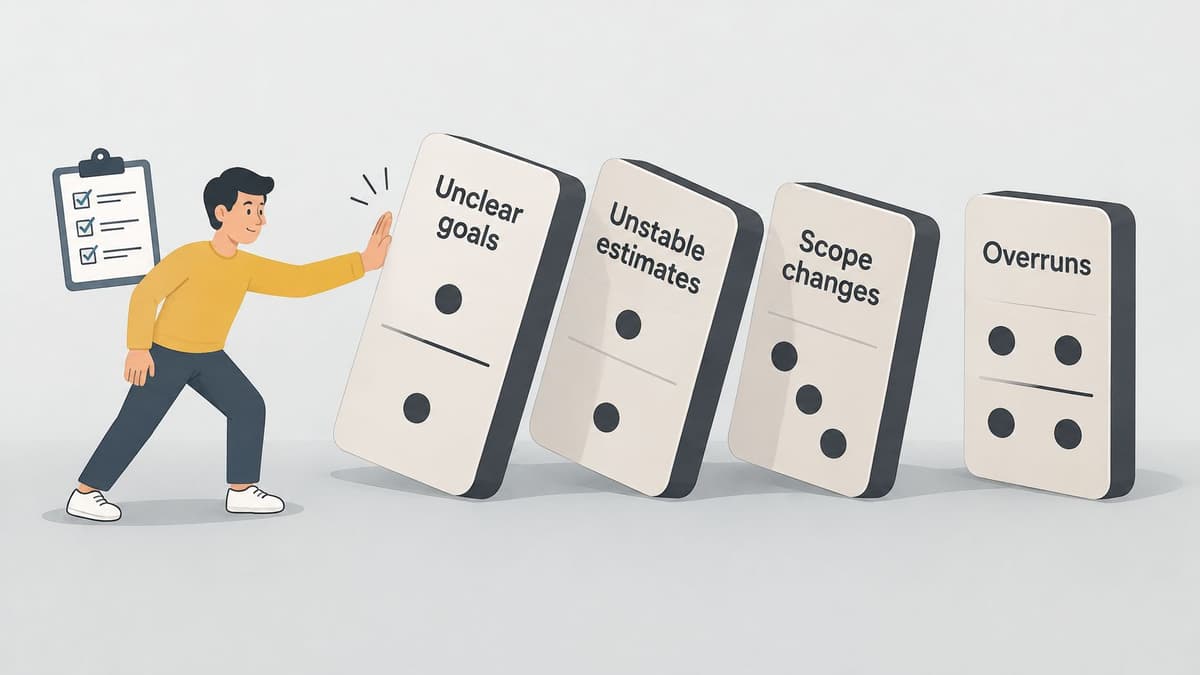
Ask people why software projects fail and most will blame the technology. Ask the people running them and a different picture appears. In a UK survey of 182 project managers, the most frequently reported causes were unclear goals at 49%, incomplete risk understanding at 48% and significant changes to the project brief at 45%, followed by unsuitable resourcing at 42%, unrealistic timeframes at 41% and budget overruns at 32%.
| Failure cause | Share reporting it | Planning control |
|---|---|---|
| Unclear goals | 49% | Written outcome with measurable acceptance criteria |
| Incomplete risk understanding | 48% | Risk register with owner, impact, mitigation and trigger |
| Significant changes to the project brief | 45% | Change log with cost and date effect for each request |
| Unsuitable resourcing | 42% | Named owners and skills checked before the build starts |
| Unrealistic timeframes | 41% | Timeline given as a range tied to stated assumptions |
| Budget overruns | 32% | Contingency reserved for integration, testing, security and launch |
Read the list as a chain, not a menu
Unclear goals make estimates unstable. Unstable goals drive changes to the brief. Changed briefs against a fixed date push teams into under-resourcing or dropping quality. The schedule and budget failures at the bottom of the table are symptoms of the planning failures at the top, which is why adding more developers late rarely rescues a project.
The risk register is one page
Before committing to full production, run a short discovery phase that tests the highest-risk assumptions: what users need, which integrations exist and how well they behave, what data protection requires, whether the technical approach holds up, and who owns the system once it's live. Then convert each major risk into a row with an owner, a likelihood, an impact, a planned response and the signal that triggers escalation.
Say a finance team's payroll export changes format halfway through a build. If nobody owned that data, the fix waits three weeks for a decision. If someone owned it and the format change was on the trigger list, the work is repriced in a day.
Ask for this in writing: a risk register with the first proposal, and the name of a person against each of the top three risks.
Operational ownership is the gap most plans leave open. Who supports the system after launch, who maintains the data inside it, who decides what changes next quarter? A plan that omits those names looks affordable and creates avoidable cost three months after go-live.
Planning an AI or Automation Project
AI projects fail in planning more often than in build. The most common planning failure is skipping the question of whether the project should exist. Government research on AI adoption found that 71% of businesses say they have not identified a use for AI, while 60% cite limited AI skills, expertise or knowledge as a barrier. The same research records ethical concerns as a significant barrier for 80% of businesses, high cost for 76% and unclear regulation for 72%.
Those barriers aren't technical. They're decisions nobody has made yet, which is exactly what planning is for.
The stop-or-go test
Start with the business case and leave technology out of the room. Which manual process is costly enough to change? What measurable result do you expect? What human work remains once the machine does its part? What evidence would make you cancel?
Say a support team handles roughly 300 routine emails a week and two people spend part of every morning on them. Before any supplier is involved, record the baseline: enquiries per week, hours spent, error rates and response times. Without a baseline, nobody can tell whether the finished system helped.
Then set five gates:
- Paid discovery. A short piece of work that tests the idea against real examples of your enquiries.
- A limited pilot. One type of enquiry, one queue, one measurable threshold.
- An accuracy bar. The percentage of correct answers the pilot must reach before it handles anything live.
- Human approval rules. Which replies go out automatically and which wait for a person.
- A cost-per-task comparison. The automated cost per enquiry against the current one, including the review time automation creates.
A custom AI agent is closest to an extra team member that takes on defined work, which makes its limits easier to plan than a vague promise of intelligence everywhere. The AI agent development guide covers how those limits get specified before a build begins.
Approval rules are a planning decision, not a configuration detail. Decide before launch which customer messages can never go out unread.
If the pilot doesn't beat the baseline on cost and quality together, the project stops. That isn't a failure of the technology. It's the planning working.
Choosing Between a Tool, Your Own Team and a Studio
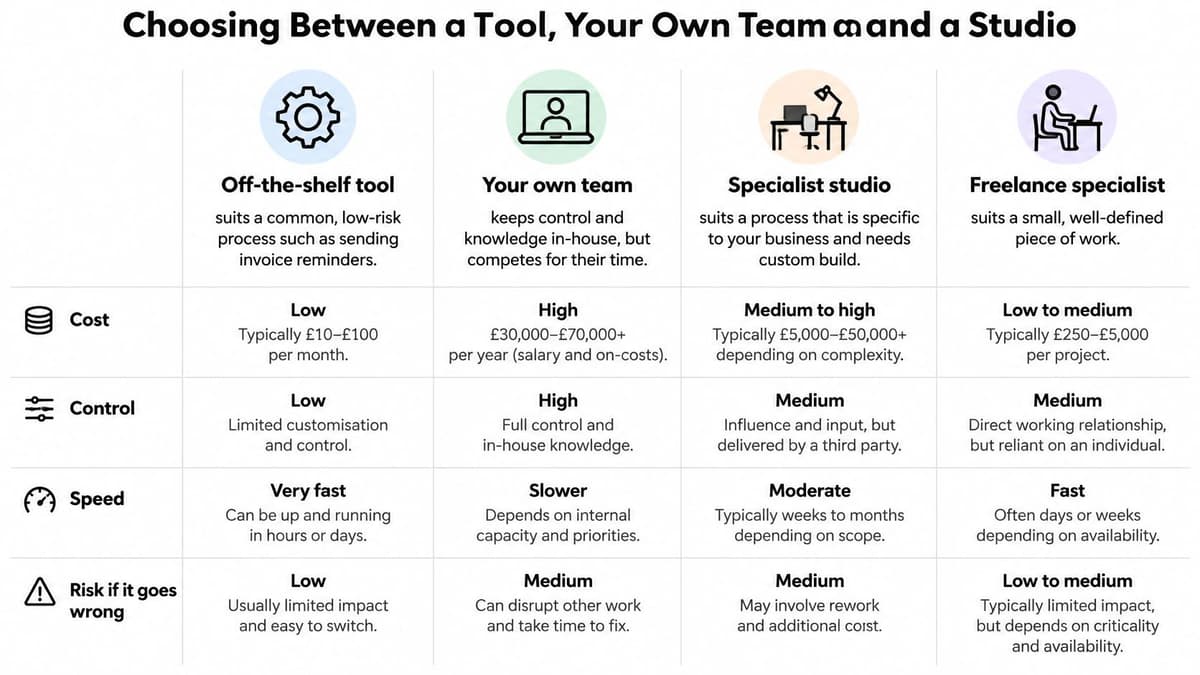
Four routes exist and the criteria that separate them are simple: how unusual the process is, how much control you need, and whether you can maintain the result yourself.
| Route | Best when | Main risk | Control you keep |
|---|---|---|---|
| Off-the-shelf tool | The process is common and low risk | Paying for features you do not use | A contract with a clear exit and data export terms |
| Specialist studio | You need tailored connections and have no technical team | Dependence on one supplier | Written scope, handover plan and ownership of data |
| In-house build | You have technical skills and a strong reason to own the system | Slow hiring and key-person risk | Full control of design, data and roadmap |
| Mixed route | A tool covers most needs and a specialist builds the gaps | Two suppliers to manage | Clear boundaries for each supplier's work |
Government research on AI activity in UK businesses found that around 15% of UK businesses had adopted at least one AI technology, about 2% were piloting and 10% planned to adopt. Among adopters, roughly 40% developed in-house, 40% bought off-the-shelf solutions and 20% outsourced development. That split reflects what each business can manage, not which option is best. The same report recorded average 2020 AI spending of £9,500 for small businesses against £1.6 million for large businesses, which is the strongest argument for testing one narrow use case before funding a programme.
A standard tool suits a common, low-risk job such as sending invoice reminders. A specialist studio suits a process that is specific to your business and needs connecting to systems you already run. Building internally makes sense only where security, compliance and operational staff already exist to own the thing.
Mixed routes suit many small firms: a tool does most of the work, and a specialist builds the two connections the tool can't handle. The risk is two suppliers pointing at each other, so write down where one's work ends and the other's begins.
Whichever route you take, four questions belong in the conversation before any price is agreed. Which category does this project fall into? What existing tools must it connect to? Who owns the data? How does the business leave if the relationship ends?
Digital Souls Studios LTD publishes packages for this kind of work, including a custom AI support agent at £3,000 and a custom AI agent between £3,000 and £10,000 depending on the tasks and approval steps involved. Support packages cover maintenance after launch, in addition to a scoped project, and the studio's services page sets out what each one covers.
Confirm the Plan Before You Sign
Before committing money, check that the plan gives the business a clear way to stop or proceed at each stage. If key decisions are still vague, pause and resolve them before signing.
- A written problem statement with one measurable goal and a named business owner.
- A must-have feature list with plain acceptance criteria. Keep later features separate.
- A budget and timeline stated as ranges, with the assumptions behind the lower figures written down.
- A named owner for each decision and for each of the top three risks.
- A pilot or stage gate before full production, with a defined stopping point.
- A contingency line for integration, testing, security and launch.
- A handover plan that states what the business will hold at the end: documentation, system access, the data itself and a support arrangement.
Digital Souls Studios LTD takes projects through Specification, Production, Launch and Support. In Specification, the client explains the idea in writing and the studio prepares a specification for the work. During Production, the studio designs and builds the project with regular updates. At Launch, it helps bring the project live and leaves it in a state the client's team can run. Support packages can cover maintenance after launch.
A launch is only one checkpoint. The handover plan should make clear who can operate the software, what access and documentation they will have, and how maintenance will be handled. If those answers are missing, the business still has decisions to make.
Digital Souls Studios LTD is a London software studio that builds products for clients without requiring them to hire a technical team. To start a conversation, describe the problem to the studio. The client explains the idea in writing, and the studio produces a specification suited to the project. That gives both sides a practical basis for deciding whether to proceed.