18th November 2026 · 19 min
Software Requirements Specification Example and Template

Four weeks before launch, someone asks a simple question in the standup: what happens if the calendar sync fails at 2am and the clinic opens at 8am? The room goes quiet. The requirements document says the app "should handle calendar integration reliably", and that sentence has survived three reviews because it sounds like a decision. It isn't one.
That gap is where most delivery disputes begin. A software requirements specification closes it, not by adding words, but by forcing every statement to carry an ID, a number, a named owner and a test that can fail.
The worked example running through this guide is a fictional booking app built for two clinics, Riverside and Northgate. Every requirement, threshold and acceptance test belongs to that one product, so each row can be checked against something real rather than a placeholder. Copy the structure, then swap the content.
Table of Contents
- Software Requirements Specification Sections at a Glance
- Complete Example SRS for a Clinic Booking App
- Writing Functional Requirements With Annotated Examples
- Non-Functional Requirements With Measurable Targets
- Interfaces, Constraints and Assumptions Explained
- AI Features and When the System Must Not Act
- Acceptance Criteria and Traceability Links
- Quick-Reference Checklist Before Sign-Off
- Adapt This Example to Your Own Project
Software Requirements Specification Sections at a Glance
A software requirements specification (SRS) is the agreed document that states what a system must do, how well it must do it and what it must not do, so that the client, the designer, the developer and the tester all work from one baseline. It's a working document, not a contract ornament.
In the UK, the current baseline is BS ISO/IEC/IEEE 29148:2018, the British Standard for requirements engineering across the full life cycle of systems and software. Its predecessor, BS ISO/IEC/IEEE 29148:2011, was published on 31 December 2011 and withdrawn on 30 November 2018. Citing the withdrawn edition in a new specification is a small thing that costs credibility in a procurement review, so reference the 2018 standard and mean it.
That standard gives a defensible test of readiness: are the requirements complete, consistent, testable and traceable before design and engineering begin? The eight sections below are the practical shape of that answer.
| Section | What it records | Example entry | Common gap |
|---|---|---|---|
| Purpose and scope | Goals, boundaries and out-of-scope items | Booking app for the Riverside and Northgate clinics; no payments in version 1 | No out-of-scope list |
| Stakeholders and user needs | Who uses the system and what they need it to do | Practice manager needs to see the day's bookings on one screen | Needs written as features rather than outcomes |
| Functional requirements | What the system must do, each with a unique ID | FR-001 a patient books a free slot online, sourced from patient research | Vague verbs such as handle, support or manage |
| Non-functional requirements | Performance, security, accessibility and availability with numbers | 95% of page loads complete in under 2 seconds | Qualities described without thresholds |
| Interfaces | External systems and user interfaces, with formats and failure behaviour | Calendar sync through OAuth 2.0 with hourly retry for 24 hours | Data formats and error handling missing |
| Constraints and assumptions | Limits and beliefs the design depends on | Data hosted in a UK region; clinic staff have work email accounts | Assumptions never stated or given an owner |
| Acceptance criteria | How each requirement is proven to be done | Reminder arrives within 5 minutes of its scheduled time | Criteria that cannot be tested |
| Change control and traceability | How changes are approved and linked to tests | Change request lists the affected IDs and an approver | No version history or approval record |
Read the table top to bottom rather than dipping in. Purpose and scope, functional requirements and acceptance criteria are where most disputes start, because they're the three places where a client, a developer and a tester can each read the same line and leave with a different picture.
A two-person project can shorten stakeholders and interfaces to a paragraph each. Leave out scope, acceptance criteria or change control and you'll rebuild them in email threads later.
Complete Example SRS for a Clinic Booking App
Here is the whole document as a numbered skeleton, so the pattern is visible in one place. Version 0.3, baseline date, owner, approver and change log sit at the top under document control.
- Purpose and scope: booking app for the Riverside and Northgate clinics; version 1 excludes payments and SMS reminders.
- Stakeholders: practice manager, patient and receptionist, each with an outcome-based need rather than a feature request.
- Functional requirements: FR-001 a patient books a free slot online, sourced from patient research; FR-012 a reminder is sent 24 hours before each booking; FR-018 an audit report can be exported.
- Non-functional requirements: NFR-001 95% of page loads under 2 seconds; NFR-007 service restored within 4 hours of a failure.
- Interfaces: calendar sync via OAuth 2.0, hourly retry for 24 hours, then an alert to the practice manager.
- Constraints and assumptions: UK hosting region; A-03 clinic staff have Microsoft 365 accounts, owned by the practice manager, with manual export as the fallback.
- Acceptance criteria and traceability: each ID linked to a test, an owner and a piece of evidence.
Every entry uses the same layout, which is the point. A reader who understands row three understands row six.
Shortening rule: a small project can merge stakeholders into scope and drop the interfaces section if nothing external is connected. The three sections that must never shrink are functional requirements, acceptance criteria and change control.
Writing Functional Requirements With Annotated Examples
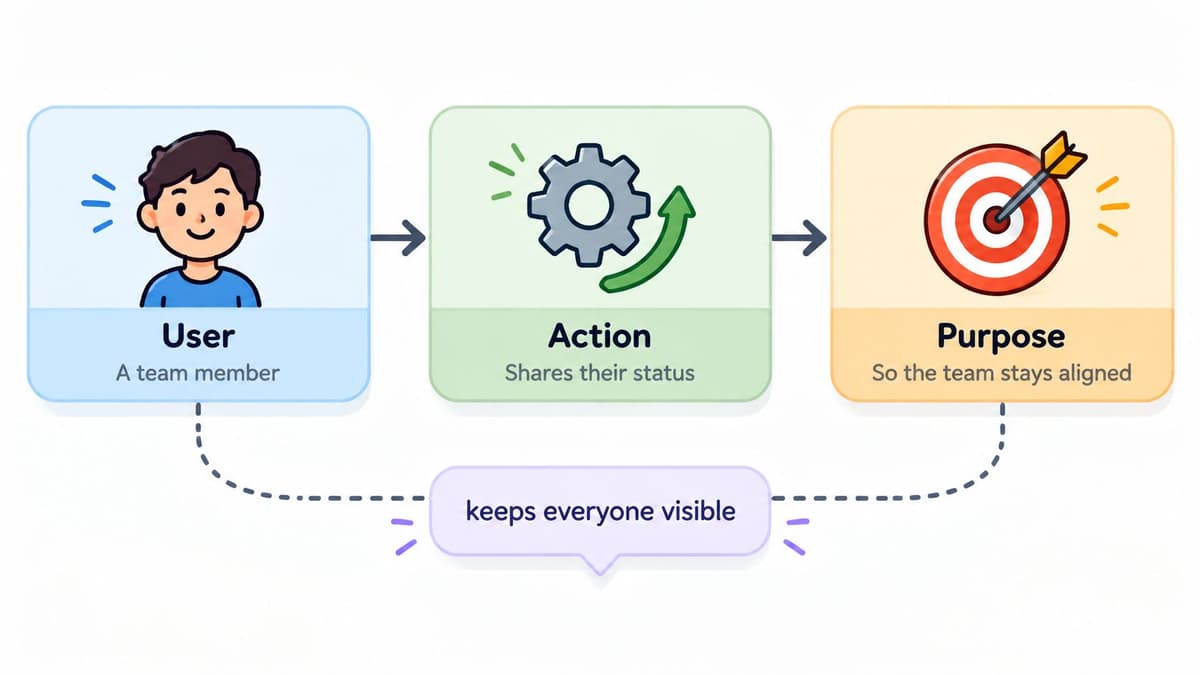
A functional requirement tells a reader what the system must do, in a form a tester can mark pass or fail. The pattern that survives review best names the user, the action and the reason. For user-needs wording in general, the UK Office for National Statistics keeps clear guidance on writing user needs; the SRS then turns that need into behaviour the product can be checked against.
As a compliance manager, I need to export an immutable audit report so that I can provide evidence during an internal review.
One sentence, three jobs. It tells a developer what to build, a tester what to prove and a client why the feature is worth paying for. Beneath it, the acceptance criteria turn the sentence into something a tester can execute:
- Date range selection: the user picks a start and end date, capped at 12 months per export.
- Two formats: CSV and PDF, generated from the same query so the totals match.
- Export timestamp: printed in the file name and inside the PDF header.
- Failure path: a clear error with the request ID and a retry option if generation fails.
The same pattern covers behaviour that has limits. “FR-021 if a patient uses a screen reader, the booking confirmation is announced and focus returns to the appointment list” is testable. So is the refusal case: “FR-022 when the assistant cannot verify live slot availability, it must not propose times and must hand the request to reception.” A requirement that says when the system must not act prevents a helpful feature from becoming an unsafe one.
Requirements work is a team activity, and the document only earns its place when the people building and testing the system keep it open.
Three fields sit around every requirement and stop arguments later. The ID runs FR-001 upward and is never reused, even if the requirement is deleted, because a reused number rewrites history. The priority is Must, Should or Could, agreed with the client. The source names the stakeholder or the research session that asked for it, which is the difference between a requirement and an opinion.
Rewrites are where the pattern clicks. “The system should be fast when a patient searches for an appointment” is not a requirement. “FR-004 a patient finds an available slot within their chosen week in under 1 second at the 95th percentile” is, because someone can measure it and argue about the number instead of the adjective.
The four tests every requirement must pass
Singular: one requirement per ID, so a failing test points at one thing. Unambiguous: a receptionist and a developer read it the same way. Testable: a named test produces a pass or fail. Traceable: a source and a test both exist and link back.
Public digital services raise the same bar. Teams building for government must meet the GOV.UK Service Standard before launch, and that pressure is useful on private work too: if a requirement cannot show the user need, the owner and the test, it is not ready to sign off.
Where first drafts go wrong
Two requirements in one sentence (“the patient books a slot and receives a reminder”) means a half-built feature reads as a failed one, so split it into the booking requirement and the reminder requirement. Empty verbs such as handle, support or manage hide the actual behaviour, so make the behaviour the verb. Missing source turns a requirement into something nobody can defend when budget pressure arrives.
Non-Functional Requirements With Measurable Targets
Non-functional requirements describe how well the system behaves, and each one needs a number, a test method and an evidence item. Without all three, nobody can check it at release, so it becomes a matter of opinion at the worst possible moment.
The table below is a starting point for a booking app. Agree every value with the client, because a two-clinic scheduler and a transaction platform carry different risks, different regulatory exposure and different tolerance for downtime.
| Area | Example target | How it is tested | Evidence at release |
|---|---|---|---|
| Performance | 95% of page loads under 2 seconds on a 4G connection | Load test at 200 concurrent users | Load test report |
| Availability | 99.9% uptime in each calendar month | Monitoring over a 30-day window | Uptime export |
| Recovery | Recovery point 1 hour; recovery time 4 hours | Restore drill from backup | Signed drill record |
| Security | No open critical or high vulnerabilities at release | Penetration test and configuration review | Penetration test summary |
| Accessibility | WCAG 2.2 AA conformance on core user journeys | Automated scan plus manual keyboard and screen-reader testing | Accessibility evidence pack |
| Audit log retention | Logs kept for 12 months | Query of logs for sampled dates | Retention policy document |
| Browser support | Latest two versions of Chrome, Edge, Firefox, Safari and iOS Safari | Cross-browser test matrix | Test matrix results |
Walk the rows in order when you review a draft. Performance without a test condition is a wish, and availability without a measurement window can be argued either way. Recovery needs a drill, not a promise, because an untested backup is a belief.
Accessibility that a passing scan still misses
Accessibility is the row most often reduced to a version number. Recent UK inclusion monitoring reported that 75% of surveyed organisations met WCAG 2.0 AA or higher, and respondents still asked for clearer guidance on inclusive routes and acceptable identity-check alternatives. Meeting the threshold didn't answer their questions.
The gap in most specifications is concrete acceptance criteria tied to real journeys. Keyboard-only completion of the booking flow, screen-reader labels and announcements for slot changes, colour contrast thresholds, zoom and reflow behaviour, accessible authentication, error recovery and testing with disabled users all belong in the document.
A service can pass every automated check and still exclude people through complex language, an unhelpful support process or an identity check with no workable alternative.
So write the accessibility requirement as an evidence pack: findings from user research, support obligations, a remediation process and a named owner. Then mark which requirements are mandatory for the target sector and which are quality goals, so the release conversation has a defensible line.
Interfaces, Constraints and Assumptions Explained
Three sections cause more late rework than any others, and they're the ones teams routinely skip because they feel like admin.
Interfaces
Separate external system interfaces from user interfaces. An external entry names the system, the data exchanged, the protocol and format, how the connection is authenticated and what happens when the link dies. Calendar sync is the worked example: OAuth 2.0, booking events exchanged as JSON, one retry an hour for 24 hours, then an alert to the practice manager and a visible degraded state on the receptionist's screen.
A user interface entry lists the screens, the supported devices and the accessibility rules that apply. Keep it consistent with the wireframes you produce in design, because a mismatch between the spec and the prototype is a decision nobody made.
Constraints
Constraints are the limits the design can't negotiate away. List the fixed launch date, the UK hosting region, the budget ceiling, the legacy system that stays in place and the regulatory rule on data retention.
- Fixed date: the flu season launch, immovable.
- Hosting region: UK only, for data residency.
- Legacy system: the existing patient records database stays, so the booking app reads from it rather than replacing it.
Assumptions
Give every assumption an ID, an owner and a fallback. A-03 says clinic staff have Microsoft 365 accounts. If that turns out to be false, calendar sync moves to version 2 and version 1 uses manual export.
Practical rule: an assumption with no owner is a rumour with a reference number.
Unstated assumptions are the most common source of late scope changes, because nobody can price a risk they can't see.
AI Features and When the System Must Not Act
Most AI sections in a specification describe prompts, inputs, outputs and an accuracy figure, then stop. That's the easy half. The UK government's guidance for software developers using generative AI expects AI requirements to address transparency, human oversight, security, privacy by design, fairness, explainability and continuous auditing, and recommends completing a data protection impact assessment before implementation.
None of that becomes real until it's testable. Take a triage assistant bolted onto the clinic's support inbox and run it through a requirements matrix.
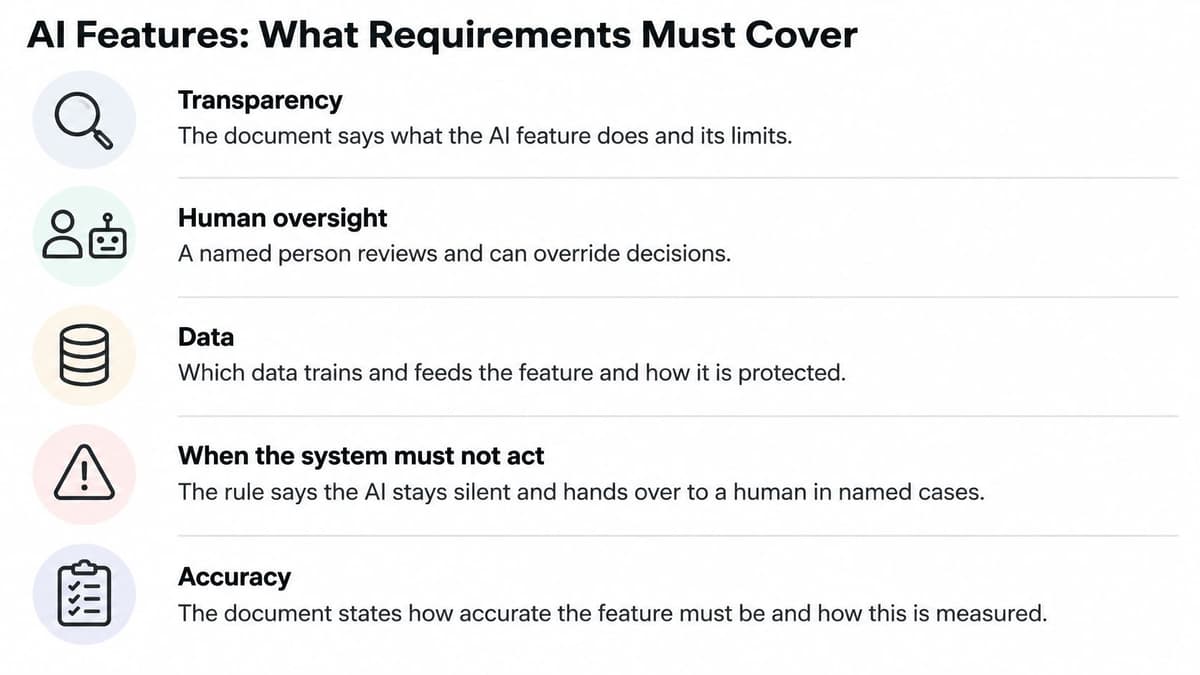
- Intended use: suggest a ticket category and a draft reply for an agent to edit.
- Prohibited use: close a ticket, issue a refund or send any message to a patient without approval.
- Data sources: the last 12 months of resolved tickets, with patient identifiers removed before training.
- Human escalation: any low-confidence suggestion goes to a named agent, never to a queue.
- Audit logs: every suggestion, acceptance and override is logged against the agent's ID.
- Monitoring threshold: misrouting above 5% in a week triggers a review and pauses the draft replies.
- Incident response: a named owner, a documented rollback and a route to suspend the feature without a release.
- Supplier dependencies: the model provider, its data processing terms and its change notification period.
- Acceptance tests: each prohibition is tested by attempting the forbidden action and confirming a block.
The prohibitions are the specification
An AI section that lists only what the system can automate gives a builder no boundary. Defining when the system must not act is the part generic templates leave out, and it's the part that protects you. Each prohibition converts cleanly into an acceptance test, and a failed test is a blocked release rather than a discussion.
Data retention belongs in the same list. Prompt and response data need a defined limit, and any model change needs documented regression and bias testing before it reaches patients. Those two requirements alone prevent most of the privacy, legal and reputational exposure that uncontrolled autonomy creates, which is why human-in-the-loop design belongs in the document rather than in a principles slide.
Acceptance Criteria and Traceability Links
An acceptance criterion is the observable condition that proves a requirement is met. "The system works well" can't be tested by anyone. "The reminder arrives within 5 minutes of its scheduled time" can be tested by a scheduled job run against a fixed clock, and it either passes or it doesn't.
Every requirement then travels a chain: requirement ID, design element, test case, evidence, owner. The table shows four finished traces across the four requirement types that matter most.
| Requirement ID | Acceptance criterion | Test or evidence | Owner |
|---|---|---|---|
| FR-012 | Reminder sent 24 hours before each booking | Scheduled job test with a fixed clock | QA lead |
| FR-018 | Audit report exports to CSV and PDF with an export timestamp | Export test across a date range, plus file inspection | QA lead |
| NFR-004 | WCAG 2.2 AA on core user journeys | Keyboard and screen-reader test plus accessibility evidence pack | Accessibility lead |
| NFR-007 | Service restored within 4 hours of a failure | Signed restore drill record | Operations lead |
Fill the columns from the right. Name the owner first, because a trace with no owner is a document nobody has committed to. Then write the evidence, then the test that produces it, then check whether the criterion describes what that test measures. Working this way exposes the "works well" criteria in seconds.
Change control that survives an agile team
Every change request records the affected IDs, the impact on tests, the approver and the date. The document carries a version number and a baseline date, and the change log shows what moved.
An agile team can keep the SRS iterative without losing traceability by treating each sprint's accepted changes as a new baseline. That keeps the discipline of the software project plans around it, and gives you a clean answer when a client asks why a number changed between March and June.
Sign-off test: pick any requirement at random and follow it. If it leads to a test, an owner and a piece of evidence, the trace is real. If any of the three is missing, the section isn't finished.
Quick-Reference Checklist Before Sign-Off
Run this list before you ask anyone to approve the document. Each item is a gate, not a note.
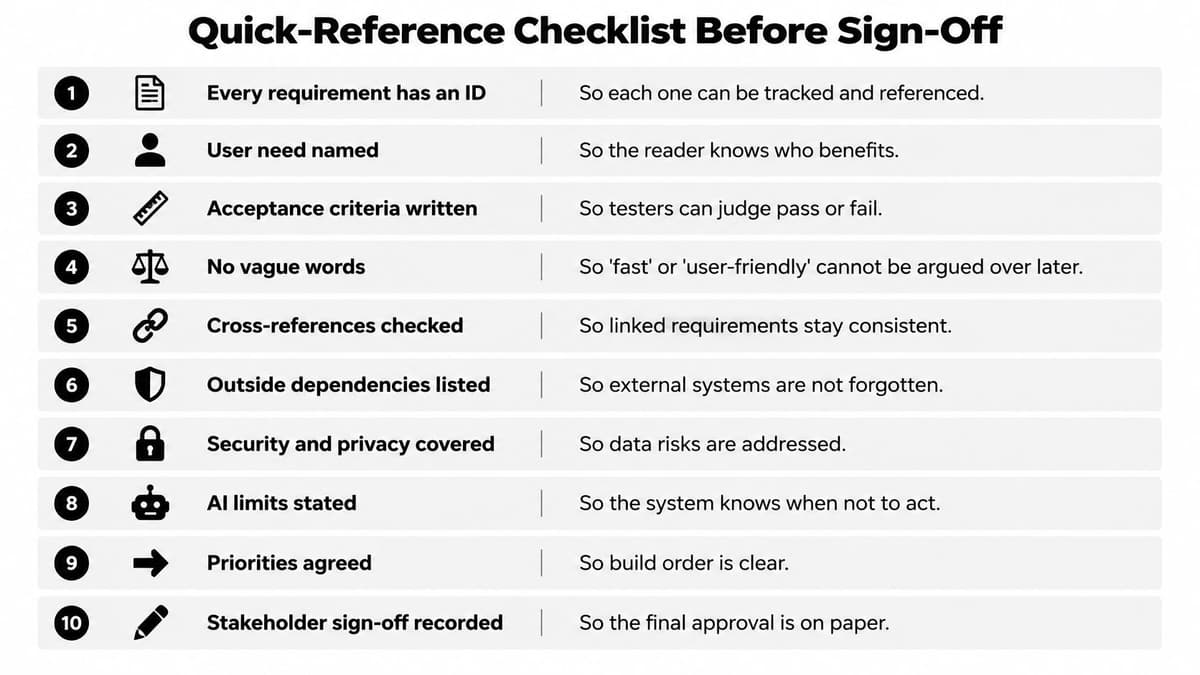
- Unique ID and named source: every requirement can be tracked and defended.
- Singular and testable: one requirement per ID, so a failure points at one thing.
- Number, test method and evidence: each non-functional requirement can be checked at release.
- Out-of-scope list written and agreed: the boundary is documented, not assumed.
- Interfaces record format and failure behaviour: nobody discovers the integration gap in week ten.
- Constraints and assumptions stated: each assumption carries an owner and a fallback.
- AI prohibitions and escalation route: the system has a defined set of actions it must not take.
- Accessibility tied to journeys and an evidence pack: not a version number in a footer.
- At least one acceptance test per requirement: the trace is complete in both directions.
- Version number, approval record and change-control rule: the document has a history and a gate.
A failed item blocks sign-off. Noting it for later is how a specification becomes decorative, and how the same conversation restarts two months before launch. Keep the checklist attached to the SRS so it gets re-run at every baseline, not just the first.
Adapt This Example to Your Own Project
A clinic booking app is a teaching prop. The document underneath it is what carries over: eight sections, numbered requirements, measurable targets, and a written record of what the system must never do. Adapt it in this order.
- Swap the product, keep the skeleton. Replace the clinic with your own purpose and scope, and keep all eight sections even when two of them shrink to a paragraph. A short section still marks where that decision belongs.
- Fix the ID scheme and source field on day one. Renumbering later breaks every trace link, every test case and every change log entry at once.
- Agree the non-functional targets with the client. Start from the table of measurable targets, then mark which rows are sector-mandatory and which are quality goals. A healthcare product inherits stricter accessibility and audit rows than a marketing site.
- Include the AI matrix only where AI is in the product. When you do, write the prohibited actions and the escalation route as testable requirements, and complete a data protection impact assessment during drafting, before implementation begins.
- Pilot the draft with three to five real users and two people from delivery, then revise before anyone treats it as a baseline.
Handing the work to a studio follows the same logic. At Digital Souls Studios LTD, the Specification step begins with the client explaining the idea in writing, and the studio puts together a specification matched to the work. Projects then move through Specification, Production, Launch and Support, so the document stays in use after handover. The ten-point checklist applies to whatever comes back, and questions do not have to be about a new project.
Run the checklist against your current draft this week. Fix every failed item before the next design review, while the fix is still a sentence rather than a rebuild.
Digital Souls Studios LTD designs and builds web applications, SaaS products and AI automation for UK and international clients, working from a written idea through specification to launch and support. If your draft keeps failing the same checklist items, visit Digital Souls Studios LTD and describe what you're building.