16th November 2026 · 16 min
Virtual Fitting Rooms Explained: How They Work in 2026

You've found a jumper you like, but you're stuck between sizes. The model's wearing it loose, the size chart doesn't explain the cut, and ordering both sizes feels easier than guessing. A virtual fitting room promises to help, but what exactly is it telling you?
Some tools show how clothing might look on you. Others estimate which size you should buy. Those aren't the same job, and understanding the difference helps shoppers judge the advice and retailers choose something worth building.
Table of Contents
- Three Ways Virtual Fitting Rooms Work Compared
- How the Fit Pipeline Works Behind the Screen
- Why UK Shoppers Want Virtual Try-On and Where Adoption Lags
- Measuring Whether It Cuts Returns, Not Just Lifts Sales
- Privacy, Accessibility and a Route Without a Camera
- Implementation Requirements and Cost Drivers
- Choose a Fitting Method and Test It Before You Scale
Three Ways Virtual Fitting Rooms Work Compared
Think of a mirror and a tailor's tape. The mirror helps you judge appearance; the tape helps you assess dimensions. Many virtual fitting rooms deliver a mirror without doing the measuring needed to predict fit.
The technology falls into three broad families: live overlays, photo or avatar previews, and sizing tools. That last family includes both predictive recommendations and direct measurement comparisons, so it's useful to compare four approaches.
Virtual fitting approaches and what each one shows
| Approach | What the shopper sees | Input needed | Fit accuracy | Privacy exposure |
|---|---|---|---|---|
| Camera overlay (AR try-on) | Garment pinned over live video | Phone camera feed | Low for sizing: shows appearance rather than physical fit | Live video processing; check whether frames are stored |
| Photo or avatar try-on | A body model or generated preview wearing the garment | Photographs or body measurements | Conditional: credible fit requires garment-specific data | Full-body images can create substantial exposure |
| Predictive size recommendation | A suggested size, sometimes with a tightness warning | Saved size history and brand size charts | Stronger where brand data and purchase outcomes are reliable | Usually no images, but may use purchase history |
| Measurement-based fit guidance | Garment dimensions compared with body dimensions and ease | Body measurements plus garment specifications | Useful for structured garments with accurate specifications | Measurements only, though these still need protection |
These are capability descriptions, not independently measured accuracy ratings. A retailer needs to validate its particular implementation rather than assume that choosing a method guarantees a result.
Start with what the shopper actually receives
A camera overlay tracks the shopper and places a digital garment over the video. It can help someone explore a neckline or silhouette, but a well-aligned picture doesn't establish whether a waistband will fasten. Our explanation of AR and VR provides useful context for these visual experiences.
A photo or avatar tool creates a representation of the shopper and dresses it digitally. Some reconstruct body geometry; others generate a plausible image without producing a measurement-calibrated body model. Don't treat those outputs as interchangeable.
A fitting room that shows the look is not the same as one that predicts the fit.
Predictive sizing works more like a recommendation service. It uses information such as previous sizes and brand charts to suggest a likely match, often without asking for a photograph. Its weakness is incomplete history: keeping an item doesn't necessarily mean the shopper liked its fit.
Measurement-based guidance makes the comparison more explicit. It considers body dimensions, garment dimensions and ease, the space deliberately allowed between the body and clothing. For structured pieces, that can support useful advice about a particular area rather than an unexplained size label.
Before trusting a retailer's tool, check whether it answers how this looks, which size to choose, or both.
How the Fit Pipeline Works Behind the Screen
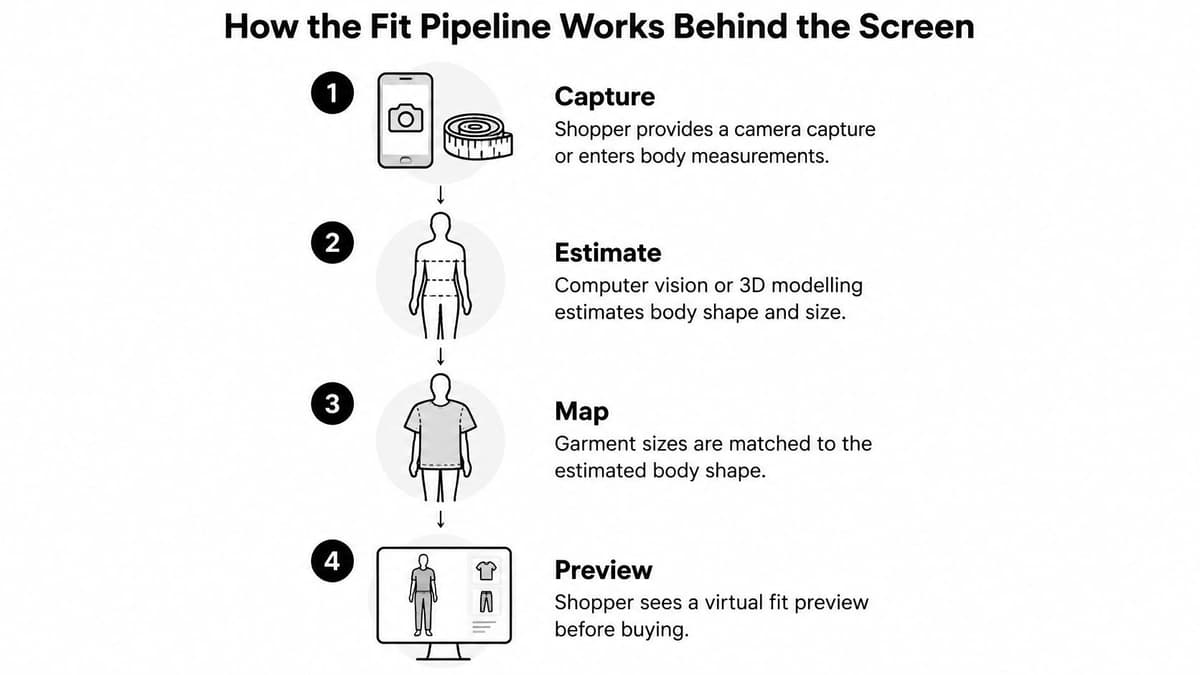
A useful fit system follows a sequence a tailor would recognise: collect information, interpret the body, compare it with the garment and explain the result. The rendering is only the visible end of that process.
The simplified flow below shows how shopper inputs become a preview.
Where accuracy gets lost
Capture the shopper's inputs. The shopper supplies photographs, a camera capture or manually entered measurements. A tape placed at the wrong point can produce an incorrect waist measurement before any algorithm runs. Give illustrated instructions and let shoppers correct their inputs.
Estimate body shape and pose. Computer vision locates landmarks, while reconstruction estimates the body's geometry. Posture is a concrete failure point: a raised shoulder or arched back can distort the estimated proportions. The system should identify unsuitable captures rather than accept them.
Match the body to the garment. A recommendation engine compares the estimated dimensions with product specifications and ease allowances. Missing stretch information can break this comparison, particularly for knitwear. A relaxed measurement alone doesn't describe how a fabric behaves when worn.
Render a preview or recommend a size. The interface displays an avatar, sizing advice or both. Incorrect fabric weight can make a rendered skirt hang convincingly but differently from the delivered item. Visual plausibility isn't evidence that the underlying material model is correct.
Expose uncertainty. Show a confidence indication or explain that the shopper falls between sizes. A poorly calibrated confidence score can mislead just as much as an unrealistic preview, so test whether stronger confidence corresponds to better outcomes.
Garment construction adds another complication. Darts shape flat fabric around the body, while boning restricts movement and supports a particular silhouette. A system that treats every garment as a flexible shell won't capture those differences.
Test the explanation, not just the picture
Say a shopper's jacket size accommodates their chest but leaves little room at the upper arm. A useful result identifies that trade-off and asks about layering or preferred looseness. A polished avatar with no explanation leaves the shopper guessing.
Use this short inspection checklist:
- Confidence: Does the tool explain how certain its recommendation is, rather than displaying an unexplained score?
- Garment specifications: Does it use product-level dimensions and construction information, or only a generic brand chart?
- Between-size handling: Does it describe the compromise between the available sizes?
- Recovery: Can the shopper correct a measurement or reject an unsuitable recommendation?
A system doesn't need to display every calculation. It does need to explain enough for a shopper to make a reasoned choice.
Why UK Shoppers Want Virtual Try-On and Where Adoption Lags
Demand for virtual try-on resembles a long checkout queue with too few tills open. In the 2025 DHL Ecommerce Trends study, which surveyed more than 24,000 shoppers globally, including 1,000 UK respondents, 77% of UK respondents wanted virtual try-on, according to Retail Rewired's coverage.
That establishes interest, not successful adoption. A shopper can want better buying information while declining a particular tool because its setup feels intrusive, its advice is unclear or it doesn't cover the garment they're considering.
An ambition that predates today's camera tools
UK retailers were exploring this problem well before the current generation of shopping interfaces. In 2012, Tesco Clothing introduced an F&F virtual fitting-room trial on Facebook, developed by London start-up Metail; shoppers could create a three-dimensional representation from two photographs, or measurements and a facial image, and explore 50 new-season garments, with 10 additional items planned each week, according to FashionUnited's contemporary report.
Customers could style their digital representation and add selected products to a Tesco basket. The ambition wasn't just to place clothing over a photograph. It was to connect styling with fit and size recommendations based on personal measurements.
That distinction makes the trial more useful than a historical novelty. It illustrates the same product challenge retailers face today: helping someone move from an appealing image to a purchase they'll be happy to keep.
The route to that outcome involves several different decisions:
- Discoverability: Can shoppers find the fitting feature while considering a product?
- Effort: Do the requested inputs feel proportionate to the help offered?
- Credibility: Does the result explain something the product photographs don't?
- Coverage: Is the experience available for the item and size the shopper wants?
A launch announcement answers none of those questions.
Interest doesn't remove the need for trust
Retailers should distinguish stated demand, feature availability and completed use. These describe different things. A survey response doesn't tell you whether someone will grant camera access on a busy commute, finish a capture process or accept the resulting recommendation.
Nor does broad enthusiasm prove that trust and accuracy are the only obstacles. Catalogue preparation, integration work and maintenance can also affect what a retailer can offer. The sensible conclusion is that there's a strong reason to test the experience, not that any implementation will succeed.
Practical rule: Treat shopper interest as permission to investigate a need, not proof that your chosen interface meets it.
For a UK ecommerce team, the useful question is specific: what uncertainty prevents customers from buying this category confidently? A shopper choosing a statement jumper may want to judge proportions. Someone replacing a work shirt may care more about collar, shoulder and sleeve dimensions.
Interview shoppers at the point of hesitation and observe what they do with the existing size chart. Then design the fitting feature around that task. A smaller experience that resolves a clear doubt is a better starting point than an impressive preview whose purpose nobody can explain.
Measuring Whether It Cuts Returns, Not Just Lifts Sales
Online purchases can see return rates of up to 30%, compared with about 10% in physical stores, and UK retailers and brands were reported to face roughly £7 billion in return costs in 2022, according to the Rendered Fits Fashion Returns Index. Those figures explain why returns deserve attention, but they aren't a forecast of what a fitting tool will save.
The comparison below preserves an important qualification: the online figure is an upper level, not a universal rate.
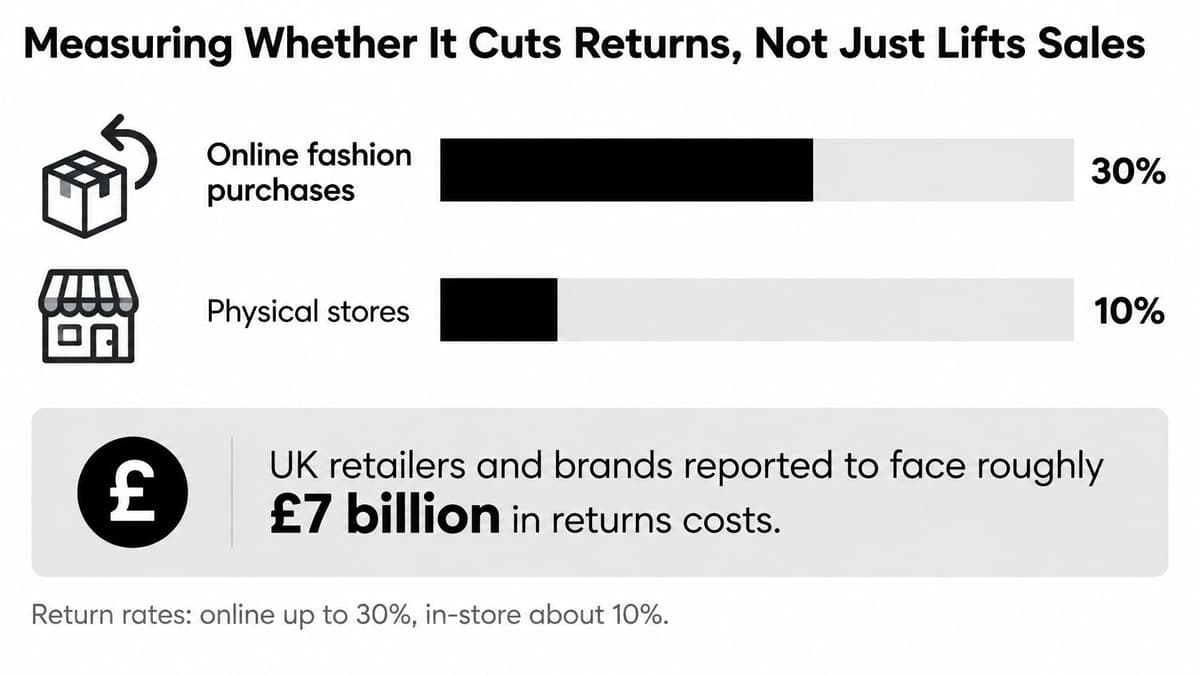
Uncertainty about size, colour and appearance can lead shoppers to order alternatives or return disappointing purchases. More confidence only helps when it's justified. A preview that overpromises can encourage orders that later become refunds.
The fit problem is substantial within specific surveyed groups: 93% of surveyed high-intensity online shoppers who had returned items cited wrong size or fit, according to Rendered Fits' open data. Separately, women reported fit-related returns more often than men, 12.9% versus 7.1%, in Just Style's UK-focused reporting. Neither finding establishes that a particular fitting product prevents those returns.
Build the test around kept orders
Randomly assign eligible shoppers to an exposed group and a control group. Keep pricing, promotions and return policies consistent, and analyse the assigned groups rather than comparing enthusiastic tool users with everyone else.
Metrics for judging a virtual fitting room
| Metric | What it shows | Why it matters |
|---|---|---|
| Size-exchange rate | Share of orders where the shopper swapped size | Tests sizing guidance rather than appearance |
| Multi-size basket frequency | Share of baskets containing multiple sizes of the same item | Signals unresolved uncertainty |
| Return reason | Fit, colour or appearance recorded per returned item | Separates different kinds of disappointment |
| Refund cost | Refund and handling cost per returned order | Makes the financial effect visible |
| Gross margin after returns | Margin after refunds and relevant return costs | Tests whether conversion gains survive |
| Measurement completion rate | Share of users finishing measurement capture | Identifies friction and abandonment |
| Latency | Time to render or recommend | Reveals delays in completing the task |
Allow purchases to pass through delivery and the applicable return window before judging results. Choose the test duration and sample size around the return outcome you need to detect, not the speed at which clicks accumulate.
A demonstration can help teams discuss the interface, but it isn't controlled evidence of commercial performance.
Keep detailed descriptions, size calculators and rotating product views available during the test. Otherwise, you risk measuring a wider merchandising change instead of the fitting feature.
Report results by category, garment construction, device and demographic group, where appropriate and responsibly collected. An acceptable overall average can conceal a weak result for a particular body group or product type. Treat vendor return-reduction claims as hypotheses to test against your catalogue, not dependable planning benchmarks.
Privacy, Accessibility and a Route Without a Camera
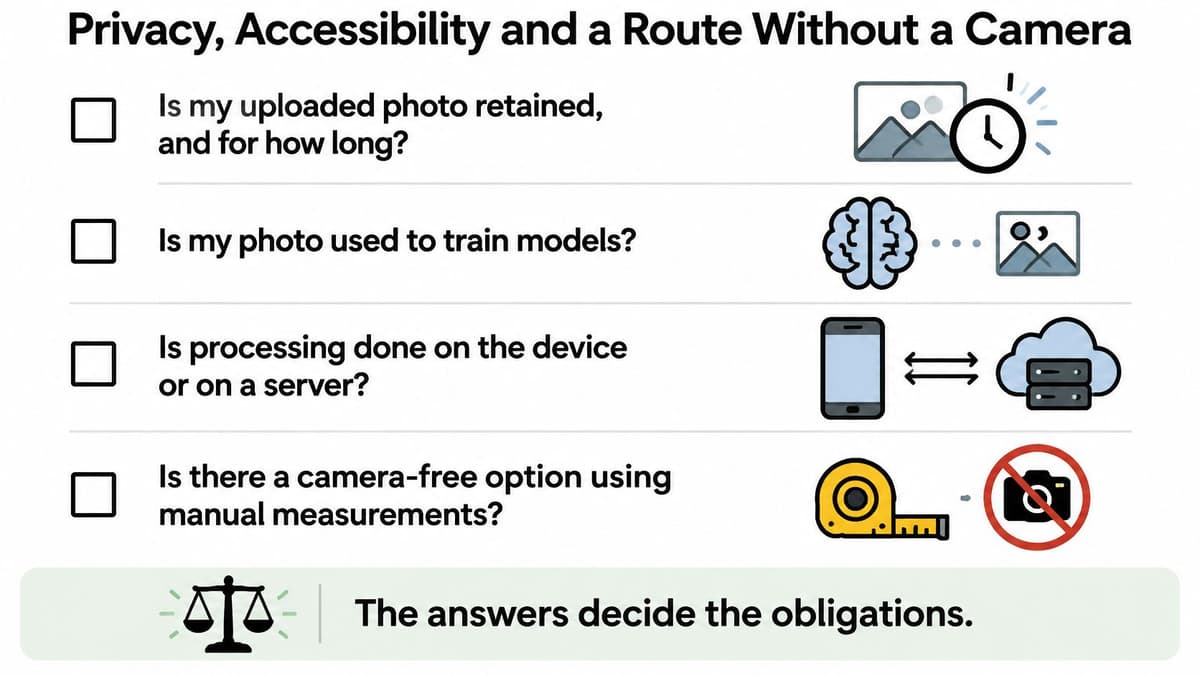
Before uploading a photograph, shoppers should be able to answer four practical questions: is it retained, is it used for model training, where is it processed, and can they get useful help without it? Retailers should make those answers visible before requesting camera access.
These questions belong in the buying journey, not only in a lengthy policy document.
Understand what happens to the image
On-device processing and server processing describe where computation takes place, not a complete privacy assessment. Ask what leaves the device, which derived measurements remain, who receives them and how deletion works. Consent to produce a preview shouldn't be presented as an automatic agreement to unrelated model training.
Don't assume every photograph is biometric data, or that none can be. Classification depends on how the information is processed and why. A retailer should assess the actual processing activity rather than rely on the product's marketing label.
Make the alternative equally useful
Fynd's implementation guidance highlights image-processing disclosures, a non-camera route and assistive-technology compatibility under WCAG 2.2. Treat that guidance as a design starting point, not a substitute for assessing the implementation's legal and accessibility requirements.
A camera-free route might accept manual measurements, offer a readable size chart or recommend a size without an image. It should preserve access to the important sizing explanation rather than leave privacy-conscious shoppers with less useful information.
This matters for keyboard and screen-reader users, people with limited digital confidence, and customers whose bodies or clothing needs aren't well represented by the model. Our approach to human-focused design puts those different ways of using a service into the design discussion.
Run this short check at the screen:
- Find the privacy notice. Check retention, training use, processing location and deletion options.
- Confirm a measurement-only route. Decline camera permission and verify that useful sizing help remains available.
- Test every control with a keyboard. Check focus visibility, error messages and whether you can leave the preview.
- Compare the advice. Confirm that camera-free users receive a meaningful explanation, not merely a generic fallback.
Refusing a photograph shouldn't mean accepting an inferior shopping journey.
Implementation Requirements and Cost Drivers
Start with the information a fitting system can't infer safely. Clean brand size charts need consistent categories and units, while garment specifications need a clear distinction between body measurements and finished garment measurements.
Prepare ease allowances, fabric stretch and construction details alongside the dimensions. Camera-derived and manually entered shopper measurements must then map to the same sizing model, so the input route doesn't change the recommendation.
Check readiness before commissioning the interface
| Requirement | What needs preparing | Typical owner |
|---|---|---|
| Category size charts | Consistent labels, units and brand mappings | Merchandising |
| Garment specifications | Dimensions, ease, stretch and construction | Product development |
| Shopper inputs | Capture instructions, validation and correction | Product and engineering |
| Data integration | Reliable product and variant identifiers | Engineering |
| Privacy decisions | Processing location, retention, training use and deletion | Privacy and security |
| Accessible controls | Keyboard operation, screen-reader labels and error recovery | Design and quality assurance |
| Evaluation | Exposure assignment, order linkage and return reasons | Analytics and ecommerce |
| Maintenance | Versioning and checks when garments or charts change | Catalogue operations |
Costs remain unscoped until the catalogue and integration work are understood. Ask for an effort breakdown covering data preparation, asset creation, storefront integration, testing and ongoing operation, rather than treating rendering as the entire project.
A catalogue with consistent specifications requires different work from one assembled from supplier spreadsheets with incompatible measurement conventions. Category breadth also matters: adding another garment family can require different rules, capture instructions and validation cases.
Budgeting principle: Price the information and maintenance needed to support the promise, not just the screen that displays it.
For a useful estimate, prepare a representative product sample, identify missing fields and document the existing commerce and analytics systems. Our explanation of app development cost provides context for separating scope decisions from a headline build price.
Set a release gate for incomplete products. If an item lacks the inputs needed for a credible recommendation, show ordinary product information rather than inventing certainty.
Choose a Fitting Method and Test It Before You Scale
Choose a visual overlay when the shopper's decision is mainly about style and appearance. Choose predictive sizing when reliable size history and brand mappings are available. Choose measurement-based guidance when the problem concerns dimensional fit, particularly for structured garments with usable specifications.
A hybrid can be appropriate, but every additional capability needs a clear purpose. Don't commission an avatar because a competitor has one, or demand camera capture when entered measurements would support the task.
Turn the decision into a bounded pilot
Audit return reasons for a focused category. Separate sizing complaints from colour, appearance, damage and changed-mind returns. Inspect the wording customers use, because a broad fit code can hide different problems.
Start with size guidance and measurement capture. Validate recommendations against product specifications and actual purchase outcomes. This creates a testable foundation before adding more visual complexity.
Add visual try-on only when it earns its place. Decide in advance what improvement in kept orders or shopper decision-making would justify the added effort. Engagement alone shouldn't settle that decision.
Write down the pilot's exclusions as carefully as its features. Specify unsupported garments, missing-data behaviour, camera-free access, uncertain recommendations and the point at which the team will pause or expand the test.
At Digital Souls Studios, our Specification step starts with the client explaining the idea in writing, after which we put together a specification matched to the work. For a fitting or sizing feature, that written starting point can include the target category, available catalogue fields, shopper journey and evaluation criteria.
Bring the metrics table into that discussion before a build begins. A practical first version should have a defined question to answer, named owners for its inputs and a clear method for deciding whether it deserves wider use.
Digital Souls Studios LTD offers software design and development with close attention to the end-user experience, from specification through launch and support. Visit Digital Souls Studios LTD with a written outline of your fitting-room idea, target category and available product data to start defining a focused, testable first version.